


java实现TTS文字转语音wav (Jacob + SAPI)
Jacob + SAPI 的优缺点
Windows集成 SAPI Jacob 调用系统语音,音质较好,无需安装额外引擎。 但仅限Windows平台,依赖COM组件。
注:此代码生成的wav文件,非单声道,不能直接应该在电话系统中,需要转换格式才行(单声道 8k 6bit)
第一步 下载 jacob-1.19-x64.dll
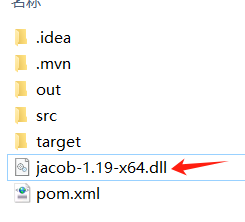
将 jacob-1.19-x64.dll 存放到工程根目录下
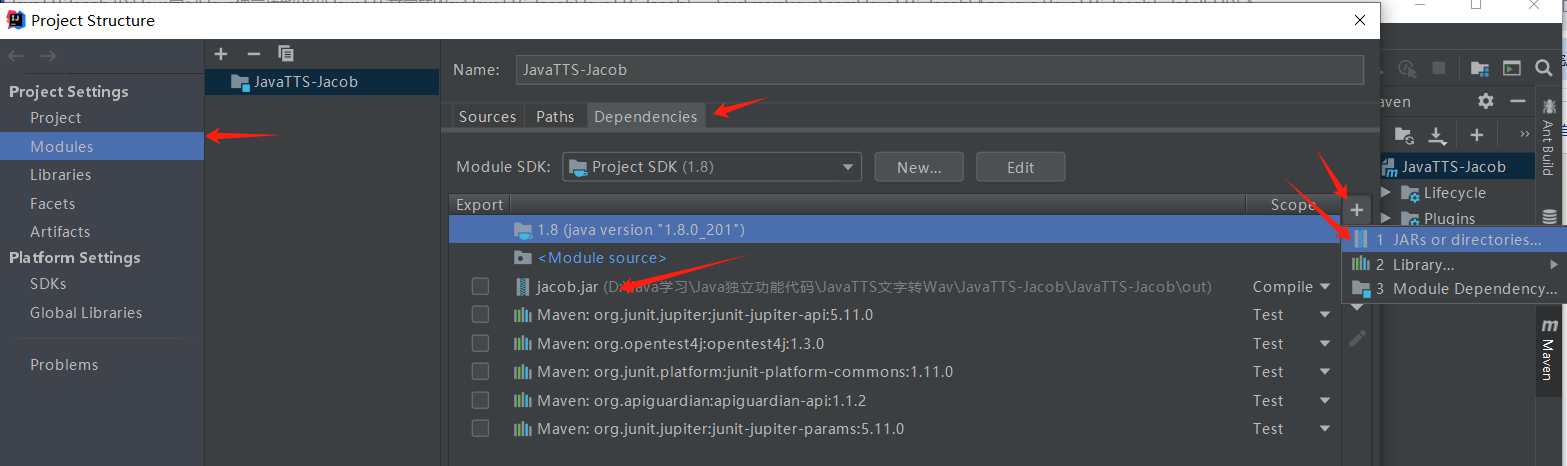
第二步 下载 jacob.jar 引用到工程中
第三步 直接上代码
WindowsTtsHelper.java
package com.JavaTTS_Jacob;

import com.jacob.activeX.ActiveXComponent;
import com.jacob.com.Dispatch;
import com.jacob.com.Variant;

public class WindowsTtsHelper {
    private ActiveXComponent voice;
    private Dispatch sapVoice;

    /**
     * 初始化 TTS 引擎
     */
    public WindowsTtsHelper() {
        try {
            this.voice = new ActiveXComponent("SAPI.SpVoice");
            this.sapVoice = voice.getObject();
            System.out.println("TTS引擎初始化成功。");
        } catch (Exception e) {
            System.err.println("初始化TTS引擎失败,请确认系统支持 SAPI。");
            throw new RuntimeException(e);
        }
    }

    /**
     * 设置语音参数
     *
     * @param rate   语速,范围 -10(慢) 到 10(快),0为正常
     * @param volume 音量,范围 0 到 100
     */
    public void setParams(int rate, int volume) {
        try {
            if (rate < -10 || rate > 10) rate = 0;
            if (volume < 0 || volume > 100) volume = 80;

            voice.setProperty("Rate", new Variant(rate));
            voice.setProperty("Volume", new Variant(volume));
        } catch (Exception e) {
            System.err.println("设置参数失败: "+e.getMessage());
        }
    }

    /**
     * 选择并设置指定的发音人
     *
     * @param voiceNameKeyword 发音人名称关键词,如 "Huihui", "David", "Zira"
     * @return 是否设置成功
     */
    public boolean selectVoice(String voiceNameKeyword) {
        try {
            Dispatch voiceItems = Dispatch.call(sapVoice, "GetVoices").toDispatch();
            int count = Dispatch.call(voiceItems, "Count").changeType(Variant.VariantInt).getInt();

            for (int i = 0; i < count; i++) {
                Dispatch voiceItem = Dispatch.call(voiceItems, "Item", new Variant(i)).toDispatch();
                String desc = Dispatch.call(voiceItem, "GetDescription").toString();
                System.out.println("索引 " + i + ": " + desc);//显示所有语音包

                if (desc.toLowerCase().contains(voiceNameKeyword.toLowerCase())) {
                    // 【核心修复行】使用 put 设置属性
                    Dispatch.put(sapVoice, "Voice", voiceItem);
                    System.out.println("发音人设置成功: "+desc);
                    return true;
                }
            }
            System.out.println("未找到包含 ‘" + voiceNameKeyword + "‘的发音人,使用默认。");
            return false;
        } catch (Exception e) {
            System.err.println("选择发音人时出错: "+e.getMessage());
            return false;
        }
    }

    /**
     * 朗读文本(同步,会阻塞直到读完)
     *
     * @param text 要朗读的文本
     */
    public void speak(String text) {
        try {
            Dispatch.call(sapVoice, "Speak", new Variant(text));
        } catch (Exception e) {
            System.err.println("朗读失败: "+e.getMessage());
        }
    }

    /**
     * 将文本合成并保存为 WAV 文件 (修复版)
     * @param text 要合成的文本
     * @param filePath 输出文件完整路径,如 "C:\\output.wav"
     */
    public void saveToFile(String text, String filePath) {
        ActiveXComponent audioStream = null;
        try {
            // 1. 创建文件流对象
            audioStream = new ActiveXComponent("SAPI.SpFileStream");
            Dispatch stream = audioStream.getObject();

            // 2. 打开文件。模式 3 表示:创建用于写入(SSFMCreateForWrite)
            Dispatch.call(stream, "Open", new Variant(filePath), new Variant(3), new Variant(true));

            // 3. 【核心修复】使用 putRef 将文件流设置为语音对象的输出
            Dispatch.putRef(sapVoice, "AudioOutputStream", stream);

            // 4. 此时合成语音,音频数据将自动写入文件
            Dispatch.call(sapVoice, "Speak", new Variant(text));

            System.out.println("文件保存成功: " + filePath);

        } catch (Exception e) {
            System.err.println("保存文件失败: " + e.getMessage());
            e.printStackTrace(); // 打印完整堆栈有助于进一步调试
        } finally {
            // 5. 至关重要的清理工作:关闭流并重置输出
            try {
                if (audioStream != null) {
                    Dispatch stream = audioStream.getObject();
                    Dispatch.call(stream, "Close");
                    // 将音频输出重置回默认的扬声器,避免后续语音无法播放
                    Dispatch.putRef(sapVoice, "AudioOutputStream", null);
                    audioStream.safeRelease();
                }
            } catch (Exception e) {
                // 忽略清理时的次要错误
            }
        }
    }


    /**
     * 释放 COM 资源(重要!使用完毕后必须调用)
     */
    public void release() {
        if (voice != null) {
            voice.safeRelease();
            voice = null;
            sapVoice = null;
            System.out.println("TTS资源已释放。");
        }
    }

}
调用测试代码
App.java
package com.JavaTTS_Jacob;

import com.jacob.activeX.ActiveXComponent;
import com.jacob.com.Dispatch;
import com.jacob.com.Variant;

/**
 * Hello world!
 */
public class App {
    public static void main(String[] args) {
        System.out.println("Hello World!");
        WindowsTtsHelper tts = new WindowsTtsHelper();
        try {
            // 1. 设置参数
            tts.setParams(1, 90); // -2稍慢,音量90%

            // 2. 选择中文发音人(如果系统有安装) 未找到包含 ‘David‘的发音人,使用默认。
            //boolean success = tts.selectVoice("David");

            // 3. 朗读
            //tts.speak("你好,语音导航测试。这是一个修复后的稳定版本。");
            //Thread.sleep(500); // 简单等待一下

            // 4. 保存为文件
            tts.saveToFile("福佳2楼管道漏水,暂时停供,正在抢修,给您造成不便,敬请谅解!", "d:\\joincc_output.wav");

            System.out.println("\n所有功能测试完成!");

        } catch (Exception e) {
            System.err.println("WindowsTTS转Wav出错: " + e.getMessage());
            //e.printStackTrace();
        }finally {
            // 确保释放资源
            tts.release();
        }

    }


    //不需要选择特定发音人
    private void TTSRead(){
        ActiveXComponent voice = new ActiveXComponent("SAPI.SpVoice");

        try {
            // 只设置基础参数,不选择特定发音人
            voice.setProperty("Rate", new Variant(0));   // 正常语速
            voice.setProperty("Volume", new Variant(100)); // 最大音量

            // 直接朗读
            String[] texts = {
                    "你好,这是默认语音测试。",
                    "欢迎使用语音导航系统。",
                    "操作完成,感谢使用。"
            };

            for (String text : texts) {
                System.out.println("朗读: " + text);
                Dispatch.call(voice.getObject(), "Speak", new Variant(text));
                Thread.sleep(800); // 稍微停顿
            }

        } catch (Exception e) {
            System.err.println("错误: " + e.getMessage());
            e.printStackTrace();
        } finally {
            voice.safeRelease();
        }

    }

}
pom.xml
  <dependencyManagement>
    <dependencies>
      <dependency>
        <groupId>org.junit</groupId>
        <artifactId>junit-bom</artifactId>
        <version>5.11.0</version>
        <type>pom</type>
        <scope>import</scope>
      </dependency>
      <dependency>
        <groupId>com.hynnet</groupId>
        <artifactId>jacob</artifactId>
        <version>1.19</version>
      </dependency>

    </dependencies>
  </dependencyManagement>

 浙公网安备 33010602011771号