


vue 读取 外部配置文件
1.首先:
在public中创建static文件夹,在static文件夹中创建config.js文件 (注:扩展名是 .js )

2.创建完成在public中的index.html引入
<script src="./static/config.js"></script>
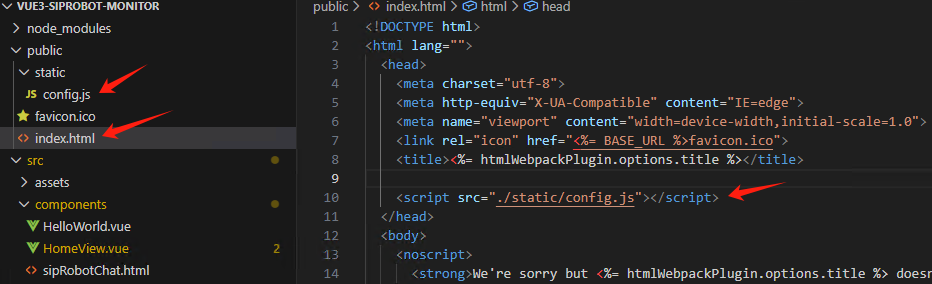
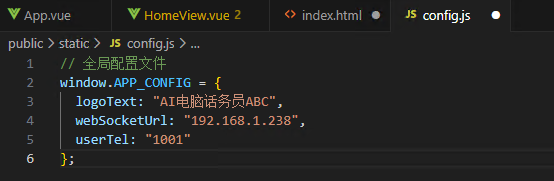
3.在config.js写入
// 全局配置文件
window.APP_CONFIG = {
  logoText: "AI电脑话务员ABC",
  webSocketUrl: "192.168.1.238",
  userTel: "1001"
};
4.在App.vue中使用
<script>
//import HelloWorld from './components/HelloWorld.vue'
import HomeView from './components/HomeView.vue'

export default {
  name: 'App',
  components: {
    //HelloWorld
    HomeView
  },
  mounted() {
    console.log('全局配置 ' + window.APP_CONFIG.logoText + " " + window.APP_CONFIG.webSocketUrl + " " + window.APP_CONFIG.userTel);
  }
}
</script>
5.在HomeView主页面中使用
<div class="logo-text">{{ logoText }}</div>
<script>
export default {
  name: 'HomeView',
  props: {
    msg: String
  },
  data() {
    return {
      logoText: 'AI电脑话务员' // 默认值
    }
  },
  mounted() {
    // 从全局配置中加载 logoText
    if(window.APP_CONFIG && window.APP_CONFIG.logoText) {
      this.logoText = window.APP_CONFIG.logoText;
    }
    console.log('读配置 '+window.APP_CONFIG.logoText+ " "+window.APP_CONFIG.webSocketUrl+ " "+window.APP_CONFIG.userTel);
  }

}
感谢:繁星如梦&
https://blog.csdn.net/fackyoufack/article/details/120952701?spm=1001.2101.3001.6661.1&utm_medium=distribute.pc_relevant_t0.none-task-blog-2%7Edefault%7EBlogCommendFromBaidu%7ERate-1-120952701-blog-125520975.pc_relevant_3mothn_strategy_and_data_recovery&depth_1-utm_source=distribute.pc_relevant_t0.none-task-blog-2%7Edefault%7EBlogCommendFromBaidu%7ERate-1-120952701-blog-125520975.pc_relevant_3mothn_strategy_and_data_recovery&utm_relevant_index=1

 浙公网安备 33010602011771号