


vue中如何使用i18n实现国际化 以及 登录成功后切换语言
参考:
https://www.jianshu.com/p/4b96919e3622
https://blog.csdn.net/joyce_lcy/article/details/78840371(内容全)
一:使用i18n
1、在src目录下建立文件夹:lang
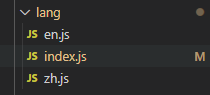
2、en.js:


const zh = {
  // layout
  commons: {
    xiaoai: 'Ai.',
    admin: 'Admin',
    editor: 'Editor',
    quit: 'Sign Out',
    hi: 'Hi',
    index: 'Dashboard',
    userManage: 'Users',
    share: 'Share',
    infoManage: 'Infos',
    infoShow: 'InfoShow',
    infoShow1: 'InfoShow1',
    infoShow2: 'InfoShow2',
    infoShow3: 'InfoShow3',
    infoShow4: 'InfoShow4',
    infoShow5: 'InfoShow5',
    infoModify: 'InfoModify',
    infoModify1: 'InfoModify1',
    infoModify2: 'InfoModify2',
    infoModify3: 'InfoModify3',
    fundManage: 'Money',
    fundList: 'MoneyList',
    chinaTabsList: 'AreaList',
    fundData: 'FundData',
    fundPosition: 'FundPosition',
    typePosition: 'TypePosition',
    incomePayPosition: 'IncomePayPosition',
    permission: 'Permission',
    pagePer: 'PagePermission',
    directivePer: 'DirectivePermission',
    errorPage: 'ErrorPage',
    page401: '401',
    page404: '404',
    wechatNumber: 'wechat'
  },
  index: {
    yearLoss: 'Year Loss',
    yearProfit: 'Year Profit',
    potentialInvestor: 'Potential Investor',
    intentionInvestor: 'Intention Investor',
    waitExamineInvestor: 'Wait Examine Investor',
    examiningInvestor: 'Examining Investor',
    tenMillion: 'Ten Million',
    person: 'P'
  }
};

export default zh;
3、zh.js:
const zh = {
  // layout
  commons: {
    xiaoai: '小爱',
    admin: '管理员',
    editor: '赵晓编',
    quit: '退出',
    hi: '您好',
    index: '首页',
    userManage: '用户管理',
    share: '分享功能',
    infoManage: '信息管理',
    infoShow: '个人信息',
    infoShow1: '个人信息子菜单1',
    infoShow2: '个人信息子菜单2',
    infoShow3: '个人信息子菜单3',
    infoShow4: '个人信息子菜单4',
    infoShow5: '个人信息子菜单5',
    infoModify: '修改信息',
    infoModify1: '修改信息子菜单1',
    infoModify2: '修改信息子菜单2',
    infoModify3: '修改信息子菜单3',
    fundManage: '资金管理',
    fundList: '资金流水',
    chinaTabsList: '区域投资',
    fundData: '资金数据',
    fundPosition: '投资分布',
    typePosition: '项目分布',
    incomePayPosition: '收支分布',
    permission: '权限设置',
    pagePer: '页面权限',
    directivePer: '按钮权限',
    errorPage: '错误页面',
    page401: '401',
    page404: '404',
    wechatNumber: '微信号'
  },
  index: {
    yearLoss: '年度总盈亏',
    yearProfit: '年度收益率',
    potentialInvestor: '潜在投资人',
    intentionInvestor: '意向投资人',
    waitExamineInvestor: '待审投资人',
    examiningInvestor: '审核中投资人',
    tenMillion: '千万元',
    person: '人'
  }
};

export default zh;
4、index.js:
// 引入i18n国家化插件
import { getToken } from '@/utils/auth';
import Vue from 'vue';
import VueI18n from 'vue-i18n';
import enLocale from './en';
import zhLocale from './zh';

// eslint-disable-next-line no-unused-expressions
process.env.NODE_ENV === 'development' ? Vue.use(VueI18n) : null;

// 注册i18n实例并引入语言文件,文件格式等下解析
console.log(getToken('lang'));
const i18n = new VueI18n({
  locale: getToken('lang') || 'zh',
  messages: {
    zh: {
      ...zhLocale
    },
    en: {
      ...enLocale
    }
  }
});

export default i18n;
locale: getToken('lang') || 'zh':查看是否存在token:lang,没有就默认语言为中文
5、main.js:
import Vue from 'vue';
import App from './App.vue';
import ElementUI from 'element-ui';
import 'element-ui/lib/theme-chalk/index.css';

import router from '@/router/index.js';
import '@/assets/iconfonts/iconfont.css';
import store from '@/store/index.js';
import '@/permission.js';
import '@/mock/index.js';

import i18n from '@/lang/index.js';
Vue.use(ElementUI);

Vue.config.productionTip = false;

new Vue({
  router,
  store,
  i18n, // 便于可以直接在组件中通过this.$i18n使用,也可以按需引用
  render: h => h(App)
}).$mount('#app');
二:如何切换语言
如图:


headNav.vue组件中:
import { mapGetters } from 'vuex';
import TopMenu from './topMenu';
import { github } from '@/utils/env';
import wechatImg from '@/assets/img/wechat.jpg';
import qqImg from '@/assets/img/qq.png';
import chinaImg from '@/assets/img/china.svg';
import americaImg from '@/assets/img/america.svg';
import { getToken, setToken } from '@/utils/auth.js';

export default {
  components: {
    TopMenu
  },
  data() {
    return {
      github: github,
      wechatImg: wechatImg,
      qqImg: qqImg,
      chinaImg: chinaImg,
      americaImg: americaImg,
    // 如果存在token:langLogo,就取它,没有就默认为英文

      langLogo: getToken('langLogo') || americaImg
    };
  },
切换语言:
 <el-submenu index="1" class="language">
              <template slot="title">
                <img :src="langLogo" />
              </template>
              <el-menu-item index="1-1" @click="changeLocale('zh')">
                <!-- <img :src="chinaImg" alt="中文" />
                <span class="intro">中文</span>-->
                <img
                  :src="chinaImg"
                  alt="中文"
                  :style="{ width: '20px', marginRight: '6px' }"
                />
                <span class="intro">中文</span>
              </el-menu-item>
              <el-menu-item index="1-2" @click="changeLocale('en')">
                <!-- <img :src="americaImg" alt="English" />
                <span class="intro">English</span>-->
                <img
                  :src="americaImg"
                  alt="English"
                  :style="{ width: '20px', marginRight: '6px' }"
                />
                <span class="intro">English</span>
              </el-menu-item>
            </el-submenu>
changeLocale(type) {
      setToken('lang', type);
      this.$i18n.locale = type;
      if (type === 'en') {
        this.langLogo = americaImg;
      } else {
        this.langLogo = chinaImg;
      }
      setToken('langLogo', this.langLogo);
}
记录自己的采坑之路,需要时方便查找

 浙公网安备 33010602011771号