生成SSH公钥私钥
ssh-keygen -t rsa –C “youremail@example.com”
Git命令
git config --global user.email "you@example.com" #最开始要初始化邮箱

git config --global user.email "you@example.com" #最开始要初始化名字

git init #创建git库

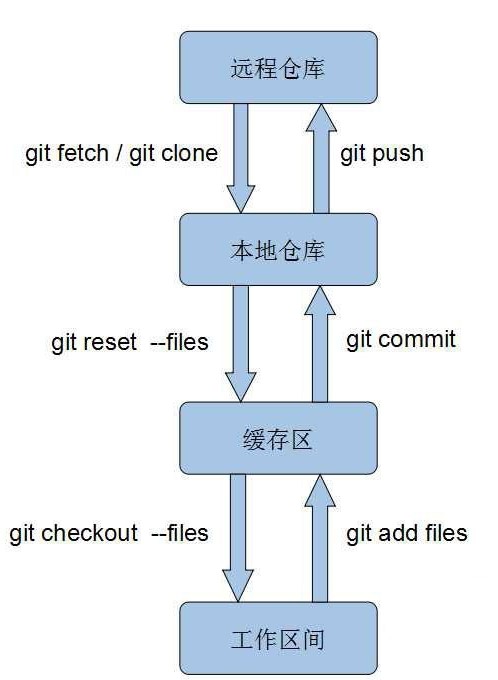
git add files #提交到缓存区

git rm files #从缓存区删除

git commit -m "备注" #提交到本地仓库

git status #查看状态

git log #查看日志

git reflog #获得版本号日志

git log --pretty=oneline #简化版日志

git reset --hard 版本号(可以是HEAD^或者版本号) #回退版本

git checkout -- file #丢弃工作区的修改,使工作区与缓存区一致

git remote add origin https://github.com/.... #连接远程库

git push origin master #把本地库内容推送至远程库

git branch #查看分支

git branch name #创建分支

git checkout name #切换分支

git checkout –b name #创建+切换分支

git merge name #合并某分支到当前分支

git branch –d name #删除分支

git stash #隐藏当前工作现场

git stash pop #恢复隐藏的工作现场

git pull #用于从远程获取代码并合并本地的版本


 浙公网安备 33010602011771号