9.UI的使用——信息注册器
界面填写:
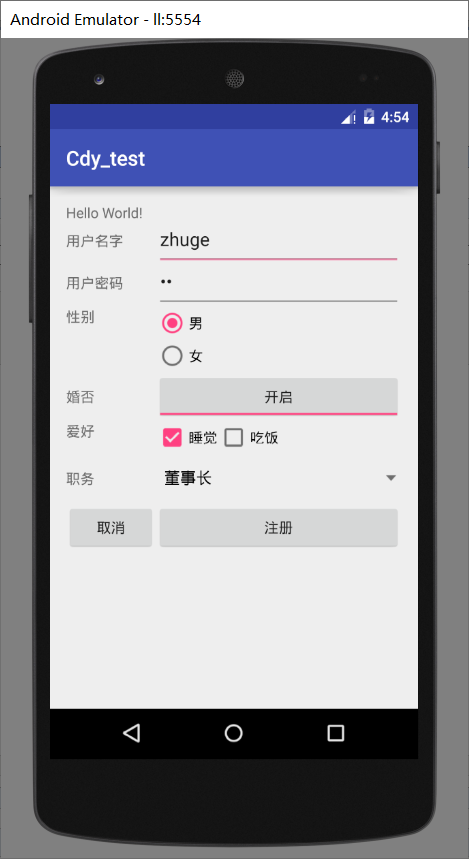
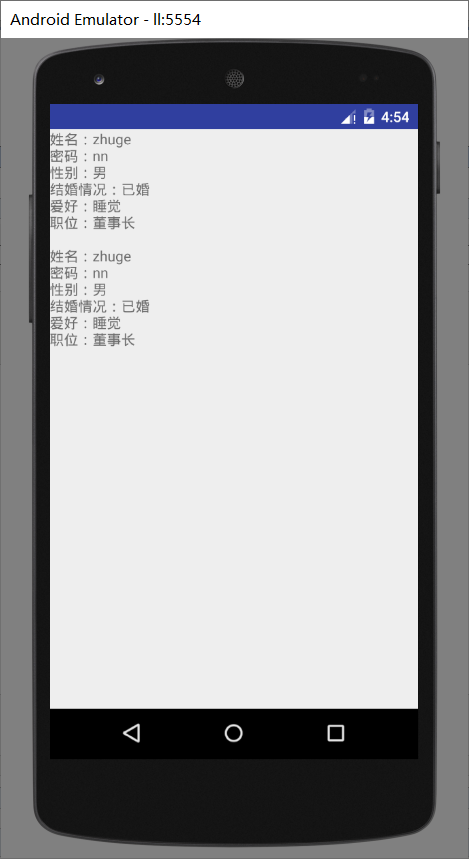
点击注册,跳转界面
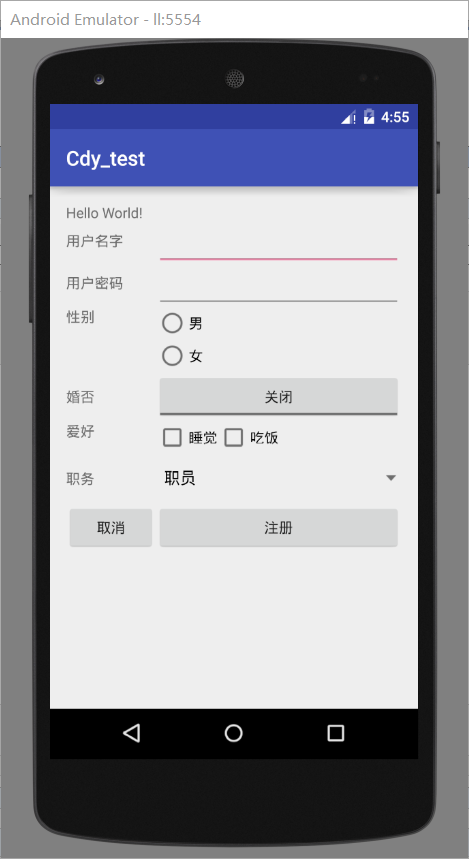
点击取消清除设置
第一个xlm
<?xml version="1.0" encoding="utf-8"?>
<LinearLayout xmlns:android="http://schemas.android.com/apk/res/android"
    xmlns:tools="http://schemas.android.com/tools"
    android:layout_width="match_parent"
    android:layout_height="match_parent"
    android:paddingBottom="@dimen/activity_vertical_margin"
    android:paddingLeft="@dimen/activity_horizontal_margin"
    android:paddingRight="@dimen/activity_horizontal_margin"
    android:paddingTop="@dimen/activity_vertical_margin"
    android:orientation="vertical"
    tools:context="com.example.xialm.cdy_test.MainActivity">

    <TextView
        android:layout_width="wrap_content"
        android:layout_height="wrap_content"
        android:text="Hello World!" />

    <TableLayout
        android:layout_width="wrap_content"
        android:layout_height="wrap_content"
        android:stretchColumns="1"
        >

        <TableRow>
            <TextView
                android:layout_width="wrap_content"
                android:layout_height="wrap_content"
                android:text="用户名字"

                />
            <EditText
                android:id="@+id/et_name"
                android:layout_width="wrap_content"
                android:layout_height="wrap_content"

                />


        </TableRow>


        <TableRow>
            <TextView
                android:layout_width="wrap_content"
                android:layout_height="wrap_content"
                android:text="用户密码"


                />

            <EditText
                android:id="@+id/et_password"
                android:layout_width="wrap_content"
                android:layout_height="wrap_content"
                android:password="true"
                />


        </TableRow>

        <TableRow>
            <TextView
                android:layout_width="wrap_content"
                android:layout_height="wrap_content"
                android:text="性别"


                />

            <RadioGroup>
                <RadioButton
                    android:id="@+id/rb_male"

                    android:layout_width="wrap_content"
                    android:layout_height="wrap_content"
                    android:text="男"
                    />
                <RadioButton
                    android:id="@+id/rb_female"
                    android:layout_width="wrap_content"
                    android:layout_height="wrap_content"
                    android:text="女"
                    />


            </RadioGroup>

        </TableRow>

        <TableRow>
            <TextView
                android:layout_width="wrap_content"
                android:layout_height="wrap_content"
                android:text="婚否"
                />
            <ToggleButton
                android:id="@+id/tb_open"
                android:layout_width="wrap_content"
                android:layout_height="wrap_content"
                android:textOff="关闭"
                android:textOn="开启"
                />

        </TableRow>

        <TableRow>
            <TextView
                android:layout_width="wrap_content"
                android:layout_height="wrap_content"
                android:text="爱好"
                />
            <LinearLayout
                android:layout_width="wrap_content"
                android:layout_height="wrap_content"
                android:orientation="horizontal"
                >
                <CheckBox
                    android:id="@+id/cb_hb1"
                    android:layout_width="wrap_content"
                    android:layout_height="wrap_content"
                    android:text="睡觉"
                    />
                <CheckBox
                    android:id="@+id/cb_hb2"
                    android:layout_width="wrap_content"
                    android:layout_height="wrap_content"
                    android:text="吃饭"
                    />


            </LinearLayout>


        </TableRow>

        <TableRow>
            <TextView
                android:layout_width="wrap_content"
                android:layout_height="wrap_content"
                android:text="职务"
                />
            <Spinner
                android:id="@+id/sp_posion"
                android:layout_width="wrap_content"
                android:layout_height="wrap_content"

                >

            </Spinner>

        </TableRow>
        <TableRow>
                <Button
                    android:id="@+id/bt_cancle"

                    android:layout_width="wrap_content"
                    android:layout_height="wrap_content"
                    android:text="取消"

                    />

                <Button
                    android:id="@+id/bt_regesiter"
                    android:layout_width="wrap_content"
                    android:layout_height="wrap_content"
                    android:text="注册"
                    />


        </TableRow>


    </TableLayout>

</LinearLayout>
第二个xlm
<?xml version="1.0" encoding="utf-8"?>
<LinearLayout xmlns:android="http://schemas.android.com/apk/res/android"
    android:layout_width="match_parent"
    android:layout_height="match_parent">


    <TextView
        android:id="@+id/hello"
        android:layout_width="wrap_content"
        android:layout_height="wrap_content"
        android:text="sss"
        />
</LinearLayout>
第一个activity
package com.example.xialm.cdy_test;

import android.content.Intent;
import android.content.pm.FeatureGroupInfo;
import android.support.v7.app.AppCompatActivity;
import android.os.Bundle;
import android.view.View;
import android.widget.ArrayAdapter;
import android.widget.Button;
import android.widget.CheckBox;
import android.widget.EditText;
import android.widget.RadioButton;
import android.widget.Spinner;
import android.widget.TextView;
import android.widget.ToggleButton;

public class MainActivity extends AppCompatActivity {


//先声明一大群东西,实例到oncreate里面在进行实例化
    static String data;
    //输入文本框
    private EditText username;
    private EditText password;
    //单选按钮
    private RadioButton male,famale;
    //开关按钮
    private ToggleButton open;
    //多选按钮,复选按钮
    private CheckBox sleep,swiming;
    //下拉菜单
    private Spinner posion;
    //按钮
    private Button bu_1,bu_2;

    @Override
    protected void onCreate(Bundle savedInstanceState) {
        super.onCreate(savedInstanceState);
        setContentView(R.layout.activity_main);

        //找到各个组件的id号,联系起来
        username = (EditText) findViewById(R.id.et_name);
        password = (EditText) findViewById(R.id.et_password);

        male = (RadioButton)findViewById(R.id.rb_male);
        famale = (RadioButton)findViewById(R.id.rb_female);

        open = (ToggleButton)findViewById(R.id.tb_open);

        sleep = (CheckBox)findViewById(R.id.cb_hb1);
        swiming = (CheckBox)findViewById(R.id.cb_hb2);

        posion = (Spinner)findViewById(R.id.sp_posion);


        //其中下拉菜单需要,适配器往里面加入菜单选项
        String[] ss = {"职员","经理","董事长"};
        final ArrayAdapter po = new ArrayAdapter(this,android.R.layout.simple_spinner_dropdown_item,ss);
        posion.setAdapter(po);


        bu_1 = (Button)findViewById(R.id.bt_cancle);
        bu_2 = (Button) findViewById(R.id.bt_regesiter);


        //设置监听,获取信息
        bu_2.setOnClickListener(new View.OnClickListener() {
            @Override
            public void onClick(View v) {

                //获取文本框输入内容
                data = "姓名:"+username.getText().toString()+"\n"
                        +"密码:"+password.getText().toString()+"\n";

                //获取单选框输入内容
                if(male.isChecked())
                {
                    data+="性别:男"+"\n";

                }else {
                    data+="性别:女"+"\n";
                }

                //获取开关按钮开关情况
                if(open.isChecked())
                {
                    data+="结婚情况:已婚"+"\n";

                }else {
                    data+="结婚情况:未婚"+"\n";

                }

                //获取多选框,复选框的选择内容
                String like="爱好:";
                if(sleep.isChecked()){
                    like+="睡觉"+"\n";

                }
                if (swiming.isChecked())
                {
                    like+="吃饭"+"\n";
                }

                data+=like;

                //获取下拉菜单的内容
                data+="职位:"+posion.getSelectedItem().toString();


                //跳转下一个界面
                Intent ii = new Intent(MainActivity.this,Second.class);
                startActivity(ii);

            }
        });
        //设置监听
        bu_1.setOnClickListener(new View.OnClickListener() {
            @Override
            public void onClick(View v) {
                //对各个组件选择内容进行清空操作
                username.setText("");
                password.setText("");
                //单选框,选空的就是没选
                male.setChecked(false);
                famale.setChecked(false);
                //开关按钮,同理
                open.setChecked(false) ;
                //多选框,复选框同理
                sleep.setChecked(false);
                swiming.setChecked(false);
                //下拉菜单。重新塞一边配置器
                posion.setAdapter(po);
            }
        });

    }

    //设置两个Javabean,可以让其他类来使用变量
    public static String getData() {
        return data;
    }

    public void setData(String data) {
        this.data = data;
    }
}
第二个activity
package com.example.xialm.cdy_test;

import android.app.Activity;
import android.os.Bundle;
import android.widget.TextView;

/**
 * Created by xialm on 2019/9/24.
 */
public class Second extends Activity{
    //拿到数据
    String ss = MainActivity.data;

    @Override
    protected void onCreate(Bundle savedInstanceState) {
        super.onCreate(savedInstanceState);
        setContentView(R.layout.second);
        //联系起来
        TextView hell = (TextView)findViewById(R.id.hello);
        //这种方法也可以拿到数据
        ss += "\n\n"+MainActivity.getData();

        hell.setText(ss);
    }


}


 浙公网安备 33010602011771号