
对TabHost、TabWidget的理解分析,Android TabWidget切换卡的实现应用
要用到tab组件,布局layout中必须有TabHost文件,它有一个id,比如 android:id="@+id/tabhost" 或者android:id="@android:id/tabhost"
在TabHost中一般必须有TabWidget,这个主要是用来处理tab的位置、属性等。一般还有FrameLayout组件,用于定义显示的在Tab下显示的组件。
例如:
TabHost tabs = (TabHost) findViewById(R.id.tabhost);
tabs.setup();
TabHost.TabSpec spec = tabs.newTabSpec("tag1");
spec.setContent(R.id.tab1);
spec.setIndicator("Clock");
tabs.addTab(spec);
其中tabs.newTabSpec("tag1")用来new一个tab,同时标记这个tab的tag
setContent()用来处理点击这个tab后的动作,可以是这个Activity下的一个组件,如setContent(R.id.tab1),也可以是一个intent,比如:setContent(new Intent(this, SubTab.class))
setIndicator()用来标记这个tab的名字,可以是setIndicator("Clock"),也可以包含其他的属性,如图片:setIndicator( "商场",getResources().getDrawable(android.R.drawable.arrow_down_float))
tabs.addTab(spec)将这个tab添加如TabHost
TabWidget类似于Android 中查看电话薄的界面,通过多个标签切换显示不同内容。要实现这一效果,首先要了解TabHost,它是一个用来存放多个Tab标签的容器。每一个Tab都可以对应自己的布局,比如,电话薄中的Tab布局就是一个List的线性布局了。
要使用TabHost,首先需要通过getTabHost方法来获取TabHost的对象,然后通过addTab方法来向TabHost中添加 Tab。当然每个Tab在切换时都会产生一个事件,要捕捉这个事件需要设置TabActivity的事件监听 setOnTabChangedListener。
1、布局文件
<TabHost xmlns:android="http://schemas.android.com/apk/res/android"
android:id="@android:id/tabhost"
android:layout_width="fill_parent"
android:layout_height="fill_parent" >
<LinearLayout
android:layout_width="fill_parent"
android:layout_height="fill_parent"
android:orientation="vertical" >
<TabWidget
android:id="@android:id/tabs"
android:layout_width="fill_parent"
android:layout_height="wrap_content" />
<FrameLayout
android:id="@android:id/tabcontent"
android:layout_width="fill_parent"
android:layout_height="fill_parent" >
<TextView
android:id="@+id/textview1"
android:layout_width="fill_parent"
android:layout_height="fill_parent"
android:text="Linux"
android:textColor="#FF0000" />
<TextView
android:id="@+id/textview2"
android:layout_width="fill_parent"
android:layout_height="fill_parent"
android:text="MAC"
android:textColor="#385E0F" />
<TextView
android:id="@+id/textview3"
android:layout_width="fill_parent"
android:layout_height="fill_parent"
android:text="Windows"
android:textColor="#1E90FF" />
</FrameLayout>
</LinearLayout>
</TabHost>
2、修改MainActivity,注意是继承自TabActivity
public class MainActivity extends TabActivity {

 private TabHost tabHost;

 @Override
 protected void onCreate(Bundle savedInstanceState) {
 super.onCreate(savedInstanceState);
 setContentView(R.layout.activity_main);

 tabHost = getTabHost();

 addTab();// 添加标签
 // 设置TabHost背景颜色
 tabHost.setBackgroundColor(Color.argb(150, 20, 80, 150));
 // 设置TabHost背景图片资源
 tabHost.setBackgroundResource(R.drawable.ic_launcher);
 // 设置当前显示哪一个标签 我的理解就是当你第一次启动程序默认显示那个标签 这里是指定的选项卡的ID从0开始
 tabHost.setCurrentTab(0);
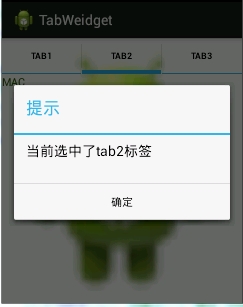
 // 标签切换事件处理,setOnTabChangedListener 注意是标签切换事件不是点击事件,而是从一个标签切换到另外一个标签会触发的事件
 tabHost.setOnTabChangedListener(new OnTabChangeListener() {
  @Override
  public void onTabChanged(String tabId) {
  AlertDialog.Builder builder = new AlertDialog.Builder(MainActivity.this);
  Dialog dia;
  builder.setTitle("提示");
  builder.setMessage("当前选中了" + tabId + "标签");
  builder.setPositiveButton("确定", new OnClickListener() {
   @Override
   public void onClick(DialogInterface dialog, int which) {
   dialog.cancel();
   }
  });
  dia = builder.create();
  dia.show();
  }
 });
 }

 // 为TabHost添加标签 新建一个newTabSped(new TabSpec) 设置其标签和图标(setIndicator)、设置内容(setContent)
 // TabSpec是TabHost的内部类 TabHost对象的 newTabSpec()方法返回一个TabSpec对象
 // 源码里边是这么写的 public TabSpec newTabSpec(String tag)
 // { return new TabSpec(tag); }
 private void addTab() {
 tabHost.addTab(tabHost
  .newTabSpec("tab1")
  .setIndicator("TAB1",
   getResources().getDrawable(R.drawable.ic_launcher))// setIndicator()此方法用来设置标签和图表
  .setContent(R.id.textview1));
 // 指定内容为一个TextView --->public TabHost.TabSpec setContent(int viewId) 此方法需要一个 viewId 作为参数
 tabHost.addTab(tabHost
  .newTabSpec("tab2")
  .setIndicator("TAB2",
   getResources().getDrawable(R.drawable.ic_launcher))
  .setContent(R.id.textview2));

 tabHost.addTab(tabHost
  .newTabSpec("tab3")
  .setIndicator("TAB3",
   getResources().getDrawable(R.drawable.ic_launcher))
  .setContent(R.id.textview3));
 }
}
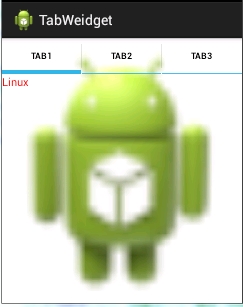
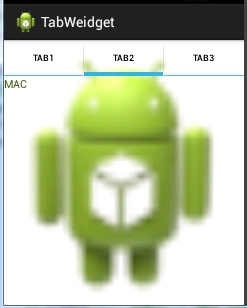
3、运行程序:如下!

 浙公网安备 33010602011771号