<!DOCTYPE html>
<html>
    <head>
        <meta charset="UTF-8">
        <title>筛选商品</title>
        <script type="text/javascript" src="js/vue.js"></script>
        <style>
            body{
                font-size: 14px;
                font-family: "lucida sans typewriter",arial;
            }
            ul{
                padding: 0;
                margin: 0;
                list-style: none;
            }
            a{
                text-decoration: none;
            }
            img{
                vertical-align: top;
            }
            #wrap{
                width: 760px;
                height: 260px;
                margin: 100px auto;
                padding: 145px 120px 95px;
                background: url(img/bg.jpg) no-repeat 0 0;
                background: #87B2B3;
            }
            #section{
                width: 760px;
                height: 260px;
                -moz-box-shadow:0px 0px 4px rgba(0,0,0,.2);
                box-shadow:0px 0px 4px rgba(0,0,0,.2);
            }
            #choose{
                width: 788px;
                height: 50px;
                margin: 0 auto;
                background: #DBEFEF;
                line-height: 50px;
                text-indent: 21px;
            }
            #type{
                width: 100%;
                height: 210px;
                padding: 17px 0 16px 28px;
                background: #E7F2F2;
            }
            #type li{
                height: 44px;
                color: #8a8a8a;
                line-height: 44px;
            }
            #type a{
                margin: 0 12px 0 11px;
                color: #000;
            }
            #choose mark{
                position: relative;
                display: inline-block;
                height: 24px;
                line-height: 24px;
                border: 1px solid #28a5c4;
                color: #28a5c4;
                margin: 12px 5px 0;
                background: none;
                padding: 0 30px 0 6px;
                text-indent: 0;
            }
            #choose mark a{
                position: absolute;
                top: 3px;
                right: 2px;
                display: inline-block;
                width: 18px;
                height: 18px;
                background: #28a5c4;
                color: #fff;
                line-height: 18px;
                font-size: 16px;
                text-align: center;
            }
            .active{
                background: rgb(40,165,196);
            }
        </style>
    </head>
    <body>
        <div id="wrap">
            <section id="section">
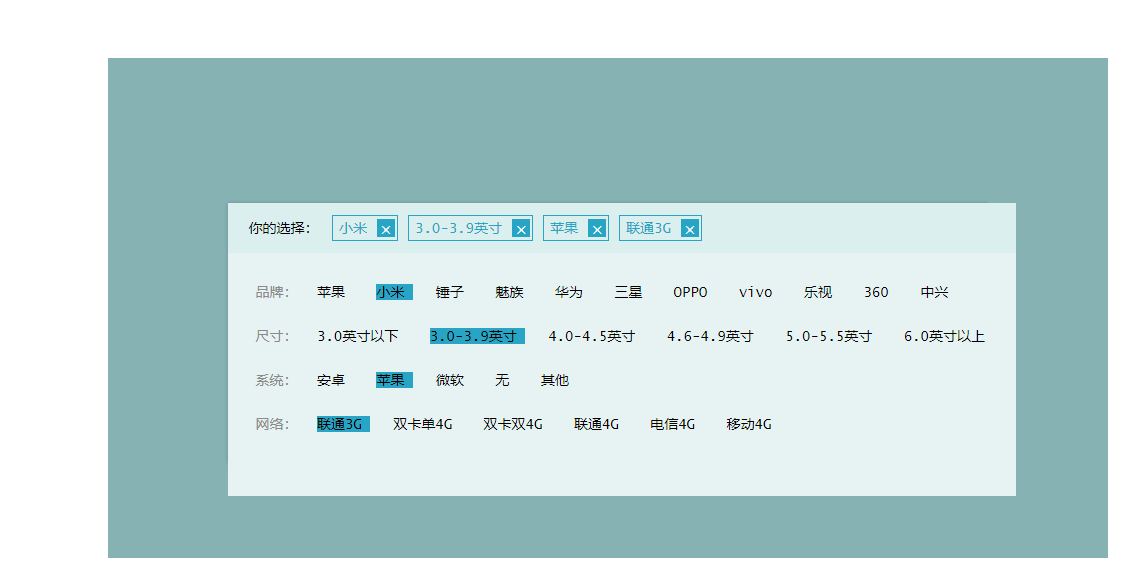
                <nav id="choose">
                    你的选择:
                    <mark @click="removeHandle(key)" v-for="item,key in choose">
                        {{item}}
                        <a href="javascript:;">×</a>
                    </mark>
                </nav>
                <ul id="type">
                    <li v-for="item,index in dataList">
                        {{item.title}}:
                        <a
                            v-for="option,i in item.list"
                            href="javascript:;"
                            v-bind:class="{active:item.index===i}"
                            @click="addChooseHandle(option,index,i)"
                        >
                        {{option}}
                        </a>
                    </li>
                </ul>
            </section>
        </div>
    </body>
    <script type="text/javascript">
        let data=[
            {
                title:'品牌',
                list:[
                    "苹果",
                    "小米",
                    "锤子",
                    "魅族",
                    "华为",
                    "三星",
                    "OPPO",
                    "vivo",
                    "乐视",
                    "360",
                    "中兴",

                ]
            },
            {
                title:'尺寸',
                list:[
                    "3.0英寸以下",
                    "3.0-3.9英寸",
                    "4.0-4.5英寸",
                    "4.6-4.9英寸",
                    "5.0-5.5英寸",
                    "6.0英寸以上"
                ]
            },
            {
                title:'系统',
                list:[
                    "安卓",
                    "苹果",
                    "微软",
                    "无",
                    "其他",
                ]
            },
            {
                title:'网络',
                list:[
                    "联通3G",
                    "双卡单4G",
                    "双卡双4G",
                    "联通4G",
                    "电信4G",
                    "移动4G",
                ]
            },
        ]
        data.forEach(item=>item.index=-1)
        console.log(data)
        new Vue({
            el:"#wrap",
            data:{
                dataList:data,
                choose:{}
            },
            methods:{
                addChooseHandle(option,index,i){
                    console.log(option)
                    this.$set(this.choose,index,option)
//                    找到操作的一行,把这一行的数据中的index,设置为点击的标签的下标
                    this.dataList[index].index=i
                },
                removeHandle(key){
                    console.log(this.choose)
                    console.log(key)
//                    删除对象的属性
                    this.$delete(this.choose,key)
                    this.dataList[key].index=-1
                }
            }
        })


    </script>
</html>


 浙公网安备 33010602011771号