<!DOCTYPE html>
<html>
    <head>
        <meta charset="UTF-8">
        <title></title>
        <script src="https://cdn.staticfile.org/vue/2.2.2/vue.min.js"></script>
        <style>
            .tab{
                width: 500px;
                background: #fff;
                margin: 0 auto;
                background: rgb(227,232,238);
                padding: 16px;
            }
            .tab-header{
                overflow: hidden;
            }
            .tab-item{
                width: 100px;
                height: 30px;
                line-height: 30px;
                background: #ccc;
                border: 1px solid #dddee1;
                background: #f8f8f9;
                text-align: center;
                margin-right: 5px;
                border-radius: 2px;
                float: left;
            }
            .tab-active{
                border-color: transparent;
                height: 32px;
                margin-bottom: 5px;
                background: #fff;
                transform: translateZ(0);
                color: #e6451e;
            }
            .tab-content{
                height: 100px;
                line-height: 10px;
                background: #fff;
                overflow: hidden;
            }
            .tab-content div{
                width: 100%;
                height: 100%;
                text-align: center;
                display: none;
            }
        </style>
    </head>
    <body>
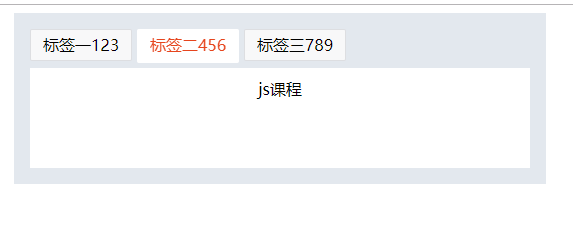
        <div class="tab" id="app">
            <div class="tab-header">
                <div
                    v-for="item ,index in tabData"
                    class="tab-item"
                    @click="tab(index)"
                    v-bind:class="{'tab-active':index===currentIndex}"
                    >
                {{item.title}}
                </div>

            </div>
            <div class="tab-content">
                <div
                    v-for="item,index in tabData"
                    v-bind:style="{display: index===currentIndex?'block':'none'}"
                >
                    <p v-for="option in item.list">{{option.subTitle}}</p>
                </div>

            </div>
        </div>
    </body>
    <script>
        let tabData=[
            {
                title:'标签一123',
                list:[
                    {
                        subTitle:'css课程'
                    },
                    {
                        subTitle:'css课程'
                    },
                    {
                        subTitle:'css课程'
                    }
                ]
            },
            {
                title:'标签二456',
                list:[
                    {
                        subTitle:'js课程'
                    }
                ]
            },
            {
                title:'标签三789',
                list:[
                    {
                        subTitle:'Vue课程'
                    }
                ]
            }
        ]
        new Vue({
            el:"#app",
            data:{
                tabData:tabData,
                currentIndex:1
            },
            methods:{
                tab(index){
                    this.currentIndex=index;
                }
            }
        })
    </script>
</html>
![]()




 浙公网安备 33010602011771号