
LNMP一键安装
进入下载页面可以看到
测试版:
LNMP 1.5
下载版:(不含源码安装包文件,仅有安装脚本及配置文件)
http://soft.vpser.net/lnmp/lnmp1.5beta.tar.gz  (144KB)
MD5: 111e42fd5ea37eb63810678a8cd71771
最后更新:2018年4月25日 11:40 GMT+8 具体更新内容可以 https://github.com/licess/lnmp 上查看。
进行安装
# 下载
wget http://soft.vpser.net/lnmp/lnmp1.5beta.tar.gz
# 解压
tar -zxvf lnmp1.5beta.tar.gz
# 进入lnmp目录
cd lnmp1.5
# 执行install.sh进行安装
./install.sh
出现以下页面
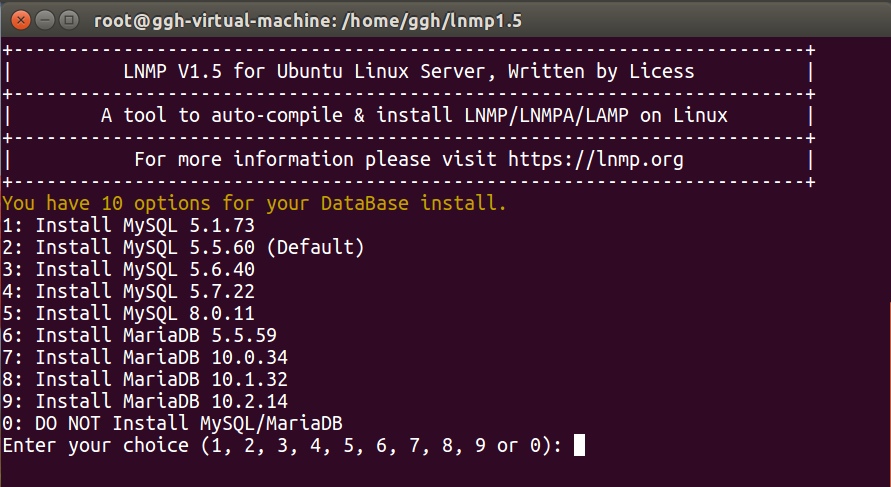
选择需要的选项并回车,此处选择默认
输入密码
You will install MySQL 5.5.60
===========================
Please setup root password of MySQL.(Default password: root)
Please enter:
是否使用InnoDB存储引擎
MySQL root password: root
===========================
Do you want to enable or disable the InnoDB Storage Engine?
Default enable,Enter your choice [Y/n]:
选择php版本,此处默认
No input,The InnoDB Storage Engine will enable.
===========================
You have 6 options for your PHP install.
1: Install PHP 5.2.17
2: Install PHP 5.3.29
3: Install PHP 5.4.45
4: Install PHP 5.5.38 (Default)
5: Install PHP 5.6.30
6: Install PHP 7.0.15
7: Install PHP 7.1.1
Enter your choice (1, 2, 3, 4, 5, 6 or 7):
是否安装内存分配器
You will install PHP 7.1.1
===========================
You have 3 options for your Memory Allocator install.
1: Don't install Memory Allocator. (Default)
2: Install Jemalloc
3: Install TCMalloc
Press any key to install...or Press Ctrl+c to cancel
按下任意键,接下来就是等待安装完成。需要二十分钟左右。
============================== Check install ==============================
Checking ...
Nginx: OK
MySQL: OK
PHP: OK
PHP-FPM: OK
Clean src directory...
+------------------------------------------------------------------------+
|          LNMP V1.5 for Ubuntu Linux Server, Written by Licess          |
+------------------------------------------------------------------------+
|           For more information please visit https://lnmp.org           |
+------------------------------------------------------------------------+
|    lnmp status manage: lnmp {start|stop|reload|restart|kill|status}    |
+------------------------------------------------------------------------+
|  phpMyAdmin: http://IP/phpmyadmin/                                     |
|  phpinfo: http://IP/phpinfo.php                                        |
|  Prober:  http://IP/p.php                                              |
+------------------------------------------------------------------------+
|  Add VirtualHost: lnmp vhost add                                       |
+------------------------------------------------------------------------+
|  Default directory: /home/wwwroot/default                              |
+------------------------------------------------------------------------+
|  MySQL/MariaDB root password: 123456                          |
+------------------------------------------------------------------------+
+-------------------------------------------+
|    Manager for LNMP, Written by Licess    |
+-------------------------------------------+
|              https://lnmp.org             |
+-------------------------------------------+
nginx (pid 107009 107008 107007 107006 107005) is running...
php-fpm is runing!
这样子就安装成功了
此安装过程安装完成便也启动了nginx,mysql,php-fpm并加入了开机启动项。如果重启服务器,不需要再单独手动开启相关的服务了。总的来说相当方便的。

 浙公网安备 33010602011771号