

JAVA11-12周作业
 1 <?xml version="1.0" encoding="utf-8"?>
 2 <LinearLayout xmlns:android="http://schemas.android.com/apk/res/android"
 3     xmlns:tools="http://schemas.android.com/tools"
 4     android:layout_width="match_parent"
 5     android:layout_height="match_parent"
 6     android:orientation="vertical">
 7
 8     <EditText
 9         android:id="@+id/et1"
10         android:layout_width="match_parent"
11         android:layout_height="wrap_content"
12         android:hint="输入你想输入的内容"/>
13     <Button
14         android:id="@+id/bt1"
15         android:layout_width="match_parent"
16         android:layout_height="wrap_content"
17         android:text="写入"
18         android:textColor="#FFFFFF"
19         android:background="#000"
20         android:onClick="click1"/>
21     <EditText
22         android:id="@+id/et2"
23         android:layout_width="match_parent"
24         android:layout_height="wrap_content"
25         android:hint="显示读取的内容"/>
26     <Button
27         android:id="@+id/bt2"
28         android:layout_width="match_parent"
29         android:layout_height="wrap_content"
30         android:text="读取"
31         android:textColor="#FFFFFF"
32         android:background="#000"
33         android:onClick="click2"/>
34 </LinearLayout>
 1 package com.example.dell.myapplication1;
 2
 3 import android.os.Bundle;
 4 import android.support.v7.app.ActionBarActivity;
 5 import android.view.Menu;
 6 import android.view.MenuItem;
 7 import android.view.View;
 8 import android.widget.EditText;
 9 import android.widget.Toast;
10
11 import java.io.FileInputStream;
12 import java.io.FileOutputStream;
13 import java.io.IOException;
14
15 public class MainActivity1 extends ActionBarActivity {
16
17     @Override
18     protected void onCreate(Bundle savedInstanceState) {
19         super.onCreate(savedInstanceState);
20         setContentView(R.layout.activity_main1);
21         findViewById(R.id.bt1);
22         findViewById(R.id.bt2);
23         EditText editText1 = (EditText) findViewById(R.id.et1);
24         EditText editText2 = (EditText) findViewById(R.id.et2);
25     }
26
27     public void click1(View view) {
28         EditText editText1 = (EditText) findViewById(R.id.et1);
29         EditText editText2 = (EditText) findViewById(R.id.et2);
30         String fileName = "data.txt";
31         String context = editText1.getText().toString();
32         FileOutputStream fos = null;
33         try {
34             fos = openFileOutput(fileName, MODE_PRIVATE);
35             fos.write(context.getBytes());
36         } catch (Exception e) {
37             e.printStackTrace();
38         } finally {
39             if (fos != null) {
40                 try {
41                     fos.close();
42                 } catch (IOException e) {
43                     e.printStackTrace();
44                 }
45             }
46         }
47         Toast.makeText(this, "保存成功", Toast.LENGTH_SHORT).show();
48     }
49
50     public void click2(View view) {
51         EditText editText2 = (EditText) findViewById(R.id.et2);
52         String context = "";
53         FileInputStream fis = null;
54         try {
55             fis = openFileInput("data.txt");
56             byte[] buffer = new byte[fis.available()];
57             fis.read(buffer);
58             context = new String(buffer);
59         } catch (Exception e) {
60             e.printStackTrace();
61         } finally {
62             if (fis != null) {
63                 try {
64                     fis.close();
65                 } catch (IOException e) {
66                     e.printStackTrace();
67                 }
68             }
69         }
70         editText2.setText(context);
71     }
72 }
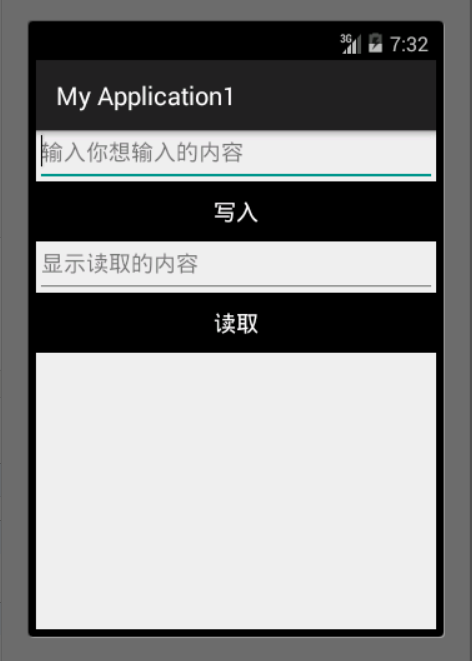
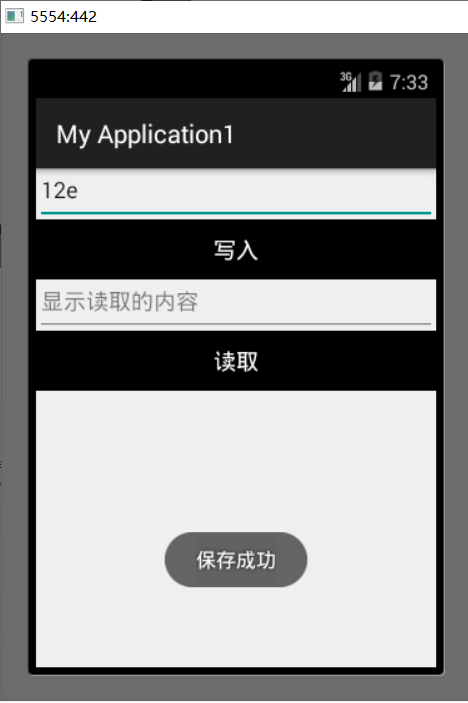
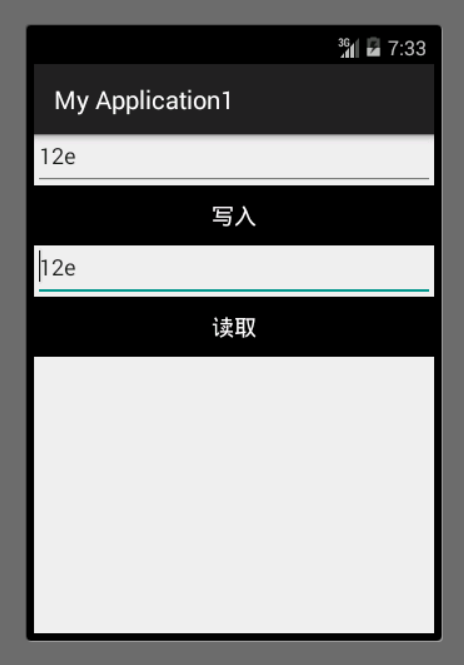
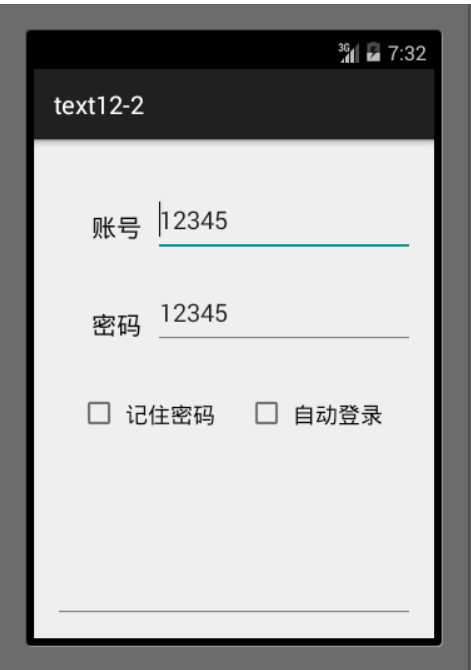
2 图片二 使用sharedpreference实现记住密码功能.
  1 <?xml version="1.0" encoding="utf-8"?>
  2 <RelativeLayout xmlns:android="http://schemas.android.com/apk/res/android"
  3     xmlns:tools="http://schemas.android.com/tools"
  4     android:layout_width="match_parent"
  5     android:layout_height="match_parent"
  6     android:paddingBottom="@dimen/activity_vertical_margin"
  7     android:paddingLeft="@dimen/activity_horizontal_margin"
  8     android:paddingRight="@dimen/activity_horizontal_margin"
  9     android:paddingTop="@dimen/activity_vertical_margin"
 10     tools:context="com.example.dell.text12_2.text12">
 11
 12     <TextView
 13         android:id="@+id/tv_1"
 14         android:layout_width="wrap_content"
 15         android:layout_height="wrap_content"
 16         android:text="账号"
 17         android:textColor="#000000"
 18         android:textSize="20sp"
 19         android:layout_marginTop="30dp"
 20         android:layout_marginLeft="20dp"
 21         android:padding="10dp"/>
 22
 23     <EditText
 24         android:id="@+id/et_1"
 25         android:layout_width="match_parent"
 26         android:layout_height="wrap_content"
 27         android:hint="请输入用户名"
 28         android:layout_toRightOf="@id/tv_1"
 29         android:layout_marginTop="30dp"
 30         android:padding="10dp"
 31         android:textSize="20sp"/>
 32
 33     <TextView
 34         android:id="@+id/tv_2"
 35         android:layout_width="wrap_content"
 36         android:layout_height="wrap_content"
 37         android:text="密码"
 38         android:textColor="#000000"
 39         android:textSize="20sp"
 40         android:layout_marginTop="30dp"
 41         android:layout_marginLeft="20dp"
 42         android:layout_below="@id/tv_1"
 43         android:padding="10dp"/>
 44
 45     <EditText
 46         android:id="@+id/et_2"
 47         android:layout_width="match_parent"
 48         android:layout_height="wrap_content"
 49         android:hint="请输入密码"
 50         android:layout_toRightOf="@id/tv_2"
 51         android:layout_below="@id/et_1"
 52         android:layout_marginTop="30dp"
 53         android:padding="10dp"
 54         android:textSize="20sp"/>
 55
 56     <EditText
 57         android:id="@+id/text1"
 58         android:layout_width="match_parent"
 59         android:layout_height="400dp"
 60         />
 61
 62
 63     <CheckBox
 64         android:id="@+id/cb_1"
 65         android:layout_width="wrap_content"
 66         android:layout_height="wrap_content"
 67         android:text="记住密码"
 68         android:textColor="#000000"
 69         android:textSize="18sp"
 70         android:layout_below="@id/tv_2"
 71         android:padding="5dp"
 72         android:layout_marginTop="30dp"
 73         android:layout_marginLeft="20dp"
 74         />
 75
 76     <CheckBox
 77         android:id="@+id/cb_2"
 78         android:layout_width="wrap_content"
 79         android:layout_height="wrap_content"
 80         android:text="自动登录"
 81         android:textColor="#000000"
 82         android:textSize="18sp"
 83         android:layout_below="@id/tv_2"
 84         android:layout_toRightOf="@id/cb_1"
 85         android:padding="5dp"
 86         android:layout_marginTop="30dp"
 87         android:layout_marginLeft="20dp"
 88         />
 89
 90     <Button
 91         android:id="@+id/btn_1"
 92         android:layout_width="500dp"
 93         android:layout_height="wrap_content"
 94         android:text="登录"
 95         android:textColor="#000000"
 96         android:textSize="18sp"
 97         android:layout_below="@id/text1"
 98         android:padding="5dp"
 99         android:layout_marginTop="25dp"
100         android:layout_marginLeft="20dp"
101         android:layout_toRightOf="@id/cb_2" />
102
103
104
105 </RelativeLayout>
package com.example.dell.text12_2;

import android.os.Bundle;
import android.support.v7.app.ActionBarActivity;
import android.text.TextUtils;
import android.view.View;
import android.widget.Button;
import android.widget.CheckBox;
import android.widget.CompoundButton;
import android.widget.EditText;
import android.widget.Toast;

import java.util.Map;

public class text12 extends ActionBarActivity  implements android.view.View.OnClickListener, CompoundButton.OnCheckedChangeListener {


        private EditText et_account;
        private EditText et_password;
        private Button btn_login;
    @Override
    protected void onCreate(Bundle savedInstanceState) {
        super.onCreate(savedInstanceState);
        setContentView(R.layout.activity_text12);
        initView();
        Map<String,String> userInfo=saveQQ.getUserInfo(this);
        if(userInfo!=null){
            et_account.setText(userInfo.get("account"));
            et_password.setText(userInfo.get("password"));
        }
    }

    private void initView() {
        et_account= (EditText) findViewById(R.id.et_1);
        et_password= (EditText) findViewById(R.id.et_2);
        btn_login= (Button) findViewById(R.id.btn_1);
        btn_login.setOnClickListener(this);
        CheckBox cb1= (CheckBox) findViewById(R.id.cb_1);
        cb1.setOnCheckedChangeListener(this);
        CheckBox cb2= (CheckBox) findViewById(R.id.cb_2);
        cb2.setOnCheckedChangeListener(this);
    }

    @Override
    public void onClick(View view) {
        switch (view.getId()){
            case R.id.btn_1:
                String account=et_account.getText().toString().trim();
                String password=et_password.getText().toString();
                if(TextUtils.isEmpty(account)){
                    Toast.makeText(this, "请输入账号", Toast.LENGTH_LONG).show();
                    return;
                }
                if(TextUtils.isEmpty(password)){
                    Toast.makeText(this,"请输入密码",Toast.LENGTH_LONG).show();
                    return;
                }
                Toast.makeText(this,"登录成功",Toast.LENGTH_LONG).show();
        }
    }

    @Override
    public void onCheckedChanged(CompoundButton compoundButton, boolean b) {
        switch (compoundButton.getId()){
            case R.id.cb_1:
                String account=et_account.getText().toString().trim();
                String password=et_password.getText().toString();
                boolean isSaveSuccess=saveQQ.saveUserInfo(this,account,password);
                if(isSaveSuccess&&b){
                    Toast.makeText(this,"保存成功",Toast.LENGTH_LONG).show();
                }else {
                    Toast.makeText(this,"保存失败",Toast.LENGTH_LONG).show();
                    et_account.setText(null);
                    et_password.setText(null);
                }
                break;
            case R.id.cb_2:
                account=et_account.getText().toString().trim();
                password=et_password.getText().toString();
                if(TextUtils.isEmpty(account)){
                    Toast.makeText(this,"请输入账号",Toast.LENGTH_LONG).show();
                    return;
                }
                if(TextUtils.isEmpty(password)){
                    Toast.makeText(this,"请输入密码",Toast.LENGTH_LONG).show();
                    return;
                }
                if(b)
                    Toast.makeText(this,"登录成功",Toast.LENGTH_LONG).show();
                else {
                    Toast.makeText(this,"请登录",Toast.LENGTH_LONG).show();
                }
        }
    }
}
 1 package com.example.dell.text12_2;
 2 import java.util.HashMap;
 3 import java.util.Map;
 4
 5 import android.content.Context;
 6 import android.content.SharedPreferences;
 7 /**
 8  * Created by dell on 2021/10/31.
 9  */
10 public class saveQQ {
11     public static boolean saveUserInfo(Context context,String account,String password ){
12     SharedPreferences sp=context.getSharedPreferences("data", context.MODE_PRIVATE);
13     SharedPreferences.Editor editor=sp.edit();
14     editor.putString("Username", account);
15     editor.putString("pwd", password);
16     editor.commit();
17     return true;
18 }
19
20
21
22     public static Map<String, String> getUserInfo(Context context){
23
24         SharedPreferences sp=context.getSharedPreferences("data", context.MODE_PRIVATE);
25         String account=sp.getString("Username", null);
26         String password=sp.getString("pwd", null);
27         Map<String, String> userMap=new HashMap<String,String>();
28         userMap.put("account", account);
29         userMap.put("password", password);
30         return userMap;
31
32
33     }
34
35 }
.

 浙公网安备 33010602011771号