
09字库
文字显示
一、ASCII、ANSI和Unicode
1.1ASCII编码
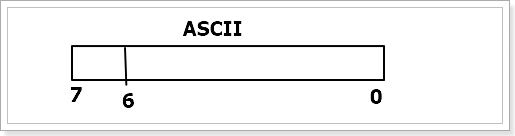
ASCII码一般只是用0-6位,第七位为0
1.2ANSI编码
ANSI编码是一种对ASCII码的拓展
ANSI编码用0x00~0x7f (即十进制下的0到127)范围的1 个字节来表示 1 个英文字符,超出一个字节的 0x80~0xFFFF 范围来表示其他语言的其他字符。
ANSI码仅在前128(0-127)个与ASCII码相同,之后的字符全是某个国家语言的所有字符。
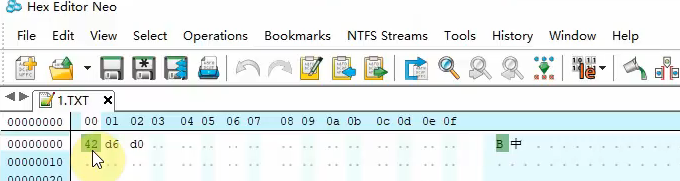
对于第一个字符bit7是0,就代表是ASCII码
对于第二个字符bit7是1,就代表不是ASCII码,它会用两个词表示一个非ASCII码的字符
同一个词0xd6d0,使用不同字符集有不同的字符。这是一对多的关系。
中国使用的GB2312编码
1.3 Unicode编码
为了解决不同国家ANSI编码的冲突问题,Unicode应运而生,每个字符都对应一个词,一一对应的关系。
Unicode的范围0x0000至0x10FFFF
最常用的是用两个字节表示一个字符
A:0x41
中:0x4e2d
如果在一个TXT文本写入
0x41 0x4e 0x2d
不表示A中,而是A-N
关键问题就是怎么进行断字,将两个字节0x4e 0x2d看为一体,这就对应不同编码
二、编码实现
使用三个字节表示一个Unicode太浪费
使用两个字节可以,就出现了
UTF-16 LE 小端存储 数据的低地址,放到内存的低地址 A: 0x41 0x00
UTF-16 BE 大端存储 数据的高地址,放到内存的低地址 A: 0x00 0x41 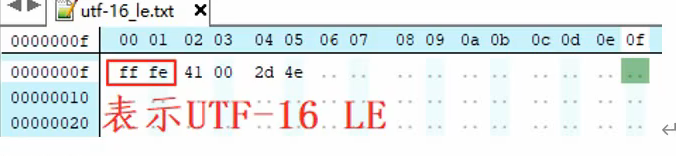
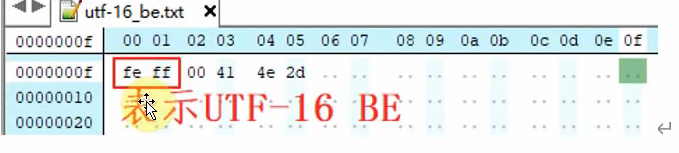
容错性比较差,当丢失一个字节时,里面的内容全部都乱了
使用UTF8的格式编码
UTF8是可变长便阿门
又分为带头部,不带头部的
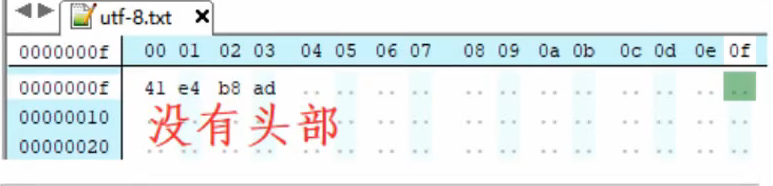
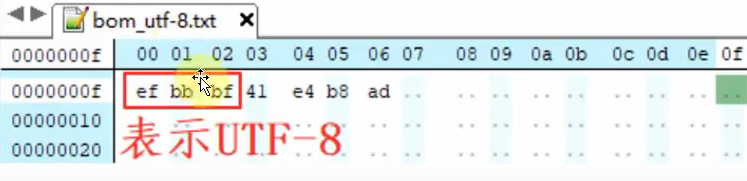
对于ASCII码,在UTF8中直接用其ASCII码表示,对于非ASCII码,使用变长的编码,每一字节的高位都自带长度信息
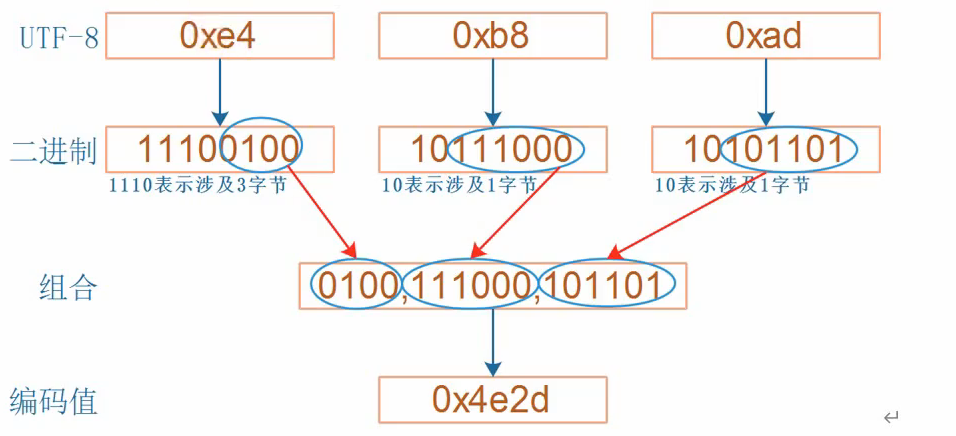
0xe4→11100100:以1110开头,说明这是一个 3 字节 的 UTF-8 编码。
0xb8→10111000:以10开头,是多字节编码中的后续字节。
0xad→10101101:以10开头,也是后续字节。
三、显示
3.1ASCII字符显示
在linux中有文件fontdata_8x16,可以获取对应ASCII码的点阵
8x16的大小,一行8个bit,一个字符16行
一个字符也就是16字节
显示A

设计一个函数,在指定的坐标上显示出字符
-
获取点阵,字符对应的偏移地址,c*16,c是字符 例:‘A’*16
-
描点
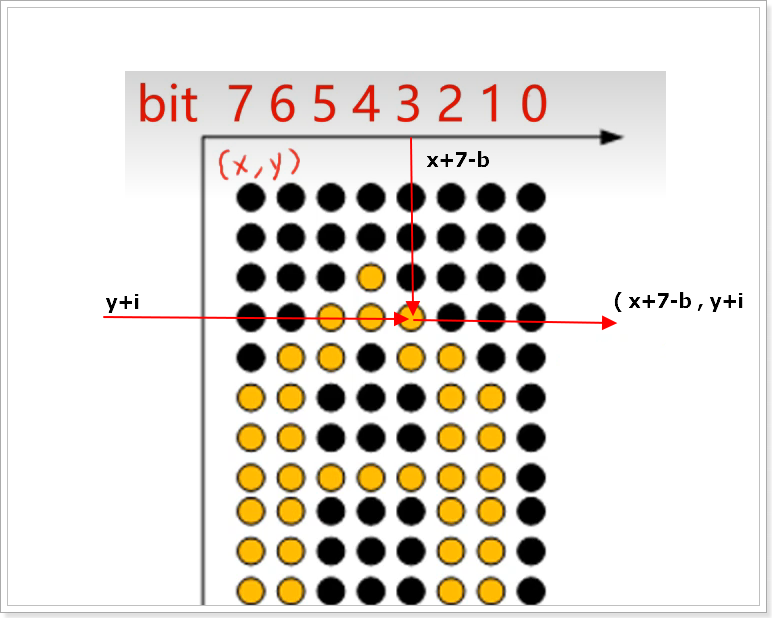
void lcd_put_ascii(int x, int y, unsigned char c)
{
	unsigned char *dots = (unsigned char *)&fontdata_8x16[c*16];
	int i, b;
	unsigned char byte;

	for (int i = 0; i < 16; i++)
	{
		byte = dots[i];
		for (int b = 7; b >= 0; b--)
		{
			if (byte & (1<<b))
			{
				/* show */
				lcd_put_pixel(x+7-b, y+i, 0xffffff); /* 白 */
			}
			else
			{
				/* hide */
				lcd_put_pixel(x+7-b, y+i, 0); /* 黑 */
			}
		}
	}
}
3.2 中文字符显示
使用GB2312显示
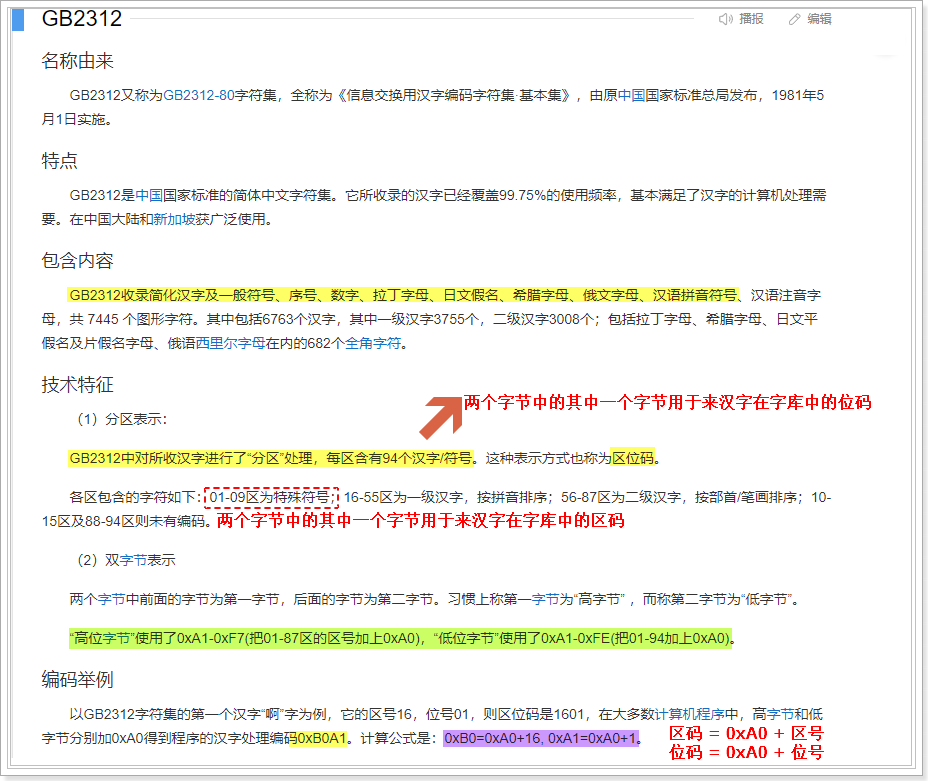
使用时必须提前将文件的字符编码设置为GB2312
16x16大小的汉字库
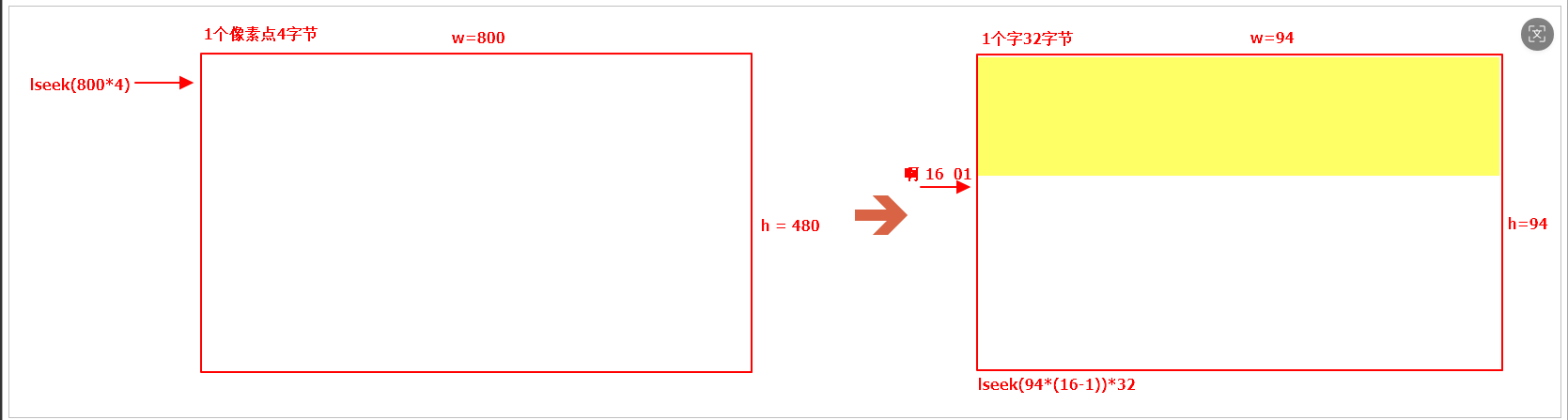
16 x 16大小的一个汉字,需要占用32字节。如果生成的是16 x 16的汉字库,则库中每个单元都是32字节。
汉字啊的区位码: 0xB0-----区码------>区号=0XB0-0XA0 == 16 0XA1-----位码------>位号=0XA1-0XA0 == 1
就得以得到一个汉字对应汉字库的位置
int main(int argc, char const *argv[])
{
    //数组用于存储待显示的内容
	unsigned char font_buf[2] = "啊";

    //1.打开LCD   open
	int lcd_fd = open("/dev/fb0",O_RDWR);

	//2.对LCD进行内存映射  mmap
	int* lcd_mp = (int *)mmap(NULL,1024*600*4,PROT_READ|PROT_WRITE,MAP_SHARED,lcd_fd,0);

    //3.打开汉字库文件  汉字库中的汉字都是16*16
    FILE * hzk_fp = fopen("./HZK16.dzk","rb");

    //4.计算待显示的汉字的在汉字库中的偏移量,并把光标偏移到该汉字的开头位置
    int offset = ( (font_buf[0] -0xA0 - 1)*94 + (font_buf[1] - 0xA0 - 1) ) * 32;
    fseek(hzk_fp,offset,SEEK_SET);

    //5.从汉字库中读取该汉字的数据内容,需要读取32字节并存储在缓冲区
    unsigned char font[32] = {0};
    fread(font,1,32,hzk_fp);

    //6.根据汉字的每个点阵的状态来控制LCD相应的像素点显示未某种颜色  0xFFFFFFFF; //白色
    unsigned char  data = 0;

    for (int h = 0; h < 16; h++)        //控制点阵的行数
    {
        for (int  w = 0; w < 16/8; w++)   //分析点阵的列数
        {
            data = font[h*2+w];

            for(int i = 0; i<8; i++)
            {
                //分析每个bit位的状态
                if( data & 0x80 )
                {
                    //如果条件满足,则说明应该让LCD点亮一个像素点
                    *(lcd_mp + 200*800 + 100 + 8*w + i + 800*h )= 0xFFFFFFFF;
                }

                data<<=1;
            }
        }
    }


	return 0;
}
gcc常用命令
-finput-charset=GB2312			告诉编译器源代码的文件本身的编码格式
-fexec-charset=GB2312` 或 `-fexec-charset=UTF-8		指定编译生成的可执行文件中,字符串常量的存储编码
四、Freetype显示
4.1 Freetype概念
FreeType是一个开源的字体渲染引擎,它能够加载和渲染多种格式的字体文件,如TrueType(.ttf)、OpenType(.otf)等。FreeType提供了一组API来处理字体数据,包括字符的加载、渲染以及获取字符的各种信息(例如字形边界框、位图等)。它被广泛应用于各种需要显示文本的应用程序中,尤其是在那些需要高质量文本渲染的地方。
4.2 嵌入式设备使用FreeType的方法步骤
-
安装 FreeType 库:
- 下载FreeType源码。
- 配置并编译FreeType以适应你的目标平台。
- 将编译好的库文件和头文件部署到你的开发环境中。
-
编写代码:
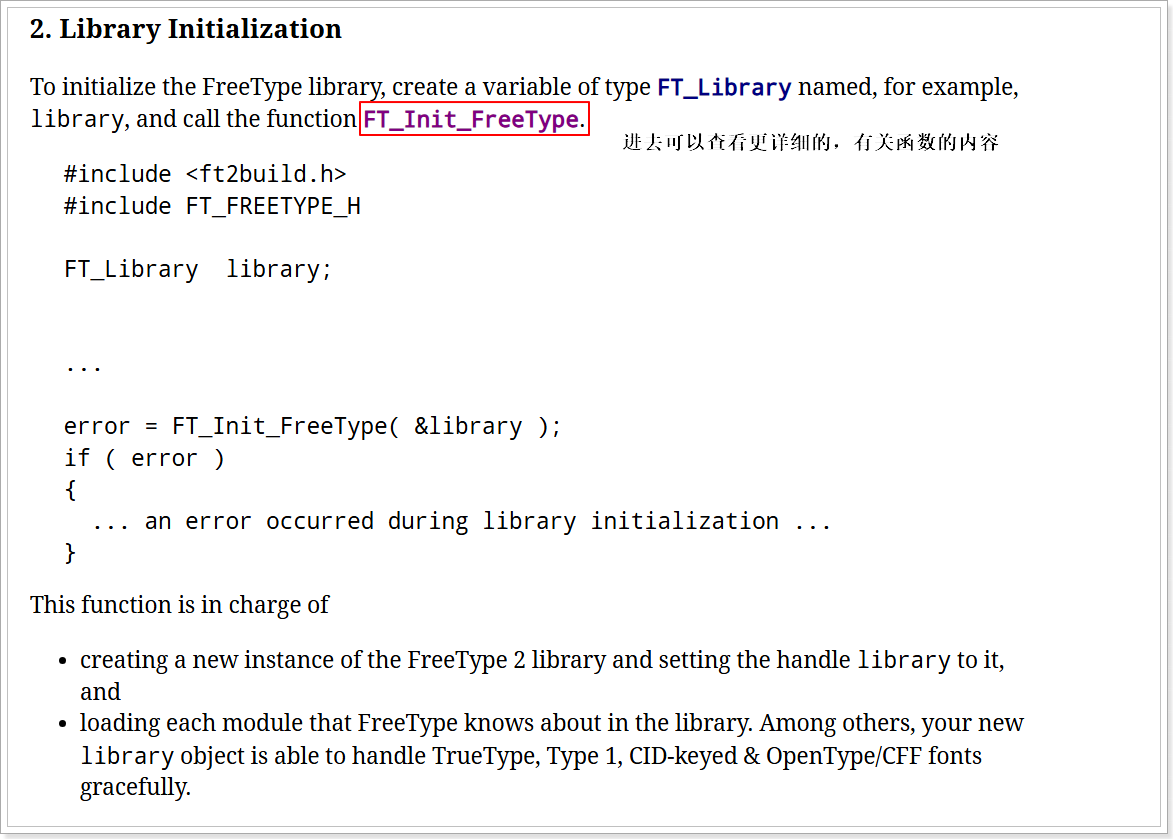
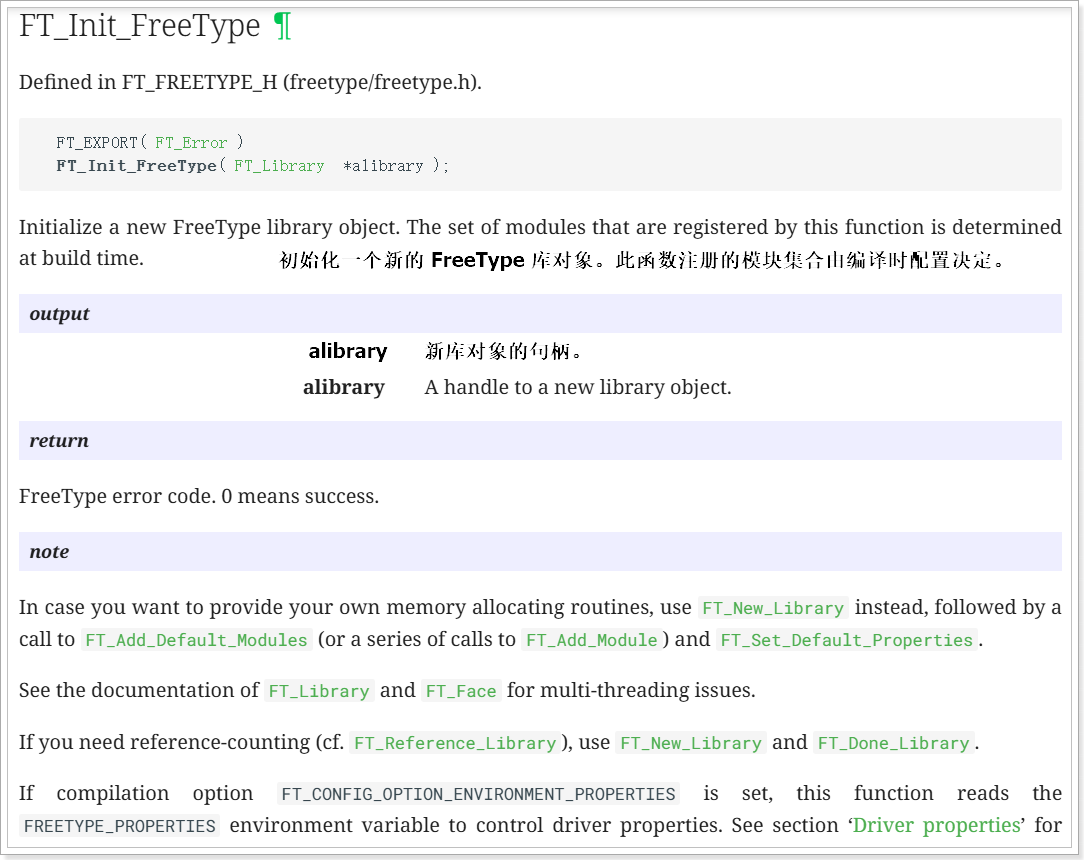
- 初始化FreeType库。
- 加载字体文件。
- 设置字体大小。
- 渲染指定的字符或字符串
- 处理渲染后的位图数据。
- 清理资源。
4.3 分析官方教程

只需要看第一章就可以

包含必要的头文件


初始化字库
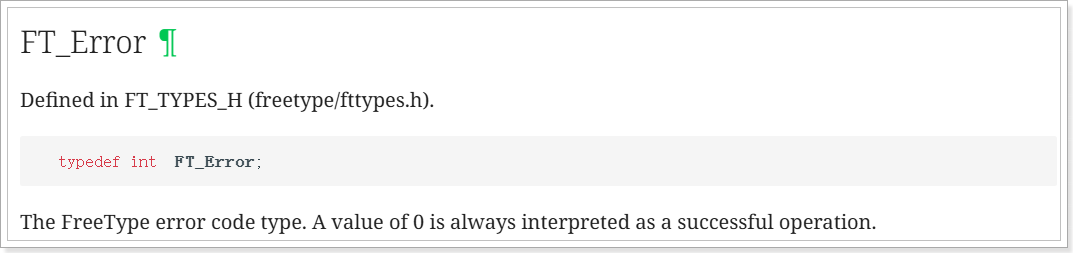
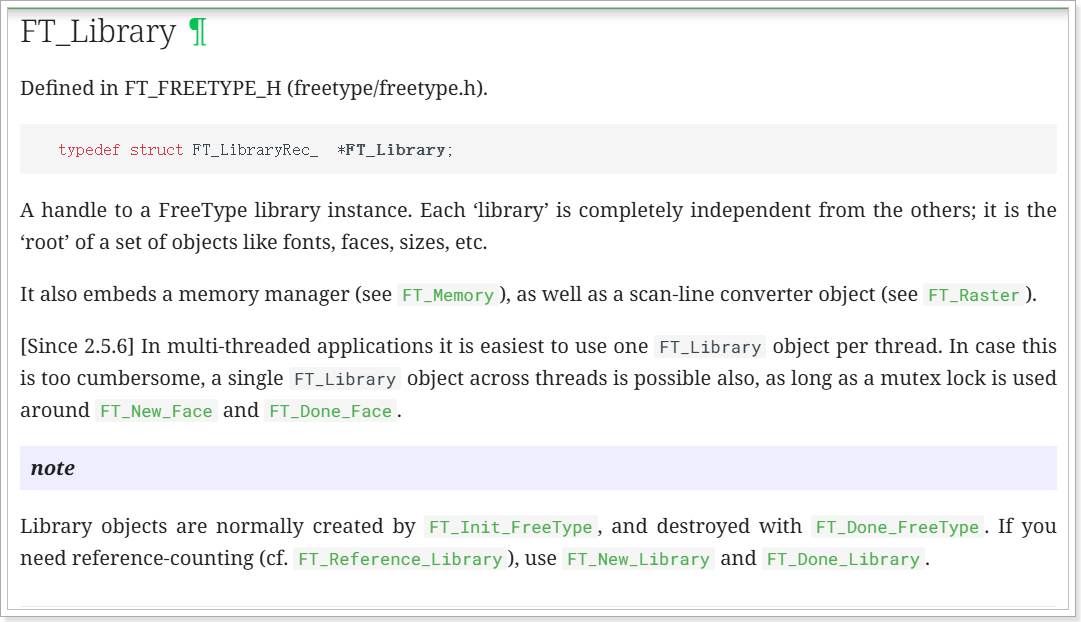
加载字体文件
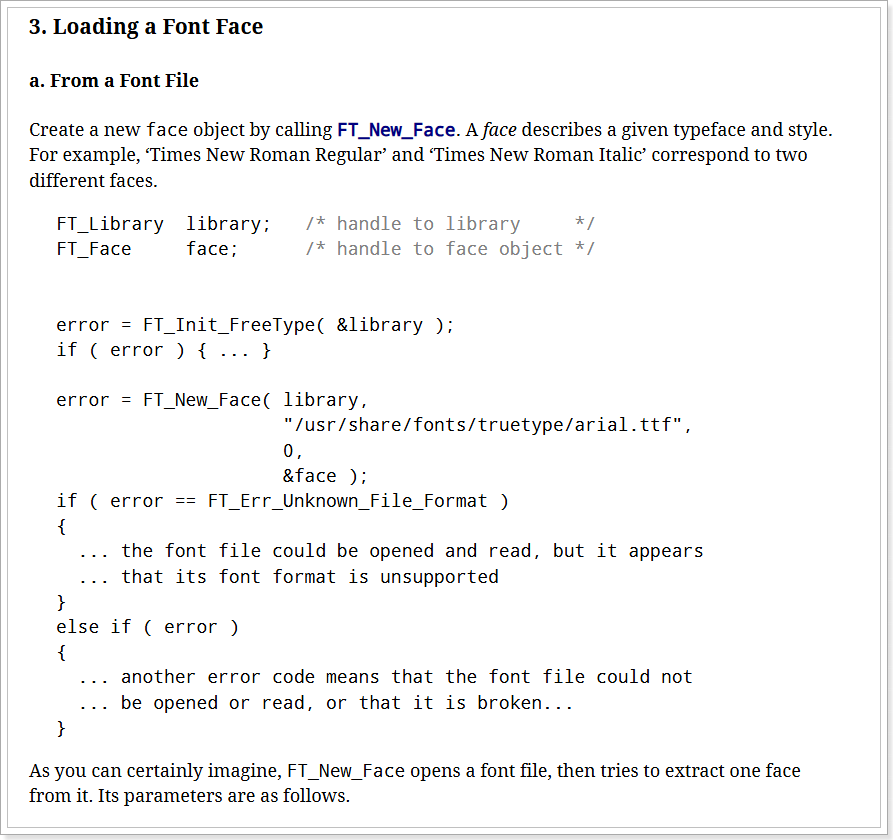
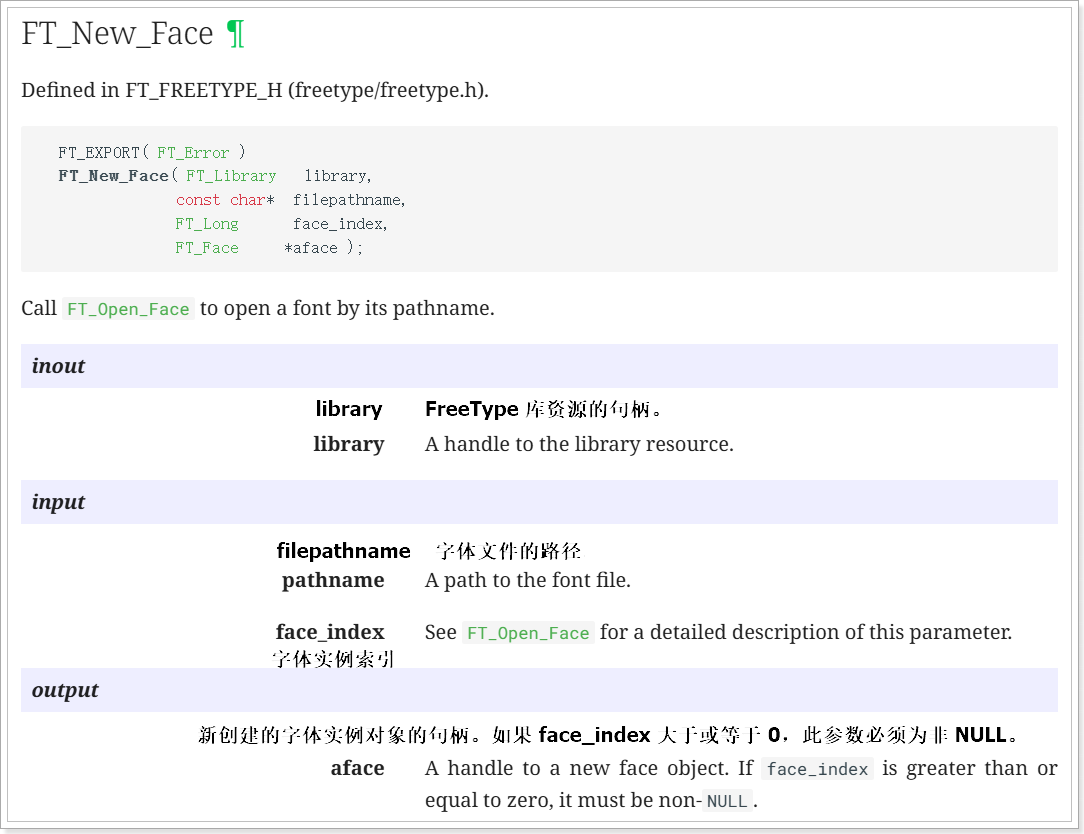


设置字体大小
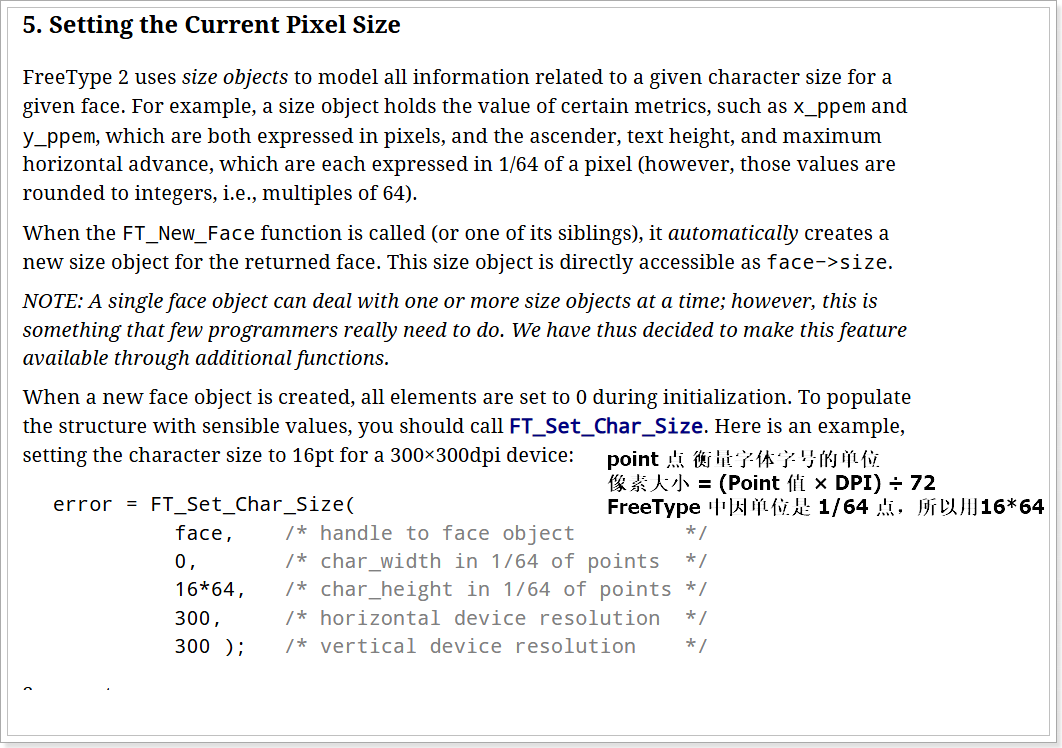
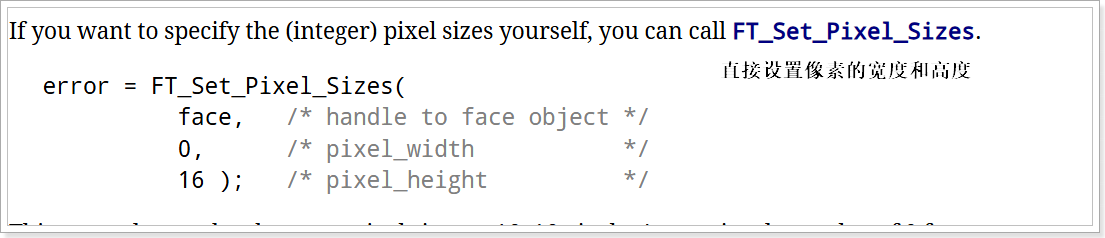
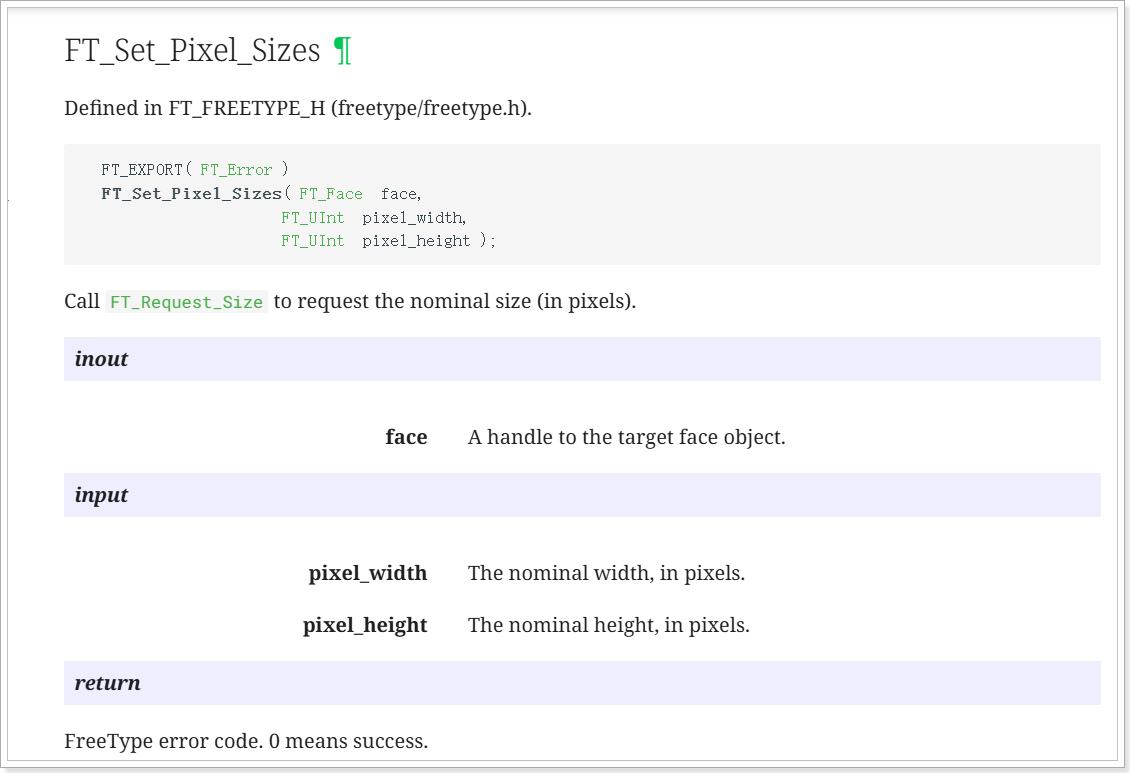
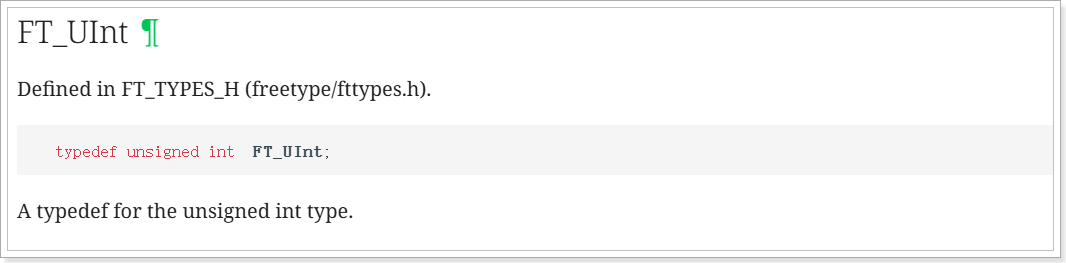
加载字形图像
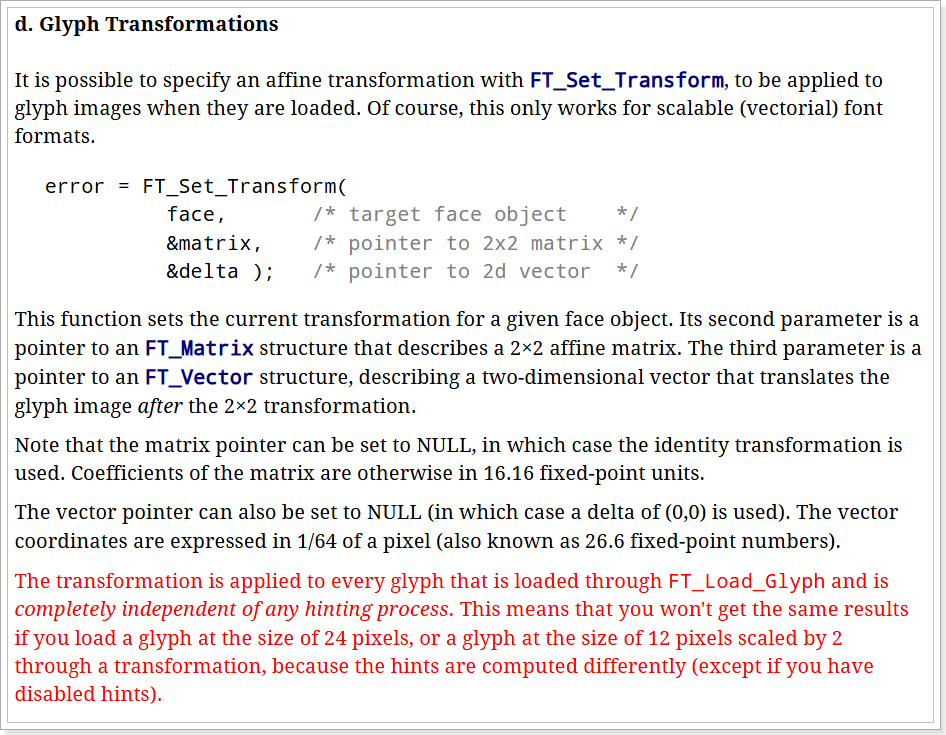
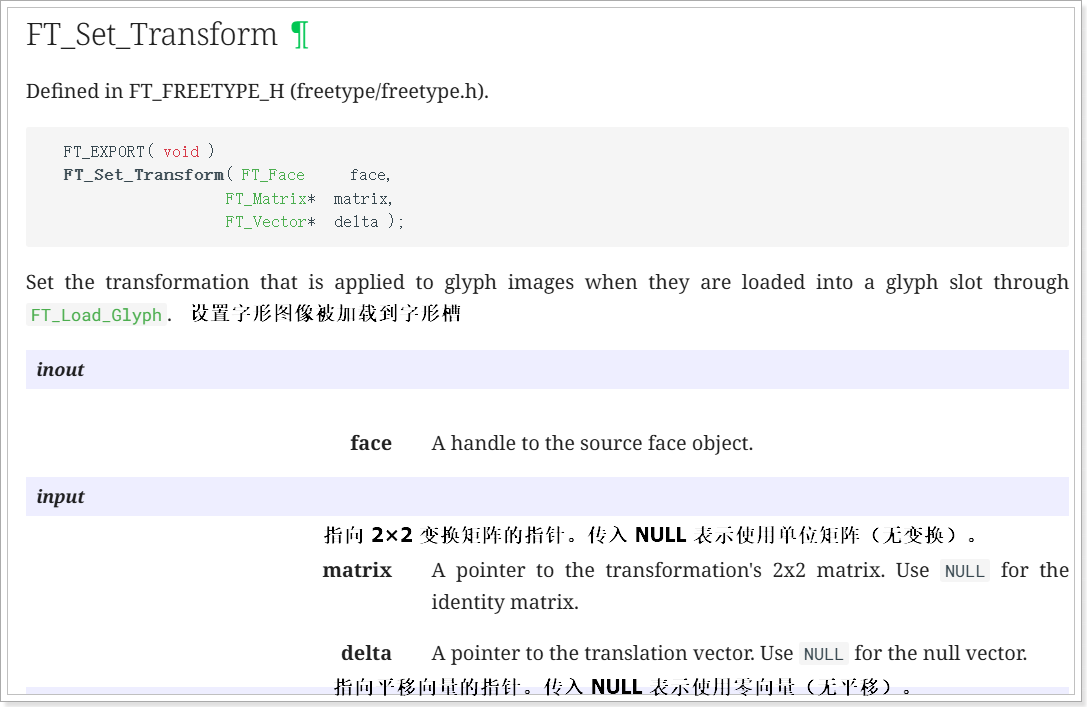
渲染指定的字符或字符串
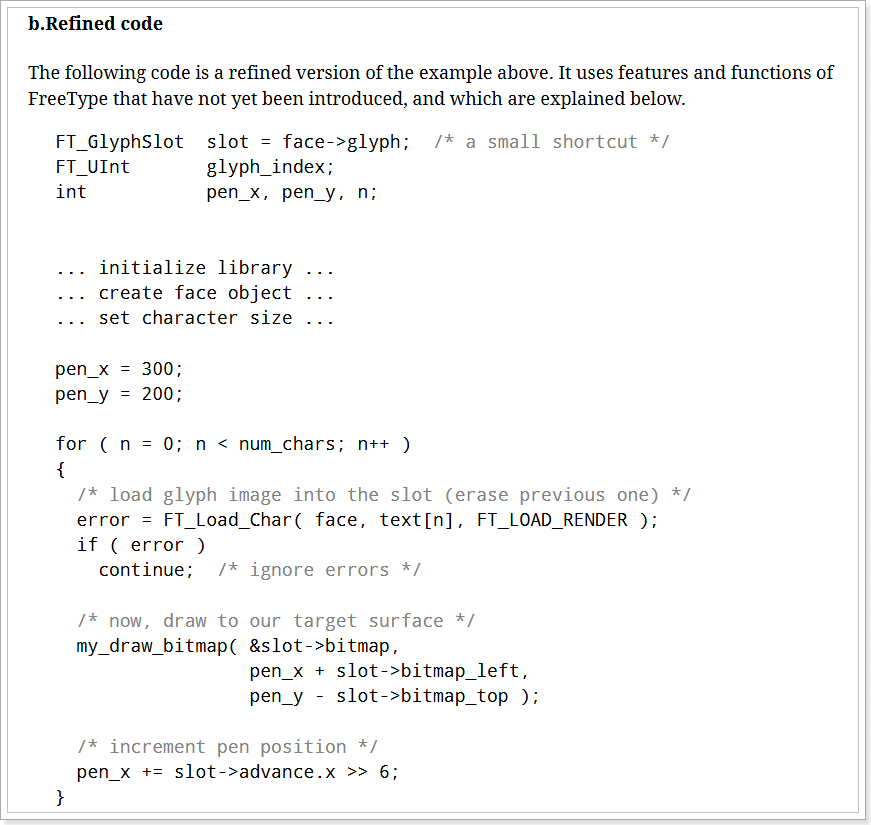
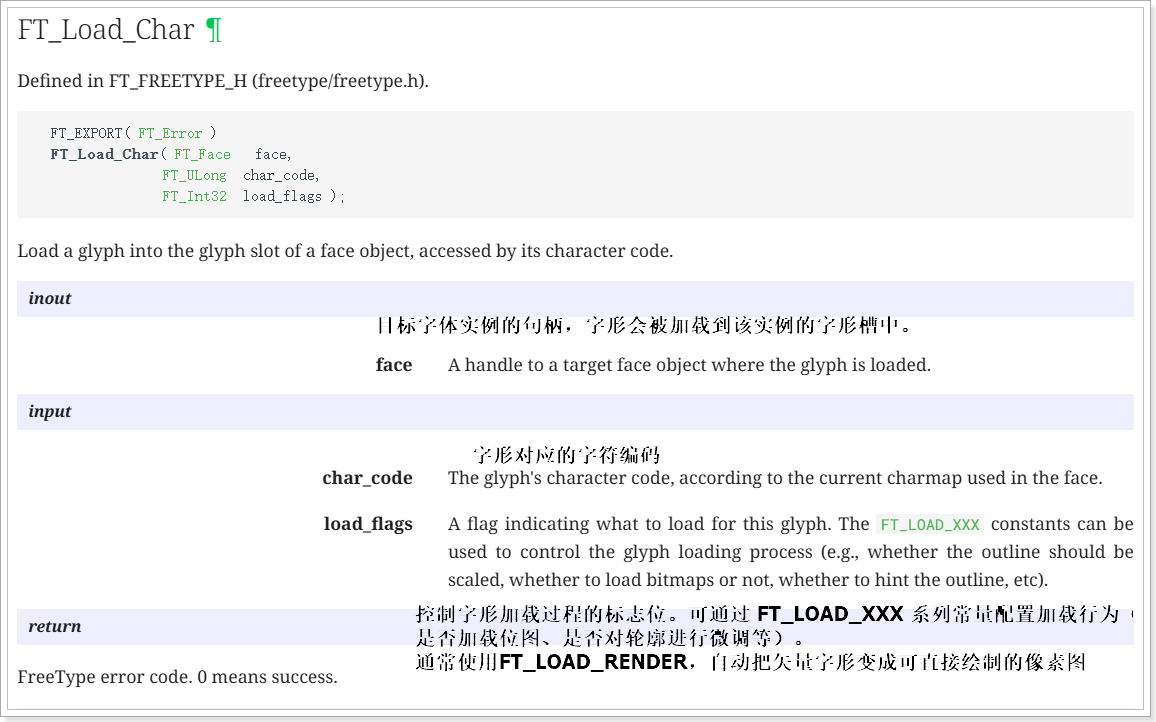
这个代码运行后会把位图的所有数据(像素、宽高、行间距等)存入字体实例的字形槽中,供后续绘制使用

绘制位图
void draw_bitmap( FT_Bitmap*  bitmap,
                 FT_Int      x,
                 FT_Int      y)
{
	FT_Int  i, j, p, q;
	FT_Int  x_max = x + bitmap->width;
	FT_Int  y_max = y + bitmap->rows;

	//printf("x = %d, y = %d\n", x, y);
//从(x,y)开始打印
	for ( j = y, q = 0; j < y_max; j++, q++ )
	{
		for ( i = x, p = 0; i < x_max; i++, p++ )
		{
			if ( i < 0      || j < 0       ||
				i >= var.xres || j >= var.yres )
			continue;												//起始点不合适就退出

			//image[j][i] |= bitmap->buffer[q * bitmap->width + p];
			lcd_put_pixel(i, j, bitmap->buffer[q * bitmap->width + p]);//绘图函数
		}
	}
}
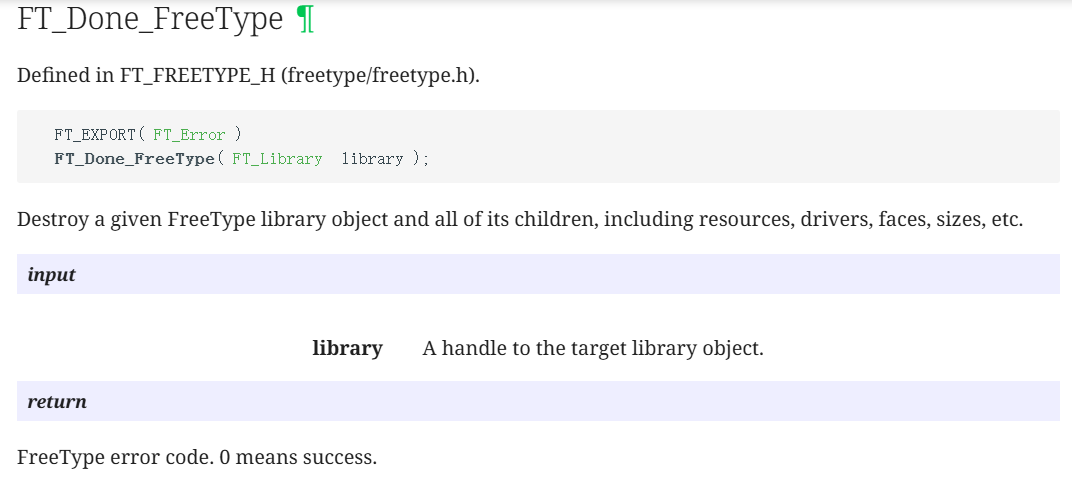
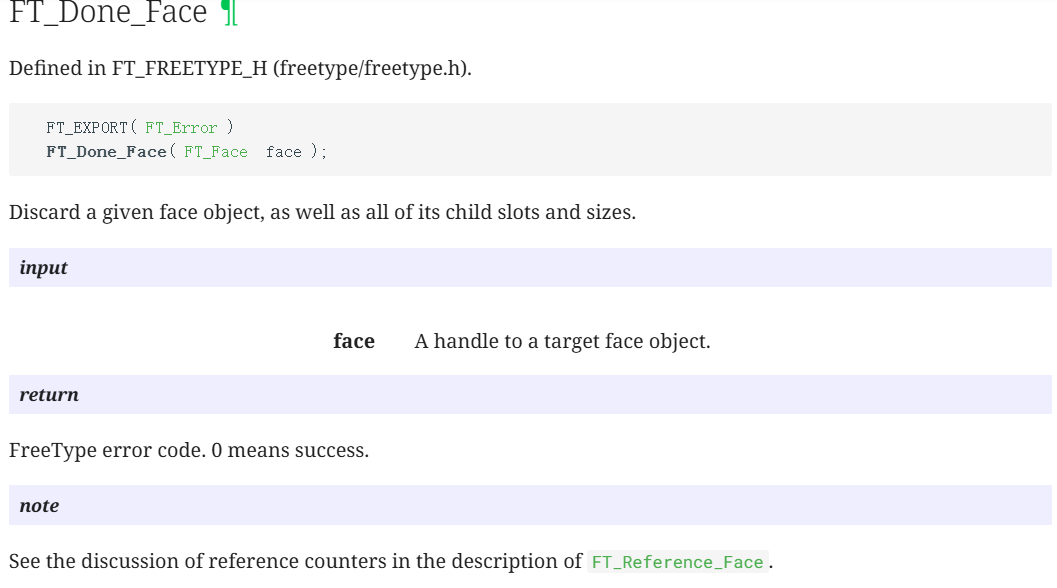
释放
案例使用的是这两个
  FT_Done_Face    ( face );			//	销毁字体实例的函数
  FT_Done_FreeType( library );		//
4.4在LCD上显示一个矢量字体
#include <sys/mman.h>
#include <sys/types.h>
#include <sys/stat.h>
#include <unistd.h>
#include <linux/fb.h>
#include <fcntl.h>
#include <stdio.h>
#include <string.h>
#include <math.h>
#include <wchar.h>
#include <sys/ioctl.h>
#include <ft2build.h>
#include FT_FREETYPE_H
#include FT_GLYPH_H

int fd_fb;
struct fb_var_screeninfo var;	/* Current var */
int screen_size;
unsigned char *fbmem;
unsigned int line_width;
unsigned int pixel_width;


/**********************************************************************
 * 函数名称: lcd_put_pixel
 * 功能描述: 在LCD指定位置上输出指定颜色(描点)
 * 输入参数: x坐标,y坐标,颜色
 * 输出参数: 无
 * 返 回 值: 会
 * 修改日期        版本号     修改人	      修改内容
 * -----------------------------------------------
 * 2020/05/12	     V1.0	  zh(angenao)	      创建
 ***********************************************************************/
void lcd_put_pixel(int x, int y, unsigned int color)
{
	unsigned char *pen_8 = fbmem+y*line_width+x*pixel_width;
	unsigned short *pen_16;
	unsigned int *pen_32;

	unsigned int red, green, blue;

	pen_16 = (unsigned short *)pen_8;
	pen_32 = (unsigned int *)pen_8;

	switch (var.bits_per_pixel)
	{
		case 8:
		{
			*pen_8 = color;
			break;
		}
		case 16:
		{
			/* 565 */
			red   = (color >> 16) & 0xff;
			green = (color >> 8) & 0xff;
			blue  = (color >> 0) & 0xff;
			color = ((red >> 3) << 11) | ((green >> 2) << 5) | (blue >> 3);
			*pen_16 = color;
			break;
		}
		case 32:
		{
			*pen_32 = color;
			break;
		}
		default:
		{
			printf("can't surport %dbpp\n", var.bits_per_pixel);
			break;
		}
	}
}

/**********************************************************************
 * 函数名称: draw_bitmap
 * 功能描述: 根据bitmap位图,在LCD指定位置显示汉字
 * 输入参数: x坐标,y坐标,位图指针
 * 输出参数: 无
 * 返 回 值: 无
 * 修改日期        版本号     修改人	      修改内容
 * -----------------------------------------------
 * 2020/05/12	     V1.0	  zh(angenao)	      创建
 ***********************************************************************/
void
draw_bitmap( FT_Bitmap*  bitmap,
             FT_Int      x,
             FT_Int      y)
{
	FT_Int  i, j, p, q;
	FT_Int  x_max = x + bitmap->width;
	FT_Int  y_max = y + bitmap->rows;

	//printf("x = %d, y = %d\n", x, y);

	for ( j = y, q = 0; j < y_max; j++, q++ )
	{
		for ( i = x, p = 0; i < x_max; i++, p++ )
		{
			if ( i < 0      || j < 0       ||
				i >= var.xres || j >= var.yres )
			continue;

			//image[j][i] |= bitmap->buffer[q * bitmap->width + p];
			lcd_put_pixel(i, j, bitmap->buffer[q * bitmap->width + p]);
		}
	}
}


int main(int argc, char **argv)
{
	wchar_t *chinese_str = L"繁";

	FT_Library	  library;
	FT_Face 	  face;
	int error;
    FT_Vector     pen;
	FT_GlyphSlot  slot;
	int font_size = 24;

	if (argc < 2)
	{
		printf("Usage : %s <font_file> [font_size]\n", argv[0]);
		return -1;
	}

	if (argc == 3)
		font_size = strtoul(argv[2], NULL, 0);

	fd_fb = open("/dev/fb0", O_RDWR);
	if (fd_fb < 0)
	{
		printf("can't open /dev/fb0\n");
		return -1;
	}

	if (ioctl(fd_fb, FBIOGET_VSCREENINFO, &var))
	{
		printf("can't get var\n");
		return -1;
	}

	line_width  = var.xres * var.bits_per_pixel / 8;
	pixel_width = var.bits_per_pixel / 8;
	screen_size = var.xres * var.yres * var.bits_per_pixel / 8;
	fbmem = (unsigned char *)mmap(NULL , screen_size, PROT_READ | PROT_WRITE, MAP_SHARED, fd_fb, 0);
	if (fbmem == (unsigned char *)-1)
	{
		printf("can't mmap\n");
		return -1;
	}

	/* 清屏: 全部设为黑色 */
	memset(fbmem, 0, screen_size);

	/* 显示矢量字体 */
	error = FT_Init_FreeType( &library );			   /* initialize library */
	/* error handling omitted */

	error = FT_New_Face( library, argv[1], 0, &face ); /* create face object */
	/* error handling omitted */
	slot = face->glyph;

	FT_Set_Pixel_Sizes(face, font_size, 0);

	/* 确定座标:
	 */
	//pen.x = 0;
	//pen.y = 0;

    /* set transformation */
    //FT_Set_Transform( face, 0, &pen);

    /* load glyph image into the slot (erase previous one) */
    error = FT_Load_Char( face, chinese_str[0], FT_LOAD_RENDER );
	if (error)
	{
		printf("FT_Load_Char error\n");
		return -1;
	}

    draw_bitmap( &slot->bitmap,
                 var.xres/2,
                 var.yres/2);

	return 0;
}
使用wchar_t获得字符的UNICODE值
要显示一个字符,首先要确定它的编码值。常用的是UNICODE编码,在程序里使用这样的语句定义字符串时,str中保存的要么是GB2312编码值,要么是UTF-8格式的编码值,即使编译时使用“-fexec-charset=UTF-8”,str中保存的也不是直接能使用UNICODE值:
char *str = “中”;
如果想在代码中能直接使用UNICODE值,需要使用wchar_t,宽字符
01 #include <stdio.h>
02 #include <string.h>
03 #include <wchar.h>
04
05 int main( int argc, char** argv)
06 {
07 		wchar_t *chinese_str = L"中 gif";
08 		unsigned int *p = (wchar_t *)chinese_str;
09 		int i;
10
11 		printf("sizeof(wchar_t) = %d, str's Uniocde: \n", (int)sizeof(wchar_t));
12 		for (i = 0; i < wcslen(chinese_str); i++)
13 		{
14 			printf("0x%x ", p[i]);
15 		}
16 		printf("\n");
17
18 		return 0;
19 }
每个wchar_t占据4字节,可执行程序里wchar_t中保存的就是字符的UNICODE值。
如果test_wchar.c是以ANSI(GB2312)格式保存
gcc -finput-charset=GB2312 -fexec-charset=UTF-8 -o test_wchar test_wchar.c
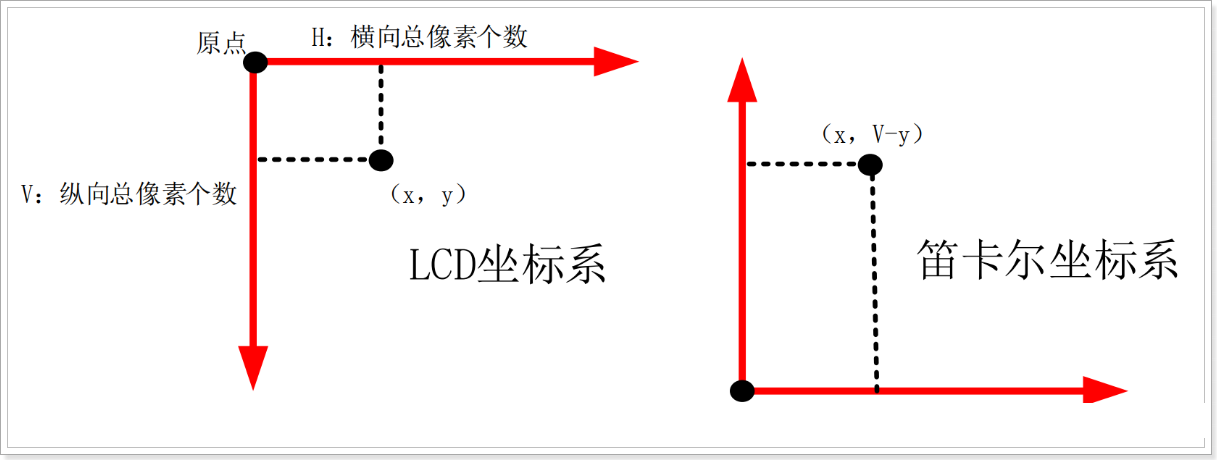
4.5笛卡尔坐标系
在 LCD 的坐标系中,原点在屏幕的左上角。对于笛卡尔坐标系,原点在左下角。 freetype 使用笛卡尔坐标系,在显示时需要转换为 LCD 坐标系。
从下图可知, X 方向坐标值是一样的。
在 Y 方向坐标值需要换算,假设 LCD 的高度是 V。
在 LCD 坐标系中坐标是(x, y),那么它在笛卡尔坐标系中的坐标值为(x, V-y)。
4.6显示一行文字
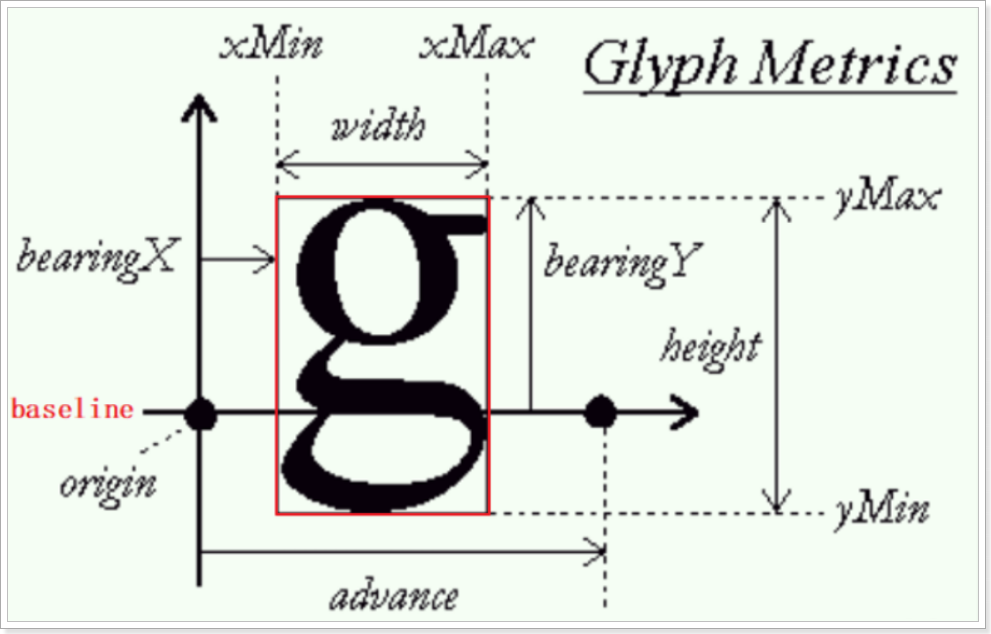
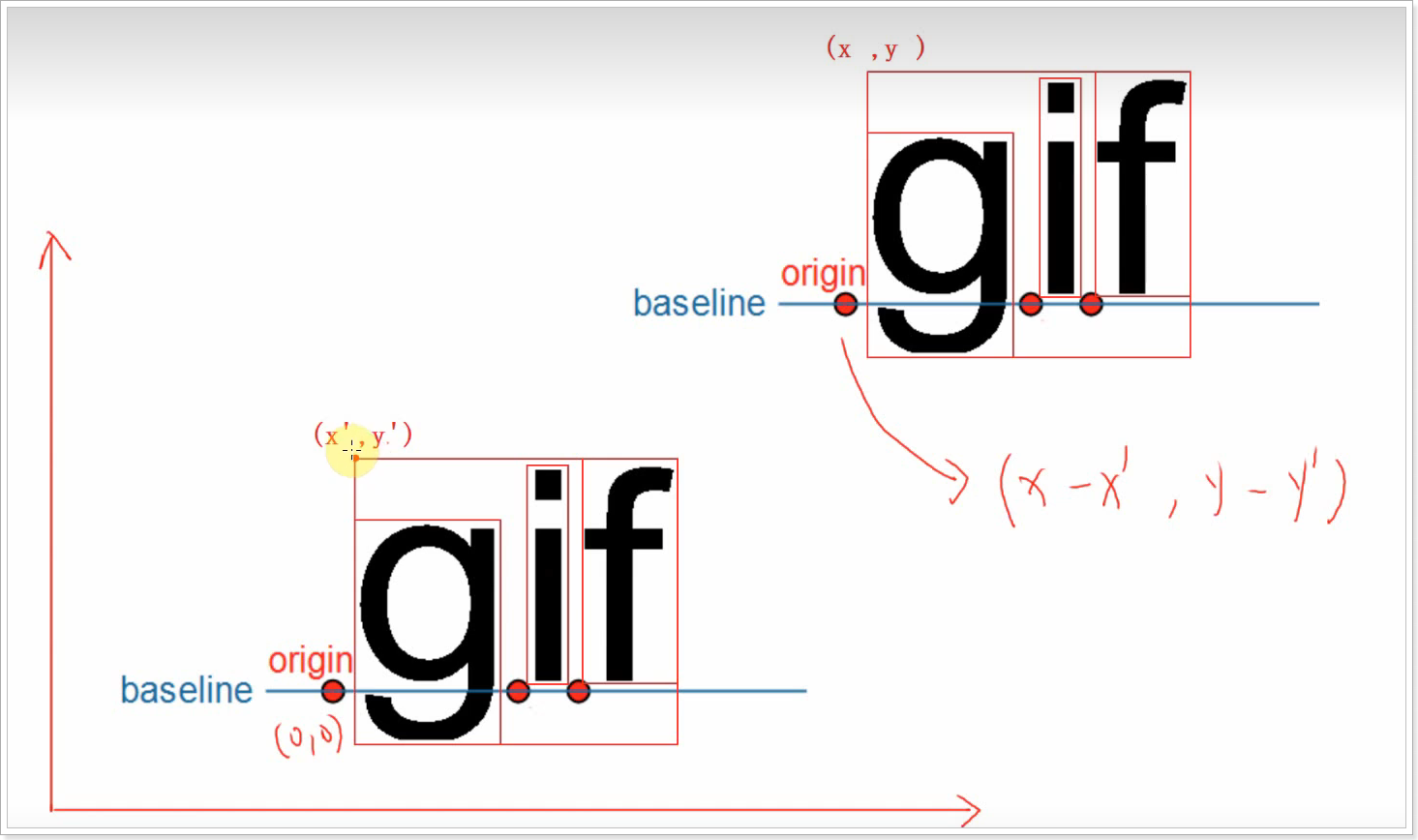
在显示一行文字时,这些文字会基于同一个基线来绘制位图:baseline。
在 baseline 上,每一个字符都有它的原点(origin),比如上图中 baseline左边的黑色圆点就是字母“ g”的原点。当前 origin 加上 advance 就可以得到下一个字符的 origin,比如上图中 baseline 右边的黑色圆点。在显示一行中多个文件字时,后一个文字的原点依赖于前一个文字的原点及 advance。
字符的位图是有可能越过 baseline 的,比如上图中字母“ g”在 baseline下方还有图像。
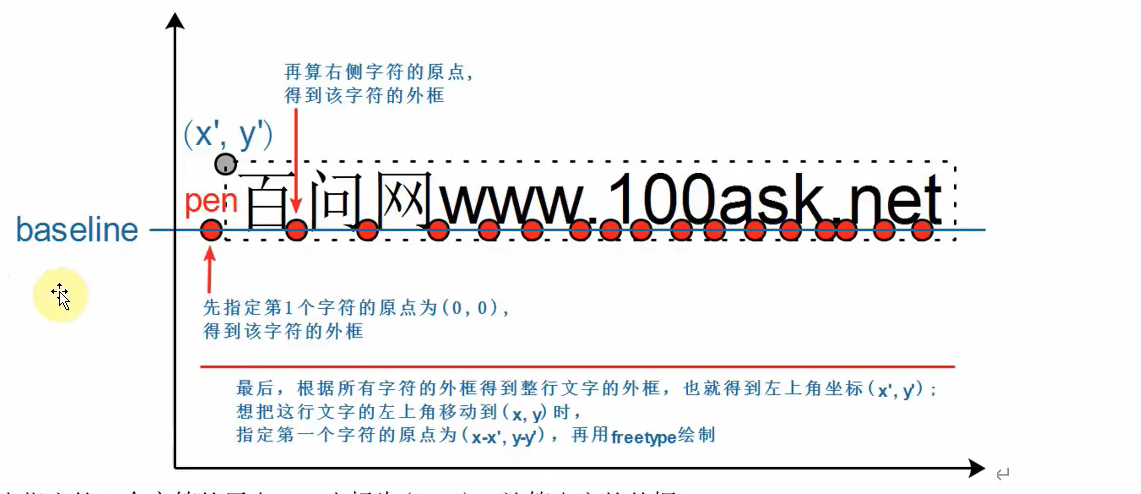
先指定第 1 个字符的原点 pen 坐标为(0, 0),计算出它的外框
再计算右边字符的原点,也计算出它的外框,把所有字符都处理完后就可以得到一行文字的整体外框:假设外框左上角坐标为(x’, y’)
想在(x, y)处显示这行文字,调整一下 pen 坐标即可。 pen 为(0, 0)时对应左上角(x’, y’);那么左上角为(x, y)时就可以算出pen 为(x-x’, y-y’)
一行文字中:后一个字符的原点=前一个字符的原点+advance。所以要计算一行文字的外框,需要按照排列顺序处理其中的每一个字符。
#include <sys/mman.h>
#include <sys/types.h>
#include <sys/stat.h>
#include <unistd.h>
#include <linux/fb.h>
#include <fcntl.h>
#include <stdio.h>
#include <string.h>
#include <math.h>
#include <wchar.h>
#include <sys/ioctl.h>

#include <ft2build.h>
#include FT_FREETYPE_H
#include FT_GLYPH_H

int fd_fb;
struct fb_var_screeninfo var;   /* Current var */
struct fb_fix_screeninfo fix;   /* Current fix */
int screen_size;
unsigned char *fbmem;
unsigned int line_width;
unsigned int pixel_width;

/* color : 0x00RRGGBB */
void lcd_put_pixel(int x, int y, unsigned int color)
{
    unsigned char *pen_8 = fbmem+y*line_width+x*pixel_width;
    unsigned short *pen_16;
    unsigned int *pen_32;

    unsigned int red, green, blue;

    pen_16 = (unsigned short *)pen_8;
    pen_32 = (unsigned int *)pen_8;

    switch (var.bits_per_pixel)
    {
        case 8:
        {
            *pen_8 = color;
            break;
        }
        case 16:
        {
            /* 565 */
            red   = (color >> 16) & 0xff;
            green = (color >> 8) & 0xff;
            blue  = (color >> 0) & 0xff;
            color = ((red >> 3) << 11) | ((green >> 2) << 5) | (blue >> 3);
            *pen_16 = color;
            break;
        }
        case 32:
        {
            *pen_32 = color;
            break;
        }
        default:
        {
            printf("can't surport %dbpp\n", var.bits_per_pixel);
            break;
        }
    }
}

/**********************************************************************
 * 函数名称: draw_bitmap
 * 功能描述: 根据bitmap位图,在LCD指定位置显示汉字
 * 输入参数: x坐标,y坐标,位图指针
 * 输出参数: 无
 * 返 回 值: 无
 * 修改日期        版本号     修改人        修改内容
 * -----------------------------------------------
 * 2020/05/12        V1.0     zh(angenao)         创建
 ***********************************************************************/
void
draw_bitmap( FT_Bitmap*  bitmap,
             FT_Int      x,
             FT_Int      y)
{
    FT_Int  i, j, p, q;
    FT_Int  x_max = x + bitmap->width;
    FT_Int  y_max = y + bitmap->rows;

    //printf("x = %d, y = %d\n", x, y);

    for ( j = y, q = 0; j < y_max; j++, q++ )
    {
        for ( i = x, p = 0; i < x_max; i++, p++ )
        {
            if ( i < 0      || j < 0       ||
                i >= var.xres || j >= var.yres )
            continue;

            //image[j][i] |= bitmap->buffer[q * bitmap->width + p];
            lcd_put_pixel(i, j, bitmap->buffer[q * bitmap->width + p]);
        }
    }
}

int compute_string_bbox(FT_Face       face, wchar_t *wstr, FT_BBox  *abbox)
{
    int i;
    int error;
    FT_BBox bbox;
    FT_BBox glyph_bbox;
    FT_Vector pen;
    FT_Glyph  glyph;
    FT_GlyphSlot slot = face->glyph;

    /* 初始化 */
    bbox.xMin = bbox.yMin = 32000;
    bbox.xMax = bbox.yMax = -32000;

    /* 指定原点为(0, 0) */
    pen.x = 0;
    pen.y = 0;

    /* 计算每个字符的bounding box */
    /* 先translate, 再load char, 就可以得到它的外框了 */
    for (i = 0; i < wcslen(wstr); i++)
    {
        /* 转换:transformation */
        FT_Set_Transform(face, 0, &pen);

        /* 加载位图: load glyph image into the slot (erase previous one) */
        error = FT_Load_Char(face, wstr[i], FT_LOAD_RENDER);
        if (error)
        {
            printf("FT_Load_Char error\n");
            return -1;
        }

        /* 取出glyph */
        error = FT_Get_Glyph(face->glyph, &glyph);
        if (error)
        {
            printf("FT_Get_Glyph error!\n");
            return -1;
        }

        /* 从glyph得到外框: bbox */
        FT_Glyph_Get_CBox(glyph, FT_GLYPH_BBOX_TRUNCATE, &glyph_bbox);

        /* 更新外框 */
        if ( glyph_bbox.xMin < bbox.xMin )
            bbox.xMin = glyph_bbox.xMin;

        if ( glyph_bbox.yMin < bbox.yMin )
            bbox.yMin = glyph_bbox.yMin;

        if ( glyph_bbox.xMax > bbox.xMax )
            bbox.xMax = glyph_bbox.xMax;

        if ( glyph_bbox.yMax > bbox.yMax )
            bbox.yMax = glyph_bbox.yMax;

        /* 计算下一个字符的原点: increment pen position */
        pen.x += slot->advance.x;
        pen.y += slot->advance.y;
    }

    /* return string bbox */
    *abbox = bbox;
}


int display_string(FT_Face     face, wchar_t *wstr, int lcd_x, int lcd_y)
{
    int i;
    int error;
    FT_BBox bbox;
    FT_Vector pen;
    FT_Glyph  glyph;
    FT_GlyphSlot slot = face->glyph;

    /* 把LCD坐标转换为笛卡尔坐标 */
    int x = lcd_x;
    int y = var.yres - lcd_y;

    /* 计算外框 */
    compute_string_bbox(face, wstr, &bbox);

    /* 反推原点 */
    pen.x = (x - bbox.xMin) * 64; /* 单位: 1/64像素 */
    pen.y = (y - bbox.yMax) * 64; /* 单位: 1/64像素 */

    /* 处理每个字符 */
    for (i = 0; i < wcslen(wstr); i++)
    {
        /* 转换:transformation */
        FT_Set_Transform(face, 0, &pen);

        /* 加载位图: load glyph image into the slot (erase previous one) */
        error = FT_Load_Char(face, wstr[i], FT_LOAD_RENDER);
        if (error)
        {
            printf("FT_Load_Char error\n");
            return -1;
        }

        /* 在LCD上绘制: 使用LCD坐标 */
        draw_bitmap( &slot->bitmap,
                        slot->bitmap_left,
                        var.yres - slot->bitmap_top);

        /* 计算下一个字符的原点: increment pen position */
        pen.x += slot->advance.x;
        pen.y += slot->advance.y;
    }

    return 0;
}


int main(int argc, char **argv)
{
    wchar_t *wstr = L"百问网www.100ask.net";

    FT_Library    library;
    FT_Face       face;
    int error;
    FT_BBox bbox;
    int font_size = 24;
    int lcd_x, lcd_y;

    if (argc < 4)
    {
        printf("Usage : %s <font_file> <lcd_x> <lcd_y> [font_size]\n", argv[0]);
        return -1;
    }

    lcd_x = strtoul(argv[2], NULL, 0);
    lcd_y = strtoul(argv[3], NULL, 0);

    if (argc == 5)
        font_size = strtoul(argv[4], NULL, 0);

    fd_fb = open("/dev/fb0", O_RDWR);
    if (fd_fb < 0)
    {
        printf("can't open /dev/fb0\n");
        return -1;
    }

    if (ioctl(fd_fb, FBIOGET_VSCREENINFO, &var))
    {
        printf("can't get var\n");
        return -1;
    }

    if (ioctl(fd_fb, FBIOGET_FSCREENINFO, &fix))
    {
        printf("can't get fix\n");
        return -1;
    }

    line_width  = var.xres * var.bits_per_pixel / 8;
    pixel_width = var.bits_per_pixel / 8;
    screen_size = var.xres * var.yres * var.bits_per_pixel / 8;
    fbmem = (unsigned char *)mmap(NULL , screen_size, PROT_READ | PROT_WRITE, MAP_SHARED, fd_fb, 0);
    if (fbmem == (unsigned char *)-1)
    {
        printf("can't mmap\n");
        return -1;
    }

    /* 清屏: 全部设为黑色 */
    memset(fbmem, 0, screen_size);

    error = FT_Init_FreeType( &library );              /* initialize library */

    error = FT_New_Face( library, argv[1], 0, &face ); /* create face object */

    FT_Set_Pixel_Sizes(face, font_size, 0);

    display_string(face, wstr, lcd_x, lcd_y);

    return 0;
}

 浙公网安备 33010602011771号