
006JPEG图像原理与应用
一、JPEG图像原理与应用
1.基本概念
JPEG(Joint Photographic Experts Group)指的是联合图像专家组,是国际标准化组织ISO制订并于1992年发布的一种面向连续色调静止图像的压缩编码标准,所以也被称为JPEG标准。
同样,JPEG也是一种常用的图像存储格式,JPEG的文件格式有两种文件扩展名:.jpg和.jpeg,这两种扩展名是相同的,我们可以把.jpg的文件改名为.jpeg,而对文件本身不会有任何影响。

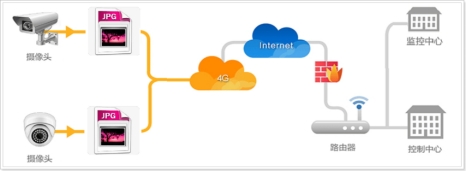
和其他相同图像质量的文件格式相比,JPEG格式的压缩比是最高的,也就是说在图像质量相差不大的情况下,JPEG文件所占的内存更小。所以JPEG图像一般适合进行网络传输。
2. 编解码库
由于JPEG格式的文件是经过压缩的,所以用户无法向访问BMP位图一样直接读取JPEG文件中的内容,而是需要使用对应的libjpeg解码库对JPEG文件进行解码,从而得到解码之后的RGB颜色分量,然后把解码之后的RGB颜色分量写入到LCD屏即可。
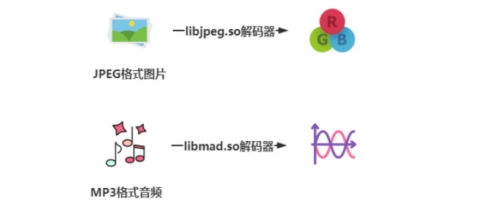
libjpeg是一款开源的JPEG图像库,可以用于编码JPEG文件格式或者用于解码JPEG文件格式,这套库是由IJG(Independent JPEG Group)独立小组进行维护与发布,libjpeg库完全利用C语言设计并且内部集成各种用于编解码算法的函数接口,广泛用于各种图像处理,比如OpenCV(开源的跨平台计算机视觉库)读取图像的底层实现逻辑就是基于libjpeg库的。

由于IJG独立小组不属于官方组织,也就是说libjpeg库不属于标准库,而属于第三方库,所以Linux系统并没有直接为用户安装libjpeg库,用户如果打算使用libjpeg库就需要完成库的移植工作。
3.库的移植(重点)
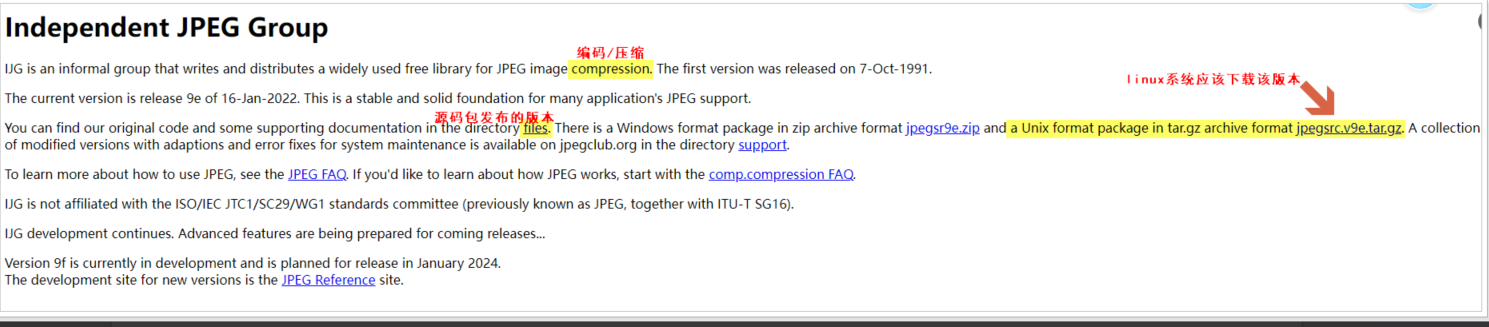
(1) 下载需要移植的库的源码包,libjpeg库源码包在官网可以下载 www.ijg.org,如图所示
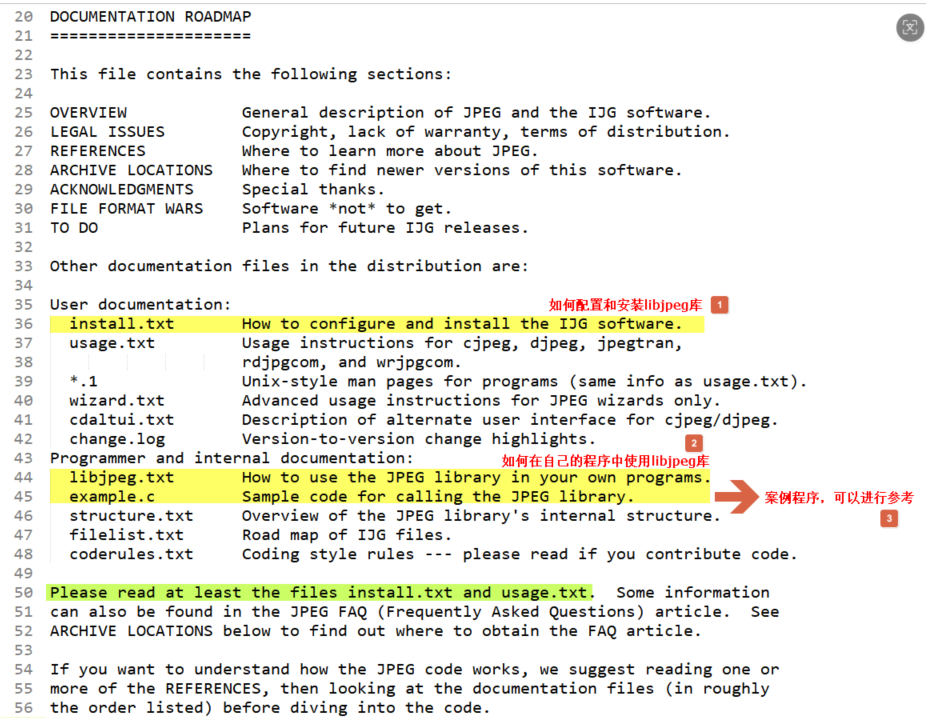
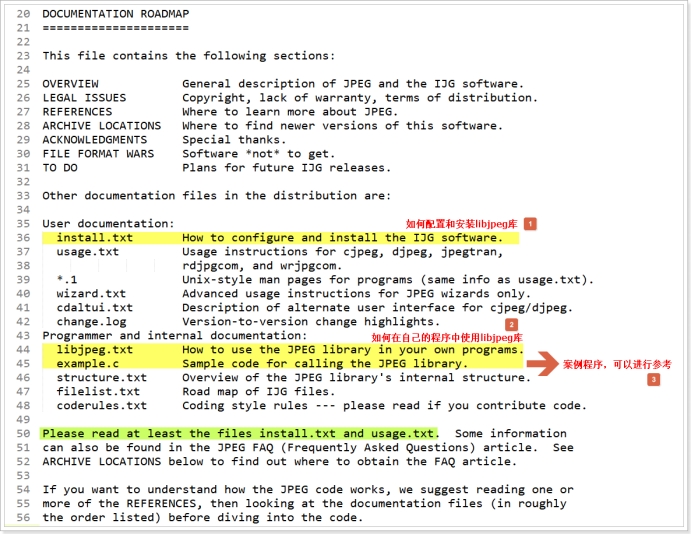
(2) 解压压缩包,解压后找到自述文件README,打开README了解libjpeg库的使用规则!
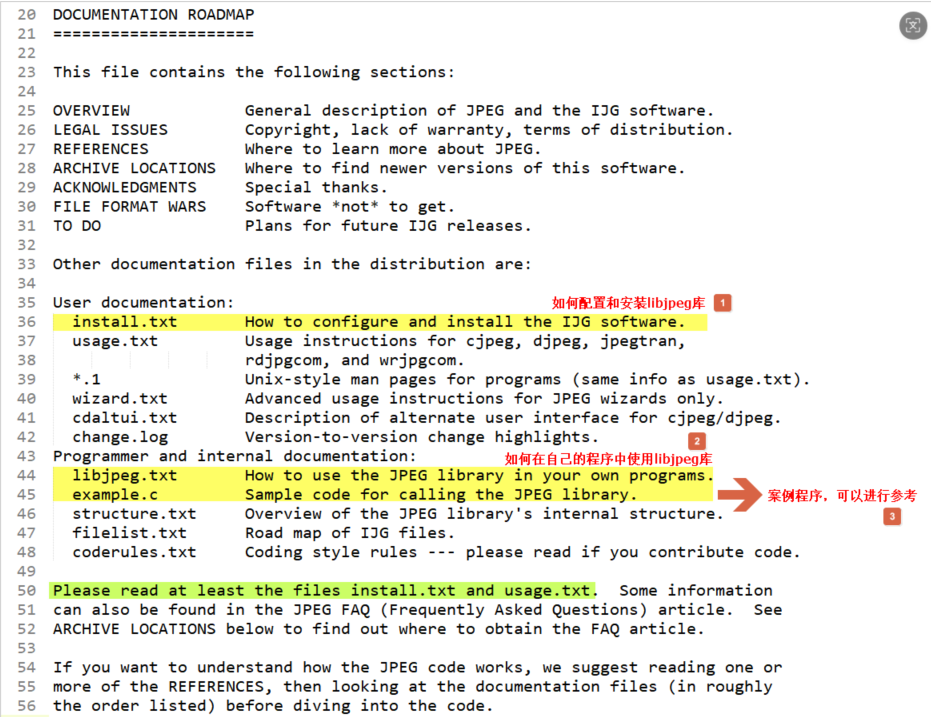
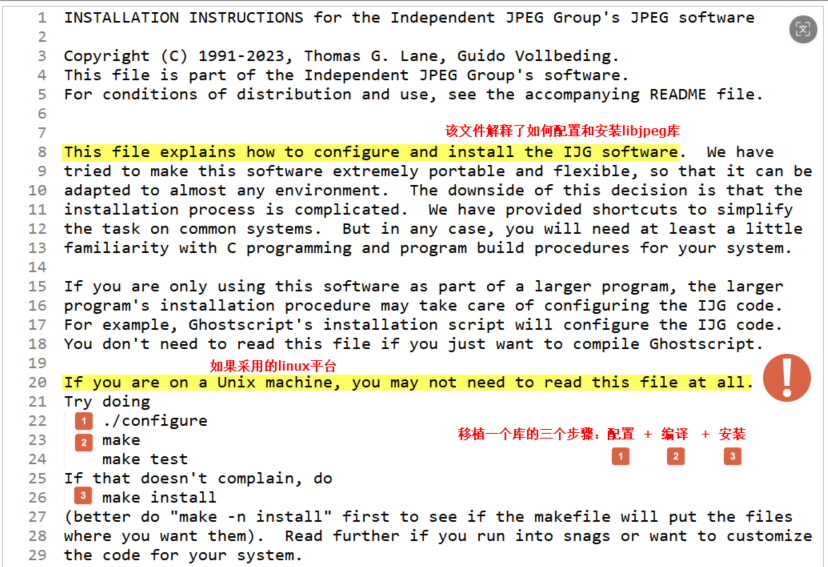
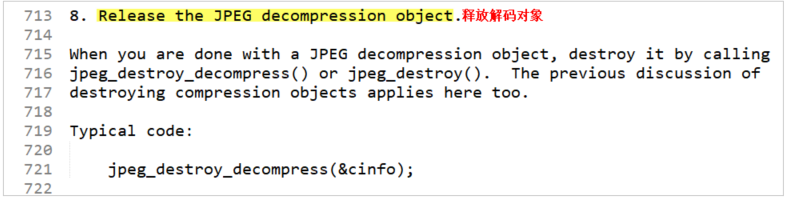
(3) 打开源码包中的install.txt的文本,学习libjpeg库的移植和安装的步骤,移植libjpeg的步骤分为三步:配置(./configure) + 编译(make) + 安装(make install)。
(4) 把下载好的源码包jpegsrc.v9f.tar.gz发送到linux系统的家目录下进行解压,注意不可以在共享文件夹进行解压

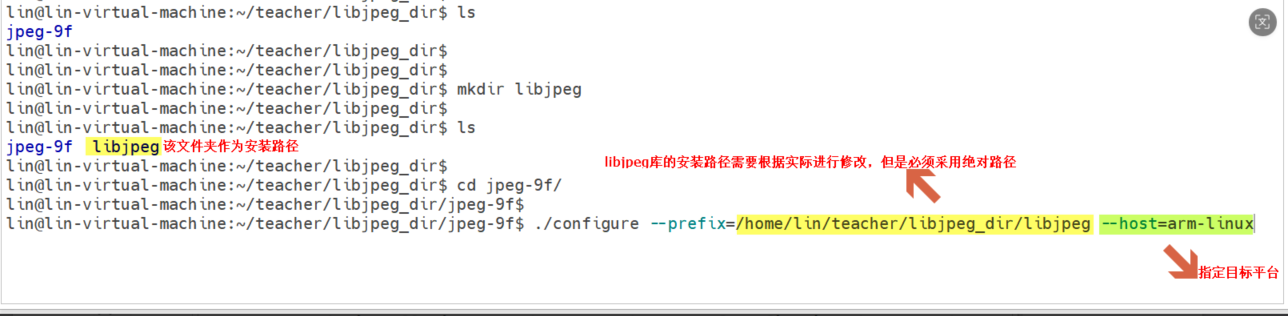
(5) 切换到解压后的jpeg-9f的文件夹内,然后输入指令配置libjpeg库,*配置*的时候需要使用一个叫做configure的配置文件,该配置文件有两个选项非常重要:--prefix 和 --host
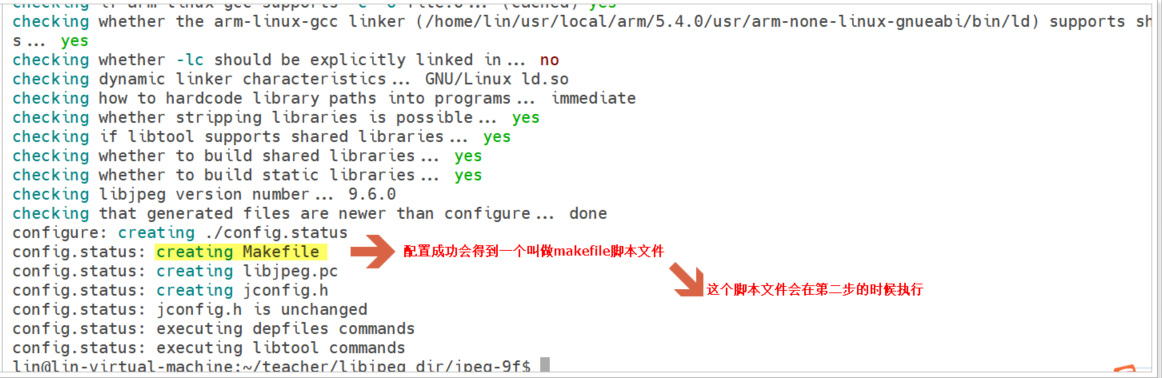
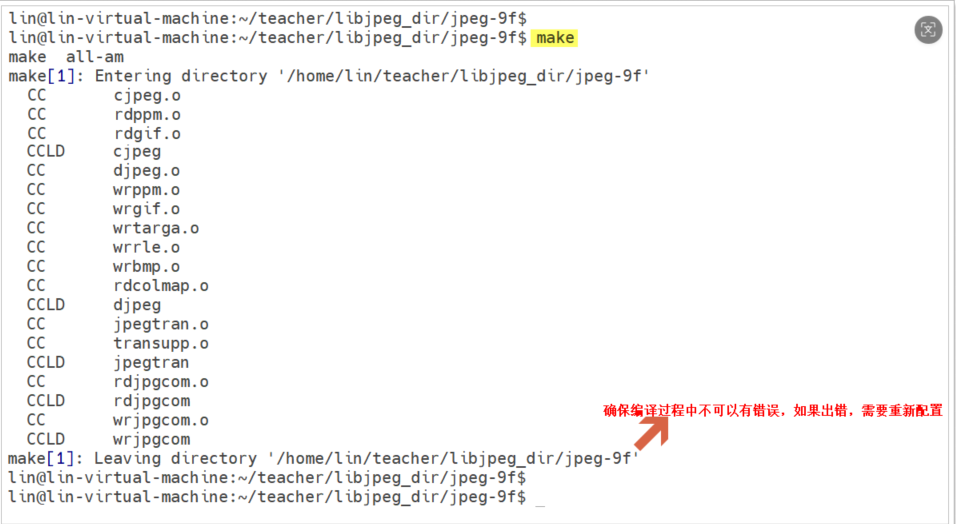
(6) 配置成功之后,会得到一个makefile脚本文件,此时可以完成移植的第二步:*编译*,在命令行输入指令:make ,该指令会自动执行makefile
(7) 编译通过之后,则可以完成libjpeg库的*安装*,此时在命令行输入指令: make install
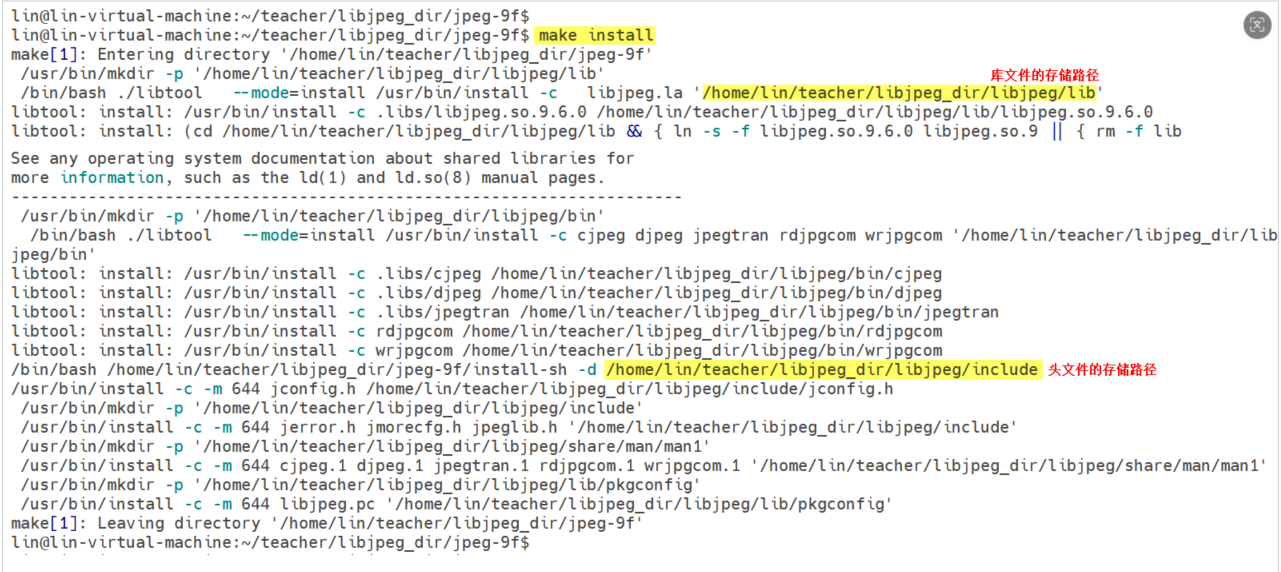
(8) 安装完成后,可以在用户指定的安装路径中找到生成的libjpeg库的头文件和库文件,此时用户可以选择拷贝出来,就可以设计程序时使用。
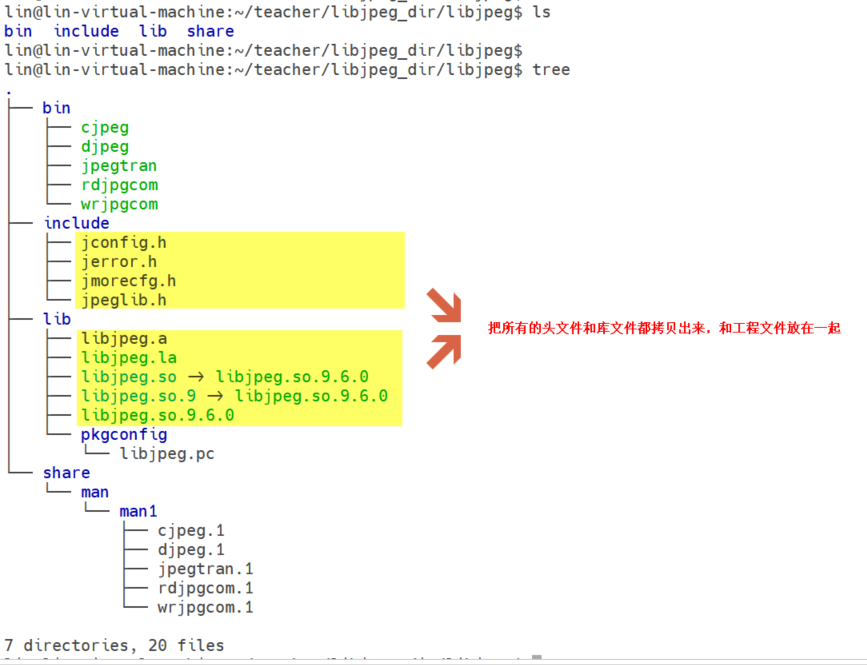
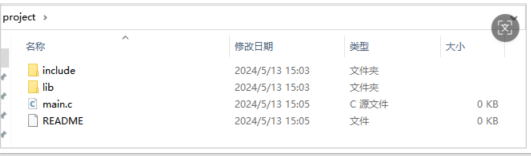
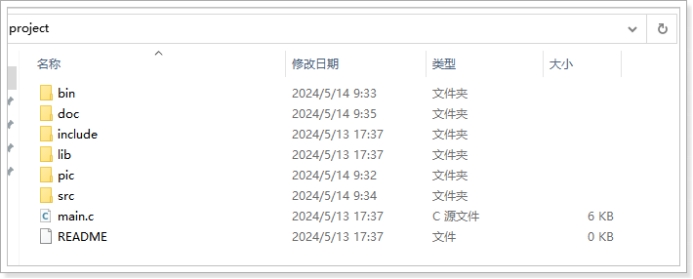
(9) 把include文件夹和lib文件夹与自己的工程文件放在同一个路径,方便后期的工程维护!
4.库的使用
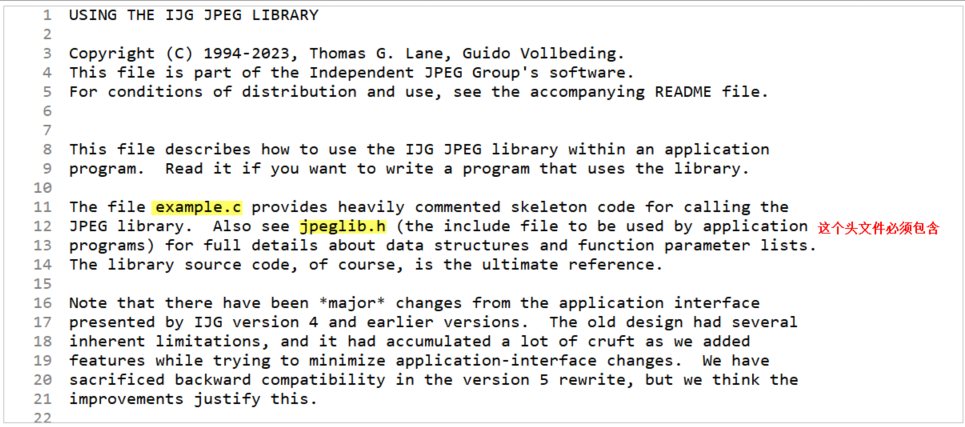
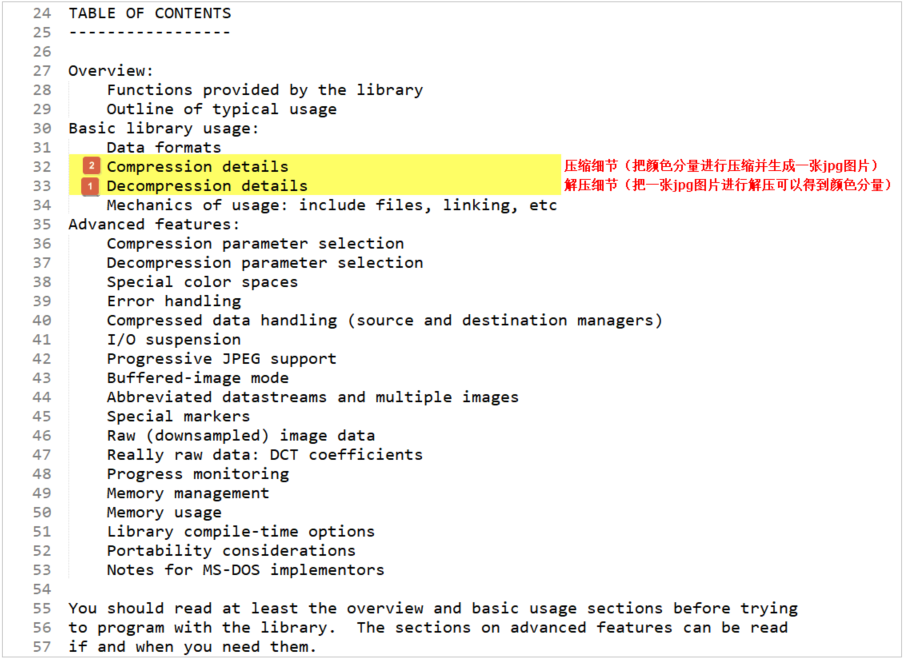
为了可以把一张jpg图片显示在LCD上,所以需要把jpg图片进行解压,解压之后就可以得到图片内部的像素点的颜色分量,就可以把像素点的颜色分量向LCD的像素点写入。
5. 解码流程
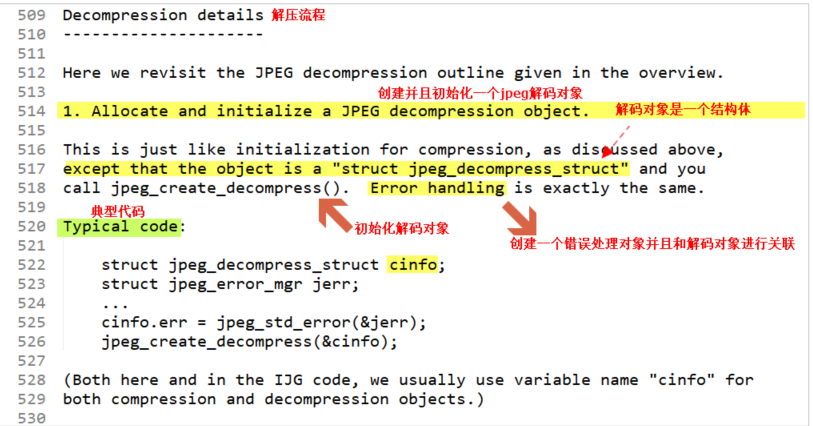
(1) 创建解码对象,并且对解码对象进行初始化,另外需要创建错误处理对象,并和解码对象进行关联。
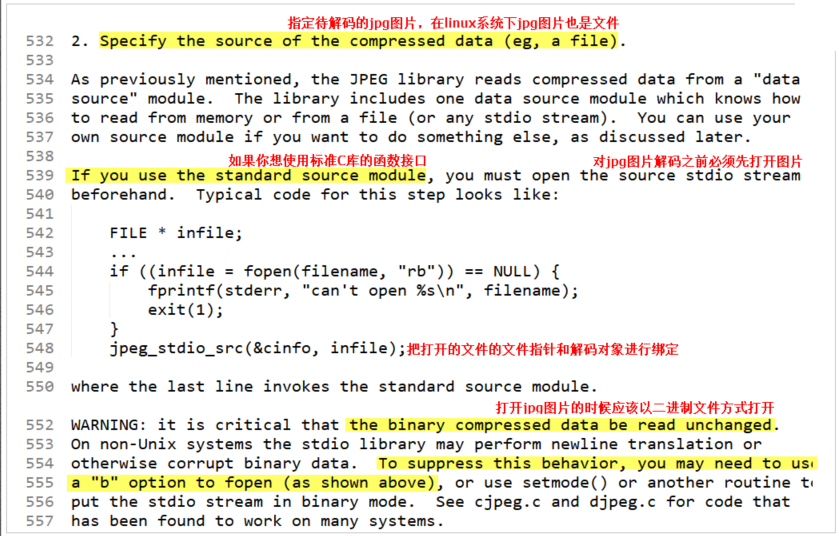
(2) 打开待解码的jpg图片,使用fopen的时候需要添加选项”b”,以二进制方式打开文件!
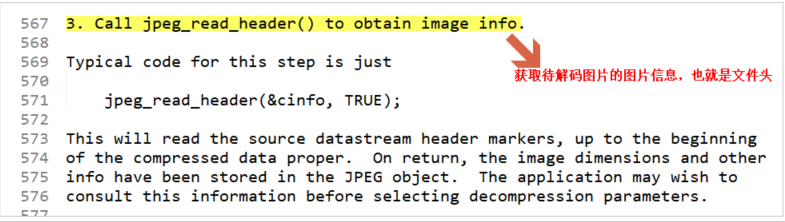
(3) 读取待解码图片的文件头,并把图像信息和解码对象进行关联,通过解码对象对jpg图片进行解码
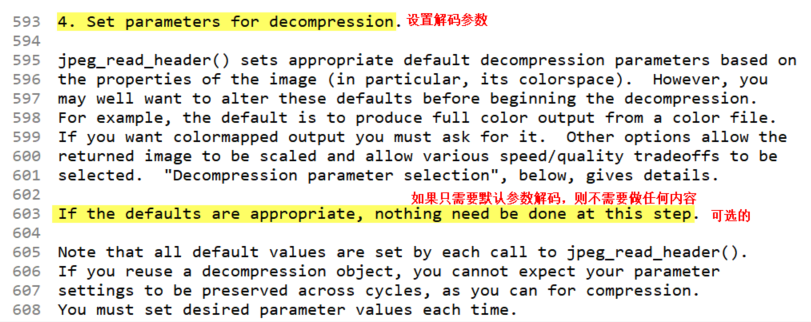
(4) 可以选择设置解码参数,如果打算以默认参数对jpg图片进行解码,则可以省略该步骤!
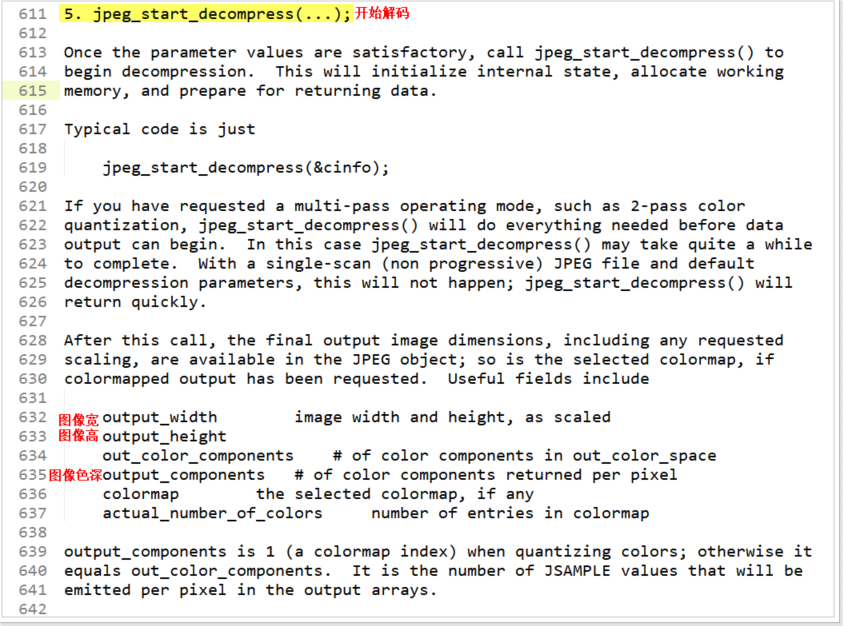
(5) 开始对jpg图片进行解码,调用函数之后开始解码,可以得到图像宽、图像高等信息!
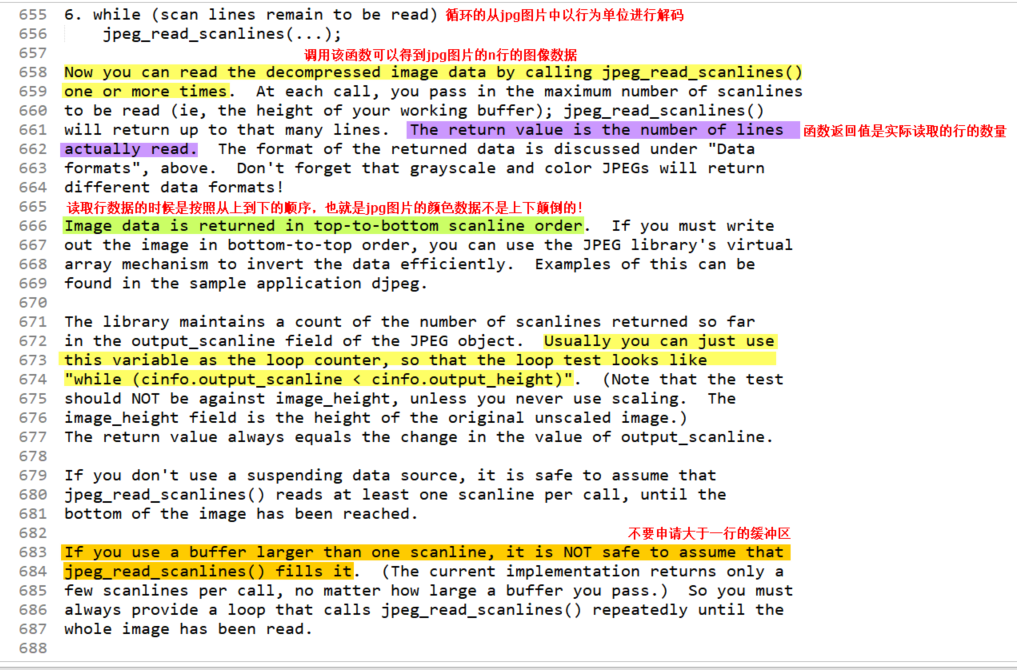
(6) *开始设计一个循环,在循环中每次读取1行的图像数据,并写入到LCD中,注意:转换算法需要用户自己设计。*
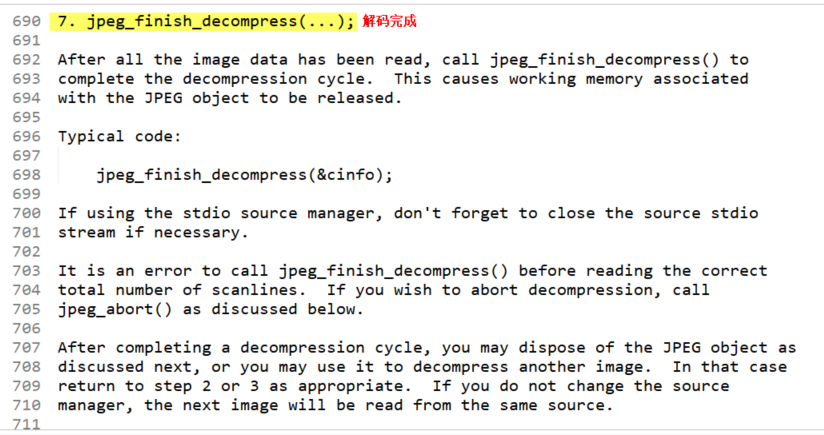
(7) 在所有的图像数据都已经解码完成后,则调用函数完成解码即可,然后释放相关资源!
6. 程序设计
7. 程序编译
由于libjpeg库不是直接安装在Linux系统下,这个libjpeg库是拷贝出来,所以在Linux系统路径下是找不到libjpeg的头文件和库文件的,所以在编译程序的时候需要使用编译器的选项: -I 指定头文件的路径 -L 指定库文件的路径 -l 指定库文件的名称(lib缩写)

8.练习
没有错误判断
作业:完成libjpeg库的移植,并设计程序实现在LCD上的任意位置显示一张任意大小的jpg图片,注意不要越界。
#include <stdio.h>
#include <stdlib.h>
#include "jpeglib.h"
#include <sys/types.h>
#include <sys/stat.h>
#include <fcntl.h>
#include <unistd.h>
#include <stdio.h>
#include <sys/ioctl.h>
#include <sys/mman.h>

int *lcd_mp;

int read_JPEG_file (char * filename,int x,int y)
{
  /* This struct contains the JPEG decompression parameters and pointers to
   * working space (which is allocated as needed by the JPEG library).
   */
  struct jpeg_decompress_struct cinfo;
  /* We use our private extension JPEG error handler.
   * Note that this struct must live as long as the main JPEG parameter
   * struct, to avoid dangling-pointer problems.
   */
  struct jpeg_error_mgr jerr;
  /* More stuff */
  FILE * infile;		/* source file */
  unsigned char * buffer;		/* Output row buffer */
  int row_stride;		/* physical row width in output buffer */

  /* In this example we want to open the input file before doing anything else,
   * so that the setjmp() error recovery below can assume the file is open.
   * VERY IMPORTANT: use "b" option to fopen() if you are on a machine that
   * requires it in order to read binary files.
   */

  if ((infile = fopen(filename, "rb")) == NULL) {
    fprintf(stderr, "can't open %s\n", filename);
    return 0;
  }

  /* Step 1: allocate and initialize JPEG decompression object */

  /* We set up the normal JPEG error routines, then override error_exit. */
  cinfo.err = jpeg_std_error(&jerr);

  /* Establish the setjmp return context for my_error_exit to use. */

  /* Now we can initialize the JPEG decompression object. */
  jpeg_create_decompress(&cinfo);

  /* Step 2: specify data source (eg, a file) */

  jpeg_stdio_src(&cinfo, infile);

  /* Step 3: read file parameters with jpeg_read_header() */

  (void) jpeg_read_header(&cinfo, TRUE);
  /* We can ignore the return value from jpeg_read_header since
   *   (a) suspension is not possible with the stdio data source, and
   *   (b) we passed TRUE to reject a tables-only JPEG file as an error.
   * See libjpeg.txt for more info.
   */

  /* Step 4: set parameters for decompression */

  /* In this example, we don't need to change any of the defaults set by
   * jpeg_read_header(), so we do nothing here.
   */

  /* Step 5: Start decompressor */

  (void) jpeg_start_decompress(&cinfo);
  /* We can ignore the return value since suspension is not possible
   * with the stdio data source.
   */

  /* We may need to do some setup of our own at this point before reading
   * the data.  After jpeg_start_decompress() we have the correct scaled
   * output image dimensions available, as well as the output colormap
   * if we asked for color quantization.
   * In this example, we need to make an output work buffer of the right size.
   */
  /* JSAMPLEs per row in output buffer */
  row_stride = cinfo.output_width * cinfo.output_components;
  /* Make a one-row-high sample array that will go away when done with image */
  buffer = calloc(1,row_stride);

  /* Step 6: while (scan lines remain to be read) */
  /*           jpeg_read_scanlines(...); */

  /* Here we use the library's state variable cinfo.output_scanline as the
   * loop counter, so that we don't have to keep track ourselves.
   */
   int data = 0;
  while (cinfo.output_scanline < cinfo.output_height) {

    (void) jpeg_read_scanlines(&cinfo, &buffer, 1);
    for(int i=0;i<cinfo.output_width;i++){
        data |=0XFF<<24;        //A
        data |= buffer[3*i]<<16;  //R
        data |= buffer[3*i+1]<<8; //G
        data |= buffer[3*i+2];    //B
        *(lcd_mp+1024*y+x +(cinfo.output_scanline-1)*1024+i)= data;
        data = 0;
    }

  }

  /* Step 7: Finish decompression */

  (void) jpeg_finish_decompress(&cinfo);
  /* We can ignore the return value since suspension is not possible
   * with the stdio data source.
   */

  /* Step 8: Release JPEG decompression object */

  /* This is an important step since it will release a good deal of memory. */
  jpeg_destroy_decompress(&cinfo);

  /* After finish_decompress, we can close the input file.
   * Here we postpone it until after no more JPEG errors are possible,
   * so as to simplify the setjmp error logic above.  (Actually, I don't
   * think that jpeg_destroy can do an error exit, but why assume anything...)
   */
  fclose(infile);

  return 1;
}
int main(int argc,char *argv[])
{
    int lcd_fb=open("/dev/fb0",O_RDWR);
	if(-1 ==lcd_fb){
		printf("LCD open error!\n");
		return -1;
	}

	//对LCD内存映射
	lcd_mp=(int *)mmap(NULL,
		1024*600*4,
		PROT_READ | PROT_WRITE,
		MAP_SHARED,
		lcd_fb,
		0
		);
    read_JPEG_file (argv[1],0,0);

    return 0;
}
作业:完成libjpeg库的移植,并设计程序实现把bmp图片转换为jpg图片,学***g图片的压缩算法。
#include <stdio.h>
#include "jpeglib.h"
#include <sys/types.h>
#include <sys/stat.h>
#include <fcntl.h>
#include <unistd.h>
#include <stdio.h>
#include <sys/ioctl.h>
#include <sys/mman.h>
#include <string.h>
#include <stdlib.h>

#pragma pack(1)
struct Bmp_FileHeader{
	char id[2];
	int	size;
	short reserve1;
	short reserve2;
	int offset;
};
struct Bmp_InfoHeader{
	int size;
	int width;
	int height;
	short planes;
	short bit_count;
	int compression;
	int size_image;
	int x_pels_per_meter;
	int y_pels_per_meter;
	int clr_used;
	int clr_important;
};

int image_width=0;
int image_height=0;
char *image_buffer;


void write_JPEG_file (char * filename, int quality)
{
  /* This struct contains the JPEG compression parameters and pointers to
   * working space (which is allocated as needed by the JPEG library).
   * It is possible to have several such structures, representing multiple
   * compression/decompression processes, in existence at once.  We refer
   * to any one struct (and its associated working data) as a "JPEG object".
   */
  struct jpeg_compress_struct cinfo;
  /* This struct represents a JPEG error handler.  It is declared separately
   * because applications often want to supply a specialized error handler
   * (see the second half of this file for an example).  But here we just
   * take the easy way out and use the standard error handler, which will
   * print a message on stderr and call exit() if compression fails.
   * Note that this struct must live as long as the main JPEG parameter
   * struct, to avoid dangling-pointer problems.
   */
  struct jpeg_error_mgr jerr;
  /* More stuff */
  FILE * outfile;		/* target file */
  unsigned char * row_pointer[1];	/* pointer to JSAMPLE row[s] */
  int row_stride;		/* physical row width in image buffer */

  /* Step 1: allocate and initialize JPEG compression object */

  /* We have to set up the error handler first, in case the initialization
   * step fails.  (Unlikely, but it could happen if you are out of memory.)
   * This routine fills in the contents of struct jerr, and returns jerr's
   * address which we place into the link field in cinfo.
   */
  cinfo.err = jpeg_std_error(&jerr);
  /* Now we can initialize the JPEG compression object. */
  jpeg_create_compress(&cinfo);

  /* Step 2: specify data destination (eg, a file) */
  /* Note: steps 2 and 3 can be done in either order. */

  /* Here we use the library-supplied code to send compressed data to a
   * stdio stream.  You can also write your own code to do something else.
   * VERY IMPORTANT: use "b" option to fopen() if you are on a machine that
   * requires it in order to write binary files.
   */
  if ((outfile = fopen(filename, "wb")) == NULL) {
    fprintf(stderr, "can't open %s\n", filename);
    exit(1);
  }
  jpeg_stdio_dest(&cinfo, outfile);

  /* Step 3: set parameters for compression */

  /* First we supply a description of the input image.
   * Four fields of the cinfo struct must be filled in:
   */
  cinfo.image_width = image_width; 	/* image width and height, in pixels */
  cinfo.image_height = image_height;
  cinfo.input_components = 3;		/* # of color components per pixel */
  cinfo.in_color_space = JCS_RGB; 	/* colorspace of input image */
  /* Now use the library's routine to set default compression parameters.
   * (You must set at least cinfo.in_color_space before calling this,
   * since the defaults depend on the source color space.)
   */
  jpeg_set_defaults(&cinfo);
  /* Now you can set any non-default parameters you wish to.
   * Here we just illustrate the use of quality (quantization table) scaling:
   */
  jpeg_set_quality(&cinfo, quality, TRUE /* limit to baseline-JPEG values */);

  /* Step 4: Start compressor */

  /* TRUE ensures that we will write a complete interchange-JPEG file.
   * Pass TRUE unless you are very sure of what you're doing.
   */
  jpeg_start_compress(&cinfo, TRUE);

  /* Step 5: while (scan lines remain to be written) */
  /*           jpeg_write_scanlines(...); */

  /* Here we use the library's state variable cinfo.next_scanline as the
   * loop counter, so that we don't have to keep track ourselves.
   * To keep things simple, we pass one scanline per call; you can pass
   * more if you wish, though.
   */
  row_stride = image_width * 3;	/* JSAMPLEs per row in image_buffer */
  //把BGR---RGB   从下到上---从上到下
  char* rgb_buf = (char*)calloc(1,image_width*image_height*3);
  for(int i=0;i<image_height;i++){
  	int bmp_line = image_height-1-i;		//bmp行倒序
  	for(int j=0;j<row_stride;j+=3){
  		rgb_buf[i*row_stride+j]=image_buffer[bmp_line*row_stride+j+2];	//将bmp R ----- 变为jpeg	 R
  		rgb_buf[i*row_stride+j+1]=image_buffer[bmp_line*row_stride+j+1];//将bmp G ----- 变为jpeg	 G
  		rgb_buf[i*row_stride+j+2]=image_buffer[bmp_line*row_stride+j];	//将bmp B ----- 变为jpeg	 B
  	}
  }
  while (cinfo.next_scanline < cinfo.image_height) {
    /* jpeg_write_scanlines expects an array of pointers to scanlines.
     * Here the array is only one element long, but you could pass
     * more than one scanline at a time if that's more convenient.
     */
    row_pointer[0] = & rgb_buf[cinfo.next_scanline * row_stride];
    (void) jpeg_write_scanlines(&cinfo, row_pointer, 1);
  }

  /* Step 6: Finish compression */

  jpeg_finish_compress(&cinfo);
  /* After finish_compress, we can close the output file. */
  fclose(outfile);

  /* Step 7: release JPEG compression object */

  /* This is an important step since it will release a good deal of memory. */
  jpeg_destroy_compress(&cinfo);

  /* And we're done! */
}

int main(int argc,char *argv[])
{
	//打开图片
	FILE * bmp_fd=fopen(argv[1],"rb");
	if (NULL == bmp_fd){
		printf("bmp file open error\n");
		return -1;
	}

	//读取图片的宽和高
	fseek(bmp_fd,14,SEEK_SET);
	struct Bmp_InfoHeader InfoHeader;
	fread(&InfoHeader,1,40,bmp_fd);

	 image_width =	InfoHeader.width;
	 image_height = InfoHeader.height;

	 int buffer_size = image_width*image_height*3;
	 image_buffer=(char *)calloc(1,buffer_size);
	 fread(image_buffer,1,buffer_size,bmp_fd);

	 write_JPEG_file("new.jpeg",100);

}

 浙公网安备 33010602011771号