
005BMP
1、BMP图像原理与应用
实际项目开发过程中只在LCD液晶屏显示单一的颜色并不能满足设计需求,为了实现人机交互以及提供用户体验,UI工程师都需要设计符合产品主题的图像素材,然后提交给软件工程师进行人机界面的交互设计。由于Linux系统“一切皆文件”的特性,所以图片在Linux系统中也是以文件的形式存储。
1.1 图像格式
另外,图像中的数据必须按照某个已知的、公认的数据存储顺序和结构进行存储,这样才可以使不同的应用程序对该图像文件顺利的进行访问,从而实现数据共享。图像数据在文件中的存储顺序和结构也被称为图像文件格式。
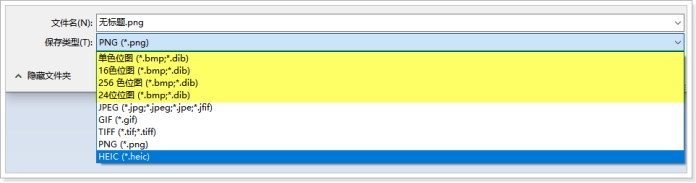
目前广为流传的图像文件格式有许多,常见格式包括BMP、GIF、JPEG、TIFF、MPEG等。在各种图像文件格式中,一部分是由某个软硬件厂商提出并被广泛接受和采用的格式,例如 BMP格式就是由微软公司(MicroSoft)公司发明的数据封装格式。另一部分是由各种国际标准组织提出的格式,例如JPEG格式就是由国际静止图像压缩标准组织提出的格式。
1.2 基本概念
BMP格式最大的特征是没有任何的压缩,因此文件尺寸比较大,不适合网络传输,但是优点是这种图像格式中的数据读取出来不需要任何解码器解码就可以直接使用,所以为了便于大家对图像格式进行了解,就先以BMP格式进行讲解。
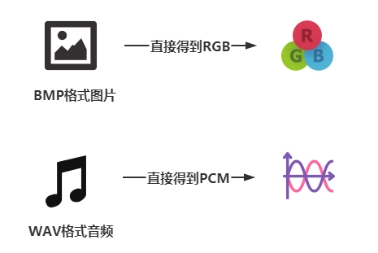
BMP格式被称为位图(Bitmap)或设备无关位图(DIB,指的是Device-Independent Bitmap),是Windows操作系统所推荐和支持的图像文件格式,是一种将内存或显示器的图像数据不经过压缩而直接按位存盘的文件格式,所以这种格式的图片也被称为BMP文件。
1.3 内部结构
BMP文件的数据按照从文件头开始的先后顺序分为四个部分:分别是位图文件头、位图信息头、调色板(24bit位图是没有的)、位图数据(RGB)。
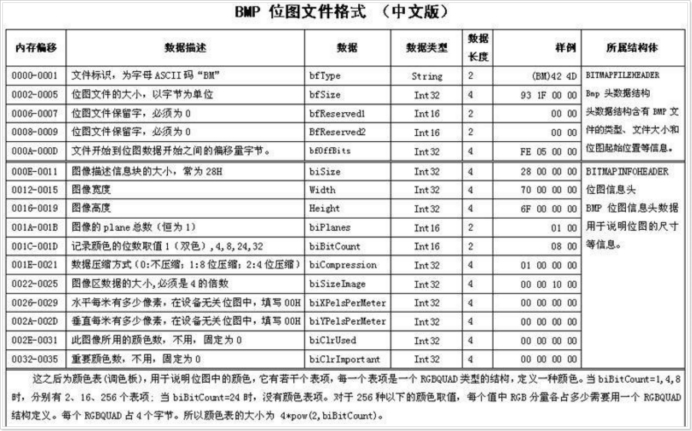
可以看到,BMP文件的位图文件头和位图信息头一共为54字节大小,其中位图文件头为14字节,位图信息头为40字节
1.3.1 位图文件头
位图文件头(Bitmap-File Header)包含了图像类型、图像大小、两个保留字以及位图数据存放地址。

1.3.2 位图信息头
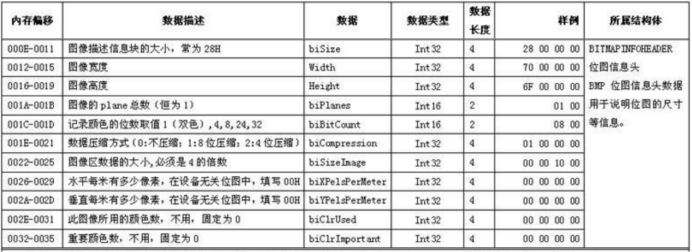
位图信息头(Bitmap-Information Header)包含了位图信息头的大小、图像的宽和高、图像的色深、压缩说明、图像数据的大小和其他一些参数。
练习:读取宽和高
设计程序,利用系统IO读取磁盘上指定BMP图片的宽和高,以及BMP图片的大小,并输出到终端,要求图片名称通过命令行传递。
#include <sys/types.h>
#include <sys/stat.h>
#include <fcntl.h>
#include <unistd.h>
#include <stdio.h>
#include <sys/ioctl.h>
#include <sys/mman.h>

#pragma pack(1)
struct Bmp_FileHeader{
	char id[2];
	int	size;
	short reserve1;
	short reserve2;
	int offset;
};
struct Bmp_InfoHeader{
	int size;
	int width;
	int height;
	short planes;
	short bit_count;
	int compression;
	int size_image;
	int x_pels_per_meter;
	int y_pels_per_meter;
	int clr_used;
	int clr_important;
};

#pragma pack()

int main(int argc,char *argv[])
{
	// int bmp_size=0;
	// int bmp_height=0;
	// int bmp_width=0;

	if(2!=argc){
		printf("argument is invaild	\n");
		return -1;
	}

	//打开图片
	int bmp=open(argv[1],O_RDWR);
	if (-1 == bmp){
		printf("open %s error\n",argv[1]);
		return -1;
	}

	struct Bmp_FileHeader file_header;
	struct Bmp_InfoHeader info_header;
	//读取文件头
	read(bmp,&file_header,sizeof(file_header));
	//读取信息头
	read(bmp,&info_header,sizeof(info_header));
	printf("===== bmp info =====\n");
	printf("bmp name is %s\n", argv[1]);
	printf("文件大小:%u 字节\n", file_header.size);
	printf("宽度:%d 像素\n", info_header.width);
	printf("高度:%d 像素\n", info_header.height);
	printf("====================\n");
#if 0
	//读取图片的大小 0002---0005
	//首先偏移2个字节,再读取4个字节
	lseek(bmp,2,SEEK_SET);
	read(bmp,&bmp_size,4);

	lseek(bmp,18,SEEK_SET);
	read(bmp,&bmp_width,4);
	read(bmp,&bmp_height,4);

	printf("===== bmp info =====\n");
	printf("bmp name is %s\n", argv[1]);
	printf("文件大小:%u 字节\n", bmp_size);
    printf("宽度:%d 像素\n", bmp_width);
    printf("高度:%d 像素\n", bmp_height);
    printf("====================\n");
#endif
    close(bmp);

    return 0;
}
1.3.3 调色板
bmp位图按照像素深度分类可以分为:1bit位图(2色)、4bit位图(16色)、8bit位图(256色)、16bit位图(65536色-高彩色)、24bit位图(1670万色-真彩色)、32bit位图(1670万色-增强型真彩色)。
调色板是为了让一些颜色深度比较小(1bit、4bit、8bit)的位图可以表示颜色而设置的。调色板存储颜色,后面的位图数据存储颜色索引,这样调色板+位图数据就可以表示颜色了。
需要注意的是:16bit、24bit、32bit的位图一般没有调色板,因为从16bit开始就直接使用位图数据表示颜色了。

1.3.4 位图数据
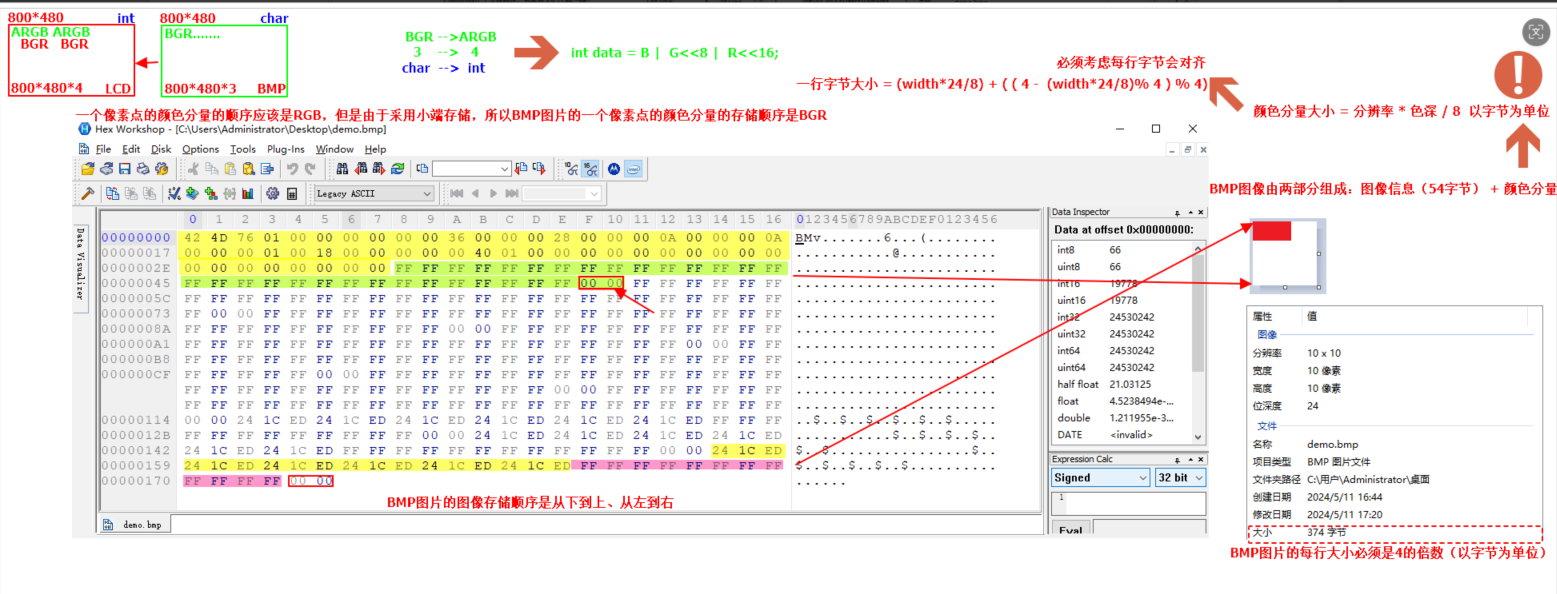
位图数据分两种情况,如果带调色板,则位图数据存放的是调色板的颜色索引,如果不带调色板,则位图数据存放实际的argb值。由于24位bmp图片不带调色板,所以文件开头的54字节为图片信息,从第55个字节开始就为bmp图片的颜色数据。
1.4 对齐说明
思考:计算当前这张BMP图片的总大小(按字节为单位计算),提示:1个像素点3字节!
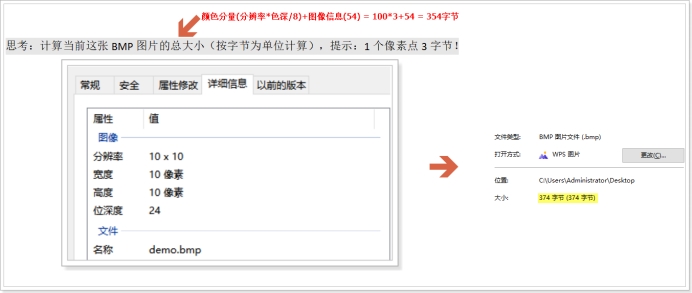
回答:计算机的CPU为了提高工作效率,所以读取数据的时候会进行字节对齐,一般图像刷新都是行为单位,所以CPU每次都是读取一行的大小,所以32bit系统下如果一行字节大小不是4的倍数,就会进行字节补齐,目的是提高效率,是典型的用空间来换时间的案例!
分辨率是10*10,每行10个像素点,每个像素点3字节,所以一行是30个字节,不够4的倍数,所以需要在每行的末尾补2个字节。
由于每行必须是4的倍数,所以需要补齐的字节数有4种情况:0、1、2、3,所以需要设计算法来计算每行需要自动补齐的字节数。 公式: byte = ( 4 - (width*3 % 4) ) % 4
1.5 存储顺序
如果打算了解BMP图片内部数据的存储顺序(大端 or 小端),应该去查看BMP文件内部数据结构,需要使用专业工具(HEX十六进制查看器)。
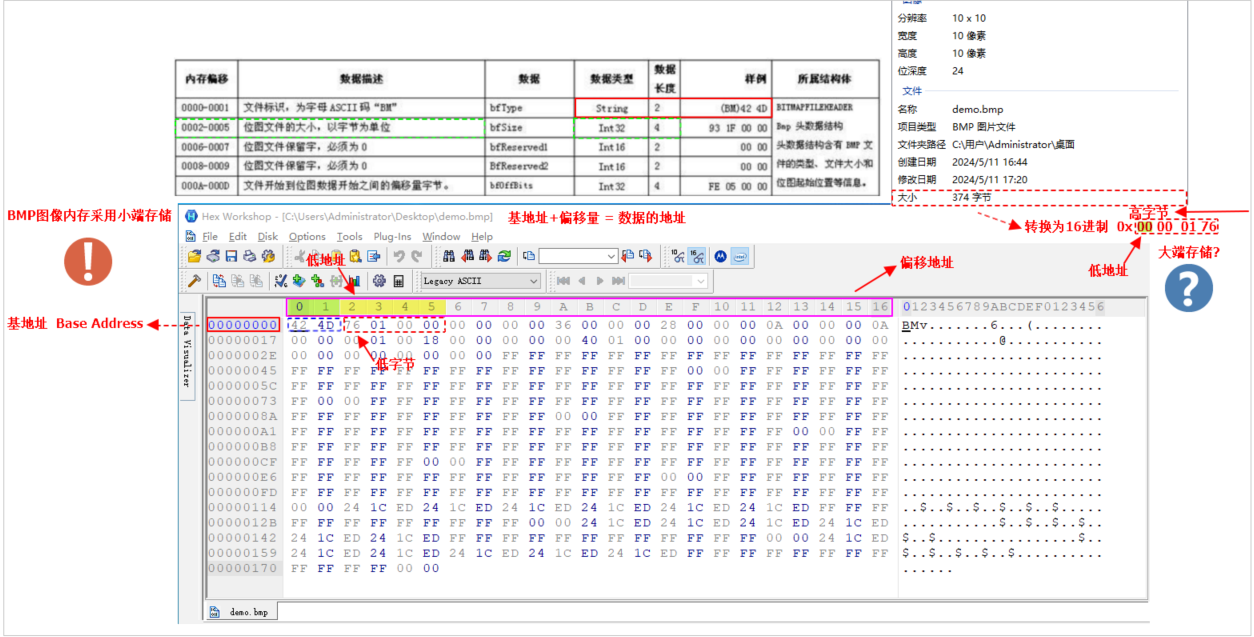
通过分析,可以知道BMP图片内部数据是采用小端方式进行存储,千万要背下来!!!!!
1.6 像素结构
习题
练习:设计程序,实现在LCD上显示一张分辨率为1024*600大小的24bit的bmp图片,要求图像不失真可以在开发板的LCD上显示。
#include <sys/types.h>
#include <sys/stat.h>
#include <fcntl.h>
#include <unistd.h>
#include <stdio.h>
#include <sys/ioctl.h>
#include <sys/mman.h>


#pragma pack(1)
struct Bmp_FileHeader{
	char id[2];
	int	size;
	short reserve1;
	short reserve2;
	int offset;
};
struct Bmp_InfoHeader{
	int size;
	int width;
	int height;
	short planes;
	short bit_count;
	int compression;
	int size_image;
	int x_pels_per_meter;
	int y_pels_per_meter;
	int clr_used;
	int clr_important;
};

#pragma pack()

int main(int argc,char *argv[])
{
	//检测参数
	if(2!=argc){
		printf("argument error\n");
		return -1;
	}
	//1、打开图片
	FILE * bmp_fd=fopen(argv[1],"rb");
	if (NULL == bmp_fd){
		printf("bmp file open error\n");
		return -1;
	}

	//2、读取图片的宽和高
	fseek(bmp_fd,14,SEEK_SET);
	struct Bmp_InfoHeader InfoHeader;
	fread(&InfoHeader,1,40,bmp_fd);

	//3、打印宽和高
	printf("===== %s =====",argv[1]);
	printf("bmp width :%d\n",InfoHeader.width);
	printf("bmp height :%d\n",InfoHeader.height);
	printf("===== === =====\n");

	//4、读取颜色分量
	char bmp_buf[1024*600*3]={0};  //BGR
	fread(bmp_buf,1,sizeof(bmp_buf),bmp_fd);
	//5、关闭图片
	fclose(bmp_fd);

	//6、打开LCD文件
	int lcd_fb=open("/dev/fb0",O_RDWR);
	if(-1 ==lcd_fb){
		printf("LCD open error!\n");
		return -1;
	}

	//对LCD内存映射
	int *lcd_mp=(int *)mmap(NULL,
		1024*600*4,
		PROT_READ | PROT_WRITE,
		MAP_SHARED,
		lcd_fb,
		0
		);

	int i=0;
	int data=0;
	for(int y=600-1;y>=0;y--){
		for(int x=0;x<1024;x++){
			data  =	bmp_buf[i];			//B
			data |= bmp_buf[i+1]<<8;	//G
			data |= bmp_buf[i+2]<<16; 	//R
			data |=	0xFF<<24;			//A

			*(lcd_mp+1024*y+x)= data;

			i+=3;
			data = 0;
		}
	}
	close(lcd_fb);
	munmap(lcd_mp,1024*600*4);

	return 0;
}
练习:设计程序,实现在LCD上任意位置显示一张任意大小的色深为24bit的bmp图片,要求图像不失真可以在开发板的LCD上显示。
#include <sys/types.h>
#include <sys/stat.h>
#include <fcntl.h>
#include <unistd.h>
#include <stdio.h>
#include <sys/ioctl.h>
#include <sys/mman.h>
#include <string.h>

#pragma pack(1)
struct Bmp_FileHeader{
	char id[2];
	int	size;
	short reserve1;
	short reserve2;
	int offset;
};
struct Bmp_InfoHeader{
	int size;
	int width;
	int height;
	short planes;
	short bit_count;
	int compression;
	int size_image;
	int x_pels_per_meter;
	int y_pels_per_meter;
	int clr_used;
	int clr_important;
};

#pragma pack()
int main(int argc,char *argv[])
{
	//检测参数
	if(4!=argc){
		printf("argument error\n");
		return -1;
	}
	//打开图片
	FILE * bmp_fd=fopen(argv[1],"rb");
	if (NULL == bmp_fd){
		printf("bmp file open error\n");
		return -1;
	}

	//读取图片的宽和高
	fseek(bmp_fd,14,SEEK_SET);
	struct Bmp_InfoHeader InfoHeader;
	fread(&InfoHeader,1,40,bmp_fd);

	int bmp_w =	InfoHeader.width;
	int bmp_h = InfoHeader.height;

	//比较
	if(1024 < bmp_w || 600 < bmp_h){
		fprintf(stderr, "Error: BMP尺寸超出限制!当前宽=%d, 高=%d,最大支持1024x600\n", bmp_w, bmp_h);
   		fclose(bmp_fd);
		return -1;
	}

	//打印宽和高
	printf("===== %s =====\n",argv[1]);
	printf("bmp width :%d\n",bmp_w);
	printf("bmp height :%d\n",bmp_h);
	printf("===== === =====\n");


	//读取颜色分量
	char bmp_buf[bmp_w*bmp_h*3];  //BGR
	memset(bmp_buf, 0, sizeof(bmp_buf));
	fread(bmp_buf,1,sizeof(bmp_buf),bmp_fd);
	fclose(bmp_fd);

	//显示的位置(x,y)
	int x=0;
	int y=0;
	int r=0; 	//判断是否转换成功
	r = sscanf(argv[2],"%d",&x);
	if (1!=r){
		printf("x:转换失败\n");
		return	-1;
	}
	r = sscanf(argv[3],"%d",&y);
	if (1!=r){
		printf("y:转换失败\n");
		return	-1;
	}

	// x 的最大值:显示区域宽度 - 图片宽度(否则图片右边会超出)
    int max_x = 1024 - bmp_w;
    if (max_x < 0) max_x = 0;
    // y 的最大值:显示区域高度 - 图片高度
    int max_y = 600 - bmp_h;
    if (max_y < 0) max_y = 0;

     // 限制 x 范围
    if(x < 0) x = 0;
    if(x > max_x) x = max_x;
    // 限制 y 范围
    if(y < 0) y = 0;
    if(y > max_y) y = max_y;

    printf("最终显示位置:x=%d, y=%d\n", x, y);

    int lcd_fb=open("/dev/fb0",O_RDWR);
    if (-1 == lcd_fb){
    	return -1;
    }

    int * lcd_mp=(int *)mmap(NULL,1024*600*4,PROT_READ | PROT_WRITE,MAP_SHARED,lcd_fb,0);
    if (MAP_FAILED == lcd_mp){
    	return -1;
    }

    int i=0;
    int data=0;
 	memset(lcd_mp, 0, 1024*600*4);
    for(int new_y = y+bmp_h-1;new_y>=y;new_y--){
    	for(int new_x =x;new_x<(x+bmp_w);new_x++){
    		data = bmp_buf[i];
    		data |= bmp_buf[i+1] << 8 ;
    		data |= bmp_buf[i+2] << 16;
    		data |= 0XFF << 24;
    		*(lcd_mp+(1024*new_y+new_x)) =data;
    		i+=3;
    		data = 0;
    	}
    }
    munmap(lcd_mp,1024*600*4);
    close(lcd_fb);
	return 0;
}
作业:设计算法,要求把一张任意尺寸的BMP图片等比例且不失真的缩小为原来的1/2,并生成一张新的BMP图片,要求BMP图片的路径都需要通过命令行进行传递
#include <sys/types.h>
#include <sys/stat.h>
#include <fcntl.h>
#include <unistd.h>
#include <stdio.h>
#include <sys/ioctl.h>
#include <sys/mman.h>
#include <string.h>
#include <stdlib.h>

#pragma pack(1)
struct Bmp_FileHeader{
	char id[2];
	int	size;
	short reserve1;
	short reserve2;
	int offset;
};
struct Bmp_InfoHeader{
	int size;
	int width;
	int height;
	short planes;
	short bit_count;
	int compression;
	int size_image;
	int x_pels_per_meter;
	int y_pels_per_meter;
	int clr_used;
	int clr_important;
};

#pragma pack()

int main(int argc ,char *argv[])
{
	struct Bmp_FileHeader FileHeader;
	struct Bmp_InfoHeader InfoHeader;

	//打开原图bmp1
	FILE * bmp1=fopen(argv[1],"rb");
	//读取原图的信息
	fread(&FileHeader,1,14,bmp1);
	fread(&InfoHeader,1,40,bmp1);

	//原图的宽和高
	int width 	=InfoHeader.width;
	int height=InfoHeader.height;

	FILE * bmp2=fopen("new.bmp","wb+");

	//将宽变为原来一半
	FileHeader.size=InfoHeader.width/2*InfoHeader.height/2*3+54;
	InfoHeader.width=InfoHeader.width/2;
	InfoHeader.height=InfoHeader.height/2;

	fwrite(&FileHeader,1,14,bmp2);
	fwrite(&InfoHeader,1,40,bmp2);

	//打算从原图每次获取一行的颜色分量大小
	int line_size = width*3;
	char * bm1_buf =(char *)calloc(1,line_size);

	//int line_num = height;
	// while(line_num--){
	// 	fread(bm1_buf,1,line_size,bmp1);
	// 	if((height - line_num - 1)%2 == 0){
	// 		for(int i=0;i<width;i+=2){
	// 		fwrite(bm1_buf+3*i,3,1,bmp2);
	// 		}
	// 	}
	// }
	for(int y=0;y<height;y++){
		fread(bm1_buf,1,line_size,bmp1);
		if(y%2 == 0){
			for(int x =0;x<width;x+=2){
				fwrite(bm1_buf+3*x,3,1,bmp2);
			}
		}
	}
	free(bm1_buf);
	bm1_buf = NULL;
	fclose(bmp1);
	fclose(bmp2);
	printf("BMP图片缩小完成!\n");
	return 0;
}

 浙公网安备 33010602011771号