<template>
  <div class="main printTemplate printTemplateD">
    <div class="titleBox">
      <el-row :gutter="20">
        <el-col :span="22"><div class="grid-content bg-purple">图标管理</div></el-col>
        <el-col :span="2">
            <el-row :gutter="20">
                <el-col :span="10" push="1">
                  <div class="grid-content bg-purple">
                      <el-button type="primary" @click="addOrMod({type:'add'})">
              <i class="el-icon-plus"></i>添加图标
             </el-button>
                  </div>
                </el-col>
            </el-row>
        </el-col>
      </el-row>
    </div>
    <div class='query'>
      <!-- 图标类型 -->
      <el-row :gutter="20">
        <el-col :span="3">
          <div class="grid-content bg-purple">
            <el-input v-model='roleData.name'
              placeholder="请输入图标名称"
              clearable>
            </el-input>
          </div>
        </el-col>
        <el-col :span="3">
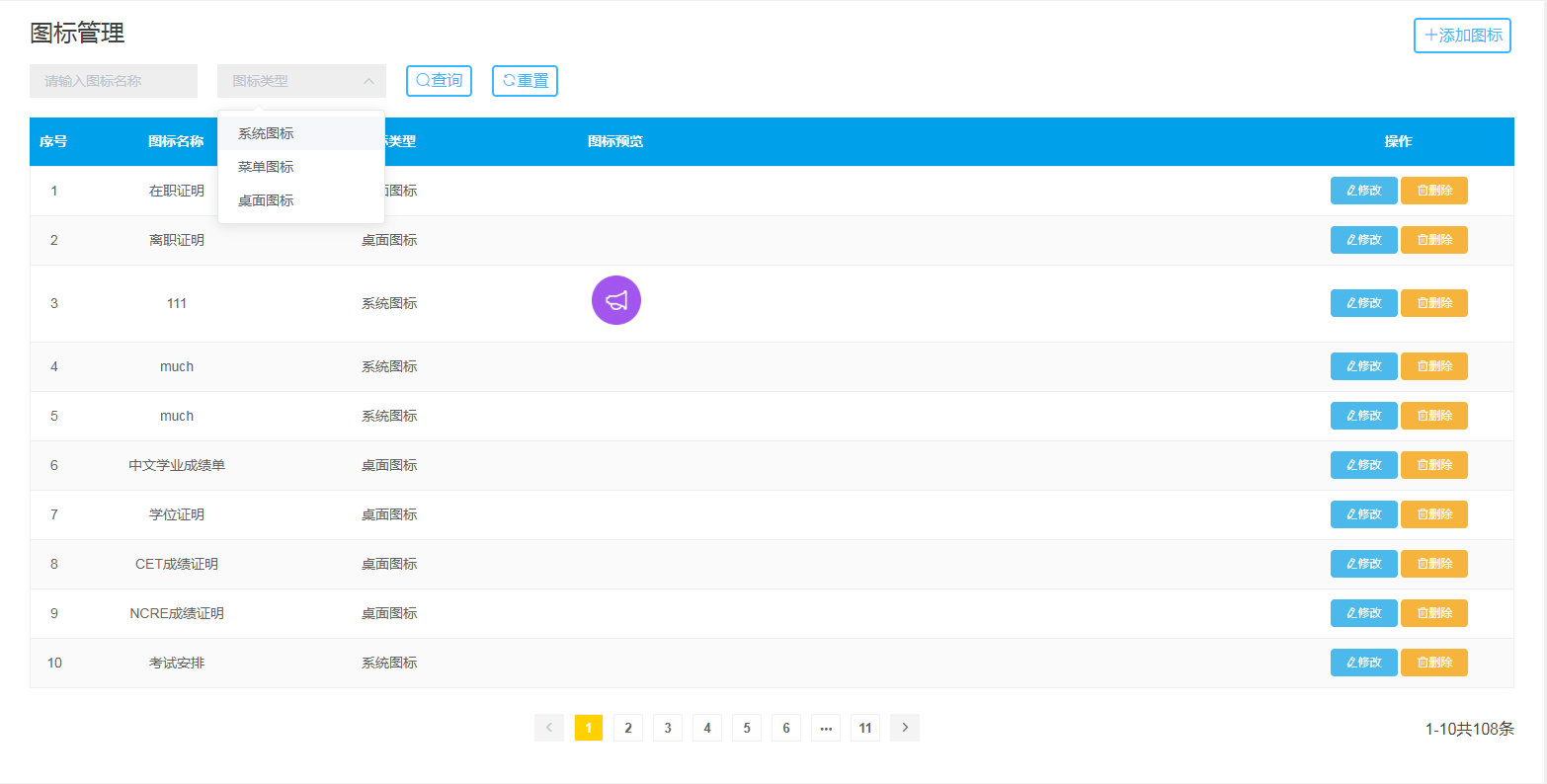
             <el-select v-model="roleData.type" placeholder="图标类型">
                <el-option
                v-for="item in icons"
                :key="item.value"
                :label="item.label"
                :value="item.value">
                </el-option>
            </el-select>
        </el-col>
        <el-col :span="1.5">
          <div class="grid-content bg-purple">
            <el-button type="primary" @click='search'><i class="el-icon-search"></i>查询</el-button>
          </div>
        </el-col>
        <el-col :span="1.5">
          <div class="grid-content bg-purple">
            <el-button type="primary" @click='resetSel'><i class="el-icon-refresh"></i>重置</el-button>
          </div>
        </el-col>
      </el-row>
    </div>
    <el-table :data="tableData" stripe style="width: 100%">
      <el-table-column type="index" label="序号" align="center" :index="indexMethod"></el-table-column>
      <el-table-column  prop="name"  label="图标名称" width="200" align="center"></el-table-column>
      <el-table-column  prop="type" label="图标类型"  width="230" align="center">
        <template slot-scope="scope">
          <span v-if="scope.row.type == 1">系统图标</span>
          <span v-else-if="scope.row.type == 2">菜单图标</span>
          <span v-else>桌面图标</span>
        </template>
      </el-table-column>
      <el-table-column prop="path" label="图标预览"  width="230" align="center">
        <template slot-scope="scope">
          <img :src="scope.row.path" alt="" style="width:50px;height:50px;">
        </template>
      </el-table-column>
      <el-table-column   width="560" align="center"></el-table-column>
      <el-table-column  prop="" label="操作"  align="center" >
        <template slot-scope="scope">
          <el-button  type="primary" size="mini" @click="addOrMod({type:'edit',id:scope.row.ID})">
        <i class="el-icon-edit"></i>修改
      </el-button>
          <el-button  type="warning" size="mini" @click='del(scope.row.ID)'>
        <i class="el-icon-delete"></i>删除
       </el-button>
        </template>
      </el-table-column>
    </el-table>
   <!-- 添加图标 -->
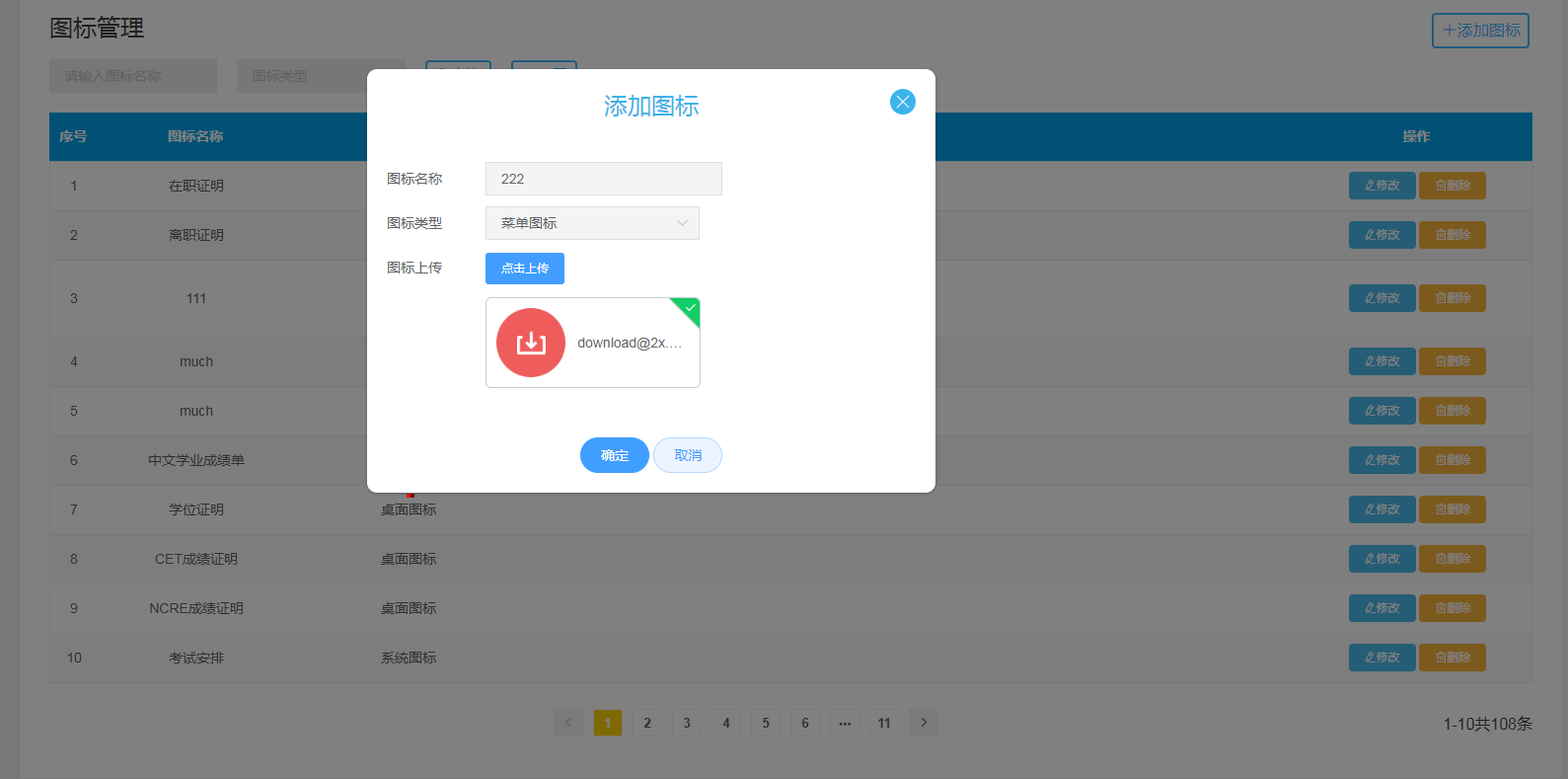
  <el-dialog
    width="35%"
    :visible.sync="addPic"
    @close="closeDialog"
    :close-on-click-modal = 'false'
     class="addPic"
     @closed = 'handleClose'
    >
    <h3 slot="title" class="dialogTitle">{{dialogTitle}}</h3>
     <el-form label-width="100px" :model="addData" :rules="rules" ref="addData" status-icon >
      <el-form-item label="图标名称" prop='iconName'>
        <el-input v-model = 'addData.iconName'></el-input>
      </el-form-item>
       <el-form-item label="图标类型" prop='iconType'>
        <el-select v-model="addData.iconType" placeholder="系统图标" class="xlk">
          <el-option
            v-for="item in types"
            :key="item.value"
            :label="item.label"
            :value="item.value">
          </el-option>
        </el-select>
      </el-form-item>
      <el-form-item label="图标上传">
        <el-upload
          v-bind:disabled="canView == true"
          class="upload-demo picup"
          action=" http://192.168.0.16:8080/sdrs_bjyd/tSdrsIconController/filesUpload.do"
          :on-success='handleSuccess'
          :on-remove="handleRemove"
          :limit="1"
          :file-list="fileList"
          name='file'
          list-type="picture">
          <el-button size="small" type="primary">点击上传</el-button>
        </el-upload>
      </el-form-item>
      <el-form-item>
        <span style='color:#f56c6c'>{{errMsg}}</span>
      </el-form-item>
    </el-form>
    <span slot="footer" class="dialog-footer">
      <el-button type="primary" size="medium" round  @click="submitForm('addData')">确定</el-button>
      <el-button type="primary" size="medium"  plain round  @click="closeForm('addData')">取消</el-button>
    </span>
  </el-dialog>
  <!-- 删除图标 -->
  <el-dialog
    width="30%"
    :visible.sync="deleteRole"
     class="deleteRole"
     :close-on-click-modal = 'false'
    >
    <h3 slot="title" class='dialogTitle'>删除图标</h3>
    <div class='confirm-dialog'>
      <img src='../../assets/image/tools/icons8-delete.png'>
      <span>{{canDel}}</span>
    </div>
    <span slot="footer" class="dialog-footer">
      <el-button type="primary" size="medium" round @click='sureDel'>确定</el-button>
      <el-button type="primary" size="medium"  plain round @click="deleteRole = false">取消</el-button>
    </span>
  </el-dialog>
   <!-- 删除提示信息 -->
  <el-dialog
    width="30%"
    :visible.sync="deleteMessage"
     class="deleteMessage"
     :close-on-click-modal = 'false'
    >
    <div class='confirm-dialog'>
      <!-- <span>该角色仍被用户使用,请到用户里面先删除关联关系!!!</span> -->
    </div>
    <span slot="footer" class="dialog-footer">
      <el-button type="primary" size="medium" round @click='deleteMessage = false'>确定</el-button>
    </span>
  </el-dialog>
  <div class="bottom">
    <el-pagination
      background
      layout="prev, pager, next"
      @current-change="handleCurrentChange"
      :current-page.sync="currentPage"
      :total="logTotal ">
    </el-pagination>
    <div v-show='logTotal>0'>
      <span>{{start}}</span>-<span>{{end}}</span>共<span>{{logTotal}}</span>条
    </div>
  </div>
  </div>
</template>

<script>
import axios from 'axios'
export default {
  data () {
    return {
      currentPage:1,
      addPic : false,//添加图标
      deleteRole: false,//删除图标
      deleteMessage:false,
      selected:'',
      errMsg: '',
      selectId: '',
      dialogTitle:'',
      canView:'',
      fileList:[],
      icons:[
        {
          label:'系统图标',
          value:1
        },
        {
          label:'菜单图标',
          value:2
        },
        {
          label:'桌面图标',
          value:3
        },
      ],
      types:[
         {
          label:'系统图标',
          value:1
        },
        {
          label:'菜单图标',
          value:2
        },
        {
          label:'桌面图标',
          value:3
        },
      ],
      tableData:[],
      logTotal: 0,
      roleData: {
        pageId: 1,
        pageNum: 10,
        name: '',
        type:'',
      },
      canDel: '确定删除该图标吗?',
      addData: {
        id:'',
        iconName:'',
        iconType:'',
        iconPath:'',
      },
      deleteData:{
        path:'',
      },
      delData: {
        id: '',
      },
      userData: {
        roleId: '',
        type: '',
        userName: '',
      },
      start: '',
      end: '',
      rules: {
        type: [
          { required: true, message: '请选择图标类型', trigger: 'blur' },
        ],
        name: [
          { required: true, message: '请输入图标名称', trigger: 'blur' },
          { min: 2, max: 10, message: '图标名称范围在2-10位字符', trigger: 'blur' },
        ],
      }
    }
  },
  created(){
    this.getList();
  },
  methods:{
    getList: function(){
      axios.post(this.$qu+'tSdrsIconController/findIcon.do',this.roleData,{
        transformRequest: [
          function (data) {
            let params = '';
            for (let index in data) {
              params += index + '=' + data[index] + '&'
            }
            return params;
          }
        ]
      }).then(rs=>{
        this.tableData = rs.data.data.icon;
        this.logTotal = rs.data.data.sum;
      })
    },
    handleSuccess:function(response,file,fileList){
      let list = [];
      list.push({name:file.name,url:response.data.filePath})
      this.addData.iconPath = response.data.filePath;
      this.deleteData.path = response.data.filePath;
      this.fileList = list;
    },
    handleRemove:function(file,fileList){
      this.fileList = fileList;
      this.delFile();
    },
    //查询
    search: function(){
      this.roleData.pageId=1;
      this.getList();
    },
    //重置
    resetSel:function(){
      this.roleData.type='';
      this.roleData.name = '',
      this.roleData.pageId=1;
      this.currentPage=1;
      this.getList();
    },
    //添加、修改
    addOrMod: function(item){
      this.addPic = true;
      if(item.type == 'add'){
        this.fileList = [];
        this.selectId = null;
        this.dialogTitle='添加图标';
        this.addData.iconType = "";
        this.addData.iconName = "";
        this.$delete(this.addData,'id');
      }else{
        this.selectId = item.id;
        this.addData.id = item.id;
        this.dialogTitle='修改图标';
        for(let i = 0;i < this.tableData.length; i++){
          if(this.selectId == this.tableData[i].ID){
            if(this.tableData[i].type == 1){
              this.addData.iconType = '系统图标';
            }else if(this.tableData[i].type == 2){
              this.addData.iconType = '菜单图标';
            }else{
              this.addData.iconType = '桌面图标';
            }
            this.addData.iconName = this.tableData[i].name;
            //回显图片路径及名称
            let arr = [];
            // let name = this.tableData[i].path;
            // let index = name.lastIndexOf("\/");  //截取最后一个斜杠后面的内容
            // name = name.substring(index+1,name.length);
            arr.push({name:this.tableData[i].iconName,url:this.tableData[i].path})
            this.fileList =  arr;
            this.addData.iconPath = this.tableData[i].path;
          }
        }
      }
    },
    //修改确定
    submitForm(formName) {
      if(this.addData.iconType == '系统图标' || this.addData.iconType == 1){
        this.addData.iconType = 1;
      }else if(this.addData.iconType == '菜单图标' || this.addData.iconType == 2){
        this.addData.iconType = 2;
      }else{
        this.addData.iconType = 3;
      }
      this.$refs[formName].validate((valid) => {
        if (valid) {
          axios.post(this.$li+'tSdrsIconController/saveOrUpdate.do',this.addData, {
          transformRequest: [
              function (data) {
                let params = '';
                for (let index in data) {
                  params += index + '=' + data[index] + '&'
                }
                return params;
              }
            ]
          }).then(rs=>{
            if(rs.data.code == 1){
              this.addPic = false;
              this.getList();
            }else{
              this.errMsg = rs.data.message;
            }
          });
        }else{
          return false;
        }
      })
    },
    //删除
    del: function(id){
      this.delData.id = id;
      this.deleteRole = true;
      this.canDel = '确定删除该图标吗?';
    },
    //删除图片
    delFile:function(){
      axios.post(this.$li+'tSdrsIconController/deleteFile.do',this.deleteData,{
          transformRequest: [
          function (data) {
            let params = '';
            for (let index in data) {
              params += index + '=' + data[index] + '&'
            }
            return params;
          }
        ]
      }).then(rs=>{
        if(rs.data.code == 1){
          for(let i = 0;i < this.tableData.length; i++){
            if(this.selectId == this.tableData[i].ID){
              this.fileList = [];
            }
          }
        }
      })
    },
    //删除确定
    sureDel: function(){
      axios.post(this.$qu+'tSdrsIconController/deleteIcon.do',this.delData, {
       transformRequest: [
          function (data) {
            let params = '';
            for (let index in data) {
              params += index + '=' + data[index] + '&'
            }
            return params;
          }
        ]
      }).then(rs=>{
        if(rs.data.code == 1){
          this.deleteRole = false;
          this.delFile();
          this.getList();
        }else{
          this.canDel = rs.data.message;
        }
      });
    },
    indexMethod(index) {
      this.start = (10* (this.roleData.pageId-1))+1;
      this.end = this.start + 9;
      return (10* (this.roleData.pageId-1))+1+index;
    },
    handleCurrentChange:function(val){
      this.roleData.pageId = val;
      this.getList();
    },
    closeDialog: function(){
      this.$refs['addData'].resetFields();
      this.errMsg='';
    },
    closeForm: function(formName){
      this.addPic = false;
    },
    handleClose:function(){
      this.$refs.addData.resetFields();// 点击取消 数据重置
    }
  }
}
</script>
<style lang="less" socped>
@import "../../assets/less/dialog.less";
.rolename{
  text-align: center;
  display: inline-block;
  background: #ddd;
  width: 100%;
  height:34px;
  line-height:34px;
}
.el-upload-list__item{
    width:55%;
}
.picup .el-upload-list__item-name{
  margin-right:0 !important;
}
.el-upload-list--picture .el-upload-list__item{
  width:50%;
}
</style>




 浙公网安备 33010602011771号