
vue 指令详情及操作
指令
需要大家实际操作去感受一下,多练容易掌握
数据绑定
{{}}和v-text 解析文本 v-html 解析html标签 * {{}}+-*/,三术运算可用
事件绑定
给标签绑定函数,v-on:click && @click 函数在methods里面 事件中有event对象,函数参数为$event,数据用this操作,如果外部调用$data
其他指令
v-for v-for="item(字段名,遍历数组指向每个值) in(of) list(数组json)"
v-model 表单元素实现数据双向绑定v-model="" 表单元素value,需要在vue初始化设置一下
v-if (操作dom元素删除添加)、 v-show(操作dom元素里面的css) 相同显示与隐藏 没v-hide
v-if(>)、v-else-if(>&&<) 和 v-else(<) 三个合用业务逻辑判断,中间不能出现其他dom元素
v-once 一次渲染
v-bind 如果行间样式有属性变量用v-bind:或者简写用: 后面可以用数组,改变多种样式
类名<:class="{classA:isa}">用布尔值判断用不用 ,对象形式 <:class="{classobj}">
基本组件属性
new Vue=({
el, //要绑定的dom
router,//路由
data,//需要绑定的数据
methods,//定义可以在组件或者模板内的方法
watch,//监听方法,监听到数据改变,需要做对应操作
filter,//过滤
computer,//依赖与别的数据计算出来的数据,必须有个返回值return,name=firstName lastName
})
实例
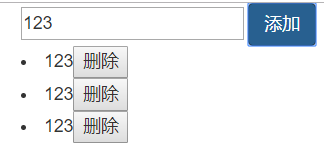
bootstrap和vue做一个todolist
<!DOCTYPE html>
<html lang="en">
<head>
    <meta charset="UTF-8">
    <meta name="viewport" content="width=device-width, initial-scale=1.0">
    <meta http-equiv="X-UA-Compatible" content="ie=edge">
    <link rel="stylesheet" type="text/css" href="bootstrap/bootstrap.min.css"/>
    <script src="bootstrap/jquery-1.11.0.js"></script>
    <script src="bootstrap/vue.js"></script>
    <title>Document</title>
</head>
<body>
    <div class="container">
    <div class="col">
        <div id="box">
<input type="text" v-model="ipt" placeholder="Search">
<button class="btn btn-primary" @click="tap()">添加</button>
<lu>
    <li v-for="(item,i) in list">{{item}}<button @click="del(i)">删除</button></li>
</lu>
    </div>
    </div>
    </div>
    <script>
    new Vue({
el:"#box",
data:{
    ipt:"",
    list:[],

},
methods:{
tap(){
    this.list.push(this.ipt)
},
del(i){
    //this.list.pop(this.ipt)
    this.list.splice(i,1)
}
}
    })
    </script>
</body>
</html>
实现图
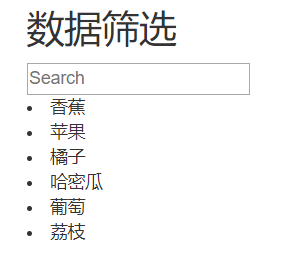
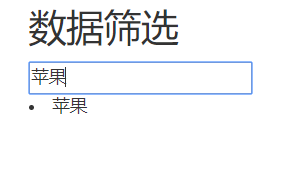
computed之数据筛选
<!DOCTYPE html>
<html lang="en">
<head>
    <meta charset="UTF-8">
    <meta name="viewport" content="width=device-width, initial-scale=1.0">
    <meta http-equiv="X-UA-Compatible" content="ie=edge">
    <link rel="stylesheet" type="text/css" href="bootstrap/bootstrap.min.css"/>
    <script src="bootstrap/jquery-1.11.0.js"></script>
    <script src="bootstrap/vue.js"></script>
    <title>Document</title>
</head>
<body>
    <div class="container">
    <div class="col">
        <div id="box">
            <h2>数据筛选</h2>
<input type="text" v-model="ipt" placeholder="Search">
<!-- <button class="btn btn-primary" @click="tap()">搜索</button> -->
<lu>
    <li v-for="item in list">{{item}}</li>
</lu>
    </div>
    </div>
    </div>
    <script>
    new Vue({
el:"#box",
data:{

    arr:['香蕉','苹果','橘子','哈密瓜','葡萄','荔枝'],
    ipt:""

},
 computed:{
list(){    //给个函数
let arr=[];//把所有符合原本arr数据放在一个arr的变量里
this.arr.map((item,i)=>{  //原数据arr做个遍历循环
    if(item.indexOf(this.ipt)!=-1){   //判断符合条件  indexOf用来判断一个字符串里是否包含另一个字符串
        arr.push(item)//把符合条件的放在数组里
    }
})
return arr;//返回符合条件的数组
}
    }
})
    </script>
</body>
</html>
实现图

 浙公网安备 33010602011771号