

linux系统安装mysql
1,上传mysql安装包到/home/用户/
alt + p -------> put d:/setup/mysql-5.7.27-1.el7.x86_64.rpm-bundle.tar
2,解压mysql安装包
mkdir mysql

tar -xvf mysql-5.7.27-1.el7.x86_64.rpm-bundle.tar -C /home/mysql/
3,安装客户端
cd mysql/

rpm -ivh mysql-community-client-5.7.27-1.el7.x86_64.rpm --force --nodeps
4,安装服务端
rpm -ivh mysql-community-server-5.7.27-1.el7.x86_64.rpm --force --nodeps
5,修改mysql默认字符集
vi /etc/my.cnf

    添加如下内容:

    [mysqld]
    character-set-server=utf8
    collation-server=utf8_general_ci

    -- 在文件最下方添加

    [client]
    default-character-set=utf8
6,启动mysql服务
service mysqld start
7,登录mysql
mysql -u root -p  敲回车,输入密码

    初始密码查看:cat /var/log/mysqld.log

    在root@localhost:   后面的就是初始密码
8,修改密码
set global validate_password_policy=0;

set global validate_password_length=1;

set password=password('密码');
9,授予远程连接权限
//授权
    grant all privileges on *.* to 'root' @'%' identified by '密码';

//刷新
    flush privileges;
10,关闭Linux系统防火墙
systemctl stop firewalld
11,重启mysql服务
service mysqld restart
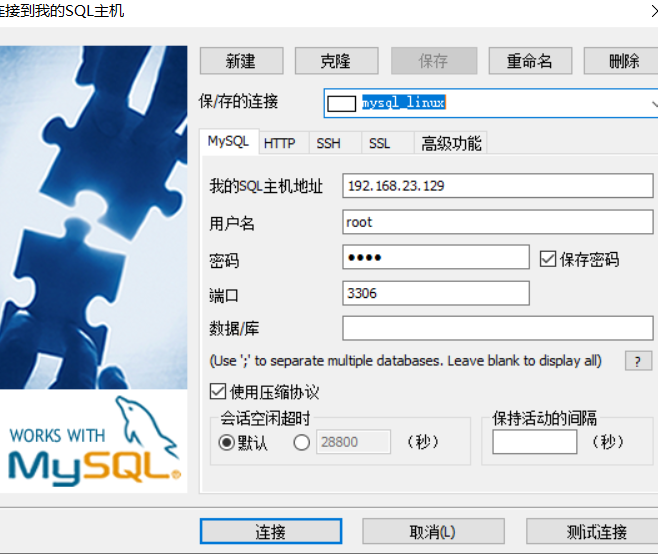
12,使用SQLYog工具连接

 浙公网安备 33010602011771号