How to use Glob() function to find files recursively in Python?

https://www.geeksforgeeks.org/how-to-use-glob-function-to-find-files-recursively-in-python/

Glob is a general term used to define techniques to match specified patterns according to rules related to Unix shell. Linux and Unix systems and shells also support glob and also provide function glob() in system libraries.

In Python, the glob module is used to retrieve files/pathnames matching a specified pattern. The pattern rules of glob follow standard Unix path expansion rules. It is also predicted that according to benchmarks it is faster than other methods to match pathnames in directories. With glob, we can also use wildcards ("*, ?, [ranges]) apart from exact string search to make path retrieval more simple and convenient.


Note: This module comes built-in with Python, so there is no need to install it externally.

Example:

import glob
  
  
print('Named explicitly:')
for name in glob.glob('/home/geeks/Desktop/gfg/data.txt'):
    print(name)
  
# Using '*' pattern 
print('\nNamed with wildcard *:')
for name in glob.glob('/home/geeks/Desktop/gfg/*'):
    print(name)
  
# Using '?' pattern
print('\nNamed with wildcard ?:')
for name in glob.glob('/home/geeks/Desktop/gfg/data?.txt'):
    print(name)
  
# Using [0-9] pattern
print('\nNamed with wildcard ranges:')
for name in glob.glob('/home/geeks/Desktop/gfg/*[0-9].*'):
    print(name)

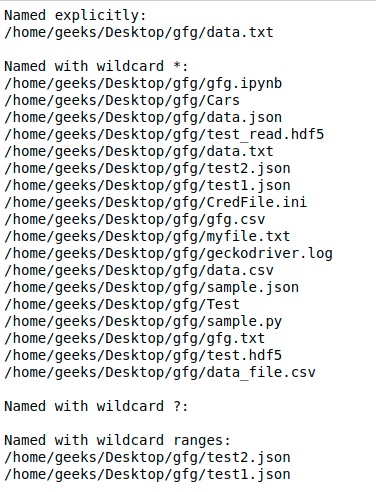
Output :

python-glob

Using Glob() function to find files recursively

We can use the function glob.glob() or glob.iglob() directly from glob module to retrieve paths recursively from inside the directories/files and subdirectories/subfiles.


Syntax:

glob.glob(pathname, *, recursive=False)
glob.iglob(pathname, *, recursive=False)

Note: When recursive is set True “**” followed by path separator('./**/') will match any files or directories.

Example:

 
# Python program to find files
# recursively using Python
  
  
import glob
  
  
# Returns a list of names in list files.
print("Using glob.glob()")
files = glob.glob('/home/geeks/Desktop/gfg/**/*.txt'
                   recursive = True)
for file in files:
    print(file)
  
  
# It returns an iterator which will 
# be printed simultaneously.
print("\nUsing glob.iglob()")
for filename in glob.iglob('/home/geeks/Desktop/gfg/**/*.txt',
                           recursive = True):
    print(filename)

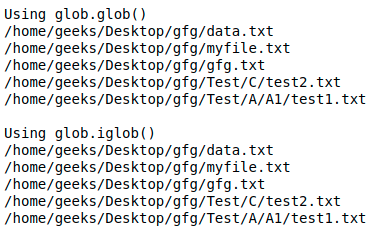
Output :

python-glob
For older versions of python:
The most simple method is to use os.walk() as it is specifically designed and optimized to allow recursive browsing of a directory tree. Or we can also use os.listdir() to get all the files in directory and subdirectories and then filter out.

Let us see it through an example-
Example:

 
# Python program to find files
# recursively using Python
  
  
import os
   
# Using os.walk()
for dirpath, dirs, files in os.walk('src'): 
  for filename in files:
    fname = os.path.join(dirpath,filename)
    if fname.endswith('.c'):
      print(fname)
   
"""
Or
We can also use fnmatch.filter()
to filter out results.
"""
for dirpath, dirs, files in os.walk('src'): 
  for filename in fnmatch.filter(files, '*.c'):
    print(os.path.join(dirpath, filename))
   
# Using os.listdir()
path = "src"
dir_list = os.listdir(path)
for filename in fnmatch.filter(dir_list,'*.c'):
  print(os.path.join(dirpath, filename))

Output :


./src/add.c
./src/subtract.c
./src/sub/mul.c
./src/sub/div.c

./src/add.c
./src/subtract.c
./src/sub/mul.c
./src/sub/div.c

./src/add.c
./src/subtract.c
./src/sub/mul.c
./src/sub/div.c

通配符是一些特殊符号,主要有星号(*)和问号(?),用来模糊搜索文件,“*”可以匹配任意个数个符号, “?”可以匹配单个字符。

当查找文件夹时,可以使用它来代替一个或多个真正字符;当不知道真正字符或者需要匹配符合一定条件的多个目标文件时,可以使用通配符代替一个或多个真正的字符。

英文 “globbing”意为统配,python在模块glob中定义了glob()函数,实现了对目录内容进行匹配的功能,glob.glob()函数接受通配模式作为输入,并返回所有匹配的文件名和路径名列表,与os.listdir类似。

glob模块中的常用函数:

1
glob(pathname, recursive=False)

第一个参数pathname为需要匹配的字符串。(该参数应尽量加上r前缀,以免发生不必要的错误)

第二个参数代表递归调用,与特殊通配符“**”一同使用,默认为False。

该函数返回一个符合条件的路径的字符串列表,如果使用的是Windows系统,路径上的“\”符号会自动加上转义符号变为“\\”。

1
iglob(pathname, recursive=False)

参数与glob()一致。

返回一个迭代器,该迭代器不会同时保存所有匹配到的路径,而是逐个获取匹配的文件路径名,遍历该迭代器的结果与使用相同参数调用glob()的返回结果一致。

glob模块支持的通配符:

通配符功能
* 匹配0或多个字符
** 匹配所有文件、目录、子目录和子目录里的文件(3.5版本新增)
? 匹配1个字符,与正则表达式里的?不同
[exp] 匹配指定范围内的字符,如:[1-9]匹配1至9范围内的字符
[!exp] 匹配不在指定范围内的字符

glob.glob函数使用示例

1
2
3
4
5
6
7
8
9
10
11
12
13
14
15
16
17
18
19
20
21
22
23
24
25
26
27
import glob
  
listglob = []
listglob = glob.glob(r"/home/xxx/picture/*.png")
listglob.sort()
print listglob
  
print '--------------------'
listglob = glob.glob(r"/home/xxx/picture/0?.png")
listglob.sort()
print listglob
  
print '--------------------'
listglob = glob.glob(r"/home/xxx/picture/0[0,1,2].png")
listglob.sort()
print listglob
  
print '--------------------'
listglob = glob.glob(r"/home/xxx/picture/0[0-3].png")
listglob.sort()
print listglob
  
print '--------------------'
listglob = glob.iglob(r"/home/xxx/picture/0[a-z].png")
print listglob
for item in listglob:
    print item

补充:Python glob() 函数 秒懂

Python glob()

glob模块是最简单的模块之一,内容非常少。用它可以查找符合特定规则的文件路径名。

跟使用windows下的文件搜索差不多。查找文件只用到三个匹配符:'*', “?”, “[ ]”。”*”匹配任意0个或多个字符;”?”匹配任意单个字符;”[ ]”匹配指定范围内的字符,如:[0-9]匹配数字。

不区分大小写

'.'开头的不匹配

print(glob.glob(r' . ./*') )

上一级所有目录

1
2
>>> print(glob.glob("../*"))
['..\\Python37-32', '..\\Python38-32']

print(glob.glob(r' ./*') )

本级所有目录

1
2
>>> print(glob.glob("./*"))
['.\\DLLs', '.\\Doc', '.\\include', '.\\Lib', '.\\libs', '.\\LICENSE.txt', '.\\NEWS.txt', '.\\python.exe', '.\\python3.dll', '.\\python38.dll', '.\\pythonw.exe', '.\\Scripts', '.\\tcl', '.\\Tools', '.\\vcruntime140.dll']

print(glob.glob(r' ./ * . *') )

本级所有文件

1
2
print(glob.glob("./*.*"))
['.\\LICENSE.txt', '.\\NEWS.txt', '.\\python.exe', '.\\python3.dll', '.\\python38.dll', '.\\pythonw.exe', '.\\vcruntime140.dll']

print(glob.glob(r' ./ * . *') )

本级所有dll

1
2
>>> print(glob.glob("./*.dll"))
['.\\python3.dll', '.\\python38.dll', '.\\vcruntime140.dll']

print(glob.glob(r' C:/ * ') )

C盘所有目录

1
2
>>> print(glob.glob("C:/*"))
['C:/$360Section', 'C:/$Recycle.Bin', 'C:/360SANDBOX', 'C:/Boot', 'C:/bootmgr'.......]

print(glob.glob(“C:/[PB][RO]”) )

C盘所有包含pr/po/br/bo的目录

1
2
print(glob.glob("C:/*[PB][RO]*"))
['C:/360SANDBOX', 'C:/Boot', 'C:/bootmgr', 'C:/BOOTNXT', 'C:/BOOTSECT.BAK', 'C:/PO', 'C:/Program Files', 'C:/Program Files (x86)', 'C:/ProgramData']

print(glob.glob(“C:/p?O”) )

C盘所有包含P_o的目录

1
2
>>> print(glob.glob("C:/*P?O*"))
['C:/Program Files', 'C:/Program Files (x86)', 'C:/ProgramData']
 

print(glob.glob(“C://.txt”) )

C盘两级目录所有的txt

1
2
>>> print(glob.glob("C:/*/*.txt"))
['C:/xiaoyi\\检索式.txt']
posted on 2023-03-07 20:49  guolongnv  阅读(0)  评论(0)    收藏  举报