

uni-app 踩坑之旅4
又是踩坑的一天,今天来处理一下富文本:
https://uniapp.dcloud.net.cn/component/editor.html
直接用的内置的,修修改改:
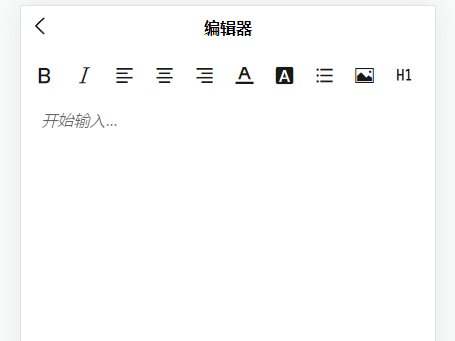
除了把字体和背景扩展了下,其他的都原生的:
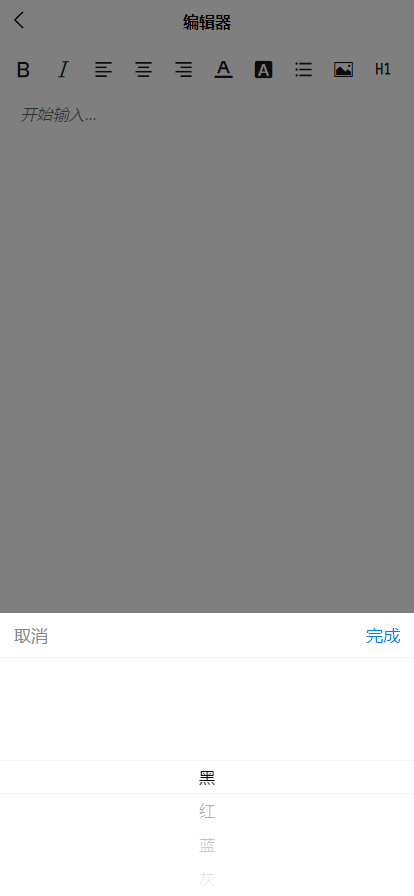
图片底层走的是 uni.chooseImage,然后调用上传,把 图片 上传到服务器,再将返回的 src 插入到富文本中:
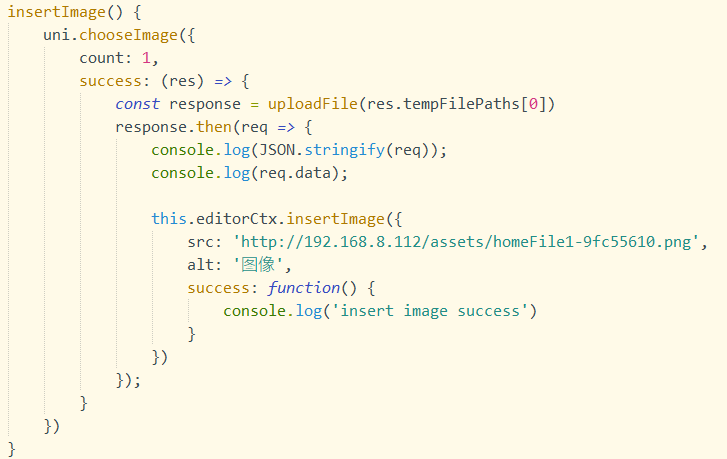
因为是真机调试,所以控制台要想打印对象,得转成字符串,之前调整底层请求时,也是这么干的(uni.request(options));
这次也是不例外,但是遇到了个坑, req 这个参数即上传成功,后台返回的参数,能打印出来,但是就是访问不到属性值:
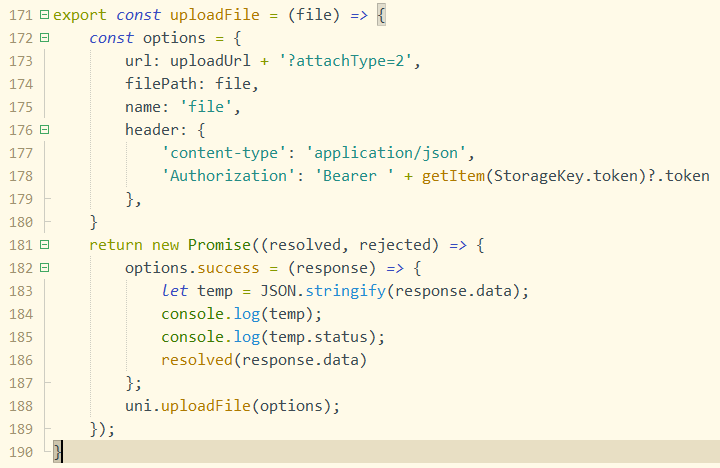

按理说对象就能访问到属性值,卡了好一会,最后还是突然想看下他的类型,
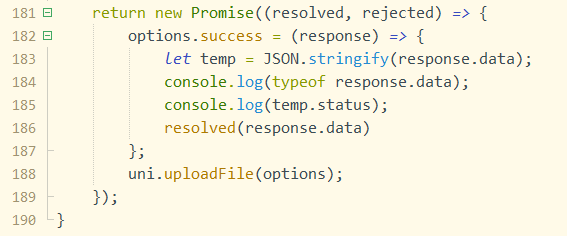
结果发现这个 data 居然是个 string,可真是太坑了!

客户端可是个对象,留待后续深入探讨:

<template>
    <view class="container">
        <view class="page-body">
            <view class='wrapper'>
                <view class='toolbar' @tap="format" style="overflow-y: auto;">
                    <view :class="formats.bold ? 'ql-active' : ''" class="iconfont icon-zitijiacu" data-name="bold">
                    </view>
                    <view :class="formats.italic ? 'ql-active' : ''" class="iconfont icon-zitixieti" data-name="italic">
                    </view>

                    <view :class="formats.align === 'left' ? 'ql-active' : ''" class="iconfont icon-zuoduiqi"
                        data-name="align" data-value="left"></view>
                    <view :class="formats.align === 'center' ? 'ql-active' : ''" class="iconfont icon-juzhongduiqi"
                        data-name="align" data-value="center"></view>
                    <view :class="formats.align === 'right' ? 'ql-active' : ''" class="iconfont icon-youduiqi"
                        data-name="align" data-value="right"></view>

                    <view class="iconfont icon-text_color" data-name="color" :data-value="color">
                        <picker :value="colorIndex" :range="colorList" class='color-picker' @change="colorChange"
                            range-key="name">
                        </picker>
                    </view>

                    <view class="iconfont icon-fontbgcolor" data-name="backgroundColor" :data-value="bgColor">
                        <picker :value="bgColorIndex" :range="colorList" class='color-picker' @change="bgColorChange"
                            range-key="name">
                        </picker>
                    </view>

                    <view :class="formats.list === 'bullet' ? 'ql-active' : ''" class="iconfont icon-wuxupailie"
                        data-name="list" data-value="bullet"></view>

                    <view class="iconfont icon-charutupian" @tap="insertImage"></view>
                    <view class="iconfont icon-format-header-1" data-name="header" :data-value="headerLevel"></view>
                </view>

                <view class="editor-wrapper">
                    <editor id="editor" class="ql-container" :placeholder="$t('placeholder.startInput')" show-img-size
                        show-img-toolbar show-img-resize @statuschange="onStatusChange" :read-only="readOnly"
                        @ready="onEditorReady" @input="onContentChange">
                    </editor>
                </view>
            </view>
        </view>
    </view>
</template>

<script>
    import { server, uploadUrl } from '@/api/base';
    import { uploadFile } from '@/utils/public';
    import { getItem, removeItem, StorageKey } from '@/utils/storage';

    export default {
        data() {
            return {
                readOnly: false,
                formats: {},
                colorList: [
                    { color: '#000000', name: this.$t('color.black') },
                    { color: '#d81e06', name: this.$t('color.red') },
                    { color: '#3662EC', name: this.$t('color.blue') },
                    { color: '#8a8a8a', name: this.$t('color.gray') },
                    { color: '#ffffff', name: this.$t('color.white') },
                    { color: '#1afa29', name: this.$t('color.green') },
                ],
                colorIndex: 0,
                color: '#000000',
                bgColorIndex: 4,
                bgColor: '#ffffff',
                headerLevel: 1,
            }
        },
        props: {
            init: {
                type: String,
                default: '',
            }
        },
        watch: {
            init: {
                handler(_new, old) {
                    if (_new) {
                        // https://uniapp.dcloud.net.cn/api/media/editor-context.html#
                        this.editorCtx.setContents({
                            html: _new,
                            success() {
                                console.log('content init success');
                            }
                        });
                    }
                },
                immediate: true,
                deep: true
            }
        },
        methods: {
            readOnlyChange() {
                this.readOnly = !this.readOnly
            },
            onEditorReady() {
                uni.createSelectorQuery().select('#editor').context((res) => {
                    this.editorCtx = res.context;
                }).exec()
            },
            format(e, s) {
                let temp = null;
                if (e) {
                    temp = e.target.dataset;
                } else {
                    temp = s;
                }
                let { name, value } = temp;
                if (!name) return
                console.log('format', name, value)
                this.editorCtx.format(name, value)
            },
            colorChange(e) {
                this.colorIndex = e.detail.value;
                this.format(null, {
                    name: 'color',
                    value: this.colorList[this.colorIndex].color,
                });
            },
            bgColorChange(e) {
                this.bgColorIndex = e.detail.value;
                this.format(null, {
                    name: 'backgroundColor',
                    value: this.colorList[this.bgColorIndex].color,
                });
            },
            onStatusChange(e) {
                const formats = e.detail
                this.formats = formats
            },
            onContentChange(e) {
                // 监听内容改变// 通过 editorCtx.getContents 手动取
            },
            insertImage() {
                uni.chooseImage({
                    count: 1,
                    success: (res) => {
                        const response = uploadFile(res.tempFilePaths[0])
                        response.then(req => {
                            this.editorCtx.insertImage({
                                src: req.data,
                                alt: '图像',
                                success: function() {
                                    console.log('insert image success')
                                }
                            })
                        });
                    }
                })
            }
        },
        onLoad() {}
    }
</script>

<style>
    @import "./editor-icon.css";

    .container {
        padding: 10rpx;
    }

    #editor {
        margin-top: 0;
    }

    .icon-text_color {
        position: relative;
    }

    .color-picker {
        position: absolute;
        top: 0;
        opacity: 0;
        width: 24rpx;
        height: 24rpx;
    }

    .icon-fontbgcolor {
        position: relative;
    }

    .page-body {
        height: calc(100vh - var(--window-top) - var(--status-bar-height));
    }

    .wrapper {
        height: 100%;
    }

    .editor-wrapper {
        height: calc(100vh - var(--window-top) - var(--status-bar-height) - 100rpx);
        background: #fff;
    }

    .iconfont {
        display: inline-block;
        padding: 8px 8px;
        width: 24px;
        height: 24px;
        cursor: pointer;
        font-size: 20px;
    }

    .toolbar {
        box-sizing: border-box;
        border-bottom: 0;
        font-family: 'Helvetica Neue', 'Helvetica', 'Arial', sans-serif;
    }

    .ql-container {
        box-sizing: border-box;
        padding: 12px 15px;
        width: 100%;
        min-height: 30vh;
        height: 100%;
        margin-top: 20px;
        font-size: 16px;
        line-height: 1.5;
    }

    .ql-active {
        color: #06c;
    }
</style>
api:https://uniapp.dcloud.net.cn/api/media/editor-context.html#

 浙公网安备 33010602011771号