

仪表盘 类 钟表 demo
用仪表盘做个 demo 玩玩
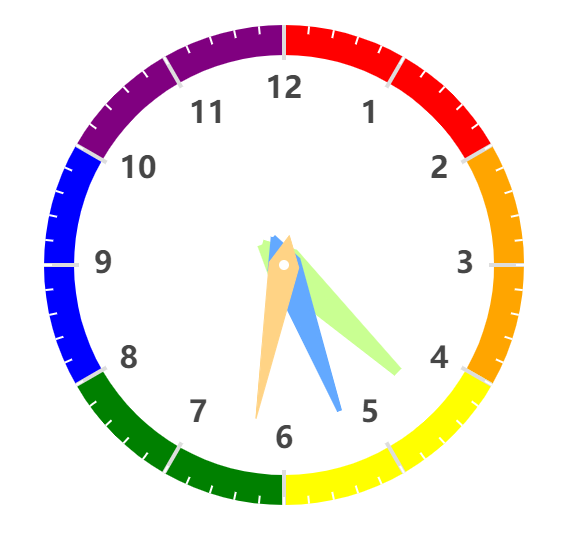
代码:
import { Pieces } from "./share/pieces";

/**
 * 通过对仪表盘样式的整理
 * 做个钟表 demo 验证掌握情况
 * 文档:https://echarts.apache.org/zh/option.html#series-gauge.axisLine
 * demo:https://echarts.apache.org/examples/zh/editor.html?c=gauge-stage
 */
export class ClockTick {
    hour = 0;
    minute = 0;
    second = 0;

    constructor(myChart) {
        this.getTime();
        myChart.setOption(this.getOptions());
        this.doTick(myChart);
    }

    // 设置出值
    getTime() {
        let current = new Date();
        // 秒针值
        this.second = current.getSeconds() * (12 / 60);
        // 分针值 + 秒针已走步数
        this.minute = current.getMinutes() * (12 / 60) + (this.second / 60);
        // 时针值 + 分针已走步数 + 秒针已走步数
        this.hour = current.getHours();
        this.hour > 12 && (this.hour -= 12);
        this.hour = this.hour + (this.minute / 12);
    }

    /**
     * 自增
     */
    doTick(myChart) {
        let self = this;
        setInterval(function () {
            self.calTime(self);
            myChart.setOption({
                series: [
                    {
                        data: self.getData([ self.hour, self.minute, self.second ]),
                    }
                ]
            });
        }, 1000);
    }

    calTime(self) {
        // 秒针自增
        self.second += 12 / 60;
        if (self.second >= 12) {
            self.second = 0;
        }
        // 分针自增
        self.minute += 12 / 60 / 60
        if (self.minute >= 12) {
            self.minute = 0;
        }
        // 时针自增
        self.hour += 12 / 60 / 60 / 60;
        if (self.hour >= 12) {
            self.hour = 0;
        }
    }

    getData(arr) {
        return [
            {
                value: arr[0],
                itemStyle: { // 数据项的指针样式。
                    color: '#C9FF92', // 图形的颜色。
                    borderWidth: 10, // 描边线宽。为 0 时无描边。
                    borderColor: '#C9FF92',
                }
            },
            {
                value: arr[1],
                itemStyle: { // 数据项的指针样式。
                    color: '#63A9FF', // 图形的颜色。
                    borderWidth: 5, // 描边线宽。为 0 时无描边。
                    borderColor: '#63A9FF',
                }
            },
            {
                value: arr[2],
                itemStyle: { // 数据项的指针样式。
                    color: '#FFD385', // 图形的颜色。
                    borderWidth: 1, // 描边线宽。为 0 时无描边。
                    borderColor: '#FFD385',
                }
            },
        ];
    }

    getOptions() {
        return {
            series: [
                {
                    type: 'gauge',
                    center: [ 400, 400 ], // 的中心(圆心)坐标,数组的第一项是横坐标,第二项是纵坐标。
                    radius: 240, // 仪表盘半径
                    startAngle: 90, // 仪表盘起始角度。圆心 正右手侧为0度,正上方为90度,正左手侧为180度。默认 225
                    endAngle: -270, // 仪表盘结束角度。默认 -45
                    clockwise: true, // 仪表盘刻度是否是顺时针增长。 默认 true
                    splitNumber: 12, // 刻度的分割段数。
                    min: 0, // 最小的数据值,映射到 minAngle。
                    max: 12, // 最大的数据值,映射到 maxAngle。
                    axisLine: { // 仪表盘轴线相关配置。
                        lineStyle: { // 仪表盘轴线样式。 { color , width , shadowBlur , shadowColor , shadowOffsetX , shadowOffsetY , opacity }
                            width: 30,
                            color: [
                                [ 0.166, 'red' ],
                                [ 0.332, 'orange' ],
                                [ 0.499, 'yellow' ],
                                [ 0.666, 'green' ],
                                [ 0.833, 'blue' ],
                                [ 1, 'purple' ],
                            ], // 颜色区间设置
                        }
                    },
                    pointer: { // 仪表盘指针。
                        show: true, // 是否显示指针。
                        showAbove: true, // 指针是否显示在标题和仪表盘详情上方。
                        length: '65%', // 指针长度,可以是绝对数值,也可以是相对于半径的半分比。
                        width: 15, // 指针宽度。
                    },
                    anchor: { // 表盘中指针的固定点。跟仪表盘指针配置差不多
                        show: true,
                        size: 10,
                        showAbove: true, // 固定点是否显示在指针上面。
                        icon: 'circle', // ECharts 提供的标记类型包括 circle|rect|roundRect|triangle|diamond|pin|arrow|none,可以通过 'image://url' 设置为图片,其中 URL 为图片的链接,或者 dataURI。
                        offsetCenter: [ 0, 0 ], // 相对于仪表盘中心的偏移位置,数组第一项是水平方向的偏移,第二项是垂直方向的偏移。可以是绝对的数值,也可以是相对于仪表盘半径的百分比。
                        itemStyle: { // 指针样式。{ color , borderColor , borderWidth , borderType , borderDashOffset , borderCap , borderJoin , borderMiterLimit , shadowBlur , shadowColor , shadowOffsetX , shadowOffsetY , opacity }
                            color: '#fff'
                        }
                    },
                    splitLine: { // 分隔线样式。
                        show: true, // 是否显示分隔线。
                        distance: -30, // 分隔线与轴线的距离。
                        length: 35, // 分隔线线长。支持相对半径的百分比。
                        lineStyle: { // { color , width , type , dashOffset , cap , join , miterLimit , shadowBlur , shadowColor , shadowOffsetX , shadowOffsetY , opacity }
                            color: '#ddd',
                            width: 4
                        }
                    },
                    axisTick: { // 刻度样式。
                        show: true, // 是否显示刻度。
                        splitNumber: 5, // 分隔线之间分割的刻度数。默认 5
                        distance: -30, // 分隔线与轴线的距离。
                        length: 8, // 刻度线长。支持相对半径的百分比。
                        lineStyle: {
                            color: '#fff',
                            width: 2
                        }
                    },
                    axisLabel: {
                        fontStyle: 'normal', // 文字字体的风格。 normal|italic|oblique
                        fontWeight: 'bold', // 文字字体的粗细。 normal|bold|bolder|lighter
                        distance: 45, // 标签与刻度线的距离。
                        fontSize: 30, // 字体样式相关
                        formatter: function (value) {
                            if (value) { // 0 与 12 重合,过滤掉 0
                                return value;
                            }
                        },
                    },
                    detail: { // 仪表盘详情,用于显示数据。
                        show: false, // 是否显示详情
                    },
                    data: this.getData([ this.hour, this.minute, this.second ]),
                    // data: [
                    //     {
                    //         // 时
                    //         value: this.hour,
                    //         itemStyle: { // 数据项的指针样式。
                    //             color: '#C9FF92', // 图形的颜色。
                    //             borderWidth: 10, // 描边线宽。为 0 时无描边。
                    //             borderColor: '#C9FF92',
                    //         }
                    //     }, {
                    //         // '分',
                    //         value: this.minute,
                    //         itemStyle: { // 数据项的指针样式。
                    //             color: '#63A9FF', // 图形的颜色。
                    //             borderWidth: 5, // 描边线宽。为 0 时无描边。
                    //             borderColor: '#63A9FF',
                    //         }
                    //     }, {
                    //         // '秒',
                    //         value: this.second,
                    //         itemStyle: { // 数据项的指针样式。
                    //             color: '#FFD385', // 图形的颜色。
                    //             borderWidth: 1, // 描边线宽。为 0 时无描边。
                    //             borderColor: '#FFD385',
                    //         }
                    //     }
                    // ]
                }
            ]
        };
    }
}
bug 的一点是:指针从 60 到 0 时,反方向归零,而不是直接下一步到0 ...

 浙公网安备 33010602011771号