
linux 安装node 使用websocke 请求php接口完成实时数据推送
首先安装node,
执行命令
wget https://nodejs.org/dist/v12.18.1/node-v12.18.1-linux-x64.tar.xz
然后解压
tar -xvf node-v12.18.1-linux-x64.tar.xz
编辑 vim /etc/profile 在最下面添加 export PATH=$PATH: 后面跟上 node 下 bin 目录的路径
export PATH=$PATH:/www/wwwroot/node-v12.18.1-linux-x64/bin
执行 source /etc/profile
执行node -v 查看版本号是否安装成功。
在网站目录使用npm安装websocket
npm install nodejs-websocket --save
创建app.js用来做服务端
var ws = require("nodejs-websocket");
console.log("开始建立连接...")
var http = require("http");
var server = ws.createServer(function(conn){
conn.on("text", function (str) {
setInterval(() => {
var data = {username:"hello",password:"123456"};
data = JSON.stringify(data);
var opt = {
host:'接口服务器IP',
port:'80',
method:'POST',
path:'接口地址',
headers:{
"Content-Type": 'application/json',
"Content-Length": data.length
}
}
var body = '';
var req = http.request(opt, function(res) {
//console.log("response: " + res.statusCode);
res.on('data',function(data){
body += data;
}).on('end', function(){
  //请求接口完毕后发送接口数据到客户端
   conn.sendText(body)
   console.log(body)
});
}).on('error', function(e) {
console.log("error: " + e.message);
})
req.write(data);
req.end();
}, 10000)


})
conn.on("close", function (code, reason) {
console.log("关闭连接")
});
conn.on("error", function (code, reason) {
console.log("异常关闭")
});
}).listen(9001)
console.log("WebSocket建立完毕")
随便创建一个php文件当接口地址
<?php
echo "创建日期是 " . date("Y-m-d h:i:s") ."id=>".rand(1,999);
?>
创建客户端文件
web.html
<!doctype html>
<html lang="en">
<head>
    <meta charset="UTF-8">
    <title>Document</title>
    <style>
        .kuang{text-align: center;margin-top:200px;}
        #mess{text-align: center}
    </style>
</head>
<body>
    <div id="mess"></div>

    <script>
        var mess = document.getElementById("mess");
        if(window.WebSocket){
            var ws = new WebSocket('ws://120.78.0.130:9001');

            ws.onopen = function(e){
                console.log("连接服务器成功");
                ws.send("game2");
            }
            ws.onclose = function(e){
                console.log("服务器关闭");
            }
            ws.onerror = function(){
                console.log("连接出错");
            }

            ws.onmessage = function(e){
                var time = new Date();
                mess.innerHTML+=time+"的消息:"+e.data+"<br>"
            }
        }
    </script>
</body>
</html>
首先执行服务端文件
node app.js
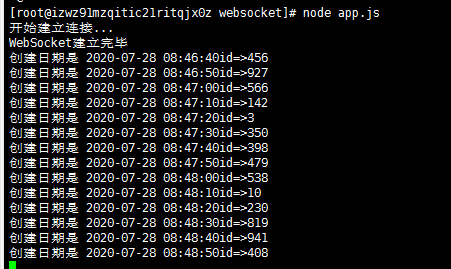
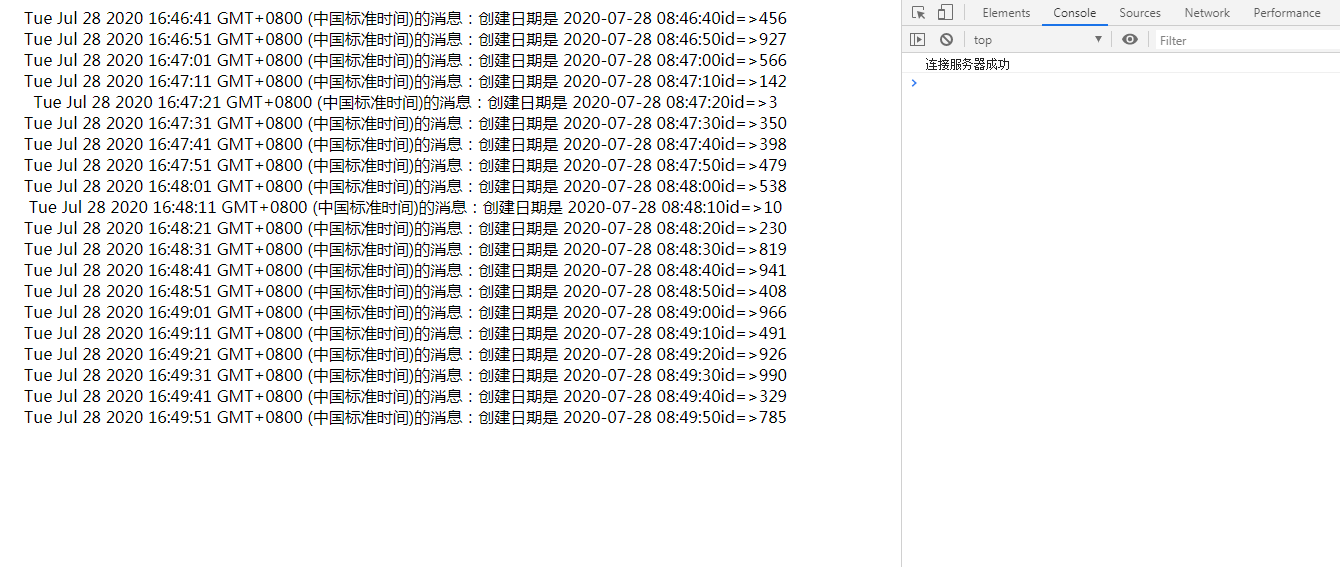
服务端成功开启时,打开客户端web.html文件就会定时接收到服务端发送过来的数据

 浙公网安备 33010602011771号