


第八次作业
一、定义一个点类Point,包含2个成员变量x、y分别表示x和y坐标,2个构造器Point()和Point(intx0,y0),以及一个movePoint(intdx,intdy)方法实现点的位置移动,
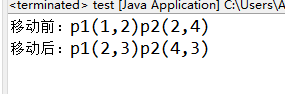
创建两个Point对象p1、p2,分别调用movePoint方法后,打印p1和p2的坐标。[必作题]
package ds;

class Point{
    int x;
    int y;
    public Point() {

    }
    public Point(int x, int y) {
        super();
        this.x = x;
        this.y = y;
    }
    public void movePoint(int x, int y) {
        this.x+=x;
        this.y+=y;
    }
}

package ds;

public class test {
    public static void main(String[] args) {

        Point p1 = new Point(1,2);
        Point p2 = new Point(2,4);
        System.out.println("移动前:p1("+p1.x+","+p1.y+")"+"p2("+p2.x+","+p2.y+")");
        p1.movePoint(1, 1);
        p2.movePoint(2, -1);
        System.out.println("移动后:p1("+p1.x+","+p1.y+")"+"p2("+p2.x+","+p2.y+")");

    }
}
二、定义一个矩形类Rectangle:(知识点:对象的创建和使用)[必做题]
1.定义三个方法:getArea()求面积、getPer()求周长,showAll()分别在控制台输出长、宽、面积、周长。
2.有2个属性:长length、宽width
3.通过构造方法Rectangle(intwidth,intlength),分别给两个属性赋值
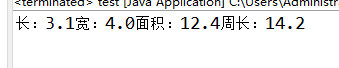
4.创建一个Rectangle对象,并输出相关信息
package ds;

class Rectangle{
    double width;
    double height;
    public Rectangle() {

    }
    public Rectangle(double width, double height) {
        super();
        this.width = width;
        this.height = height;
    }
    public double getArea() {
        return width*height;
    }
    public double getPer() {
        return (width+height)*2;
    }
    public void showAll() {
        System.out.println("长:"+width+"宽:"+height+"面积:"+getArea()+"周长:"+getPer());
    }
}

package ds;

public class test {
    public static void main(String[] args) {

        Rectangle p1 = new Rectangle(3.1,4);
        p1.showAll();
}
}
三、定义一个笔记本类,该类有颜色(char)和cpu型号(int)两个属性。[必做题]
1.无参和有参的两个构造方法;有参构造方法可以在创建对象的同时为每个属性赋值;
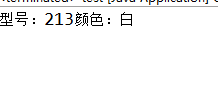
2.输出笔记本信息的方法
3.然后编写一个测试类,测试笔记本类的各个方法。
package ds;

class book{
    int cpu;
    char color;
    public book() {

    }
    public book(int cpu, char color) {
        super();
        this.cpu = cpu;
        this.color = color;
    }
    public void show() {
        System.out.println("型号:"+cpu+"颜色:"+color);
    }
}


package ds;

public class test {
    public static void main(String[] args) {

        book t = new book(213,'白');
        t.show();
}
}
四、定义两个类,描述如下:[必做题]
1.定义一个人类Person:
(1)定义一个方法sayHello(),可以向对方发出问候语“hello,mynameisXXX”
(2)有三个属性:名字、身高、体重
2.定义一个PersonCreate类:
(1)创建两个对象,分别是zhangsan,33,1.73;lishi,44,1.74
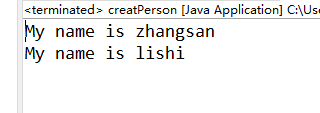
(2)分别调用对象的sayHello()方法。
package ds;

class Person{
    String name;
    double height;
    int weight;
    public Person() {

    }

    public Person(String name, int weight, double height) {
        super();
        this.name = name;
        this.height = height;
        this.weight = weight;
    }

    public void sayHello() {
        System.out.println("My name is "+name);
    }
}


package ds;

public class creatPerson {
public static void main(String[] args) {
    Person p1 = new Person("zhangsan",33,1.73);
    Person p2 = new Person("lishi",44,1.74);
    p1.sayHello();
    p2.sayHello();
}
}
六、定义一个汽车类Vehicle,要求如下:[选做题]
1.属性包括:汽车品牌brand(String类型)、颜色color(String类型)和速度speed(double类型),并且所有属性为私有。
2.至少提供一个有参的构造方法(要求品牌和颜色可以初始化为任意值,但速度的初始值必须为0)。
3.为私有属性提供访问器方法。注意:汽车品牌一旦初始化之后不能修改。
4.定义一个一般方法run(),用打印语句描述汽车奔跑
的功能
5.定义测试类VehicleTest,在其main方法中创建一个品牌为“benz”、颜色为“black”的汽车。
package ds;

class Vehicle{
    private String brand;
    private String color;
    private double speed=0;
    public Vehicle(String brand, String color) {
        super();
        this.brand = brand;
        this.color = color;
    }

    public String getColor() {
        return color;
    }
    public void setColor(String color) {
        this.color = color;
    }
    public double getSpeed() {
        return speed;
    }
    public void setSpeed(double speed) {
        this.speed = speed;
    }

    public String getBrand() {
        return brand;
    }
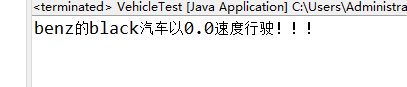
    public void run() {
        System.out.println(brand+"的"+color+"汽车以"+speed+"速度行驶!!!");
    }

}


package ds;

public class VehicleTest {
public static void main(String[] args) {
    Vehicle car = new Vehicle("benz", "black");
    car.run();
}
}

 浙公网安备 33010602011771号