
Hypertest transfer protocal
Hypertext transfer protocol(HTTP) is the core communications protocol used to access the World Wide Web(WWW) and is used by all of today's web applications. It is a simple protocol that was originally developed for retrieving static text-based resources. It has since been extended and leveraged in various ways to enable it to support the complex distributed applications that are now commonplace.
HTTP uses a message-based model in which a client sends a request message and the server returns a response message. The protocol is essentially connectionless: although HTTP uses the stateful TCP protocol as its transport mechanism, each exchange of request and response is an autonomous transaction and may use a different TCP connection.
HTTP Requests
All HTTP messages(requests and responses) consist of one or more headers, each on a separate line, followed by a mandatory blank line, followed by an optional message body. A typical HTTP request is as follows:
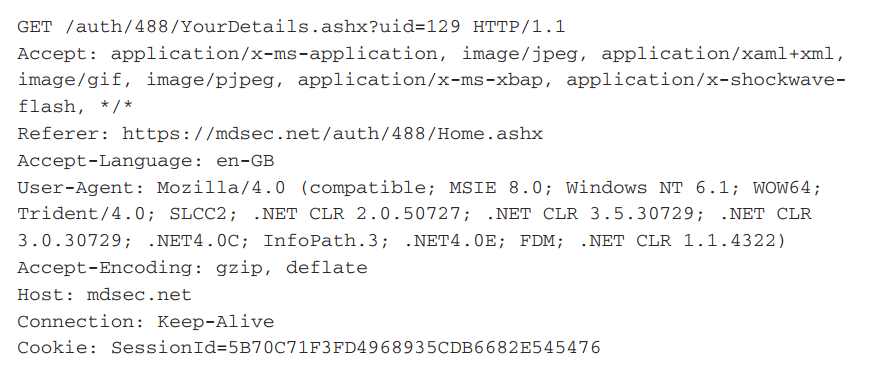
The first line of every HTTP request consists of three items, separated by spaces:
- A verb indicating the HTTP method. The most commonly used method is GET, whose function is to retrieve a resource from the webserver. GET requests do not have a message body, so no further data follows the blank line after the message headers.
- The requested URL. The URL typically as a name for the resource being requested, together with an optional query string containing parameters that the client is passing to that resource. The query string is indicated by the ? character in the URL. The example contains a single parameter with the name uid and the value 129.
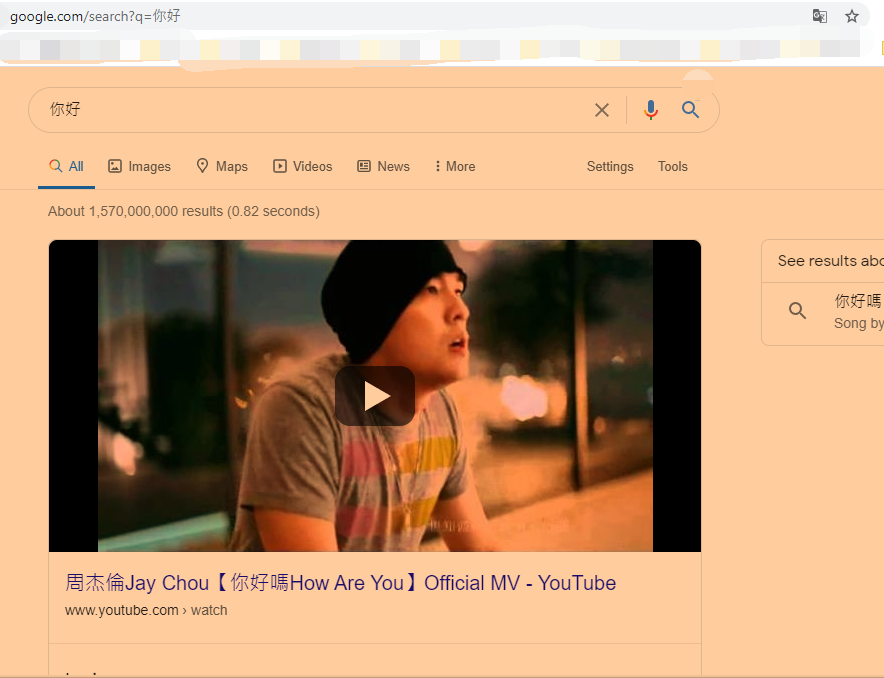
ie: In the google search function page, after ? query 你好 with parameter q and value "你好". - The HTTP version being used. The only HTTP version in common use on the Internet are 1.0 and 1.1, and most browsers use version 1.1 by default. There are a few differences between the specifications of these two versions; however, the only difference you are likely to encounter when attacking web applications is that in version 1.1 the Host request header is mandatory.
- The Referer header is used to indicate the URL from which the request originated(for example, because the user clicked a link on that page). Note that this header was misspelled in the original HTTP specification, and the misspelled version has been retained ever since.
- The User-Agent header is used to provide information about the browser or other client software that generated the request. Note that most browsers include the Mozilla prefix for historical reasons. This was the User-Agent string used by the originally dominant Netscape browser, and other browsers wanted to assert to websites that they were compatible with this standard. As with many quirks from computing history, it has become so established that it is still retained, even on the current version of Internet Explorer, which made the request shown in the example.
- The Host header specifies the hostname that appeared in the full URL being accessed. This is necessary when multiple websites are hosted on the same server, because the URL sent in the first line of the request usually does not contain a hostname.
- The Cookie header is used to submit additional parameters that the server has issued to the client.
HTTP Response
A typical HTTP response is as follows:
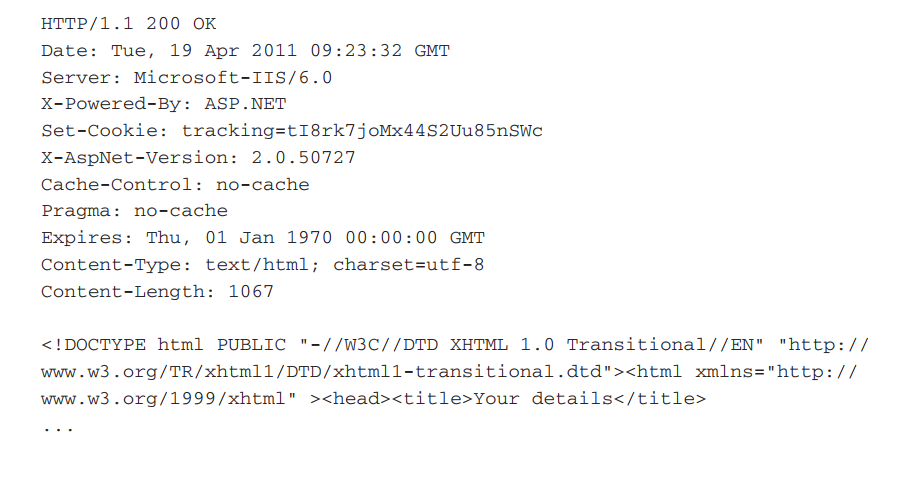
The first line of every HTTP response consists of three items, separated by spaces:
- The HTTP version being used.
- A numeric status code indicating the result of the request. 200 is the most common status code; it means that the request was successful and that the requested resource is being returned.
- A textual "reason phrase" further describing the status of the response. This can have any value and is not used for any purpose by current browsers.
Here are some other points of interest in the response: - The Server header contains a banner indicating the webserver software being used, and sometimes other details such as installed modules and the server operating system. The information contained may or may not be accurate.
- The Set-Cookie header issues the browser a further cookie; this is submitted back in the Cookie header of subsequent requests to this server.
- The Pragma header instructs the browser not to store the response in its cache. The Expires header indicates that the response content expired in the past and therefore should not be cached. These instructions are frequently issued when dynamic content is being returned to ensure that browsers obtain a fresh version of this content on subsequent occasions.
- Almost all HTTP responses contain a message body following the blank line after the headers. The Content-Type header indicates that the body of this message contains an HTML document.
- The Content-Length header indicates the length of the message body in bytes.

 浙公网安备 33010602011771号