
Using the Tor Brower to access the Dark Web

Pros:
      * Anonymous
Cons:
      * Low Speed
      * Informations are not secure

Suitable application scenarios: 1. Scanning  2. Nmapping  3. Bypass firewall setting or firewall limitations
Install
Go to https://torproject.org/download, download the proper one. Extract it on Kali Linux to desktop, Click TO Browser setup then it will change to Tor Browser.
Browser
After Running Tor browser, u need to click configure, then Select Tor is censored in my country and Select a built-in bridge, choose meek-azure, then there u go.
Proxychains Usage
Pros:
      * Support SOCK5, SOCK4, and HTTP CONNECT proxy servers.
      * Proxychains can be mixed up with different proxy types in a list.
      * Proxychains also support any kinds of chaining option methods, like random, which takes a random proxy in the list stored in a configuration file, or chaining proxies in the exact order list, different proxies are separated by a new line in a file. There is also a dynamic option, that lets Proxychains go through the live only proxies, it will exclude the dead or unreachable proxies, the dynamic option often called the smart option.
      * Proxychains is capable to do DNS resolving through the proxy.
SYNTAX
For example, we want to scan available hosts and its ports in our network using Nmap using Proxychains the command should look like this:
proxychains nmap 192.168.1.1/24
- proxychains: tell our machine to run proxychains service
- nmap: what job proxychains to be covered
- 192.168.1.1/24 or any arguments needed by certain job or tool, in this case is our scan range needed by Nmap to run the scan.
Wrap up, the syntax is simple, as it is only adds proxychains on start of every command. The rest after the proxychain command is the job and its arguments.
How to use Proxychains
Before we are using proxychains, we need to setup proxychians configuration file. We also need a list of proxy server. Proxychains configuration file located on /etc/proxychains.conf .
Open proxychains.conf file in your desirable text editor and set up some configuration. Scroll down until you reach the bottom, at the end of file you will find:
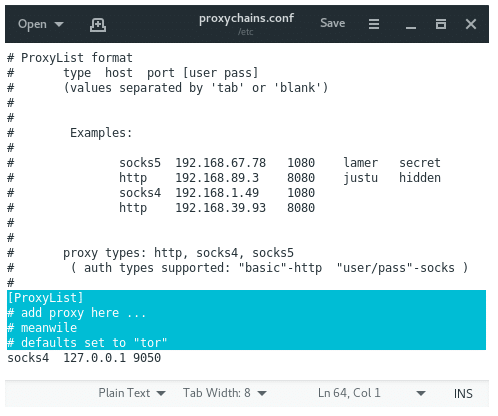
By default proxychains directly sends the traffic first through our host at 127.0.0.1 on port 9050(the default Tor configuration). If you are using Tor, leave this as it is. If you are not using Tor, you will need to comment out this line.
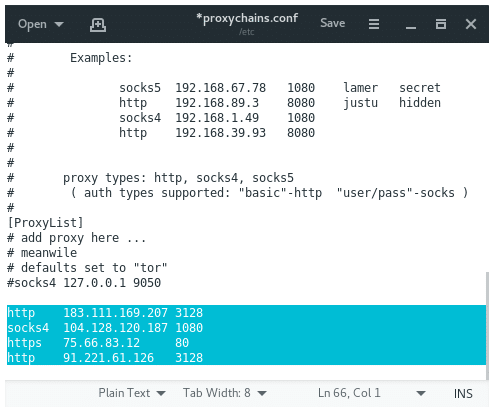
Comment the default proxy for Tor if you are not using Tor then add the proxy on Proxychains config file, then save it. It should look like this:

 浙公网安备 33010602011771号