

vue3实现甘特图,把控项目风险
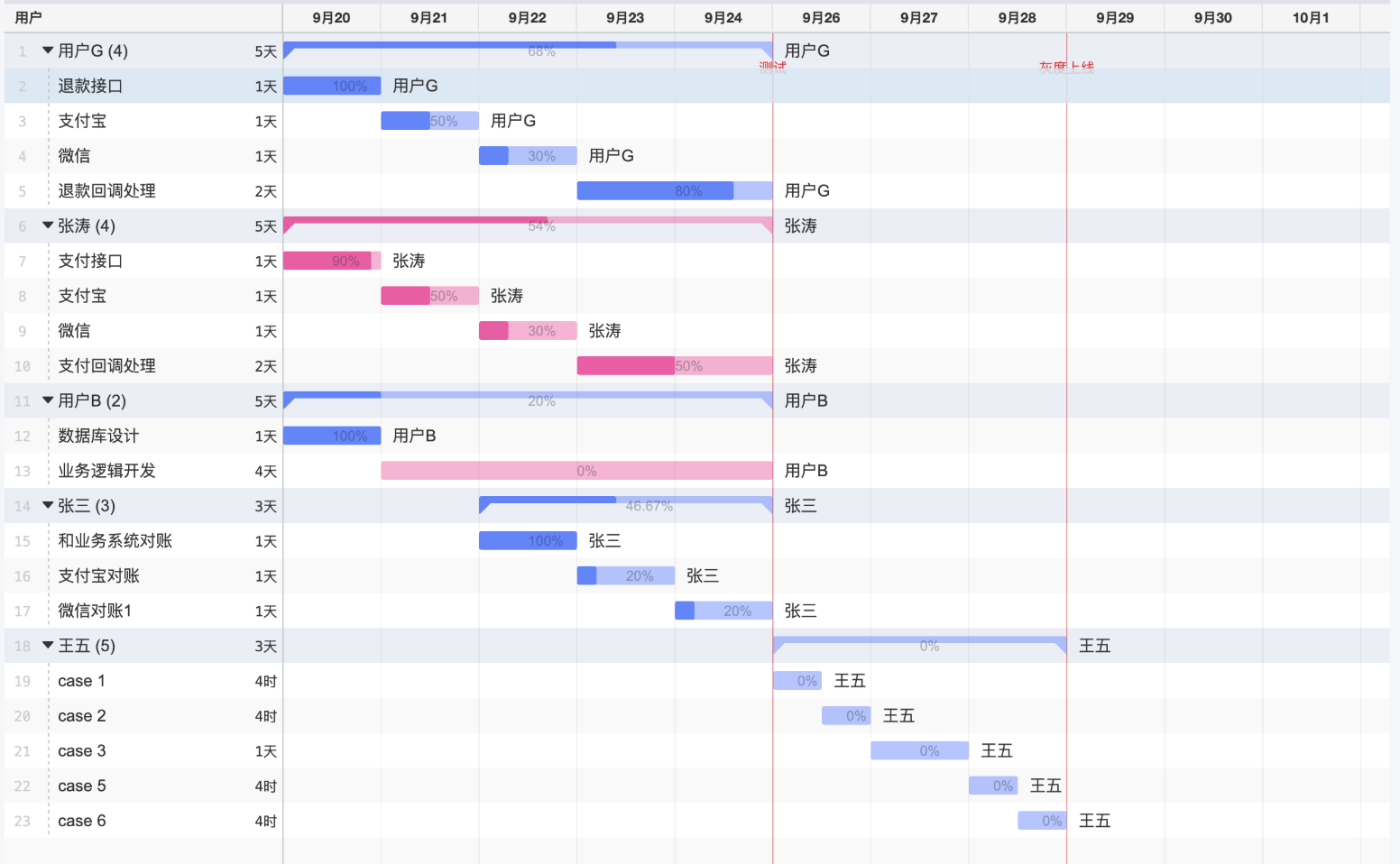
设计稿
代码如下
<template>
    <div class="gantt">
        <div class="scroll">
            <div class="inner" :style="{ width: timelineWidth + 'px' }">
                <!-- sticky 日历头 -->
                <div class="header">
                    <div class="day" v-for="dItem in days" :key="dItem.key" :class="{ today: dItem.isToday }"
                        :style="{ width: props.dayWidth + 'px' }">
                        <div class="mmdd">{{ dItem.mmdd }}</div>
                        <div class="dow">{{ dItem.dow }}</div>
                    </div>

                    <!-- markLines -->
                    <div v-for="m in markLineViews" :key="m.key" class="mark-line" :style="{ left: m.left + 'px' }">
                        <span>{{ m.name }}</span>
                    </div>
                </div>

                <!-- body -->
                <div class="body">
                    <!-- grid -->
                    <div class="grid">
                        <div v-for="dItem in days" :key="dItem.key" class="grid-day" :class="{ today: dItem.isToday }"
                            :style="{ width: props.dayWidth + 'px' }" />
                        <div v-for="m in markLineViews" :key="m.key" class="mark-line" :style="{ left: m.left + 'px' }">
                        </div>
                    </div>

                    <div class="rows">
                        <div class="row" v-for="t in tasks" :key="t.user + '|' + t.title"
                            :style="{ height: props.rowHeight + 'px' }">
                            <div class="bar" :style="barStyle(t)">
                                <div class="seg task full"></div>
                                <div class="text">{{ t.user }} / {{ t.title }}
                                </div>
                            </div>
                        </div>

                        <div v-if="tasks.length === 0" class="empty">
                            无任务
                        </div>
                    </div>
                </div>

                <div class="footerSpace"></div>
            </div>
        </div>
    </div>
</template>

<script setup>
import { computed } from "vue"
import dayjs from "dayjs"

const props = defineProps({
    tasks: { type: Array, required: true },
    taskCycle: { type: Array, required: true },
    markLines: { type: Array, default: () => [] },
    dayWidth: { type: String, default: 36 },
    rowHeight: { type: String, default: 36 }
})


const d = (s) => dayjs(s).startOf("day")

const cycleStart = computed(() => d(props.taskCycle[0]))
const cycleEnd = computed(() => d(props.taskCycle[1]))
const totalDays = computed(() => cycleEnd.value.diff(cycleStart.value, "day") + 1)
const timelineWidth = computed(() => totalDays.value * props.dayWidth)

const todayKey = dayjs().format("YYYY-MM-DD")

const days = computed(() => {
    const labels = ["日", "一", "二", "三", "四", "五", "六"]
    return Array.from({ length: totalDays.value }, (_, i) => {
        const cur = cycleStart.value.add(i, "day")
        const key = cur.format("YYYY-MM-DD")
        return {
            key,
            mmdd: cur.format("MM/DD"),
            dow: labels[cur.day()],
            isToday: key === todayKey
        }
    })
})


const range = (start, end) => {
    const l = Math.max(0, start.diff(cycleStart.value, "day"))
    const r = Math.min(totalDays.value - 1, end.diff(cycleStart.value, "day"))
    return { l, r }
}

const barStyle = (t) => {
    let start, end
    start = d(t.startDate)
    end = d(t.endDate)


    const { l, r } = range(start, end)
    return {
        left: (l * props.dayWidth) + "px",
        width: ((r - l + 1) * props.dayWidth) + "px",
        height: (props.rowHeight - 16) + "px",
        top: "8px"
    }
}

const markLineViews = computed(() => {
    return props.markLines
        .map(m => {
            const leftDays = d(m.date).diff(cycleStart.value, "day")
            return {
                key: `${m.name}-${m.date}`,
                name: m.name,
                left: leftDays * props.dayWidth,
                inRange: leftDays >= 0 && leftDays <= totalDays.value - 1
            }
        })
        .filter(x => x.inRange)
})
</script>

<style lang="scss" scoped>
.gantt {
    height: 100%;
    width: 100%;
    border: 1px solid #e6e6e6;
    border-radius: 10px;
    overflow: hidden;
    background: #fff;
    display: flex;
}

.scroll {
    flex: 1;
    overflow: auto;
}

.inner {
    position: relative;
    min-height: 100%;
}

.header {
    position: sticky;
    top: 0;
    z-index: 5;
    height: 50px;
    background: #fafafa;
    border-bottom: 1px solid #eee;
    display: flex;
}

.day {
    box-sizing: border-box;
    border-right: 1px solid #eee;
    text-align: center;
    font-size: 12px;
    padding-top: 6px;
}

.mmdd {
    font-weight: 700;
    line-height: 16px;
}

.dow {
    color: #666;
    line-height: 16px;
}

.day.today {
    background: rgba(255, 230, 150, 0.55);
}

.body {
    position: relative;
}

.grid {
    position: absolute;
    inset: 0;
    display: flex;
    pointer-events: none;
    z-index: 0;
}

.grid-day {
    border-right: 1px solid #f0f0f0;
}

.grid-day.today {
    background: rgba(255, 230, 150, 0.35);
}

.rows {
    position: relative;
    z-index: 1;

    .row {
        position: relative;
        border-bottom: 1px solid #eee;
    }
}


.bar {
    position: absolute;
    border-radius: 12px;
    border: 1px solid rgba(0, 0, 0, .10);
}

.seg {
    position: absolute;
    top: 0;
    bottom: 0;

    &.task {
        background: rgba(59, 130, 246, .80);
    }


    &.full {
        left: 0;
        width: 100%;
    }
}

.text {
    position: relative;
    z-index: 2;
    width: 200%;
    padding: 0 10px;
    color: #000;
    text-align: left;
    font-size: 12px;
}

.mark-line {
    position: absolute;
    top: 0;
    bottom: 0;
    width: 0;
    border-left: 2px dashed rgba(239, 68, 68, 0.7);
    pointer-events: none;
}

.mark-line span {
    position: absolute;
    top: 6px;
    left: 6px;
    background: rgba(255, 255, 255, .92);
    border: 1px solid rgba(239, 68, 68, .25);
    color: rgba(239, 68, 68, .95);
    font-size: 12px;
    padding: 2px 6px;
    border-radius: 999px;
    white-space: nowrap;
}

.empty {
    padding: 24px 12px;
    color: #999;
}

.footerSpace {
    height: 10px;
}
</style>
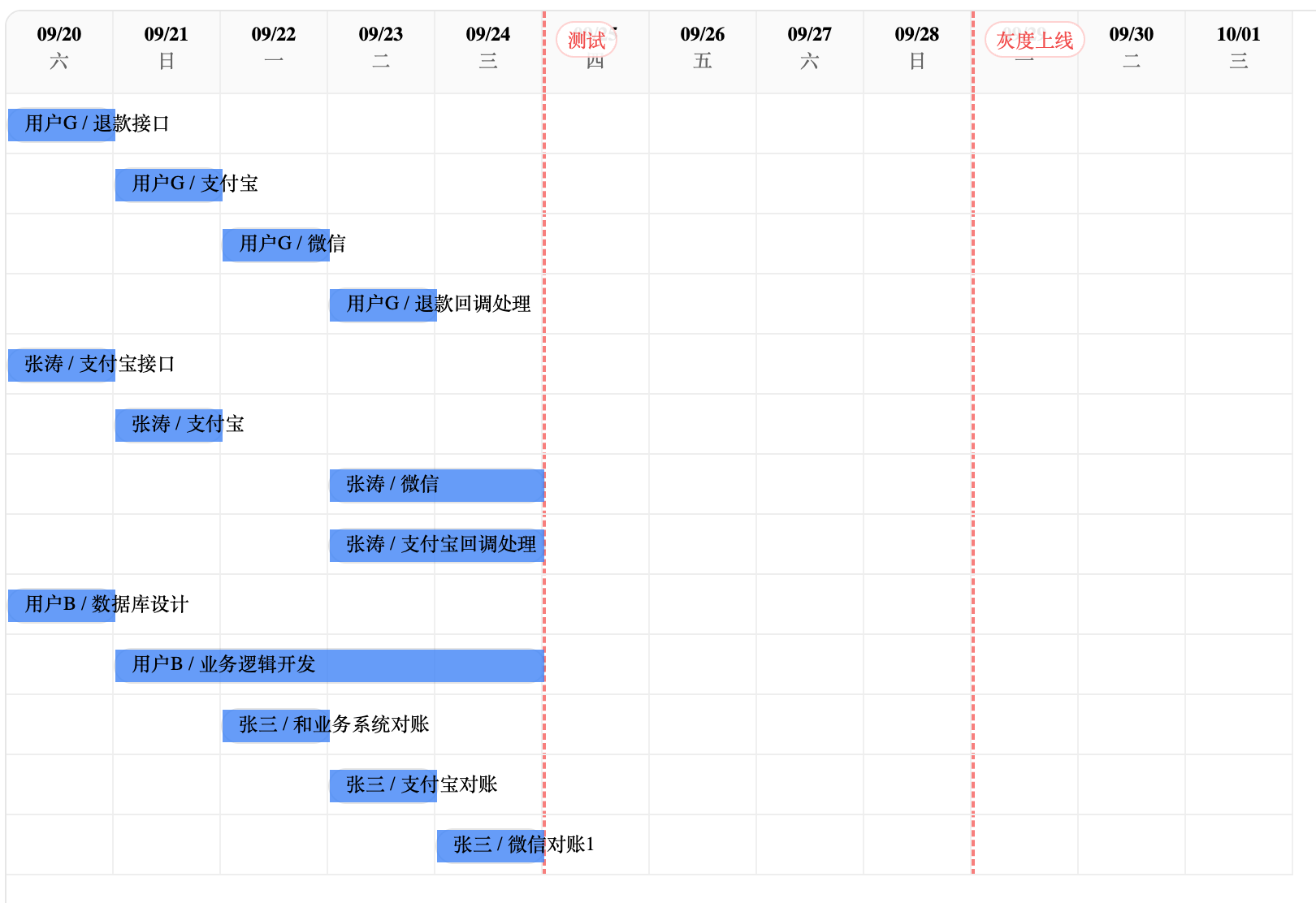
效果如下图

 浙公网安备 33010602011771号