

声明
本文来自博客园,作者:观心静 ,转载请注明原文链接:https://www.cnblogs.com/guanxinjing/p/19316238
本文版权归作者和博客园共有,欢迎转载,但必须给出原文链接,并保留此段声明,否则保留追究法律责任的权利。
前言
这个日历用了我的博客中另一个compose的自定义滚轮,如果你需要使用它,请先将滚轮View拷贝到项目中,滚轮View的博客地址 Android开发 Jetpack_Compose WheelPicker简单的自定义滚轮选择器 - 观心静 - 博客园
效果图
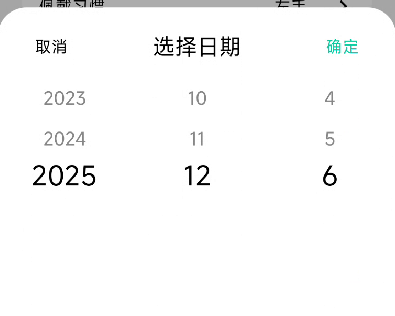
使用
val isShowCalendarDialog = remember { mutableStateOf(false) }
DatePickerBottomSheet(
    isVisible = isShowCalendarDialog,
    startDate = Calendar.getInstance().apply { set(1960, 0, 1) },
    endDate = Calendar.getInstance(),
    onDateSelected = {
        val dataFormat = SimpleDateFormat("yyyy-MM-dd", Locale.getDefault())
        viewModel.userBirthday.value = dataFormat.format( it.timeInMillis)
        viewModel.updateBtnState()
        isShowCalendarDialog.value = false
    },
    onDismiss = {
        isShowCalendarDialog.value = false
    },
)
代码
import androidx.compose.foundation.clickable
import androidx.compose.foundation.layout.Arrangement
import androidx.compose.foundation.layout.Column
import androidx.compose.foundation.layout.Row
import androidx.compose.foundation.layout.Spacer
import androidx.compose.foundation.layout.fillMaxWidth
import androidx.compose.foundation.layout.height
import androidx.compose.foundation.layout.padding
import androidx.compose.material3.ExperimentalMaterial3Api
import androidx.compose.material3.MaterialTheme
import androidx.compose.material3.ModalBottomSheet
import androidx.compose.material3.Text
import androidx.compose.runtime.Composable
import androidx.compose.runtime.MutableState
import androidx.compose.runtime.getValue
import androidx.compose.runtime.mutableIntStateOf
import androidx.compose.runtime.remember
import androidx.compose.runtime.setValue
import androidx.compose.ui.Alignment
import androidx.compose.ui.Modifier
import androidx.compose.ui.unit.dp
import androidx.compose.ui.unit.sp
import com.yakwatch.android.fitvibe.ui.compView.WheelPicker
import java.util.Calendar


@OptIn(ExperimentalMaterial3Api::class)
@Composable
fun DatePickerBottomSheet(
    isVisible: MutableState<Boolean>,
    initialDate: Calendar = Calendar.getInstance(),
    startDate: Calendar = Calendar.getInstance().apply { set(1900, 0, 1) },
    endDate: Calendar = Calendar.getInstance().apply { set(2100, 11, 31) },
    onDateSelected: (Calendar) -> Unit,
    onDismiss: () -> Unit
) {
    if (isVisible.value) {
        ModalBottomSheet(
            containerColor = MaterialTheme.colorScheme.surface,
            dragHandle = null,
            onDismissRequest = onDismiss
        ) {
            var selectedYear by remember { mutableIntStateOf(initialDate.get(Calendar.YEAR)) }
            var selectedMonth by remember { mutableIntStateOf(initialDate.get(Calendar.MONTH) + 1) }
            var selectedDay by remember { mutableIntStateOf(initialDate.get(Calendar.DAY_OF_MONTH)) }

            // 限制年份范围
            val startYear = startDate.get(Calendar.YEAR)
            val endYear = endDate.get(Calendar.YEAR)
            val years = (startYear..endYear).map { it.toString() }

            // 限制月份范围(根据年份动态调整)
            val months = if (selectedYear == startYear && selectedYear == endYear) {
                // 同一年,月份受限于开始和结束月份
                (startDate.get(Calendar.MONTH) + 1..endDate.get(Calendar.MONTH) + 1).map { it.toString() }
            } else if (selectedYear == startYear) {
                // 等于开始年份,月份从开始月份到最后一个月
                (startDate.get(Calendar.MONTH) + 1..12).map { it.toString() }
            } else if (selectedYear == endYear) {
                // 等于结束年份,月份从1月到结束月份
                (1..endDate.get(Calendar.MONTH) + 1).map { it.toString() }
            } else {
                // 中间年份,月份不受限
                (1..12).map { it.toString() }
            }

            // 根据年月动态计算天数,并应用日期范围限制
            val daysInMonth = getDaysInMonth(selectedYear, selectedMonth)
            val days =
                if (selectedYear == startYear && selectedMonth == startDate.get(Calendar.MONTH) + 1) {
                    // 等于开始年月,日期从开始日期到最后一天
                    (startDate.get(Calendar.DAY_OF_MONTH)..daysInMonth).map { it.toString() }
                } else if (selectedYear == endYear && selectedMonth == endDate.get(Calendar.MONTH) + 1) {
                    // 等于结束年月,日期从1号到结束日期
                    (1..endDate.get(Calendar.DAY_OF_MONTH)).map { it.toString() }
                } else {
                    // 其他情况,日期不受限
                    (1..daysInMonth).map { it.toString() }
                }

            Column(
                modifier = Modifier
                    .fillMaxWidth(),
                horizontalAlignment = Alignment.CenterHorizontally
            ) {
                Spacer(modifier = Modifier.height(24.dp))
                Row(
                    modifier = Modifier.fillMaxWidth().padding(horizontal = 36.dp),
                    horizontalArrangement = Arrangement.SpaceBetween,
                    verticalAlignment = Alignment.CenterVertically
                ) {
                    Text(
                        "取消",
                        style = MaterialTheme.typography.bodyMedium,
                        color = MaterialTheme.colorScheme.onBackground,
                        modifier = Modifier.clickable(
                            onClick = onDismiss
                        )
                    )
                    Text(
                        text = "选择日期",
                        style = MaterialTheme.typography.titleMedium,
                    )
                    Text(
                        "确定",
                        style = MaterialTheme.typography.bodyMedium,
                        color = MaterialTheme.colorScheme.primary,
                        modifier = Modifier.clickable(
                            onClick = {
                                val calendar = Calendar.getInstance().apply {
                                    set(selectedYear, selectedMonth - 1, selectedDay)
                                }
                                // 验证选择的日期是否在范围内
                                if (calendar.timeInMillis >= startDate.timeInMillis &&
                                    calendar.timeInMillis <= endDate.timeInMillis
                                ) {
                                    onDateSelected(calendar)
                                }
                            }
                        ))
                }
                Spacer(modifier = Modifier.height(24.dp))
                Row(
                    modifier = Modifier.fillMaxWidth(),
                    horizontalArrangement = Arrangement.SpaceEvenly
                ) {
                    // 年份选择器
                    Column(
                        modifier = Modifier.weight(1f),
                        horizontalAlignment = Alignment.CenterHorizontally
                    ) {
                        WheelPicker(
                            items = years,
                            defaultSelectedIndex = years.indexOf(selectedYear.toString())
                                .coerceAtLeast(0)
                                .coerceAtMost(years.size - 1),
                            onSelectedIndex = { index ->
                                selectedYear = years[index].toInt()
                            },
                            itemHeight = 40.dp,
                            itemFontSize = 18.sp,
                            visibleItemsCount = 5
                        )
                    }

                    // 月份选择器
                    Column(
                        modifier = Modifier.weight(1f),
                        horizontalAlignment = Alignment.CenterHorizontally
                    ) {
                        WheelPicker(
                            items = months,
                            defaultSelectedIndex = months.indexOf(selectedMonth.toString())
                                .coerceAtLeast(0)
                                .coerceAtMost(months.size - 1),
                            onSelectedIndex = { index ->
                                selectedMonth = months[index].toInt()
                            },
                            itemHeight = 40.dp,
                            itemFontSize = 18.sp,
                            visibleItemsCount = 5
                        )
                    }

                    // 日期选择器
                    Column(
                        modifier = Modifier.weight(1f),
                        horizontalAlignment = Alignment.CenterHorizontally
                    ) {
                        WheelPicker(
                            items = days,
                            defaultSelectedIndex = days.indexOf(selectedDay.toString())
                                .coerceAtLeast(0)
                                .coerceAtMost(days.size - 1),
                            onSelectedIndex = { index ->
                                selectedDay = days[index].toInt()
                            },
                            itemHeight = 40.dp,
                            itemFontSize = 18.sp,
                            visibleItemsCount = 5
                        )
                    }
                }
                Spacer(modifier = Modifier.height(24.dp))
            }
        }
    }
}

private fun getDaysInMonth(year: Int, month: Int): Int {
    val calendar = Calendar.getInstance().apply {
        set(Calendar.YEAR, year)
        set(Calendar.MONTH, month - 1)
        set(Calendar.DAY_OF_MONTH, 1)
    }
    return calendar.getActualMaximum(Calendar.DAY_OF_MONTH)
}
end
本文来自博客园,作者:观心静 ,转载请注明原文链接:https://www.cnblogs.com/guanxinjing/p/19316238
本文版权归作者和博客园共有,欢迎转载,但必须给出原文链接,并保留此段声明,否则保留追究法律责任的权利。

 浙公网安备 33010602011771号