


前言
Jetpack Compose 是用于构建原生 Android 界面的新工具包。它可简化并加快 Android 上的界面开发,使用更少的代码、强大的工具和直观的 Kotlin API,快速打造生动而精彩的应用。Jetpack Compose 可加快界面开发,提高 Android 工程师的工作效率。
请注意! Jetpack compose 还处于刚刚发布正式版本的阶段,所以代码变动很大,实验性代码极多,有一些功能与配置并没有稳定。所以,后续配置的时候一定需要参考 https://developer.android.google.cn/jetpack/compose/interop/adding 官方配置文档。其中最重要的是配置好每个依赖的版本,确定自己不是用老旧alpha的版本进行开发,减少走弯路的时间。
如果是新项目
你可以直接创建,直接选择下图创建compose项目
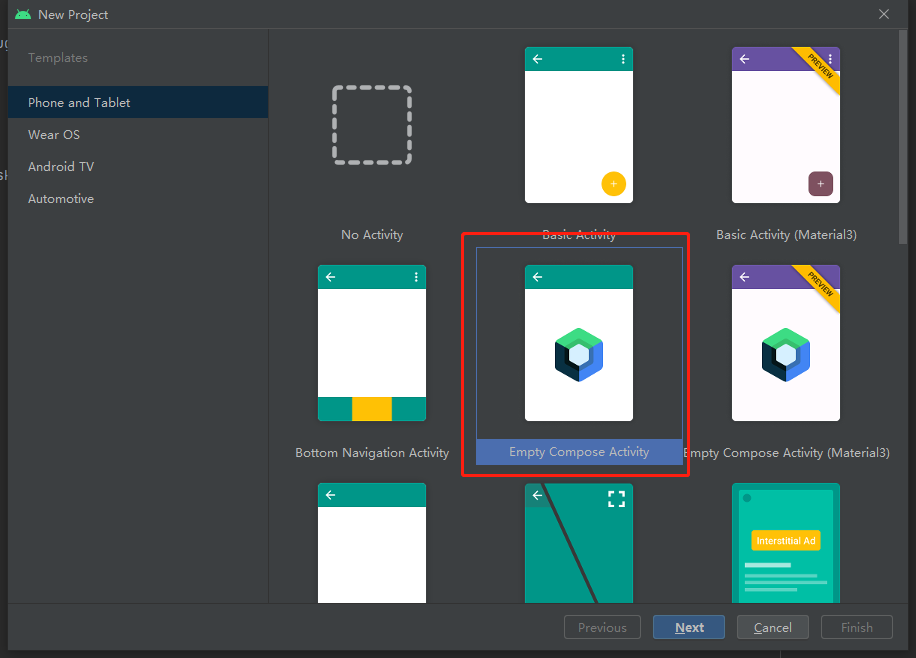
如果要自己配置新项目可以参考下面
很简单,你只需要参考 https://developer.android.google.cn/jetpack/compose/setup?hl=zh-cn#groovy_1
直接将网页中的,下面两部分直接复制黏贴添加到项目中
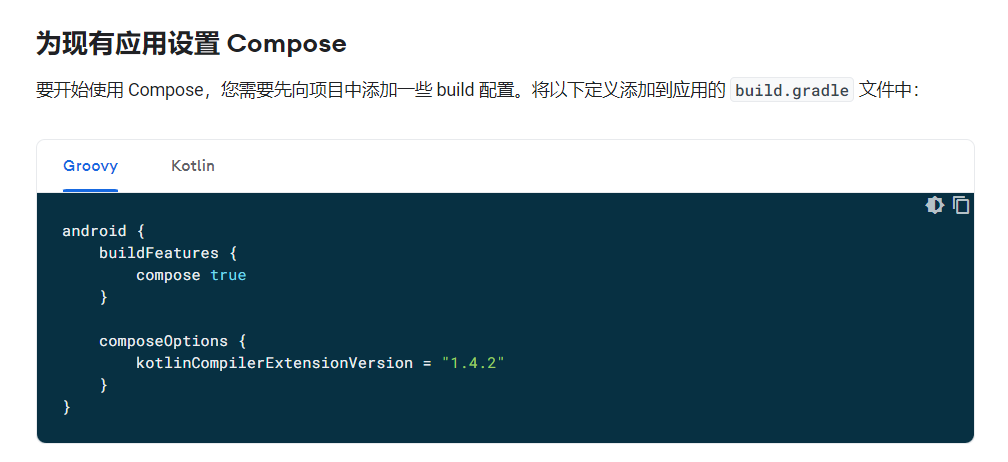
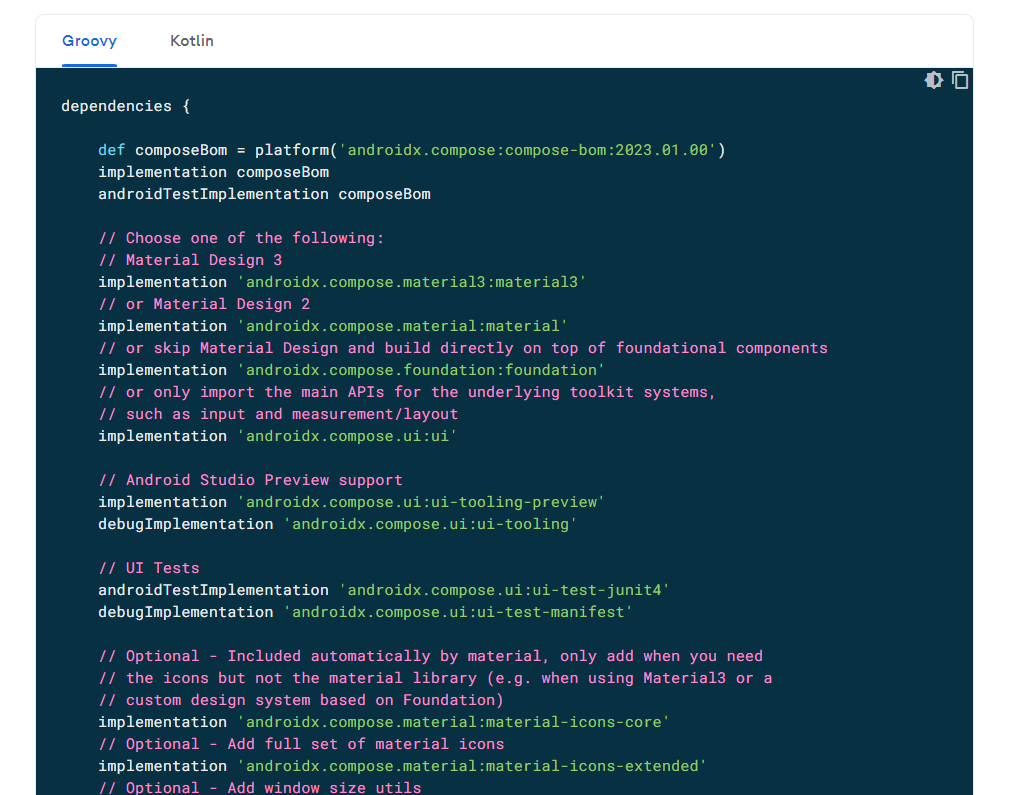
请注意!是添加,不可以完全将上面的内容完全替代复制到build的dependencies。 否则会出现一些AndroidManifest.xml配置主题上的问题。导入参考如下:
dependencies {
    //需要保留的部分
    implementation 'androidx.core:core-ktx:1.8.0'
    implementation 'androidx.appcompat:appcompat:1.5.0'
    implementation 'com.google.android.material:material:1.6.1'
    //单元测试部分
    testImplementation 'junit:junit:4.13.2'
    androidTestImplementation 'androidx.test.ext:junit:1.1.3'
    androidTestImplementation 'androidx.test.espresso:espresso-core:3.4.0'

    //>>>>>>>>>>>>>>>>>>>>>>>>>>>>>jetpack compose部分<<<<<<<<<<<<<<<<<<<<<<<<<<<<<<<<
    def composeBom = platform('androidx.compose:compose-bom:2023.01.00')
    implementation composeBom
    androidTestImplementation composeBom

    // Choose one of the following:
    // Material Design 3
    implementation 'androidx.compose.material3:material3'
    // or Material Design 2
    implementation 'androidx.compose.material:material'
    // or skip Material Design and build directly on top of foundational components
    implementation 'androidx.compose.foundation:foundation'
    // or only import the main APIs for the underlying toolkit systems,
    // such as input and measurement/layout
    implementation 'androidx.compose.ui:ui'

    // Android Studio Preview support
    implementation 'androidx.compose.ui:ui-tooling-preview'
    debugImplementation 'androidx.compose.ui:ui-tooling'

    // UI Tests
    androidTestImplementation 'androidx.compose.ui:ui-test-junit4'
    debugImplementation 'androidx.compose.ui:ui-test-manifest'

    // Optional - Included automatically by material, only add when you need
    // the icons but not the material library (e.g. when using Material3 or a
    // custom design system based on Foundation)
    implementation 'androidx.compose.material:material-icons-core'
    // Optional - Add full set of material icons
    implementation 'androidx.compose.material:material-icons-extended'
    // Optional - Add window size utils
    implementation 'androidx.compose.material3:material3-window-size-class'

    // Optional - Integration with activities
    implementation 'androidx.activity:activity-compose:1.6.1'
    // Optional - Integration with ViewModels
    implementation 'androidx.lifecycle:lifecycle-viewmodel-compose:2.5.1'
    // Optional - Integration with LiveData
    implementation 'androidx.compose.runtime:runtime-livedata'
    // Optional - Integration with RxJava
    implementation 'androidx.compose.runtime:runtime-rxjava2'
}
如果是旧项目
这会比较麻烦,因为你需要保留一部分之前的xml使用,需要按下面步骤完成配置,另外下面的只是参考,最正确的还是官网文档上的配置流程 https://developer.android.google.cn/jetpack/compose/interop?hl=zh-cn
settings.gradle
pluginManagement {
    repositories {
        gradlePluginPortal()
        google()
        mavenCentral()
    }

}
dependencyResolutionManagement {
    repositoriesMode.set(RepositoriesMode.FAIL_ON_PROJECT_REPOS)
    repositories {
        maven { url 'https://maven.aliyun.com/repository/central' }
        maven { url 'https://maven.aliyun.com/repository/public' }
        maven { url 'https://maven.aliyun.com/repository/google' }
        maven { url 'https://maven.aliyun.com/repository/gradle-plugin' }
        google()
        mavenCentral()
        maven {url "https://jitpack.io"}
    }
}
rootProject.name = "XXXX"
include ':app'
根目录build.gradle
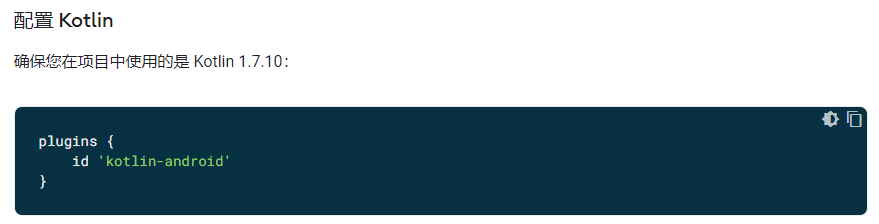
注意org.jetbrains.kotlin.android 版本,这是Android平台上kotlin语言的引用的版本,google有明确要求的确保版本在最新正式版本上, 在官方文档中有说明:
build.gradle
// Top-level build file where you can add configuration options common to all sub-projects/modules.
plugins {
    id 'com.android.application' version '7.1.2' apply false
    id 'com.android.library' version '7.1.2' apply false
    id 'org.jetbrains.kotlin.android' version '1.7.10' apply false
}

task clean(type: Delete) {
    delete rootProject.buildDir
}
这里还有一个关键信息需要特别注意,了解这个信息可以让你少走配置上的弯路!org.jetbrains.kotlin.android的kotlin版本与下面依赖的各种各样的Compose库是有对应关系的! 如果版本不对应就会出现Compose Compiler 与 Kotlin 的版本兼容性报错。最稳妥的还是去查看官方文档上提供的配置版本信息。
如果你非要特意使用某个指定kotlin版本或者某个指定compose版本,那么你就需要参考两者之间历史版本与对应关系表:
https://developer.android.google.cn/jetpack/androidx/releases/compose-kotlin
配置项目build.gradle
android {
    defaultConfig {
        ...
        minSdkVersion 21
    }

    buildFeatures {
        // 为此模块启用Jetpack Compose
        compose true
    }
    ...

    // Set both the Java and Kotlin compilers to target Java 8.
    compileOptions {
        sourceCompatibility JavaVersion.VERSION_1_8
        targetCompatibility JavaVersion.VERSION_1_8
    }
    kotlinOptions {
        jvmTarget = "1.8"
    }
  //非常重要,必须添加,并且与上面的kotlin版本有对应关系。强烈建议参考文档版本信息,配置版本
    composeOptions {
        kotlinCompilerExtensionVersion '1.3.0'
    }
}
需要的依赖的库
请注意这里的1.2.1 版本与 id 'org.jetbrains.kotlin.android' version '1.7.10' apply false 是对应的。 这最稳妥的还是去参考https://developer.android.google.cn/jetpack/compose/interop/adding 给出的版本最新配置。
    /**
     * Jetpack Compose
     */
    implementation("androidx.compose.ui:ui:1.2.1") //ui基础库 - 重要
    // Tooling support (Previews, etc.)
    implementation("androidx.compose.ui:ui-tooling:1.2.1") //ui工具基础库 - 重要
    // Foundation (Border, Background, Box, Image, Scroll, shapes, animations, etc.)
    implementation("androidx.compose.foundation:foundation:1.2.1")  //基础库 - 重要
    // Material Design
    implementation("androidx.compose.material:material:1.2.1") //Material UI 设计库 - 可选
    // Material design icons
    implementation("androidx.compose.material:material-icons-core:1.2.1") //Material UI 图标设计核心库  - 可选
    implementation("androidx.compose.material:material-icons-extended:1.2.1") //Material UI 图标设计扩展库  - 可选

    implementation 'androidx.lifecycle:lifecycle-viewmodel-compose:2.5.1' //ViewModel - 可选
    implementation("androidx.compose.runtime:runtime-livedata:1.2.1")   //生命周期库 用于配合ViewModel使用 - 可选

    implementation 'androidx.activity:activity-compose:1.5.1'           //配合activity使用的基础库 - 重要

    implementation "androidx.constraintlayout:constraintlayout-compose:1.0.1" //compose下的约束布局库 - 可选

    implementation "androidx.compose.ui:ui-tooling-preview:1.2.1"   //在Android studio里预览ui的基础库

    implementation 'androidx.compose.animation:animation:1.2.1' //动画 - 可选

    //加载网络图片
    implementation("io.coil-kt:coil:2.2.1") //网络图片缓存加载框架 - 可选
    implementation("io.coil-kt:coil-compose:2.2.1") //网络图片缓存加载框架 - 可选
androidx.compose.runtime:runtime-livedata:的用法如下:
class MainViewModel: ViewModel() {
    private val _data = MutableLiveData<String>()
    val data : LiveData<String> get() = _data

}
    @Preview()
    @Composable
    fun MyObserveAsState() {
        val data = mViewModel.data.observeAsState()
    }
END
本文来自博客园,作者:观心静 ,转载请注明原文链接:https://www.cnblogs.com/guanxinjing/p/16770124.html

 浙公网安备 33010602011771号