


效果图
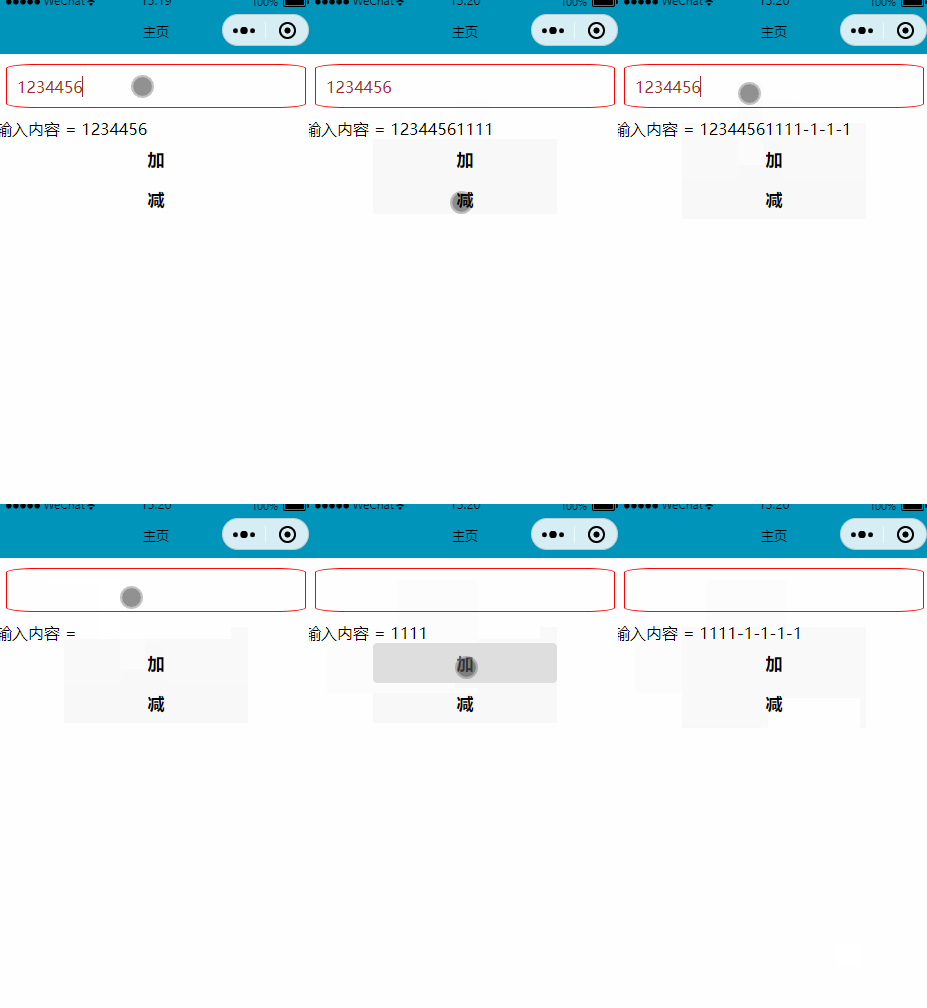
代码
.js
Page({

    /**
     * 页面的初始数据
     */
    data: {
        inputContent:0,
    },

    editText:function(e){
        this.setData({
            inputContent: e.detail.value
        })
    },
    buttontap:function(e){
        // 拿到 data-operation= 传入的值
        const operation = e.currentTarget.dataset.operation
        this.setData({
            inputContent: this.data.inputContent + operation
        })
    },
.wxml
<!--pages/home/home.wxml-->

<input class="inputstyle" bindinput="editText"/>

<view>输入内容 = {{inputContent}}</view>

<button bindtap="buttontap" data-operation="{{1}}" >加</button>

<button bindtap="buttontap" data-operation="{{-1}}" >减</button>
.wxss
.inputstyle{
    /* 红色边框线 */
    border: 1px solid red;
    /* 圆角 */
    border-radius: 10%;
    /* 外边距 */
    margin: 10px;
    /* 内边距 */
    padding: 10px;
    /* 文字颜色 */
    color: brown;
}
函数返回参数的结构
在上面的例子中我们可以外部获悉参数是从 e.currentTarget.dataset.operation 取得的,实际触控事件上的返回参是一个json结构。另外data-operation并不是固定的,你可以写出data-hi,data-xx等等自定义你想要的参数key
json结构如下:
{
  "type":"tap",
  "timeStamp":895,
  "target": {
    "id": "tapTest",
    "dataset":  {
      "hi":"Weixin"
    }
  },
  "currentTarget":  {
    "id": "tapTest",
    "dataset": {
      "hi":"Weixin"
    }
  },
  "detail": {
    "x":53,
    "y":14
  },
  "touches":[{
    "identifier":0,
    "pageX":53,
    "pageY":14,
    "clientX":53,
    "clientY":14
  }],
  "changedTouches":[{
    "identifier":0,
    "pageX":53,
    "pageY":14,
    "clientX":53,
    "clientY":14
  }]
}
触控事件类型
在上面的json,你可以看到type这个值,这就是触控事件的类型,他们一共有如下几种:
| touchstart | 手指触摸动作开始 | |
| touchmove | 手指触摸后移动 | |
| touchcancel | 手指触摸动作被打断,如来电提醒,弹窗 | |
| touchend | 手指触摸动作结束 | |
| tap | 手指触摸后马上离开 | |
| longpress | 手指触摸后,超过350ms再离开,如果指定了事件回调函数并触发了这个事件,tap事件将不被触发 | 1.5.0 |
| longtap | 手指触摸后,超过350ms再离开(推荐使用longpress事件代替) | |
| transitionend | 会在 WXSS transition 或 wx.createAnimation 动画结束后触发 |
监听指定类型事件例子
js
    click(event) {
        const type = event.type
        console.log(type)
        if (type == 'tap') {
            console.log("触摸")

        } else if (type == 'touchstart') {
            console.log("触摸开始")

        } else if (type == 'touchend') {
            console.log("触摸结束")

        }
    },
wxml
在bind的时候需要按类型绑定事件,才会返回对应type的事件
<view bindtap="click" bindtouchstart="click" bindtouchend="click" class="record-voice-container">
end
本文来自博客园,作者:观心静 ,转载请注明原文链接:https://www.cnblogs.com/guanxinjing/p/16490616.html
本文版权归作者和博客园共有,欢迎转载,但必须给出原文链接,并保留此段声明,否则保留追究法律责任的权利。

 浙公网安备 33010602011771号