windows设置控制音量快捷键
操作
1,创建一个文本,文本内容输入:
1 Windows Registry Editor Version 5.00
2 [HKEY_LOCAL_MACHINE\SYSTEM\CurrentControlSet\Control\Keyboard Layout]
3 "Scancode Map"=hex:00,00,00,00,00,00,00,00,03,00,00,00,2E,E0,43,00,30,E0,44,00,00,00,00,00
2,把文本文件后缀改成.reg,运行、重启。
说明:
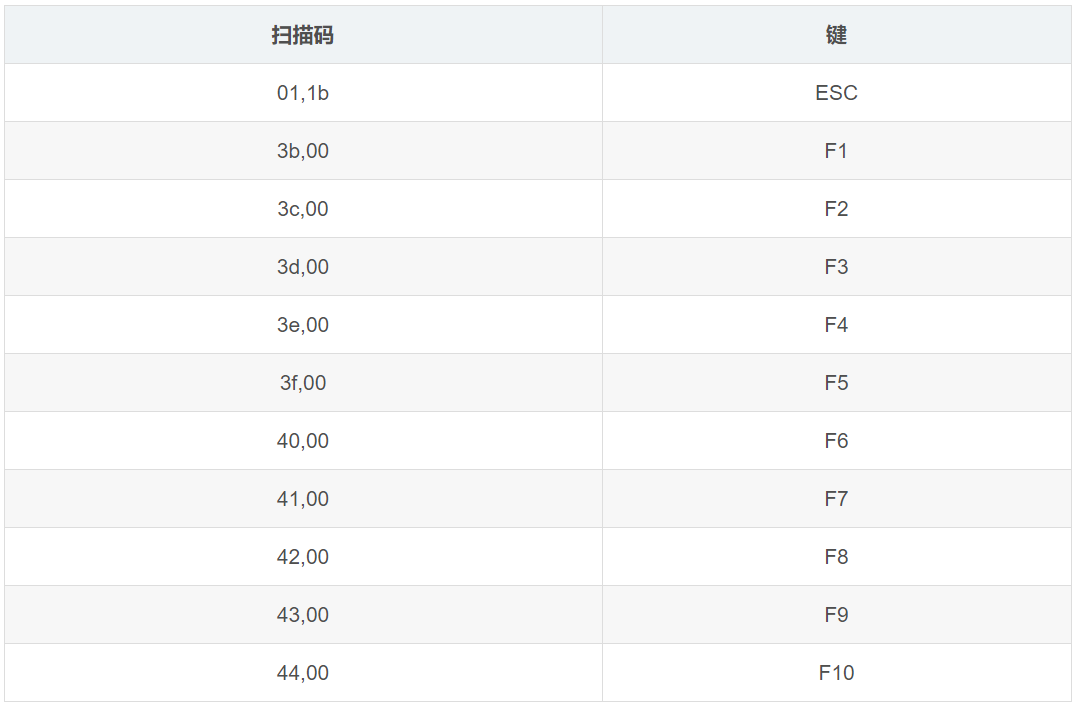
代码中"2E,E0"表示降低音量,“30,E0”表示调高音量;“43,00”指F9,“44,00”指F10,其他按键的扫描码为
备注:
恢复电脑本身键位只需要把"Scancode Map"=hex:之后的数字都删了,运行、重启即可:
1 Windows Registry Editor Version 5.00
2 [HKEY_LOCAL_MACHINE\SYSTEM\CurrentControlSet\Control\Keyboard Layout]"
3 Scancode Map"=hex:

 浙公网安备 33010602011771号