
异步编程(三)委托-Action
action实现异步处理
1.实现
    class Async
    {
        public void DoSomething(string name)
        {
            Console.WriteLine($"{name}开始工作;线程:【{Thread.CurrentThread.ManagedThreadId.ToString("00")}】;{DateTime.Now.ToString("yyyy-MM-dd HH:mm:ss.fff")}");
            long result = 0;
            for (int i = 0; i < 1_000_000_000; i++)
            {
                result += i;
            }
            Console.WriteLine($"{name}结束工作;线程:【{Thread.CurrentThread.ManagedThreadId.ToString("00")}】;{DateTime.Now.ToString("yyyy-MM-dd HH:mm:ss.fff")};result:{result}");
        }

        public void AsyncCall()
        {
            Console.WriteLine($"异步执行,线程:【{Thread.CurrentThread.ManagedThreadId.ToString("00")}】,【 {DateTime.Now.ToString("yyyy-MM-dd HH:mm:ss.fff")}】");
            Action<string> action = this.DoSomething;
            for (int i = 0; i < 5; i++)
            {
                string name = string.Format($"id_{i}");
                Console.WriteLine($"我在这儿检测线程{i}");
                action.BeginInvoke(name, null, null);
            }
            Console.WriteLine($"执行结束,线程ID:【{Thread.CurrentThread.ManagedThreadId.ToString("00")}】,【 {DateTime.Now.ToString("yyyy-MM-dd HH:mm:ss.fff")}】");
        }
    }
运行结果如下
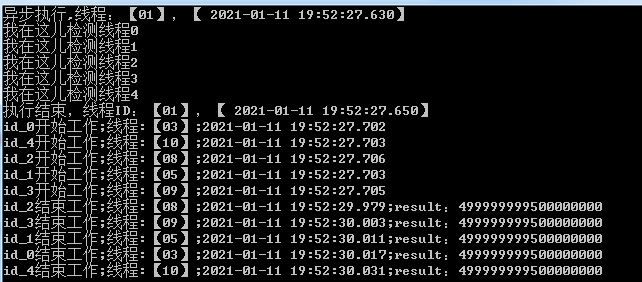
其实很清晰了,dosomething是一种类似于后台运行的状态,并不影响主程序的接续执行,因此“我在这儿检测线程4”打印到工作台时,甚至线程0都还没有开始工作。
2.扩展
(1)invoke和begininvoke
使用Invoke完成一个委托方法的封送,就类似于使用SendMessage方法来给界面线程发送消息,是一个同步方法。也就是说在Invoke封送的方法被执行完毕前,Invoke方法不会返回,从而调用者线程将被阻塞。
使用BeginInvoke方法封送一个委托方法,类似于使用PostMessage进行通信,这是一个异步方法。也就是该方法封送完毕后马上返回,不会等待委托方法的执行结束,调用者线程将不会被阻塞。但是调用者也可以使用EndInvoke方法或者其它类似WaitHandle机制等待异步操作的完成。
如果你的后台线程在更新一个UI控件的状态后不需要等待,而是要继续往下处理,那么你就应该使用BeginInvoke来进行异步处理。
如果你的后台线程需要操作UI控件,并且需要等到该操作执行完毕才能继续执行,那么你就应该使用Invoke。否则,在后台线程和主截面线程共享某些状态数据的情况下,如果不同步调用,而是各自继续执行的话,可能会造成执行序列上的问题,虽然不发生死锁,但是会出现不可预料的显示结果或者数据处理错误。
(2)begininvoke的参数跟随Action变化
①如果Action是无参的,那么begininvoke只有两个参数
        public void DoSomething()
        {
            Console.WriteLine($"开始工作;线程:【{Thread.CurrentThread.ManagedThreadId.ToString("00")}】;{DateTime.Now.ToString("yyyy-MM-dd HH:mm:ss.fff")}");
            long result = 0;
            for (int i = 0; i < 1_000_000_000; i++)
            {
                result += i;
            }
            Console.WriteLine($"结束工作;线程:【{Thread.CurrentThread.ManagedThreadId.ToString("00")}】;{DateTime.Now.ToString("yyyy-MM-dd HH:mm:ss.fff")};result:{result}");
        }
        public void FirstWay()
        {
            Console.WriteLine($"开始线程,时间:{DateTime.Now.ToString("yyyy-MM-dd HH:mm:ss.fff")}");
            Action action = this.DoSomething;
            IAsyncResult asyncResult = null;
            AsyncCallback callback = new AsyncCallback(para =>
            {
                Console.WriteLine($"dosomething完成,此处回调函数可获得第二个参数,保存在para.AsyncState中:{para.AsyncState},而para其实是BeginInvoke的返回值,para equals asyncResult?{para.Equals(asyncResult)}");
            });
            asyncResult = action.BeginInvoke(callback, "我是第二个参数");
            Console.WriteLine($"结束线程,时间:{DateTime.Now.ToString("yyyy-MM-dd HH:mm:ss.fff")}**");
        }
- 第一个参数表示一个委托,需要传递一个方法,当该线程结束时会调用这个方法;
- 第二个参数可以设置为任意对象,以便在回调函数中访问它;

②如果Action是有参的,那么begininvoke有三个参数
        public void DoSomething(string name)
        {
            Console.WriteLine($"{name}开始工作;线程:【{Thread.CurrentThread.ManagedThreadId.ToString("00")}】;{DateTime.Now.ToString("yyyy-MM-dd HH:mm:ss.fff")}");
            long result = 0;
            for (int i = 0; i < 1_000_000_000; i++)
            {
                result += i;
            }
            Console.WriteLine($"{name}结束工作;线程:【{Thread.CurrentThread.ManagedThreadId.ToString("00")}】;{DateTime.Now.ToString("yyyy-MM-dd HH:mm:ss.fff")};result:{result}");
        }
        public void FirstWay()
        {
            Console.WriteLine($"开始线程,时间:{DateTime.Now.ToString("yyyy-MM-dd HH:mm:ss.fff")}");
            Action<string> action = this.DoSomething;
            IAsyncResult asyncResult = null;
            AsyncCallback callback = new AsyncCallback(para =>
            {
                Console.WriteLine($"dosomething完成\n此处回调函数可获得第三个参数,保存在para.AsyncState中:{para.AsyncState}\npara其实是BeginInvoke的返回值,para equals asyncResult?{para.Equals(asyncResult)}");
            });
            asyncResult = action.BeginInvoke("异步线程", callback, "我是第三个参数");
            Console.WriteLine($"结束线程,时间:{DateTime.Now.ToString("yyyy-MM-dd HH:mm:ss.fff")}");
        }
- 第一个参数是传递给Action事件,可以在DoSomething中访问;
- 第二个参数表示一个委托,需要传递一个方法,当该线程结束时会调用这个方法;
- 第三个参数可以设置为任意对象,以便在回调函数中访问它;

执行顺序是:先执行Action函数,然后执行完返回一个IAsyncResult结果asyncResult,然后把asyncResult作为参数传入到AsyncCallback这个委托中,最后再执行AsyncCallback委托。
(3)异步方法如何控制顺序
①begininvoke中第二个参数:回调函数,该参数指向操作完成后要处理的函数的地址,因此可形成一个操作链。
以中医望闻问切为例
        private void 望()
        {
            ac1.BeginInvoke("望->", 闻, null);
        }
        private void 闻(object ob)
        {
            ac2.BeginInvoke("闻->", 问, null);
        }
        private void 问(object ob)
        {
            ac3.BeginInvoke("问->", 切, null);
        }
        private void 切(object ob)
        {
            ac4.BeginInvoke("切->", 出药方, null);
        }
        private void 出药方(object ob)
        {
            ac5.BeginInvoke("出药方->结束", null, null);
        }

        private void 诊断(string str)
        {
            Action ac = () =>
            {
                inputtb.AppendText(str);
            };
            ac.Invoke();
        }

        private void InitialActions()
        {
            ac1 = 诊断;
            ac2 = 诊断;
            ac3 = 诊断;
            ac4 = 诊断;
            ac5 = 诊断;
            望();
        }
由此形成一个操作步骤链,执行结果如下

②begininvoke的返回值
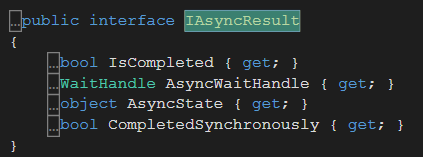
其中,IsCompleted可以标志当前Action是否已经执行完毕,从而可以控制下一个任务的开启。不过这种方式需要不停轮询状态,并不是一个十分完美的解决方案,不过这个返回值可以在许多场景下使用。
        public void SecondWay()
        {
            Console.WriteLine($"开始线程,时间:{DateTime.Now.ToString("yyyy-MM-dd HH:mm:ss.fff")}");
            Action<string> action = this.DoSomething;
            IAsyncResult asyncResult = action.BeginInvoke("异步线程", null, null);
            while (!asyncResult.IsCompleted)
            {
                //wait
                Console.WriteLine("Runnning......");
                Thread.Sleep(300);
            }
            Console.WriteLine($"结束线程,时间:{DateTime.Now.ToString("yyyy-MM-dd HH:mm:ss.fff")}");
        }
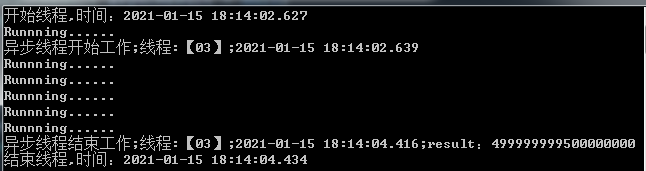
③上述方法虽然可以实现异步线程的等待,但是While循环的方法并不美好,微软为我们提供了更完备的额解决方案:WaitOne
        public void ThirdWay()
        {
            Console.WriteLine($"开始线程,时间:{DateTime.Now.ToString("yyyy-MM-dd HH:mm:ss.fff")}");
            Action<string> action = this.DoSomething;
            IAsyncResult asyncResult = action.BeginInvoke("异步线程", null, null);
            asyncResult.AsyncWaitHandle.WaitOne();
            Console.WriteLine($"结束线程,时间:{DateTime.Now.ToString("yyyy-MM-dd HH:mm:ss.fff")}");
        }

④EndInvoke也可以等待线程完成
        public void ForthWay()
        {
            Console.WriteLine($"开始线程,时间:{DateTime.Now.ToString("yyyy-MM-dd HH:mm:ss.fff")}");
            Action<string> action = this.DoSomething;
            IAsyncResult asyncResult = action.BeginInvoke("异步线程", null, null);
            action.EndInvoke(asyncResult);
            Console.WriteLine($"结束线程,时间:{DateTime.Now.ToString("yyyy-MM-dd HH:mm:ss.fff")}");
        }

waitone和endinvoke的实现方案的原理都是等待线程完成之后再处理接下来的操作,如果去掉这部分操作,那么【结束线程】就会在线程开始工作之前就被打印到工作区。
以此为例,如下:
        public void ForthWay()
        {
            Console.WriteLine($"开始线程,时间:{DateTime.Now.ToString("yyyy-MM-dd HH:mm:ss.fff")}");
            Action<string> action = this.DoSomething;
            IAsyncResult asyncResult = action.BeginInvoke("异步线程", null, null);
            //action.EndInvoke(asyncResult);
            Console.WriteLine($"结束线程,时间:{DateTime.Now.ToString("yyyy-MM-dd HH:mm:ss.fff")}");
        }

参考博客:

 浙公网安备 33010602011771号