ansible补充
ansible-galaxy
安装系统角色
yum instlal rhel-system-roles
ansible-galaxy list
角色路径:/usr/share/ansible/roles
cp /usr/share/ansible/roles/rhel-system-roles/timesync/exampletimesync-playbook.yml timesync.yml
vim timesync.yml
- hosts: all
vars:
timesync_ntp_servers:
- hostname: pool.ntp.org
iburst: yes
roles:
- rhel-system-roles.timesync
外部角色
cat nginx.yml
- src: https://www.linuxprobe.com/Software/nginxinc-nginx_core-0.3.0.tar.gz
name: nginx-core
ansible-galaxy install -r nginx.yml
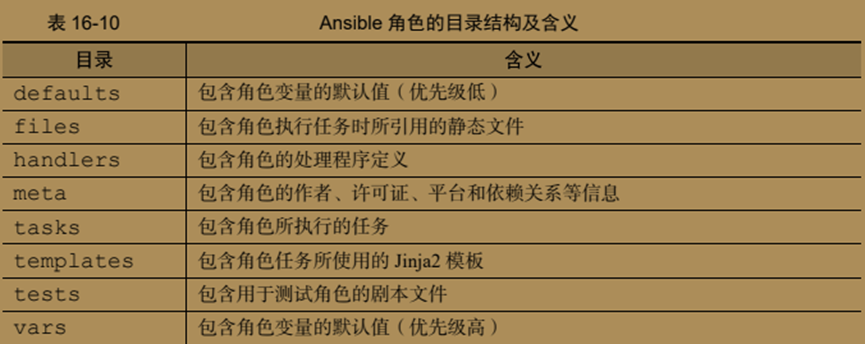
ansible-galaxy init apache 生成角色目录apache,目录包含
补充示例:
1、
- hosts: 192.168.181.3
tasks:
- name: one
file: path=/linux state=directory owner=root group=root mode=2775
- name: two
file: src=/linux dest=/linuxlink state=link
2、有问题的,如何判断ansible_all_ipv4_addresses的值
- hosts: 192.168.181.3,192.168.181.31
tasks:
- name: one
file: path=/tmp/hello state=touch
- name: two
copy: content='181.3' dest=/tmp/hello
when: ansible_all_ipv4_addresses == '["192.168.181.3"]'
- name: three
copy: content='181.31' dest=/tmp/hello
when: ansible_all_ipv4_addresses == '["192.168.181.31"]'
3、
cat /etc/ansible/hosts
[host01]
192.168.181.3
[host02]
192.168.181.31
- hosts: host01,host02
tasks:
- name: one
file: path=/tmp/hello state=touch
- name: two
copy: content="host01" dest=/tmp/hello
when: "inventory_hostname in groups.host01"
- name: three
copy: content="host02" dest=/tmp/hello
when: "inventory_hostname in groups.host02"
4、
- name: cs
hosts: 192.168.181.3
tasks:
- block:
- name: one
lvg: vg=vg01 pvs=/dev/sdb pesize=150M
- name: two
lvol: vg=vg01 lv=lv01 size=150M
- name: three
filesystem: dev=/dev/vg01/lv01 fstype=ext4
rescue:
- debug: msg="Could not create logical volume of that size
ansible-vault ansible加解密工具
ansible-vault 选项
create,decrypt,edit,view,encrypt,encrypt_string,rekey
参数
--vault-password-file 指定密码文件
在配置文件/etc/ansible/ansible.cfg中可直接配置,默认没有密码文件。
ansible-vault create play01.yml 创建一个加密的文件,交互输入密码完成
ansible-vault encrypt play02.yml 加密一个文件,交互输入密码完成
ansible-vault edit play02.yml 编辑一个加密文件,交互输入密码完成
ansible-vault view play02.yml 输出一个加密文件原内容,交互输入密码完成
ansible-vault decrypt play02.yml 解密一个加密文件,交互输入密码完成
ansible-vault rekey play02.yml 为加密文件设置新密码,交互输入密码完成
ansible-vault encrypt_string helloworld 加密字符串helloworld,输出加密内容,交互输入密码完成
以上命令,在/etc/ansible/ansible.cfg中配置密码文件后,就不再需要交互密码了
补充:
本文来自博客园,作者:赛博狗尾草,转载请注明原文链接:https://www.cnblogs.com/gpysir/p/18881642


 浙公网安备 33010602011771号