mysql笔记1
structured query language sql 结构化查询语言
sql是一种数据库查询和程序设计语言,用于存取数据以及查询、更新和管理关系数据库系统。
自带四个数据表:mysql,information_schema,test,performance_schema,
5.5新增performance_shcema 默认关闭 ,配置文件my.ini开启performance_schema=on
select * from information_schema.schemata;查看mysql数据库下所有库信息
select table_schema,table_name from information_schema.tables;查看所有库及对应表
select table_schema,table_name,column_name from information_schema.columns;查看所有库及对应表,及各表字段
create database hellocs charset utf8;创建数据库并指定字符集
create database hellocs if not exists hellocs charset utf8;
show character set;查看mysql字符集,常用utf8,、gbk、gb2312
show global variables like 'port'; 查看本机端口
id int(20) not null auto_increment primary key,
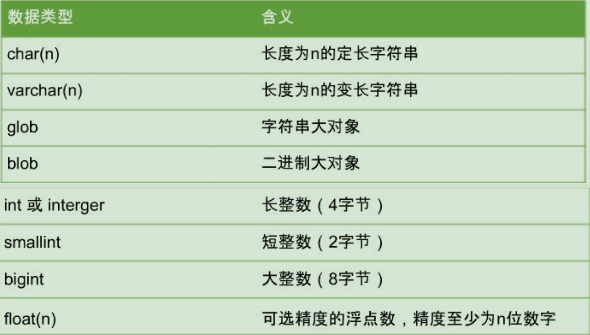
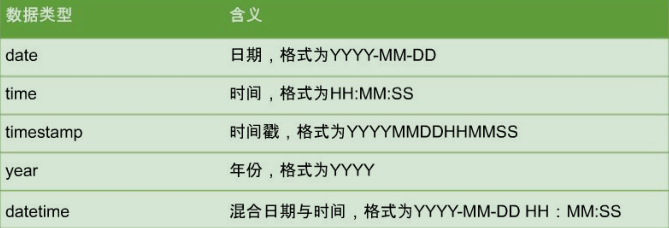
说明:约束是一种限制,对表的行或列的数据做出限制,确保表数据的完整性、唯一性。

主键约束,primary key constaint,要求主键列的数据唯一,不允许为空,能够唯一标识。
唯一约束,unique constaint,要求该列唯一,允许为空,确保一列或多列不出现重复值。
默认约束,default constaint,对某列指定默认值。
外键约束,foreign key,两个表数据建立连接,一个表可以有一个或多个外键。外键可为空,。
foreign key(列名) references 主表名(主键)
非空约束,not null constraint,指字段不能为空。添加数据时不指定的话会报错。
id int primary key auto_increment;
create table [if not exists] gnew like gold;将表gold复制一份为gnew
insert into g1(id,name) values(12,'gao');
insert into g1 values(20,'g','y'),(21,'g','y');
insert into gnew select * from gold;默认复制
insert into gnew id,name select id2,name2 from gold; 指定复制
update g1 set name='gao' where id=12;
update g1,g2 set g1.name=g2.name2 where g1.id=g2.id2;
1.alter table 表名 add 字段名 字段约束条件 #增加字段
2.alter table 表名 drop 字段名 #删除字段
3.alter table 表名 change 字段名 新字段名 字段约束条件 #修改字段
4.alter table 表名 modify 字段名 字段约束条件 #修改字段约束条件
select id,name form g1 where id=2;
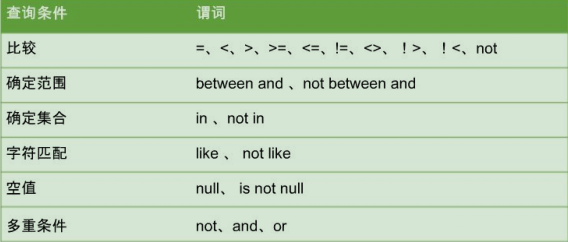
select * from stu where id <>25;其中不等于表示方式有:<>,!=
select * from stu where id [not] between 1 and 10 ;[not] between x and y 表示[不]查询某个字段的x与y间值,包括x,y。
select * from stu where id [not] in (1,2,3); [not] in(x,y,z....) 表示[不]查询某个字段的集合x,y,z...中相匹配的值。
select id,2018-age from student; 查询经过计算的值
select id idxx from student; 为id设置列别名
select distinct/all id from student; 消除/保留重复列
[not] like 模糊匹配 _单个字符 %任意多个字符,
查询字段本身含有通配符%或_,需要使用escape '<转码字符>',
select * from student where name like '高\_驿' escape '\';其中_不再作为通配符,因为其后紧跟转码字符。
elect * from student where name like '高\_驿__' escape '\';查询的名字是高_驿**,其中只对第一个_进行转义。
select * from student where name like '高_';
select * from student where name like '高%驿';
select * from studnet limit 1 限制查询数量
select * from student limit 0,1 限制查询数量
详细说明 :limit x,y 表示从x+1开始查询,查询y条数据,x默认从0开始,表示第一条数据。如limit 2,3表示从第3条数据开始查,查3条数据。
select * from student limit 4 offset 9 限制查询数量
详细说明:limit x offset y表示从y+1开始查询,查询x条数据,y默认从0开始,表示第一条数据。如limit 4 offset 9表示从第10条数据开始查,查4条数据。
说明:对结果集按照一个或多个数据列排序,asc 升序, desc降序,默认升序
select * from student order by name desc,id asc;
说明:对结果集按照某一列或多列的值进行分组,值相等的为一组。
select name,count(*) from city group by name;表示按名进行分组,并统计名字相同的人数。
select name,count(*) from city group by name having count(*)>2;在上一个查询结果中将名字重复数大于2的统计出来。
user() 或 current_user() 查询当前用户
version() 或 @@version 查看当前数据的版本
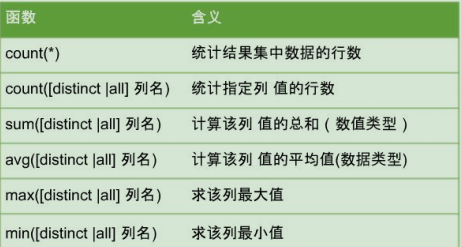
group_concat(str1,str2.....)函数
concat_ws(sep,str1,str2....)函数
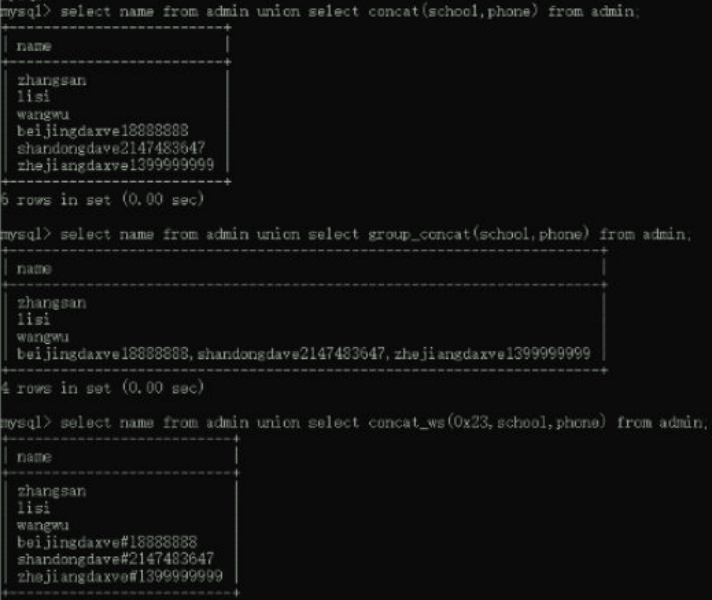
说明:当concat后面连接的字符有一个是空时,整个显示为空。
select concat('a','b','c'); abc
select concat('a','b',null); null
|
文本处理函数 |
含义 |
|
left(str,len) |
返回字符串左边的长度为len的子字符串 |
|
length(str) |
返回字符串的长度 |
|
cate(substr,str,pos) |
找出str中substr的起始索引 |
|
lower(str) |
捋字符串转换为小写 |
|
Itrim(str) |
去掉字符串左边的空格 |
|
right(str,len) |
返回字符串右边的长度为len的子字符串 |
|
Round() |
把数值字段舍入为指定的小数位 |
|
upper(str) |
捋字符串转换为大写 |
|
rtrim(str) |
去掉字符串右边的空格 |
|
substr(str,pos,[len]) |
返回字符串从pos位置开始长为len的子字符串 |
|
hex(str),hex(n) |
|
|
unhex(str) |
|
|
ascii(str) |
|
|
char(n) |
|
|
reverse(str) |
|
|
lpad(str,len,padstr) |
|
|
rpad(str,len,padstr) |
注意:在数据处理过程中,字符串的第一个就是代表1;substr()是substring()的别名'
select left('gao666',3); 'gao'
select right('gao666',3); '666'
select locate('gao','gao666gao',0); 0
select locate('gao','gao666gao',1); 1
select locate('gao','gao666gao',2); 7
select lower('gao666GAO'); 'gao666gao'
select upper('gao666GAO'); 'GAO666GAO'
select round('66.666',1); 66.7
select ltrim(' gao 666 '); 'gao 666 '
select ltrim(' gao 666 '); ' gao 666'
select substr('gao666GAO',1,6); 'gao666'
select substr('gao666GAO',7,3); 'GAO'
select substr('gao666GAO',1); 'gao666GAO'
select substr('gao666GAO',-3,2); 'GA'
select substring('gao666GAO' from -6 for 3); 666
select mid('gao666GAO',4,3); 666
select lpad('gao666GAO',3,'*'); 'gao'
select lpad('gao666GAO',10,'*'); '*gao666GAO'
select lpad('gao666GAO',3,'*'); 'gao'
select lpad('gao666GAO',10,'*'); ' gao666GAO*'
select reverse('gao666GAO'); 'OAG666oag'
一些重要字符ascii码 0:48, A:65, a:97 常见ASCII码的大小规则:0~9<A~Z<a~z。
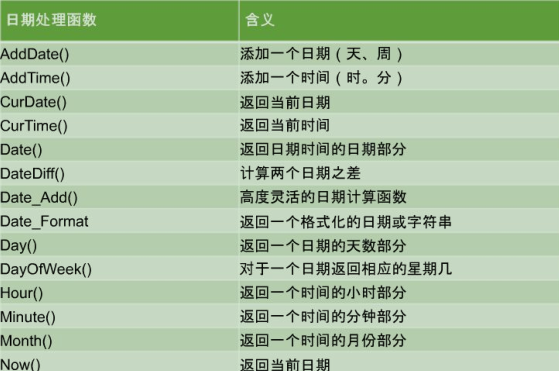
select now(); 2019-07-24 15:44:24
select datediff(now(),'2008-12-12'); 3876
select datediff('2009-12-12','2008-12-12'); 365
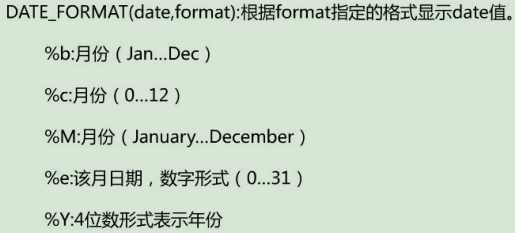
select date_format(now(),'%b'); Jul
select date_format(now(),'%Y'); 2019
select reverse(left('gao666GAO',3)); 'oag'
说明:为了保持与其他数据库兼容。进一步说明,从mysql导出的sql语句为了能在其他数据库使用,一些mysql特有的语句放在了/*!...*/中,这些语句在不兼容数据库不执行,而在mysql中可以识别、执行。
如/*!50001 语句*/表示数据库版本为50.0.01时中间的语句才执行
一个select-from-where语句称为一个查询块,讲一个查询块嵌套在另一个查询块的where子句或者having短语的条件中的查询叫做子查询。又称嵌套查询。
where dept in(select dept from depts where name='zhangsan');
where dept=(select dept from depts where name='zhangsan');
|
>any |
大于子查询结果集中的某个值 |
|
>all |
大于子查询结果集中的所有值 |
|
<any |
小于子查询结果集中的某个值 |
|
<all |
小于子查询结果集中的所有值 |
select name from ban 1 where age>ALL(select age from ban_2);
内连接:组合两个表中的记录,返回关联字段相符的记录,也就是返回两个表的交集(阴影)部分。
|
联合查询基本语法 |
内连接 |
仅显示两个表中匹配行,即两表中都有才显示。 select 列名 from 表a inner join 表b on(条件) |
|
外连接 |
左外连接:左表有就显示,不论右表。 select 列名 from 表a left outer join 表b on(条件) |
|
|
右外连接:右表有就显示,不论左表。 select 列名 from 表a right outer join 表b on(条件) |
1.select * from tgao1 inner join tgao2 on tgao1.id=tgao2.id;
左连接:左边的表记录全部展示,右表只会显示符合搜索条件的记录,不足的地方为null。
2.select * from tgao1 left join tgao2 on tgao1.id=tgao2.id; left join简写left outer join
右连接:右边的表记录全部展示,左表只会显示符合搜索条件的记录,不足的地方为null。
2.select * from tgao1 right join tgao2 on tgao1.id=tgao2.id; right join简写right outer join
union联合查询:把2条或者多条查询语句的结果合并成1个结果集
select * from tgao1 union [all] select * from tgao2;其中all显示两个表的所有数据,包括重复的。
说明:也就是没有create database和use database语句
格式:mysqldump-u username-p password dbName>name.sql存放路径
示例:mysqldump -u root -p root gao666>c:\gao666.sql 注:需要在cmd下,不能进入mysql中。
说明:首先需要创建好数据库,才能使用下面的命令。因为备份时没有创建和使用数据库语句。
source c:/gao666.sql 注:此项需要先创建数据库并使用,然后在mysql中执行(在mysql命令行模式下,恢复数据库命令中的数据库表目录需要使用/来,如:c:/users/gao666/desktop/gao666.sql)
格式:mysqldump-u username-p password -B dbName>name.sql存放路径
示例:mysqldump -u root -p root -B gao666>c:\gao666.sql 注:需要在cmd下,不能进入mysql中。
格式:mysql -uusername -ppassword [dbname]<filename.sql
dbname:表示要还原的数据库名称,若使用mysqldump命合备份的filename.sql文件中包含创建数据库的语句,则不需要指定数据库。
示例:mysql -uroot -proot <c:\gao666+.sql
格式:select user.host from mysql.user;
craete user 'gao666'@'192.168.198.120' identified by '666'; 注: mysql下,下同
格式:mysql>set password for 'user'@'host'=password('new_password");
set password for 'gao666'@'192.168.198.120'=password('gao666');
格式:rename user 'olduser'@' old_host' to 'newuser'@'new host'
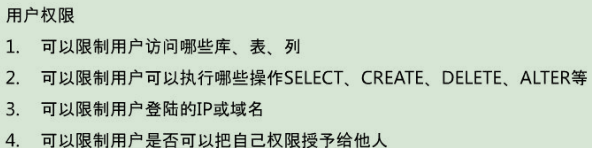
grant all privileges on *.* to 'yangxin'@'% identified by 'yangxin123456' with grant option;
to user '大虎'@'192.168.34.56' identified by 'qwe' with grant option;
|
all privileges:表示将所有权限授予给用户。也可指定具体的权限,如:SELECT、CREATE、DROP等。 |
|
on:表示这些权限对哪些数据库和表生效,格式:数据库名.表名,这里写“*”表示所有数掘库,所有表。如果我要指定将权限应用到test库的user表中,可以这么写:testuser |
|
to:将权限授予哪个用户,格式:“用户名”@”登录IP或域名”。%表示没有限制,在任何主机都可以登录。比如:"yangxin"@·192.168.0.%”,表示yangxin这个用户只能在192.168.0IP段登录 |
|
identified by:指定用户的登景密码 |
|
with grant option:表示允许用户将自己的权限授权给其它用户 |
1.授予在mysql_test数据库中的customers表上拥有对列cust_id和列cust_name的select权限
grant select(cust_id,cust_name)
2.新建一个用户为liming,并授予其在数据库mysql_test的表customers上拥有select和update的权限
to 'liming'@localhost identified by'123';
3.授予可以在数据库mysql_test中执行所有操作的权限
grant create user on *.* to 'zhangsan'@'localhost';
grant delete on mysql test.customers to 'zhangsan'@'localhost
回收用户zhangsan在数据库mysql_test的表customers上的select权限
revoke select on mysql_test.customers from'zhangsan'@localhost;
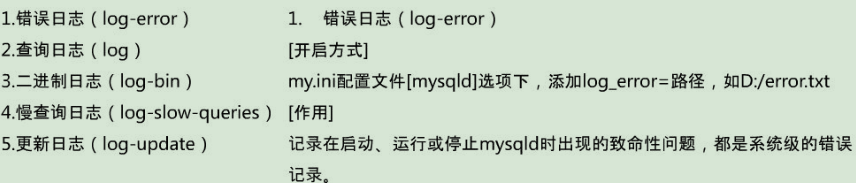
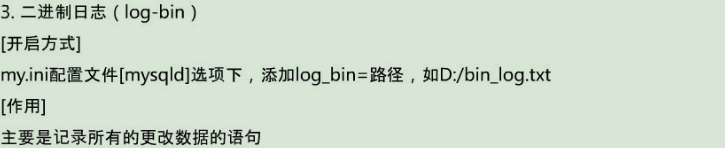
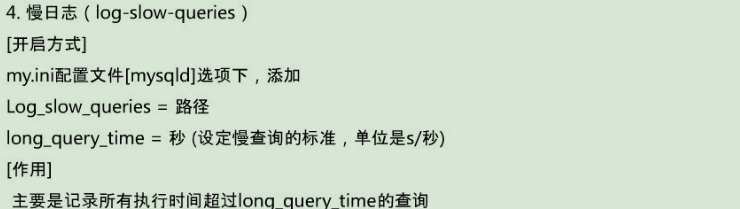
show global varivables like '%log%';

修改用户密码:set password for 'user'@'host' =password('new_password');
备份命令 ;mysqldemp -uroot -proot -Dgao666>gao666.sql
7.限制用户连接的数量 。配置在mysql目录下的my.ini,max_connections,最大连接量
本文来自博客园,作者:赛博狗尾草,转载请注明原文链接:https://www.cnblogs.com/gpysir/p/18800295


 浙公网安备 33010602011771号