国产统信系统服务器版-PXE环境部署
服务器版:
准备工作:
环境:
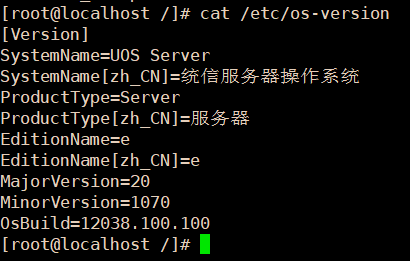
os ip:192.168.88.11/24,gw192.168.88.2
所需包:syslinux、tftp-server、dhcp、xinetd、httpd
sysllinux提供pxelinux.0,具体由sysllinux的依赖sysllinux-nonlinux包提供
tftp-server提供pxe启动时一些必要文件的传输服务
xinetd用于管理tftp-server
dhcp用于pxe启动时系统自动获取ip
http用于镜像文件传输
安装服务:
yum install syslinux tftp-server dhcp xinetd httpd
leagcy引导方式配置
服务配置
tftp服务配置
vim /etc/xinetd.d/tftp
注释wait=no
添加wait=yes
注释disable=yes
添加disable=no
修改后
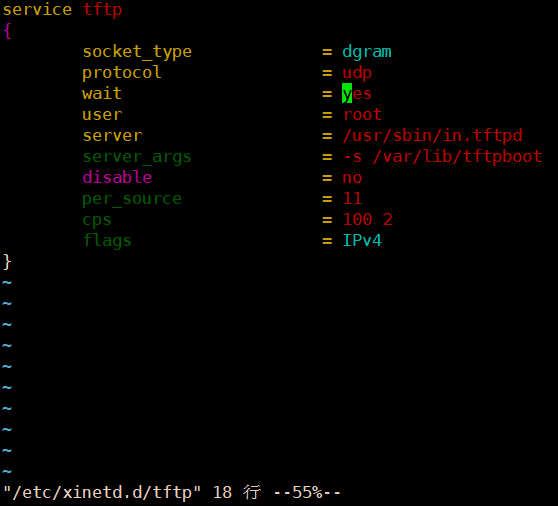
参考配置
service tftp
{
socket_type = dgram
protocol = udp
wait = yes
user = root
server = /usr/sbin/in.tftpd
server_args = -s /var/lib/tftpboot
disable = no
per_source = 11
cps = 100 2
flags = IPv4
}
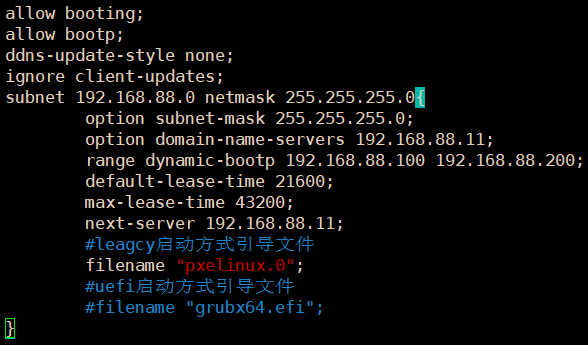
dhcp服务配置
vim /etc/dhcp/dhcpd.conf
参考配置
allow booting;
allow bootp;
ddns-update-style none;
ignore client-updates;
subnet 192.168.88.0 netmask 255.255.255.0{
option subnet-mask 255.255.255.0;
option domain-name-servers 192.168.88.11;
range dynamic-bootp 192.168.88.100 192.168.88.200;
default-lease-time 21600;
max-lease-time 43200;
next-server 192.168.88.11;
#leagcy启动方式引导文件
filename "pxelinux.0";
#uefi启动方式引导文件
#filename "grubx64.efi";
}
http服务配置
vim /etc/httpd/conf/httpd.conf
默认即可,不需要修改
服务管理
服务重启并开机自启,关闭防火墙
systemctl disable --now firewalld
systemctl enable --now httpd
systemctl enable --now xinetd
systemctl enable --now dhcpd
systemctl restart httpd
systemctl restart xinetd
systemctl restart dhcpd
补充:配置完成,应该检查一些服务端口监听状态
如图,dhcpd服务端udp67,tftp服务端udp69,httpd tcp80

配置pxe环境
挂载os镜像并配置pxe
传统leagcy引导方式
mkdir /var/www/html/uoserver
mount /dev/cdrom /var/www/html/uoserver
cp anaconda-ks.cfg /var/www/html/ks.cfg
chmod a+rw /var/www/html/ks.cfg
cd /var/lib/tftpboot
cp /usr/share/syslinux/pxelinux.0 .
cp /var/www/html/uoserver/isolinux/* .
mkdir ./pxelinux.cfg
cp ./isolinux.cfg ./pxelinux.cfg/default
chmod -R +rw *
配置default文件
vim ./pxelinux.cfg/default
注释首行:#default vesamenu.c32
添加行:default linux-graphic
查找标签行:label linux-graphic
修改为:

参考配置
label linux-graphic
menu label Install ^UOS Server 20 (Graphic)
kernel vmlinuz
# append initrd=initrd.img inst.stage2=hd:LABEL=UOS high splash
append initrd=initrd.img stage2=http://192.168.88.11/uoserver inst.ks=http://192.168.88.11/ks.cfg
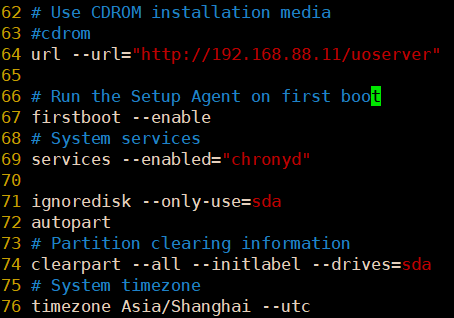
配置ks.cfg文件
vim /var/www/html/ks.cfg
注释行:#repo --name="kernel419" --baseurl=file:///run/install/sources/mount-0002-cdrom/kernel419
新增行:repo --name="kernel419" --baseurl=http://192.168.88.11/kernel419
注释行:#cdrom
新增行:url --url="http://192.168.88.12/uoserver"
参考
配置完毕,使用客户端测试
测试注意项:
1、客户端引导方式为从网卡方式启动
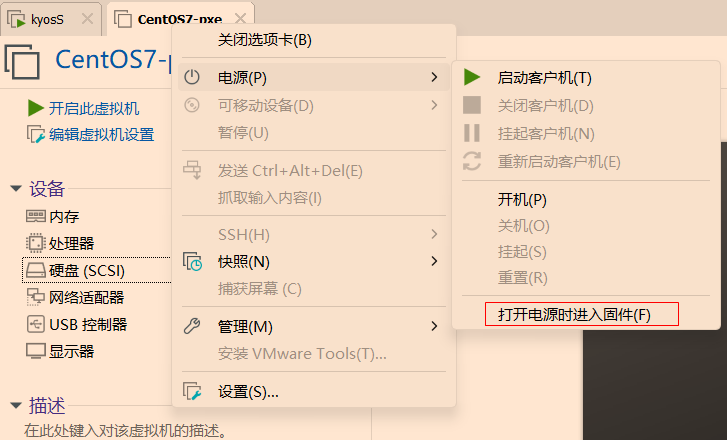
2、在使用vmware测试时, 新硬盘开机直接从网卡引导启动,已经装好的系统需要进bios修改启动项
3、虚拟机配置参考cpu2C,mem4G,disk30G,内存和硬盘过小,会导致引导起不来和磁盘空间不足安装失败
参考
vmware虚拟机进bios
uefi引导方式配置
配置无格外说明,同leagcy配置
镜像已挂载,服务已配置启动
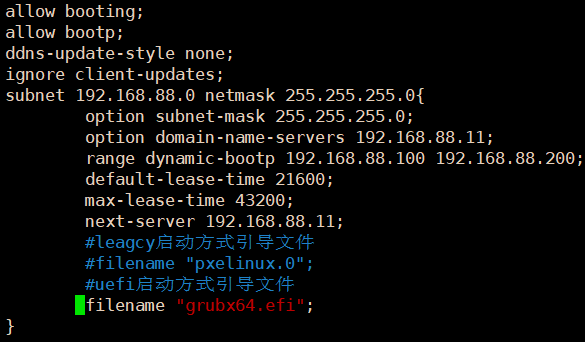
dhcp服务配置
vim /etc/dhcp/dhcpd.conf
参考配置
allow booting;
allow bootp;
ddns-update-style none;
ignore client-updates;
subnet 192.168.88.0 netmask 255.255.255.0{
option subnet-mask 255.255.255.0;
option domain-name-servers 192.168.88.11;
range dynamic-bootp 192.168.88.100 192.168.88.200;
default-lease-time 21600;
max-lease-time 43200;
next-server 192.168.88.11;
#leagcy启动方式引导文件
#filename "pxelinux.0";
#uefi启动方式引导文件
filename "grubx64.efi";
}
重启服务
systemctl restart dhcpd
pxe环境配置
cd /var/lib/tftp
mkdir legacy-bak
mv * legacy-bak
cp /var/www/html/uoserver/EFI/BOOT/* .
cp /var/www/html/uoserver/images/pxeboot/{initrd.img,vmlinuz} .
chmod +rw *
配置grub.cfg文件
注释行:#set theme=/EFI/BOOT/theme/theme.txt
注释行:#set timeout=60
新增行:set timeout=0
查找menuentry 'Install UOS Server 20 (Graphic)' 栏
修改前
menuentry 'Install UOS Server 20 (Graphic)' --class red --class gnu-linux --class gnu --class os {
linux /images/pxeboot/vmlinuz inst.stage2=hd:LABEL=UOS ro console=tty0 smmu.bypassdev=0x1000:0x17 smmu.bypassdev=0x1000:0x15 video=efifb:off rhgb
initrd /images/pxeboot/initrd.img
}修改后
menuentry 'Install UOS Server 20 (Graphic)' --class red --class gnu-linux --class gnu --class os {
linux vmlinuz inst.stage2=http://192.168.88.11/uoserver inst.ks=http://192.168.88.11/ks.cfg ro console=tty0 smmu.bypassdev=0x1000:0x17 smmu.bypassdev=0x1000:0x15 video=efifb:off rhgb
initrd initrd.img
}
配置完毕,使用客户端测试
客户端引导方式为从网卡方式启动
补充:
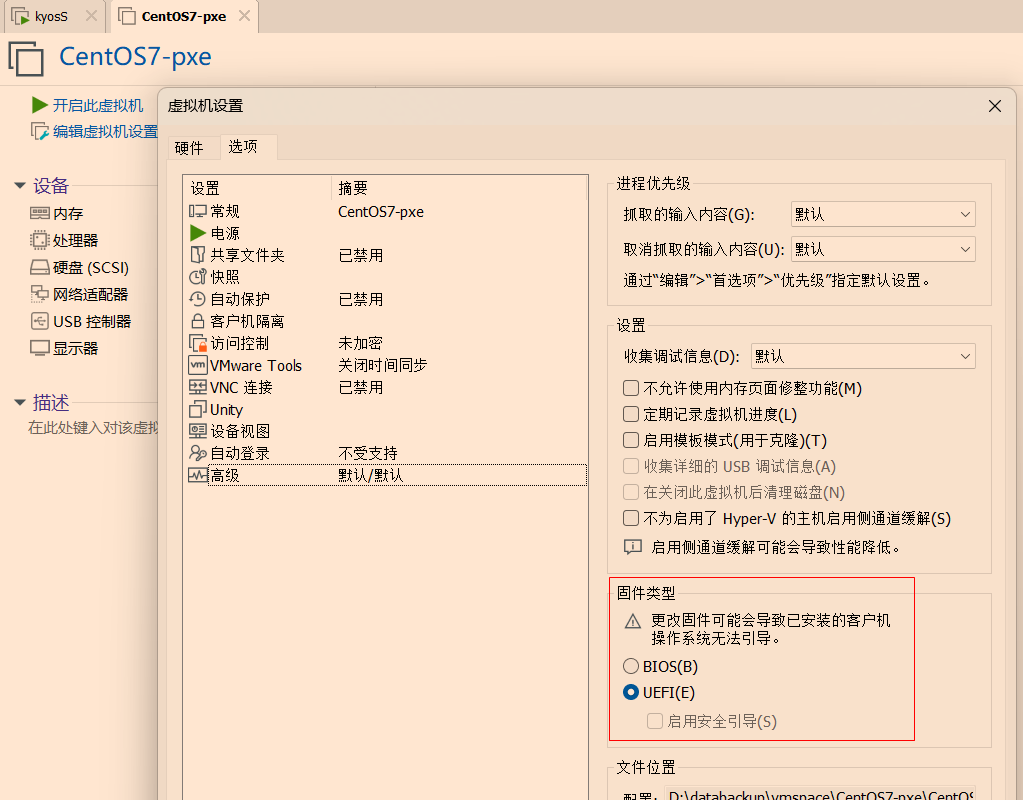
1、使用uefi引导时,需要修改虚拟机固件
修改固件步骤:新建虚拟机-编辑虚拟机设置-选项-高级-固件类型,可选择方式有BIOS和UEFI,此处选择UEFI
2、选择UEFI启动时,磁盘类型IDE无法识别,选择其他类型
补充:服务端日志查询,用于排查错误
tftp和dhcpd日志 tail -f /va/log/message
httpd日志 tail -f /var/log/httpd/access_log
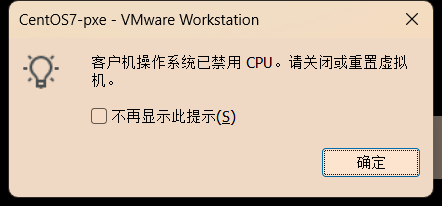
2、使用vmware测试时pxe安装报错
原因:内存不足导致,设置内存为4G及以上
本文来自博客园,作者:赛博狗尾草,转载请注明原文链接:https://www.cnblogs.com/gpysir/p/18791315


 浙公网安备 33010602011771号