

参考
https://blog.csdn.net/weixin_46084533/article/details/148422568?sharetype=blogdetail&sharerId=148422568&sharerefer=PC&sharesource=weixin_46084533&spm=1011.2480.3001.8118&login=from_csdn
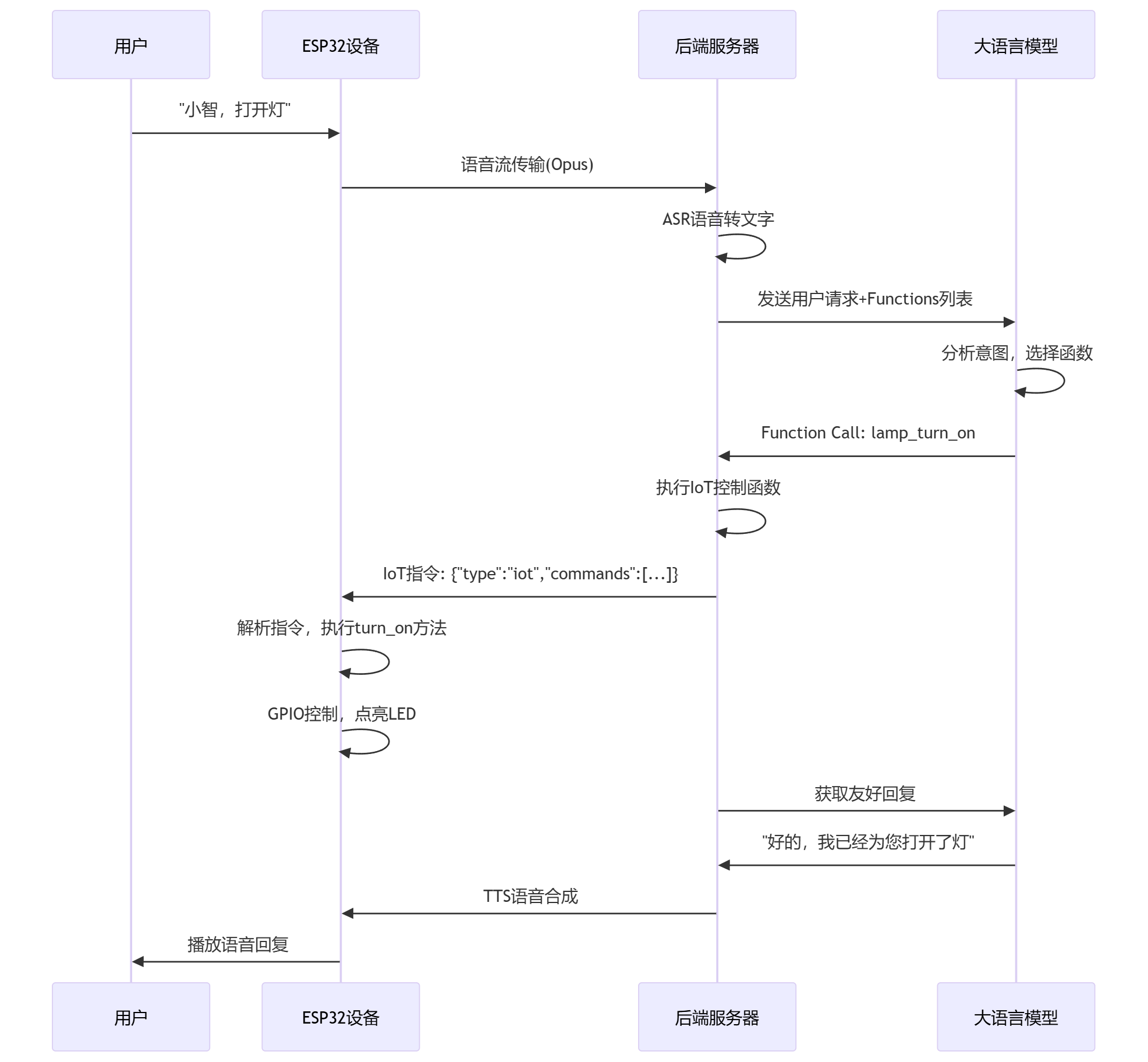
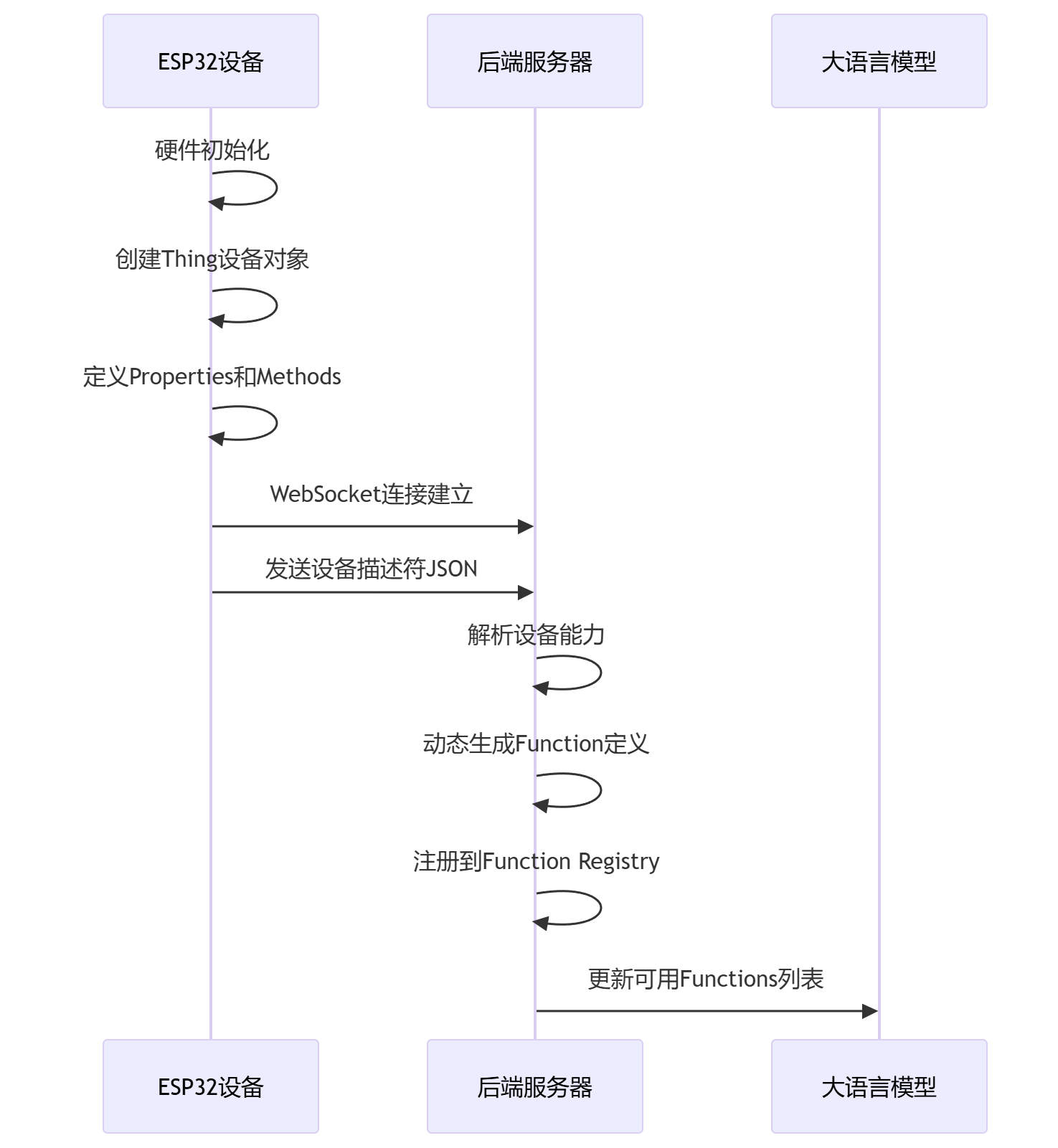
代码逻辑
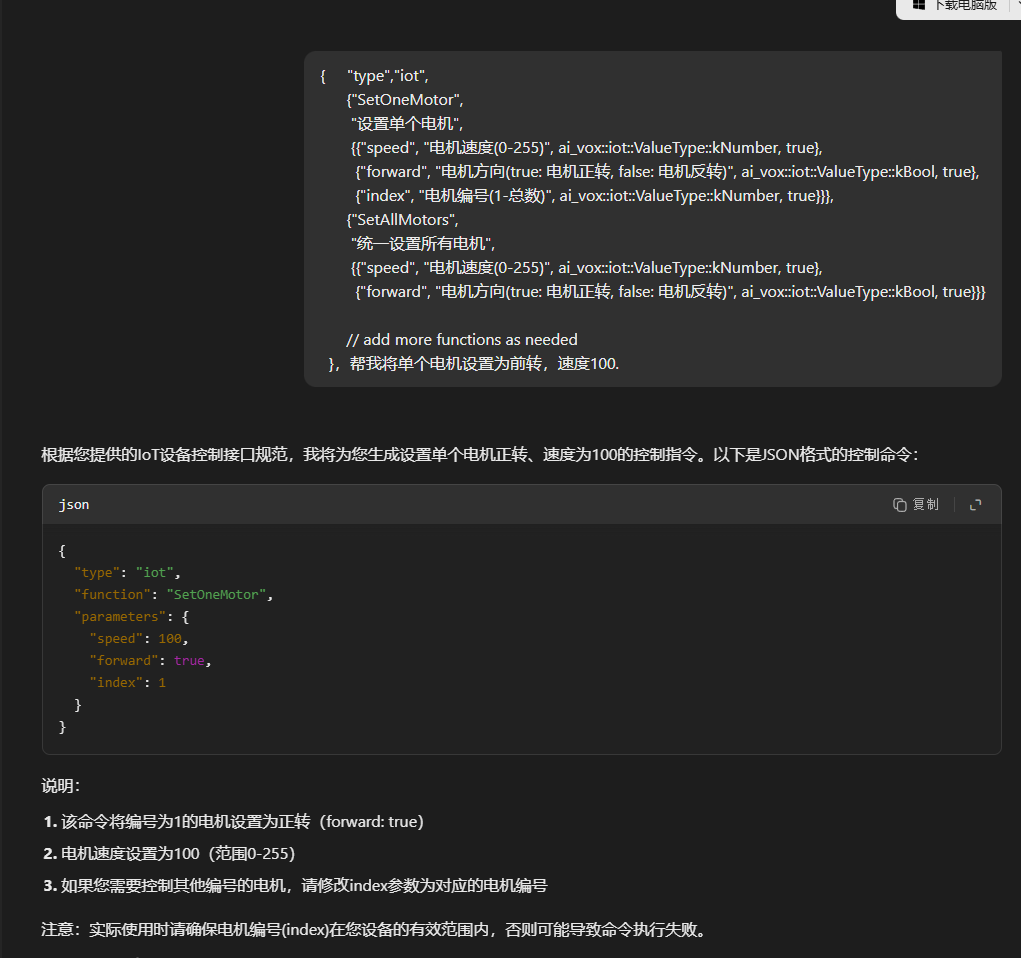
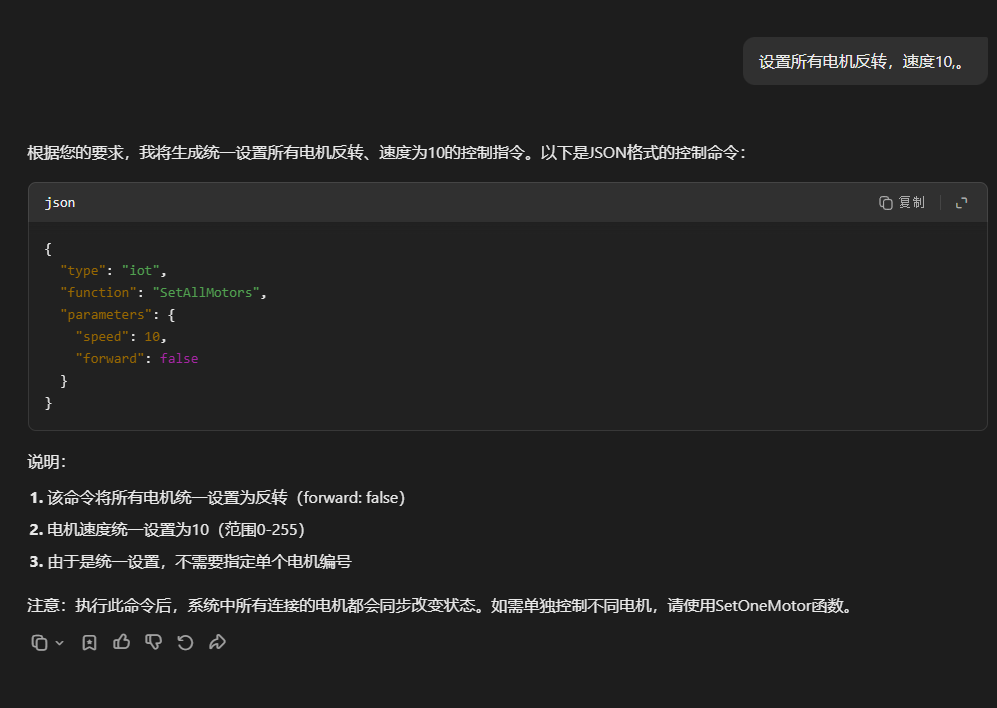
那腾讯元宝做一个测试
输入1
设备的属性和操作定义 json格式
输入2
我要的操作
大模型输出
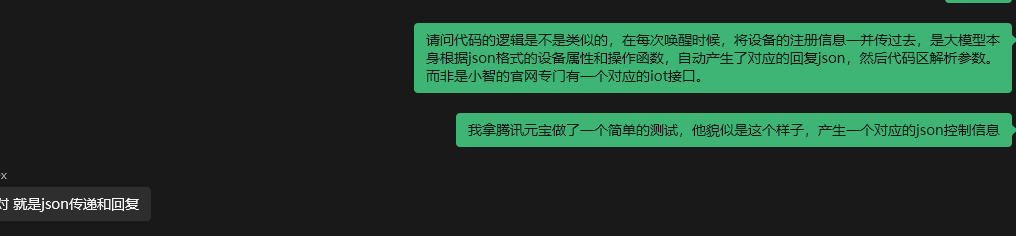
根据json产生对应的json。
整个代码依靠的是ai的理解能力产生回复信息,而非是官方有专门的api接口。
1. 扬声器设备描述信息
{
  "session_id": "",
  "type": "iot",
  "update": true,
  "descriptors": [
    {
      "name": "Speaker",
      "description": "扬声器",
      "properties": {
        "volume": {
          "description": "当前音量值",
          "type": "number"
        }
      },
      "methods": {
        "SetVolume": {
          "description": "设置音量",
          "parameters": {
            "volume": {
              "description": "0到100之间的整数",
              "type": "number"
            }
          }
        }
      }
    }
  ]
}
4. 扬声器当前状态
{
  "session_id": "",
  "type": "iot",
  "update": true,
  "states": [
    {
      "name": "Speaker",
      "state": {
        "volume": 10
      }
    }
  ]
}
2. LED灯设备描述信息
{
  "session_id": "",
  "type": "iot",
  "update": true,
  "descriptors": [
    {
      "name": "Led",
      "description": "LED灯",
      "properties": {
        "state": {
          "description": "LED灯开关状态",
          "type": "boolean"
        }
      },
      "methods": {
        "TurnOff": {
          "description": "关闭LED灯",
          "parameters": {}
        },
        "TurnOn": {
          "description": "打开LED灯",
          "parameters": {}
        }
      }
    }
  ]
}
5. LED灯当前状态
{
  "session_id": "",
  "type": "iot",
  "update": true,
  "states": [
    {
      "name": "Led",
      "state": {
        "state": false
      }
    }
  ]
}
3. RGB灯环设备描述信息
{
  "session_id": "",
  "type": "iot",
  "update": true,
  "descriptors": [
    {
      "name": "WS2812B",
      "description": "RGB灯环",
      "properties": {
        "color3": {
          "description": "3号灯颜色",
          "type": "string"
        },
        "color2": {
          "description": "2号灯颜色",
          "type": "string"
        },
        "color1": {
          "description": "1号灯颜色",
          "type": "string"
        },
        "LedNums": {
          "description": "灯的数量",
          "type": "number"
        },
        "brightness": {
          "description": "亮度(0-255)",
          "type": "number"
        }
      },
      "methods": {
        "Clear": {
          "description": "清除所有LED",
          "parameters": {}
        },
        "SetBrightness": {
          "description": "设置亮度",
          "parameters": {
            "brightness": {
              "description": "亮度值(0-255)",
              "type": "number"
            }
          }
        },
        "SetRangeIndexsColor": {
          "description": "设置连续LED范围颜色",
          "parameters": {
            "start": {
              "description": "起始LED索引(1-总数)",
              "type": "number"
            },
            "end": {
              "description": "结束LED索引(1-总数)",
              "type": "number"
            },
            "red": {
              "description": "红色值(0-255)",
              "type": "number"
            },
            "green": {
              "description": "绿色值(0-255)",
              "type": "number"
            },
            "blue": {
              "description": "蓝色值(0-255)",
              "type": "number"
            }
          }
        },
        "SetIndexColor": {
          "description": "设置指定LED颜色",
          "parameters": {
            "index": {
              "description": "LED索引(1-总数)",
              "type": "number"
            },
            "red": {
              "description": "红色值(0-255)",
              "type": "number"
            },
            "green": {
              "description": "绿色值(0-255)",
              "type": "number"
            },
            "blue": {
              "description": "蓝色值(0-255)",
              "type": "number"
            }
          }
        }
      }
    }
  ]
}
6. RGB灯环当前状态
{
  "session_id": "",
  "type": "iot",
  "update": true,
  "states": [
    {
      "name": "WS2812B",
      "state": {
        "color3": "{\"red\":0,\"green\":0,\"blue\":255}",
        "color2": "{\"red\":0,\"green\":255,\"blue\":0}",
        "color1": "{\"red\":255,\"green\":0,\"blue\":0}",
        "LedNums": 3,
        "brightness": 128
      }
    }
  ]
}
连续设置三个灯
{"session_id":"","type":"iot","update":true,"states":[{"name":"WS2812B","state":{"color1":"{\"red\":255,\"green\":0,\"blue\":0}","color2":"{\"red\":0,\"green\":255,\"blue\":0}","color3":"{\"red\":0,\"green\":0,\"blue\":255}"}}]}
22:09:17.046 -> ==================hello 设置ai处于聆听状态 s
22:09:17.087 -> state changed from 5 to 4
22:09:17.087 -> 聆听中...s
多个设备展示,虽然只有一个设备
在您提供的JSON数据中,[](方括号)表示一个数组(Array),用于包含多个相同类型的元素。让我们详细解析这个JSON结构:
JSON结构解析
为什么需要[]?.
-
states字段是一个数组•-
设计意图是允许包含多个设备状态•
-
即使当前只有一个设备(WS2812B),也使用数组形式保持扩展性
-
- 2.
实际应用场景示例
如果系统有多个IoT设备:
- 3.
与无数组的对比
如果不使用数组(错误示范):
这样设计会导致:
- •
无法添加第二个设备状态
- •
修改数据结构时会导致兼容性问题
- •
JSON中的符号含义
|
符号 |
类型 |
用途 |
|---|---|---|
|
|
对象(Object) |
表示键值对集合 |
|
|
数组(Array) |
表示有序的值集合 |
|
|
字符串(String) |
表示文本数据 |
最佳实践建议1.
-
当可能有多个同类项时始终使用数组
即使当前只有一个元素,也为未来扩展预留空间
{
  "session_id": "",
  "type": "iot",
  "update": true,
  "states": [
    {
      "name": "WS2812B",
      "state": {
        "color3": "{\"red\":0,\"green\":0,\"blue\":255}",
        "color2": "{\"red\":0,\"green\":255,\"blue\":0}",
        "color1": "{\"red\":255,\"green\":0,\"blue\":0}",
        "LedNums": 3,
        "brightness": 128
      }
    }
  ]
}
与无数组的对比
"states": {
  "name": "WS2812B",
  "state": { ... }
}
多个设备
"states": [
  {
    "name": "WS2812B",
    "state": { ... }
  },
  {
    "name": "TemperatureSensor",
    "state": { ... }
  }
]
多个IoT设备的JSON数据示例
{
  "session_id": "iot_session_12345",
  "type": "iot_state_update",
  "update": true,
  "timestamp": "2023-08-20T14:30:00Z",
  "states": [
    {
      "device_id": "LED_STRIP_1",
      "name": "WS2812B_Room1",
      "type": "RGB_LED",
      "state": {
        "colors": [
          {"red": 255, "green": 0, "blue": 0},
          {"red": 0, "green": 255, "blue": 0},
          {"red": 0, "green": 0, "blue": 255}
        ],
        "brightness": 128,
        "power": "ON",
        "effect": "rainbow"
      }
    },
    {
      "device_id": "SENSOR_1",
      "name": "DHT22_LivingRoom",
      "type": "Temperature_Humidity",
      "state": {
        "temperature": 24.5,
        "humidity": 45.7,
        "unit": "Celsius"
      }
    },
    {
      "device_id": "SWITCH_1",
      "name": "SmartSwitch_Kitchen",
      "type": "Power_Relay",
      "state": {
        "power": "OFF",
        "wattage": 0,
        "last_activated": "2023-08-20T12:15:00Z"
      }
    }
  ]
}
运行流程
模型状态定义和可执行函数定义
22:14:54.073 -> state changed from 2 to 3
22:14:54.073 -> 连接中...
22:14:54.743 -> =============== OnWebSocketConnected
22:14:54.783 -> =============== 客户端发送 hello:连接成功建立后,客户端需要发送一个 hello 消息(JSON 格式)
22:14:54.953 -> ==================Received JSON type: hello
22:14:54.953 -> ==================hello iot设备属性和操作函数信息josn上报 :
22:14:54.953 ->  {"session_id":"","type":"iot","update":true,"descriptors":[{"name":"Speaker","description":"扬声器","properties":{"volume":{"description":"当前音量值","type":"number"}},"methods":{"SetVolume":{"description":"设置音量","parameters":{"volume":{"description":"0到100之间的整数","type":"number"}}}}}]}
22:14:54.986 -> ==================hello iot设备属性和操作函数信息josn上报 :
22:14:54.986 ->  {"session_id":"","type":"iot","update":true,"descriptors":[{"name":"Led","description":"LED灯","properties":{"state":{"description":"LED灯开关状态","type":"boolean"}},"methods":{"TurnOff":{"description":"关闭LED灯","parameters":{}},"TurnOn":{"description":"打开LED灯","parameters":{}}}}]}
22:14:55.020 -> ==================hello iot设备属性和操作函数信息josn上报 :
22:14:55.020 ->  {"session_id":"","type":"iot","update":true,"descriptors":[{"name":"WS2812B","description":"RGB灯环","properties":{"color3":{"description":"3号灯颜色","type":"string"},"color2":{"description":"2号灯颜色","type":"string"},"color1":{"description":"1号灯颜色","type":"string"},"LedNums":{"description":"灯的数量","type":"number"},"brightness":{"description":"亮度(0-255)","type":"number"}},"methods":{"Clear":{"description":"清除所有LED","parameters":{}},"SetBrightness":{"description":"设置亮度","parameters":{"brightness":{"description":"亮度值(0-255)","type":"number"}}},"SetRangeIndexsColor":{"description":"设置连续LED范围颜色","parameters":{"start":{"description":"起始LED索引(1-总数)","type":"number"},"end":{"description":"结束LED索引(1-总数)","type":"number"},"red":{"description":"红色值(0-255)","type":"number"},"green":{"description":"绿色值(0-255)","type":"number"},"blue":{"description":"蓝色值(0-255)","type":"number"}}},"SetIndexColor":{"description":"设置指定LED颜色","parameters":{"index":{"description":"LED索引(1-总数)","type":"number"},"red":{"description":"红色值(0-255)","type":"number"},"green":{"description":"绿色值(0-255)","type":"number"},"blue":{"description":"蓝色值(0-255)","type":"number"}}}}}]}
22:14:55.121 -> ==================hello iot设备当前状态json上报 : {"session_id":"","type":"iot","update":true,"states":[{"name":"Speaker","state":{"volume":10}}]}
22:14:55.154 -> ==================hello iot设备当前状态json上报 : {"session_id":"","type":"iot","update":true,"states":[{"name":"Led","state":{"state":false}}]}
22:14:55.154 -> ==================hello iot设备当前状态json上报 : {"session_id":"","type":"iot","update":true,"states":[{"name":"WS2812B","state":{"color3":"{\"red\":0,\"green\":0,\"blue\":255}","color2":"{\"red\":0,\"green\":255,\"blue\":0}","color1":"{\"red\":255,\"green\":0,\"blue\":0}","LedNums":3,"brightness":128}}]}
22:14:55.191 -> ==================hello 设置ai处于聆听状态 s
22:14:55.226 -> ==================hello 1发送IOT设备信息json
22:14:55.226 -> state changed from 3 to 4
22:14:55.226 -> 聆听中...
22:14:55.226 -> ==================hello 2单独唤醒小智 : {"session_id":"4b45714e","type":"listen","state":"detect","text":"你好小智"}
22:14:55.358 -> ==================Received JSON type: tts
22:14:55.358 -> ==================tts
22:14:55.358 -> ==================tts start
22:14:55.397 -> state changed from 4 to 5
22:14:55.397 -> ==================Received JSON type: stt
22:14:55.433 -> 说话中...
22:14:55.433 -> ==================stt
22:14:55.433 -> ==================stt >> Hi, 小智
22:14:55.433 -> role: user 使用者询问语音内容,: Hi, 小智
22:14:56.280 -> ==================Received JSON type: llm
22:14:56.280 -> ==================llm
22:14:56.324 -> ==================llm emotion: happy
22:14:56.324 -> emotion: happy
具体过程
22:08:54.366 -> ==================stt >> 将一号灯、二号灯、3号灯设置为分别设置为红绿蓝。
22:08:54.366 -> role: user 使用者询问语音内容,: 将一号灯、二号灯、3号灯设置为分别设置为红绿蓝。
22:08:54.727 -> ==================Received JSON type: llm
22:08:54.727 -> ==================llm
22:08:54.727 -> ==================llm emotion: cool
22:08:54.727 -> emotion: cool
22:08:54.851 -> ==================Received JSON type: tts
22:08:54.851 -> ==================tts
22:08:54.851 -> ==================tts sentence_start
22:08:54.893 -> ==================tts sentence_start << 收到!
22:08:54.893 -> role: assistant 智能AI回复消息, content: 收到!
22:08:56.106 -> ==================Received JSON type: tts
22:08:56.148 -> ==================tts
22:08:56.148 -> ==================tts sentence_end
22:08:56.148 -> ==================Received JSON type: tts
22:08:56.148 -> ==================tts
22:08:56.148 -> ==================tts sentence_start
22:08:56.148 -> ==================tts sentence_start << 马上帮你设置灯环颜色~
22:08:56.148 -> role: assistant 智能AI回复消息, content: 马上帮你设置灯环颜色~
22:08:58.451 -> ==================Received JSON type: tts
22:08:58.451 -> ==================tts
22:08:58.451 -> ==================tts sentence_end
2:08:58.451 -> ==================Received JSON type: iot
22:08:58.451 -> ==================iot 唤醒IOT物联网函数 : iot
22:08:58.451 -> ==================iot唤醒IOT物联网函数 : 名字 WS2812B  方法 SetIndexColor
22:08:58.451 -> ==================iot唤醒IOT物联网函数 参数 Parameters:
22:08:58.484 ->   [index] = 1 (number)
22:08:58.484 ->   [red] = 255 (number)
22:08:58.484 ->   [green] = 0 (number)
22:08:58.484 ->   [blue] = 0 (number)
22:08:58.484 -> IOT message: WS2812B, function: SetIndexColor
22:08:58.484 -> ==================Received JSON type: tts
22:08:58.484 -> ==================tts
22:08:58.484 -> ==================tts start
22:08:58.484 -> key: blue, value: 0
22:08:58.484 -> ==================tts already speaking
22:08:58.484 -> key: green, value: 0
22:08:58.484 -> key: index, value: 1
22:08:58.484 -> key: red, value: 255
22:08:58.484 -> Set LED 1 to color RGB(255, 0, 0)
22:08:59.110 -> ==================Received JSON type: llm
22:08:59.144 -> ==================llm
22:08:59.144 -> ==================llm emotion: happy
22:08:59.144 -> emotion: happy
22:08:59.322 -> ==================Received JSON type: tts
22:08:59.355 -> ==================tts
22:08:59.355 -> ==================tts sentence_start
22:08:59.355 -> ==================tts sentence_start << 一号灯变红色啦~
22:08:59.355 -> role: assistant 智能AI回复消息, content: 一号灯变红色啦~
22:09:01.570 -> ==================Received JSON type: tts
22:09:01.612 -> ==================tts
22:09:01.612 -> ==================tts sentence_end
22:09:01.612 -> ==================Received JSON type: tts
22:09:01.612 -> ==================tts
22:09:01.612 -> ==================tts sentence_start
22:09:01.612 -> ==================tts sentence_start << 继续设置二号灯!
22:09:01.612 -> role: assistant 智能AI回复消息, content: 继续设置二号灯!
22:09:03.516 -> ==================Received JSON type: tts
22:09:03.549 -> ==================tts
22:09:03.549 -> ==================tts sentence_end
22:09:03.549 -> ==================Received JSON type: iot
22:09:03.549 -> ==================iot 唤醒IOT物联网函数 : iot
22:09:03.549 -> ==================iot唤醒IOT物联网函数 : 名字 WS2812B  方法 SetIndexColor
22:09:03.549 -> ==================iot唤醒IOT物联网函数 参数 Parameters:
22:09:03.549 ->   [index] = 2 (number)
22:09:03.549 ->   [red] = 0 (number)
22:09:03.549 ->   [green] = 255 (number)
22:09:03.596 ->   [blue] = 0 (number)
22:09:03.596 -> IOT message: WS2812B, function: SetIndexColor
22:09:03.596 -> key: blue, value: 0
22:09:03.596 -> key: green, value: 255
22:09:03.596 -> key: index, value: 2
22:09:03.596 -> key: red, value: 0
22:09:03.596 -> Set LED 2 to color RGB(0, 255, 0)
22:09:03.596 -> ==================Received JSON type: tts
22:09:03.596 -> ==================tts
22:09:03.596 -> ==================tts start
22:09:03.596 -> ==================tts already speaking
22:09:03.959 -> ==================Received JSON type: llm
22:09:03.959 -> ==================llm
22:09:03.959 -> ==================llm emotion: laughing
22:09:03.959 -> emotion: laughing
22:09:05.321 -> ==================Received JSON type: tts
22:09:05.321 -> ==================tts
22:09:05.321 -> ==================tts sentence_start
22:09:05.321 -> ==================tts sentence_start << 二号灯变绿色咯~
22:09:05.321 -> role: assistant 智能AI回复消息, content: 二号灯变绿色咯~
22:09:07.664 -> ==================Received JSON type: tts
22:09:07.664 -> ==================tts
2:09:07.664 -> ==================tts sentence_end
22:09:07.664 -> ==================Received JSON type: tts
22:09:07.664 -> ==================tts
22:09:07.664 -> ==================tts sentence_start
22:09:07.664 -> ==================tts sentence_start << 最后设置三号灯!
22:09:07.664 -> role: assistant 智能AI回复消息, content: 最后设置三号灯!
22:09:09.602 -> ==================Received JSON type: tts
22:09:09.602 -> ==================tts
22:09:09.602 -> ==================tts sentence_end
22:09:09.635 -> ==================Received JSON type: iot
22:09:09.635 -> ==================iot 唤醒IOT物联网函数 : iot
22:09:09.635 -> ==================iot唤醒IOT物联网函数 : 名字 WS2812B  方法 SetIndexColor
22:09:09.635 -> ==================iot唤醒IOT物联网函数 参数 Parameters:
22:09:09.635 ->   [index] = 3 (number)
22:09:09.635 ->   [red] = 0 (number)
22:09:09.635 ->   [green] = 0 (number)
22:09:09.635 ->   [blue] = 255 (number)
22:09:09.635 -> IOT message: WS2812B, function: SetIndexColor
22:09:09.674 -> key: blue, value: 255
22:09:09.674 -> ==================Received JSON type: tts
22:09:09.674 -> ==================tts
22:09:09.674 -> ==================tts start
22:09:09.674 -> key: green, value: 0
22:09:09.674 -> ==================tts already speaking
22:09:09.674 -> key: index, value: 3
22:09:09.674 -> key: red, value: 0
22:09:09.674 -> Set LED 3 to color RGB(0, 0, 255)
22:09:09.999 -> ==================Received JSON type: llm
22:09:09.999 -> ==================llm
22:09:09.999 -> ==================llm emotion: loving
22:09:09.999 -> emotion: loving
22:09:10.091 -> ==================Received JSON type: tts
22:09:10.091 -> ==================tts
22:09:10.132 -> ==================tts sentence_start
22:09:10.132 -> ==================tts sentence_start << 搞定!
22:09:10.132 -> role: assistant 智能AI回复消息, content: 搞定!
22:09:11.320 -> ==================Received JSON type: tts
22:09:11.320 -> ==================tts
22:09:11.320 -> ==================tts sentence_end
22:09:11.320 -> ==================Received JSON type: tts
22:09:11.320 -> ==================tts
22:09:11.320 -> ==================tts sentence_start
22:09:11.320 -> ==================tts sentence_start << 现在灯环红绿蓝三色都亮起来啦~
22:09:11.363 -> role: assistant 智能AI回复消息, content: 现在灯环红绿蓝三色都亮起来啦~
22:09:14.624 -> ==================Received JSON type: tts
22:09:14.670 -> ==================tts
22:09:14.670 -> ==================tts sentence_end
22:09:14.670 -> ==================Received JSON type: tts
22:09:14.670 -> ==================tts
22:09:14.670 -> ==================tts sentence_start
22:09:14.670 -> ==================tts sentence_start << 超美的!
22:09:14.670 -> role: assistant 智能AI回复消息, content: 超美的!
22:09:16.745 -> ==================Received JSON type: tts
22:09:16.745 -> ==================tts
22:09:16.745 -> ==================tts sentence_end
22:09:16.745 -> ==================Received JSON type: tts
22:09:16.745 -> ==================tts
22:09:16.745 -> ==================tts stop
22:09:17.046 -> ==================hello iot设备当前状态json上报 : {"session_id":"","type":"iot","update":true,"states":[{"name":"WS2812B","state":{"color1":"{\"red\":255,\"green\":0,\"blue\":0}","color2":"{\"red\":0,\"green\":255,\"blue\":0}","color3":"{\"red\":0,\"green\":0,\"blue\":255}"}}]}
22:09:17.046 -> ==================hello 设置ai处于聆听状态 s
22:09:17.087 -> state changed from 5 to 4
22:09:17.087 -> 聆听中...
22:10:20.474 -> ==================Received JSON type: tts
22:10:20.512 -> ==================tts
22:10:20.512 -> ==================tts start
22:10:20.557 -> state changed from 4 to 5
22:10:20.557 -> 说话中...
设置后查询等的
LED灯的设备定义
1:56:32.251 -> state changed from 2 to 3
11:56:32.251 -> 连接中...
11:56:32.800 -> =============== OnWebSocketConnected
11:56:32.800 -> =============== 客户端发送 hello:连接成功建立后,客户端需要发送一个 hello 消息(JSON 格式)
11:56:32.974 -> ==================Received JSON type: hello
11:56:33.007 -> ==================hello iot设备属性和操作函数信息josn上报 :
11:56:33.007 ->  {"session_id":"","type":"iot","update":true,"descriptors":[{"name":"Speaker","description":"扬声器","properties":{"volume":{"description":"当前音量值","type":"number"}},"methods":{"SetVolume":{"description":"设置音量","parameters":{"volume":{"description":"0到100之间的整数","type":"number"}}}}}]}
11:56:33.041 -> ==================hello iot设备属性和操作函数信息josn上报 :
11:56:33.041 ->  {"session_id":"","type":"iot","update":true,"descriptors":[{"name":"Led","description":"LED灯","properties":{"state":{"description":"LED灯开关状态","type":"boolean"}},"methods":{"TurnOff":{"description":"关闭LED灯","parameters":{}},"TurnOn":{"description":"打开LED灯","parameters":{}}}}]}
11:56:33.074 -> ==================hello iot设备属性和操作函数信息josn上报 :
11:56:33.074 ->  {"session_id":"","type":"iot","update":true,"descriptors":[{"name":"WS2812B","description":"RGB灯环","properties":{"color1":{"description":"1号灯颜色","type":"string"},"LedNums":{"description":"灯的数量","type":"number"},"brightness":{"description":"亮度(0-255)","type":"number"}},"methods":{"Clear":{"description":"清除所有LED","parameters":{}},"SetBrightness":{"description":"设置亮度","parameters":{"brightness":{"description":"亮度值(0-255)","type":"number"}}},"SetRangeIndexsColor":{"description":"设置连续LED范围颜色","parameters":{"start":{"description":"起始LED索引(1-总数)","type":"number"},"end":{"description":"结束LED索引(1-总数)","type":"number"},"red":{"description":"红色值(0-255)","type":"number"},"green":{"description":"绿色值(0-255)","type":"number"},"blue":{"description":"蓝色值(0-255)","type":"number"}}},"SetIndexColor":{"description":"设置指定LED颜色","parameters":{"index":{"description":"LED索引(1-总数)","type":"number"},"red":{"description":"红色值(0-255)","type":"number"},"green":{"description":"绿色值(0-255)","type":"number"},"blue":{"description":"蓝色值(0-255)","type":"number"}}}}}]}
11:56:33.173 -> ==================hello iot设备当前状态json上报 : {"session_id":"","type":"iot","update":true,"states":[{"name":"Speaker","state":{"volume":70}}]}
11:56:33.173 -> ==================hello iot设备当前状态json上报 : {"session_id":"","type":"iot","update":true,"states":[{"name":"Led","state":{"state":false}}]}
11:56:33.213 -> ==================hello iot设备当前状态json上报 : {"session_id":"","type":"iot","update":true,"states":[{"name":"WS2812B","state":{"color1":"{\"red\":0,\"green\":0,\"blue\":0}","LedNums":1,"brightness":128}}]}
11:56:33.213 -> ==================hello 设置ai处于聆听状态 s
11:56:33.248 -> state changed from 3 to 4
11:56:33.248 -> 聆听中...
11:56:33.248 -> ==================hello 1发送IOT设备信息json
11:56:33.248 -> ==================hello 2单独唤醒小智 : {"session_id":"0f3921f0","type":"listen","state":"detect","text":"你好小智"}
11:56:33.282 -> ==================Received JSON type: tts
11:56:33.323 -> ==================tts
11:56:33.323 -> ==================tts start
11:56:33.367 -> state changed from 4 to 5
11:56:33.367 -> ==================Received JSON type: stt
11:56:33.367 -> 说话中...
11:56:33.367 -> ==================stt
11:56:33.367 -> ==================stt >> Hi, 小智
11:56:33.367 -> role: user 使用者询问语音内容,: Hi, 小智
11:56:34.226 -> ==================Received JSON type: llm
11:56:34.226 -> ==================llm
11:56:34.226 -> ==================llm emotion: happy
11:56:34.226 -> emotion: happy
11:56:34.358 -> ==================Received JSON type: tts
11:56:34.391 -> ==================tts
11:56:34.391 -> ==================tts sentence_start
11:56:34.391 -> ==================tts sentence_start << 哈喽!
11:56:34.391 -> role: assistant 智能AI回复消息, content: 哈喽!
11:56:35.607 -> ==================Received JSON type: tts
11:56:35.607 -> ==================tts
11:56:35.607 -> ==================tts sentence_end
11:56:35.607 -> ==================Received JSON type: tts
11:56:35.607 -> ==================tts
11:56:35.607 -> ==================tts sentence_start
11:56:35.607 -> ==================tts sentence_start << 今天怎么这么机车,突然跟人家打招呼呀?
11:56:35.648 -> role: assistant 智能AI回复消息, content: 今天怎么这么机车,突然跟人家打招呼呀?
11:56:39.290 -> ==================Received JSON type: tts
11:56:39.290 -> ==================tts
11:56:39.290 -> ==================tts sentence_end
11:56:39.290 -> ==================Received JSON type: tts
11:56:39.290 -> ==================tts
11:56:39.290 -> ==================tts stop
11:56:39.549 -> ==================hello 设置ai处于聆听状态 s
11:56:39.594 -> state changed from 5 to 4
11:56:39.594 -> 聆听中...
11:56:34.391 -> ==================tts
11:56:34.391 -> ==================tts sentence_start
11:56:34.391 -> ==================tts sentence_start << 哈喽!
11:56:34.391 -> role: assistant 智能AI回复消息, content: 哈喽!
11:56:35.607 -> ==================Received JSON type: tts
11:56:35.607 -> ==================tts
11:56:35.607 -> ==================tts sentence_end
11:56:35.607 -> ==================Received JSON type: tts
11:56:35.607 -> ==================tts
11:56:35.607 -> ==================tts sentence_start
11:56:35.607 -> ==================tts sentence_start << 今天怎么这么机车,突然跟人家打招呼呀?
11:56:35.648 -> role: assistant 智能AI回复消息, content: 今天怎么这么机车,突然跟人家打招呼呀?
11:56:39.290 -> ==================Received JSON type: tts
11:56:39.290 -> ==================tts
11:56:39.290 -> ==================tts sentence_end
11:56:39.290 -> ==================Received JSON type: tts
11:56:39.290 -> ==================tts
11:56:39.290 -> ==================tts stop
11:56:39.549 -> ==================hello 设置ai处于聆听状态 s
11:56:39.594 -> state changed from 5 to 4
11:56:39.594 -> 聆听中...
11:56:44.239 -> ==================Received JSON type: tts
11:56:44.239 -> ==================tts
11:56:44.239 -> ==================tts start
11:56:44.239 -> state changed from 4 to 5
11:56:44.239 -> ==================Received JSON type: stt
11:56:44.282 -> 说话中...
11:56:44.282 -> 说话中...
11:56:44.282 -> ==================stt
11:56:44.282 -> ==================stt >> 设置一号灯的颜色为紫色。
11:56:44.282 -> role: user 使用者询问语音内容,: 设置一号灯的颜色为紫色。
11:56:45.051 -> ==================Received JSON type: llm
11:56:45.086 -> ==================llm
11:56:45.086 -> ==================llm emotion: laughing
11:56:45.086 -> emotion: laughing
11:56:45.437 -> ==================Received JSON type: tts
11:56:45.437 -> ==================tts
11:56:45.437 -> ==================tts sentence_start
11:56:45.437 -> ==================tts sentence_start << 好哦!
11:56:45.437 -> role: assistant 智能AI回复消息, content: 好哦!
11:56:46.298 -> ==================Received JSON type: tts
11:56:46.298 -> ==================tts
11:56:46.298 -> ==================tts sentence_end
11:56:47.056 -> ==================Received JSON type: tts
11:56:47.095 -> ==================tts
11:56:47.095 -> ==================tts sentence_start
11:56:47.095 -> ==================tts sentence_start << 马上帮你把一号灯调成紫色,超梦幻的啦~
11:56:47.095 -> role: assistant 智能AI回复消息, content: 马上帮你把一号灯调成紫色,超梦幻的啦~
11:56:51.515 -> ==================Received JSON type: tts
11:56:51.515 -> ==================tts
11:56:51.515 -> ==================tts sentence_end
11:56:51.515 -> ==================Received JSON type: iot
11:56:51.549 -> ==================iot 唤醒IOT物联网函数 : iot
11:56:51.549 -> ==================iot唤醒IOT物联网函数 : 名字 WS2812B  方法 SetIndexColor
11:56:51.549 -> ==================iot唤醒IOT物联网函数 参数 Parameters:
11:56:51.549 ->   [index] = 1 (number)
11:56:51.549 ->   [red] = 128 (number)
11:56:51.549 ->   [green] = 0 (number)
11:56:51.549 ->   [blue] = 128 (number)
11:56:51.549 -> ==================Received JSON type: tts
11:56:51.549 -> ==================tts
11:56:51.588 -> ==================tts start
11:56:51.588 -> ==================tts already speaking
11:56:51.588 -> IOT message: WS2812B, function: SetIndexColor
11:56:51.588 -> key: blue, value: 128
11:56:51.588 -> key: green, value: 0
11:56:51.588 -> key: index, value: 1
11:56:51.588 -> key: red, value: 128
11:56:51.588 -> Set LED 1 to color RGB(128, 0, 128)
11:56:52.175 -> ==================Received JSON type: llm
11:56:52.209 -> ==================llm
11:56:52.209 -> ==================llm emotion: loving
11:56:52.209 -> emotion: loving
11:56:52.209 -> ==================Received JSON type: tts
11:56:52.209 -> ==================tts
11:56:52.209 -> ==================tts sentence_start
11:56:52.209 -> ==================tts sentence_start << 搞定啦!
11:56:52.209 -> role: assistant 智能AI回复消息, content: 搞定啦!
11:56:53.830 -> ==================Received JSON type: tts
11:56:53.830 -> ==================tts
11:56:53.830 -> ==================tts sentence_end
11:56:53.830 -> ==================Received JSON type: tts
11:56:53.873 -> ==================tts
11:56:53.873 -> ==================tts sentence_start
11:56:53.873 -> ==================tts sentence_start << 紫色灯光超浪漫的,有没有被电到呀?
11:56:53.873 -> role: assistant 智能AI回复消息, content: 紫色灯光超浪漫的,有没有被电到呀?
11:56:57.730 -> ==================Received JSON type: tts
11:56:57.731 -> ==================tts
11:56:57.731 -> ==================tts sentence_end
11:56:57.731 -> ==================Received JSON type: tts
11:56:57.731 -> ==================tts
11:56:57.731 -> ==================tts stop
11:56:58.087 -> ==================hello iot设备当前状态json上报 : {"session_id":"","type":"iot","update":true,"states":[{"name":"WS2812B","state":{"color1":"{\"red\":128,\"green\":0,\"blue\":128}"}}]}
11:56:58.125 -> ==================hello 设置ai处于聆听状态 s
11:56:58.170 -> state changed from 5 to 4
11:56:58.170 -> 聆听中...
11:57:02.791 -> ==================Received JSON type: tts
11:57:02.823 -> ==================tts
11:57:02.823 -> ==================tts start
11:57:02.823 -> state changed from 4 to 5
11:57:02.823 -> 说话中...
11:57:02.823 -> ==================Received JSON type: stt
hello iot设备当前状态json上报 : {"session_id":"","type":"iot","update":true,"states":[{"name":"WS2812B","state":{"color1":"{\"red\":128,\"green\":0,\"blue\":128}"}}]}
核心能力原理基础
【AI大模型应用开发】2.1 Function Calling连接外部世界 - 入门与实战(1)
https://zhuanlan.zhihu.com/p/689858409
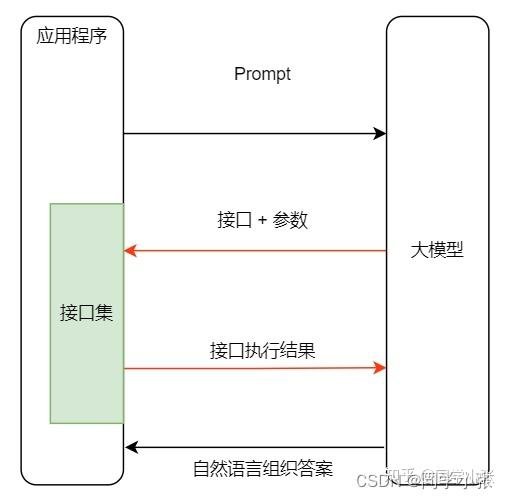
Function Calling是大模型连接外部世界的通道,目前出现的插件(Plugins )、OpenAI的Actions、各个大模型平台中出现的tools工具集,其实都是Function Calling的范畴。时下大火的OpenAI的GPTs,原理就是使用了Function Calling,例如联网检索、code interpreter。



具体的
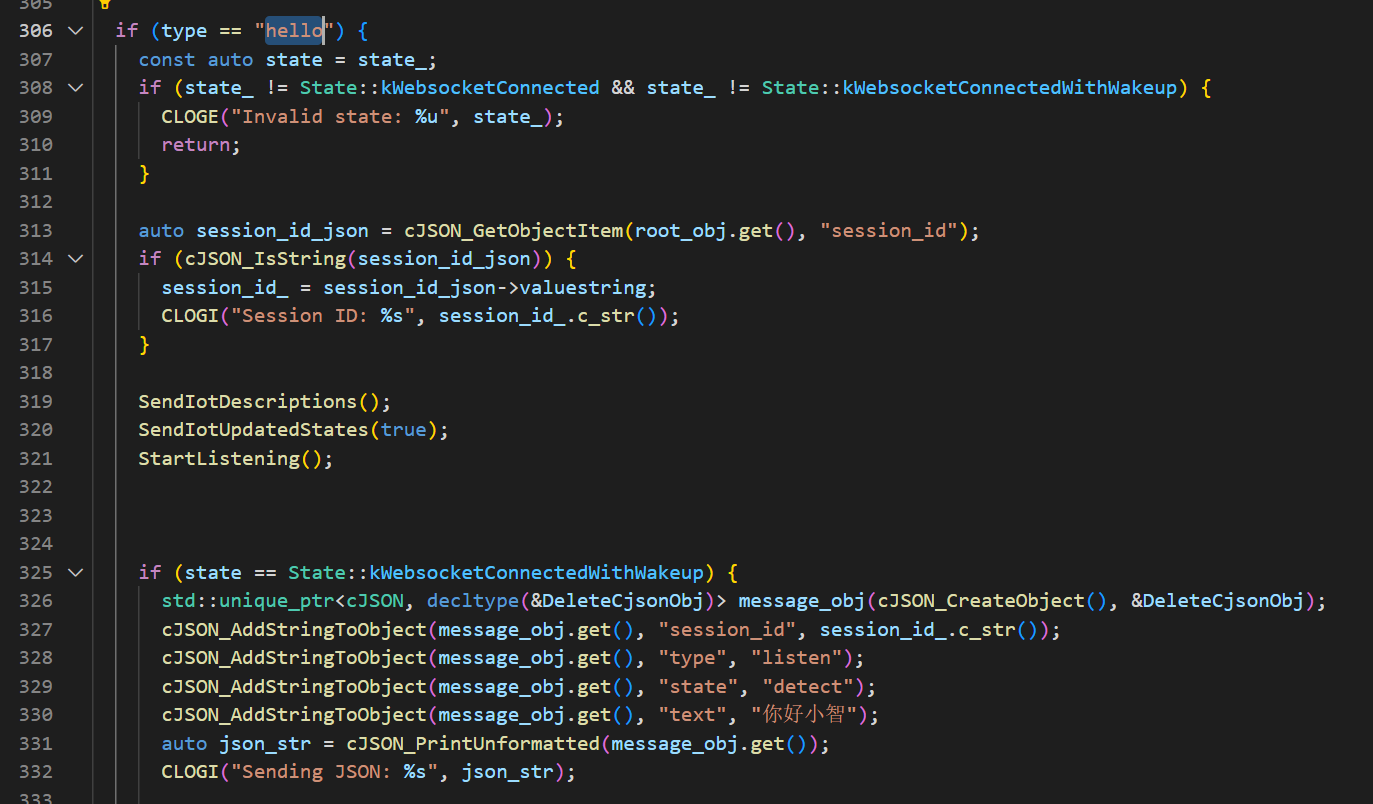
首先语音唤醒触发hello消息,服务器回复这个消息
然后触发
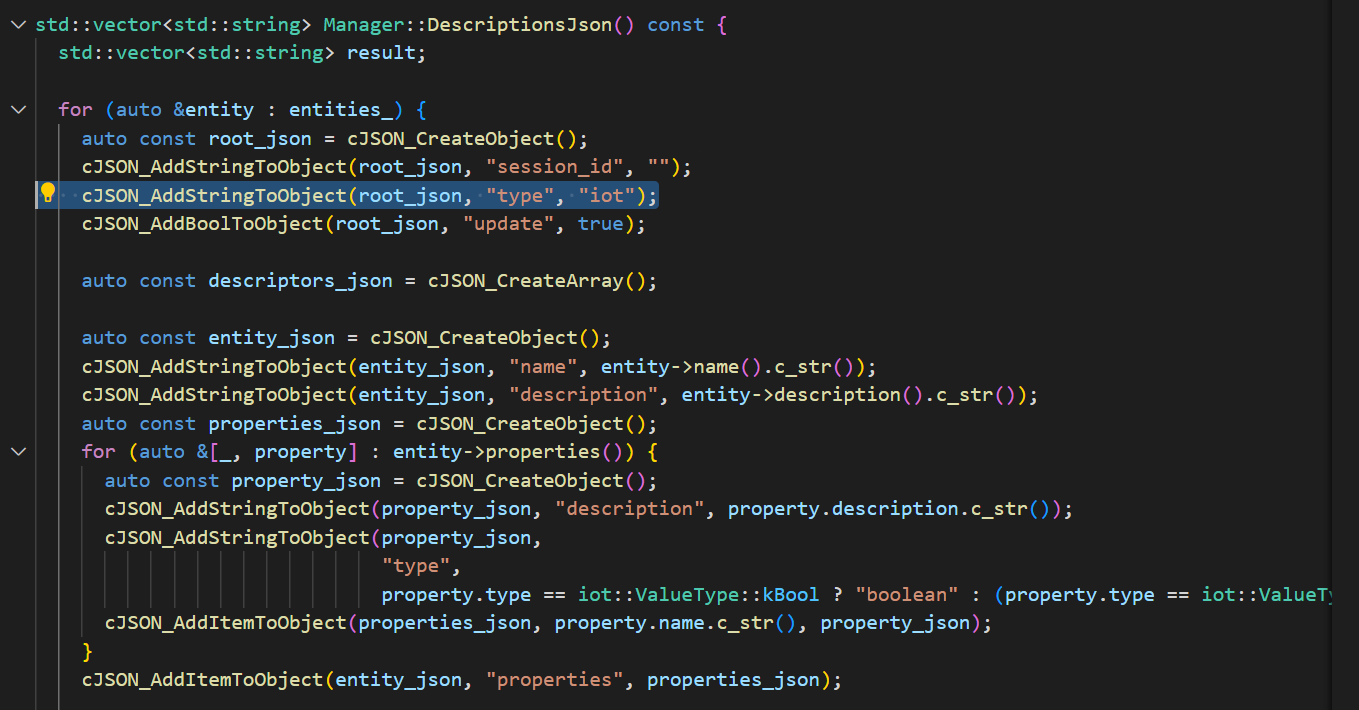
然后自动附加iot数据

并将消息设定为iot类型

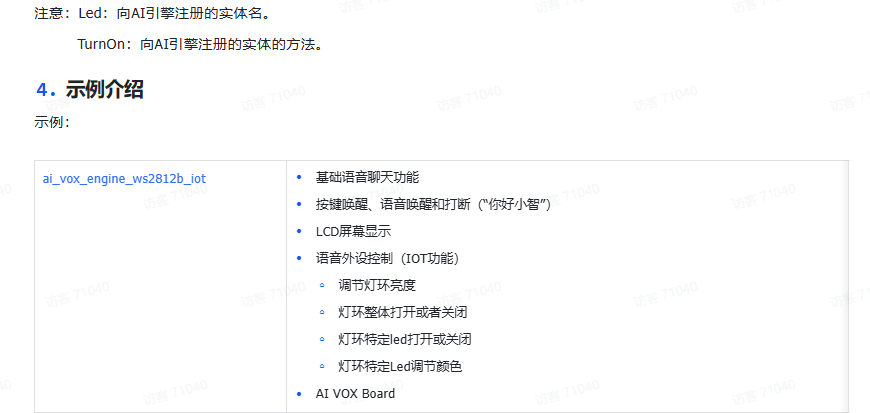
根据控制命令触发回调,判断消息类型,取出控制参数,例如名字,函数,操作
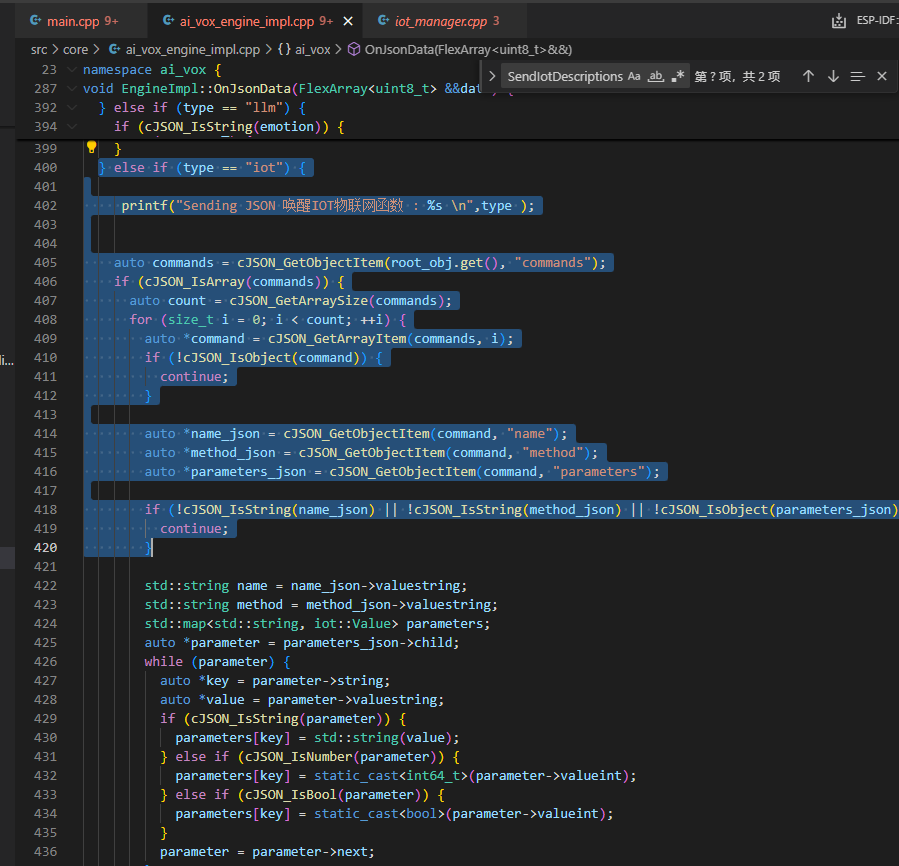
主函数控制
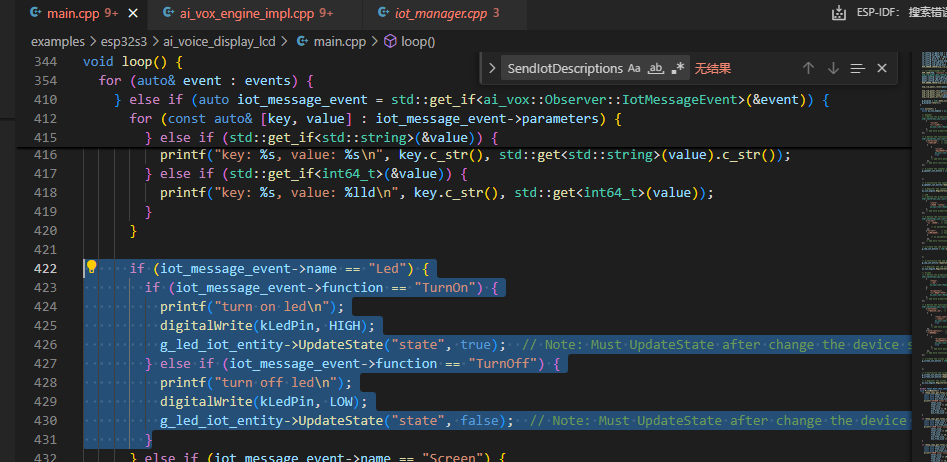
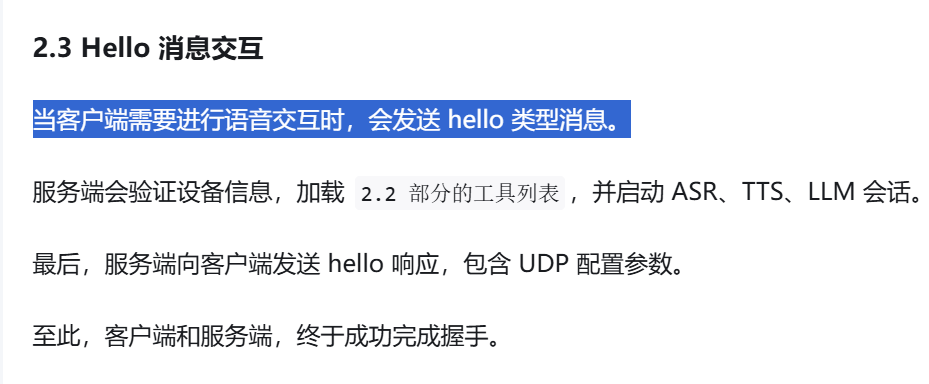
一图搞清:小智AI MCP 控制IoT设备,原理+流程拆解
https://zhuanlan.zhihu.com/p/1921139871113781343
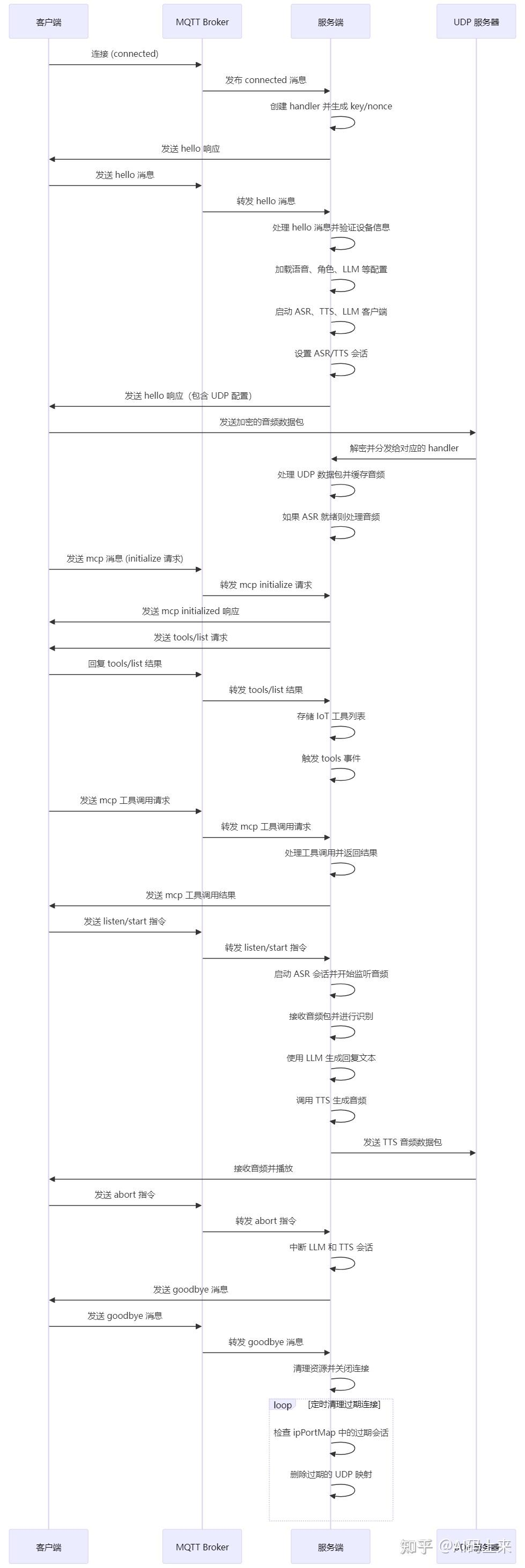

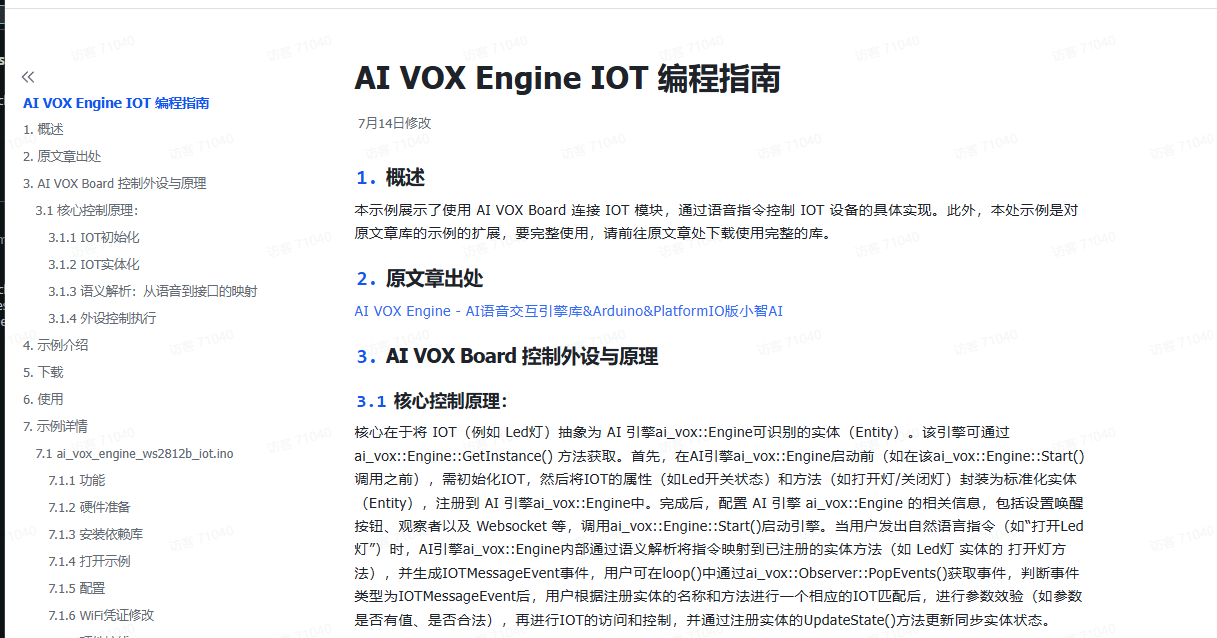
教程原理
https://dcnmu33qx4fc.feishu.cn/docx/EcXxdXiuJomKDyxjSoIc6af0nig
代码地址
https://github.com/nulllaborg/ai_vox_engine_iot_examples
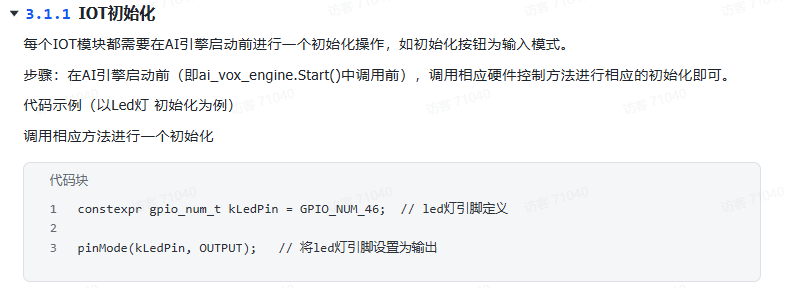


namespace {
std::shared_ptr<ai_vox::iot::Entity> g_led_iot_entity;
}

// LED
std::vector<ai_vox::iot::Property> led_properties({
    {
        "state",                       // property name
        "LED灯开关状态",               // property description
        ai_vox::iot::ValueType::kBool  // property type
    },
    // add more properties as needed
});

// 2.Define the functions for the LED entity
std::vector<ai_vox::iot::Function> led_functions({
    {"TurnOn",     // function name
     "打开LED灯",  // function description
     {
         // no parameters
     }},
    {"TurnOff",    // function name
     "关闭LED灯",  // function description
     {
         // no parameters
     }},
    // add more functions as needed
});

// 3.Create the LED entity
g_led_iot_entity = std::make_shared<ai_vox::iot::Entity>("Led",                      // name
                                                         "LED灯",                    // description
                                                         std::move(led_properties),  // properties
                                                         std::move(led_functions)    // functions
);

// 4.Initialize the LED entity with default values
g_led_iot_entity->UpdateState("state", false);

// 5.Register the LED entity with the AI Vox engine
ai_vox::Engine::GetInstance().RegisterIotEntity(g_led_iot_entity);

const auto events = ai_vox::Engine::SetObserver()->PopEvents();

for (auto& event : events) {
  if (auto iot_message_event = std::get_if<ai_vox::Observer::IotMessageEvent>(&event)) {
    printf("IOT message: %s, function: %s\n", iot_message_event->name.c_str(), iot_message_event->function.c_str());
    for (const auto& [key, value] : iot_message_event->parameters) {
      if (std::get_if<bool>(&value)) {
        printf("key: %s, value: %s\n", key.c_str(), std::get<bool>(value) ? "true" : "false");
      } else if (std::get_if<std::string>(&value)) {
        printf("key: %s, value: %s\n", key.c_str(), std::get<std::string>(value).c_str());
      } else if (std::get_if<int64_t>(&value)) {
        printf("key: %s, value: %lld\n", key.c_str(), std::get<int64_t>(value));
      }
    }

    if (iot_message_event->name == "Led") {
      if (iot_message_event->function == "TurnOn") {
        printf("turn on led\n");
        digitalWrite(kLedPin, HIGH);
        g_led_iot_entity->UpdateState("state", true);
      } else if (iot_message_event->function == "TurnOff") {
        printf("turn off led\n");
        digitalWrite(kLedPin, LOW);
        g_led_iot_entity->UpdateState("state", false);
      }
    }
  }
}
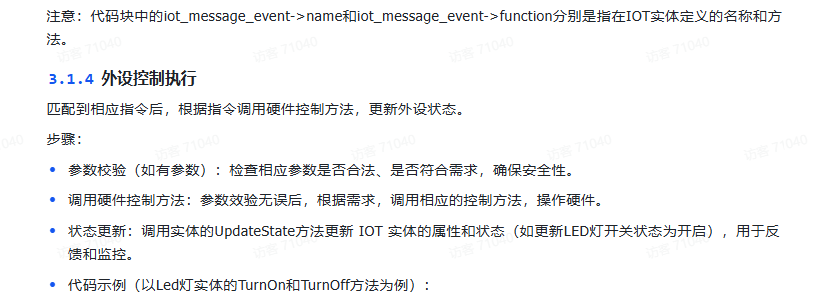
const auto events = ai_vox::Engine::SetObserver()->PopEvents();

for (auto& event : events) {
  if (auto iot_message_event = std::get_if<ai_vox::Observer::IotMessageEvent>(&event)) {
    printf("IOT message: %s, function: %s\n", iot_message_event->name.c_str(), iot_message_event->function.c_str());
    for (const auto& [key, value] : iot_message_event->parameters) {
      if (std::get_if<bool>(&value)) {
        printf("key: %s, value: %s\n", key.c_str(), std::get<bool>(value) ? "true" : "false");
      } else if (std::get_if<std::string>(&value)) {
        printf("key: %s, value: %s\n", key.c_str(), std::get<std::string>(value).c_str());
      } else if (std::get_if<int64_t>(&value)) {
        printf("key: %s, value: %lld\n", key.c_str(), std::get<int64_t>(value));
      }
    }

    if (iot_message_event->name == "Led") {
      if (iot_message_event->function == "TurnOn") {
        printf("turn on led\n");
        digitalWrite(kLedPin, HIGH);
        g_led_iot_entity->UpdateState("state", true);
      } else if (iot_message_event->function == "TurnOff") {
        printf("turn off led\n");
        digitalWrite(kLedPin, LOW);
        g_led_iot_entity->UpdateState("state", false);
      }
    }
  }
}


其他

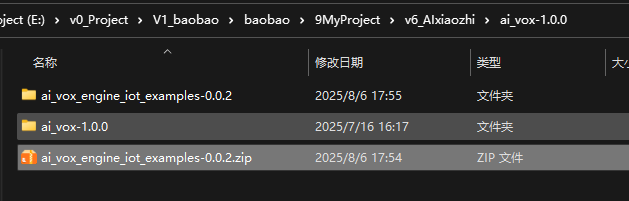
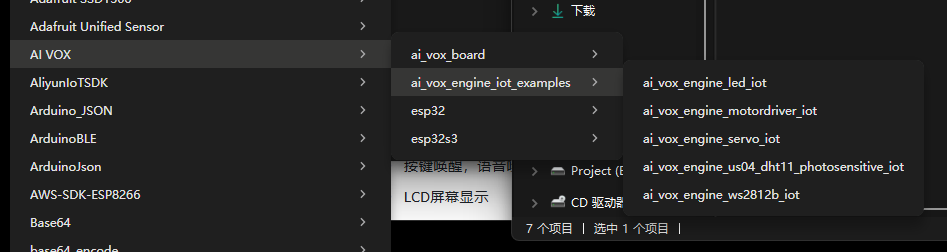
拷贝到库目录,添加这个些例子到原来的api库中

可以看到新添加的例子

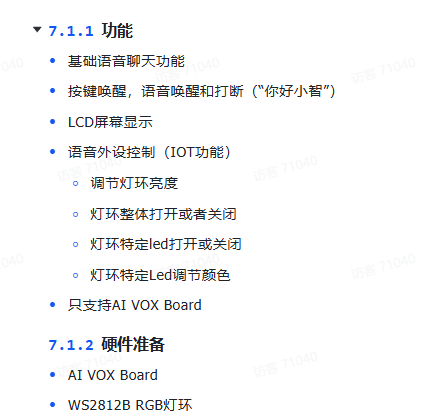
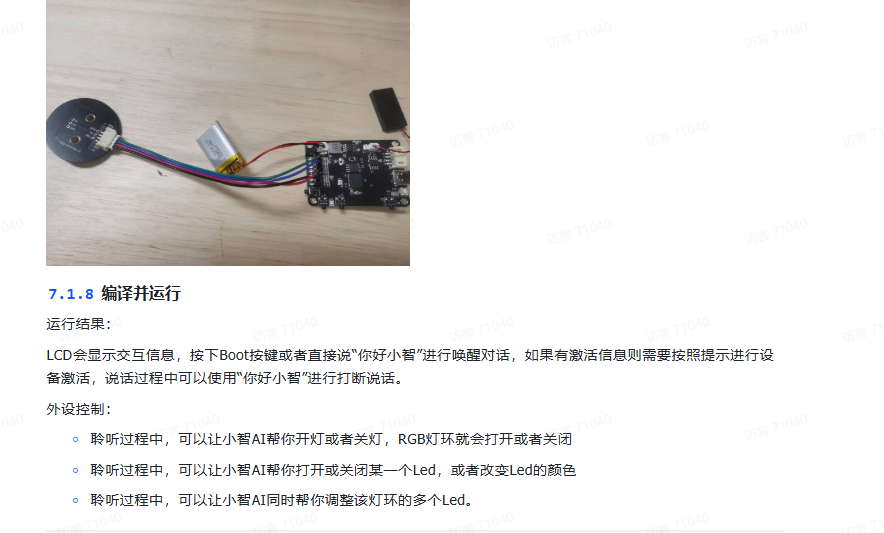
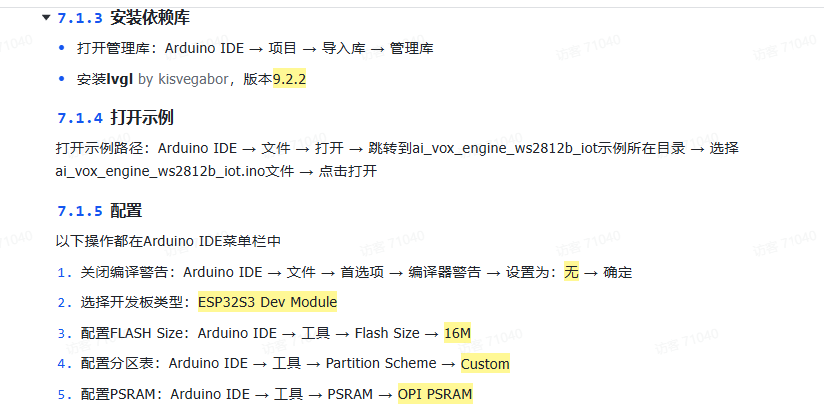
其他
使用
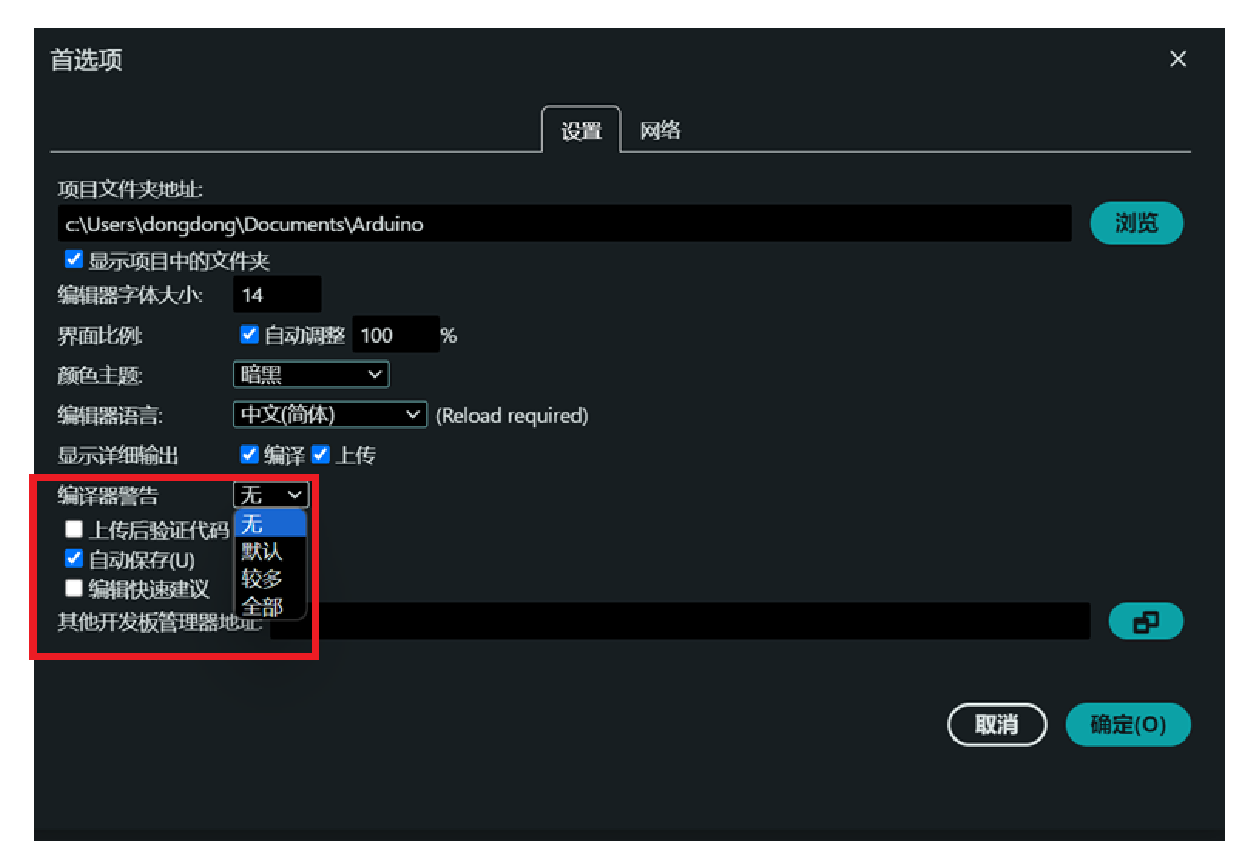
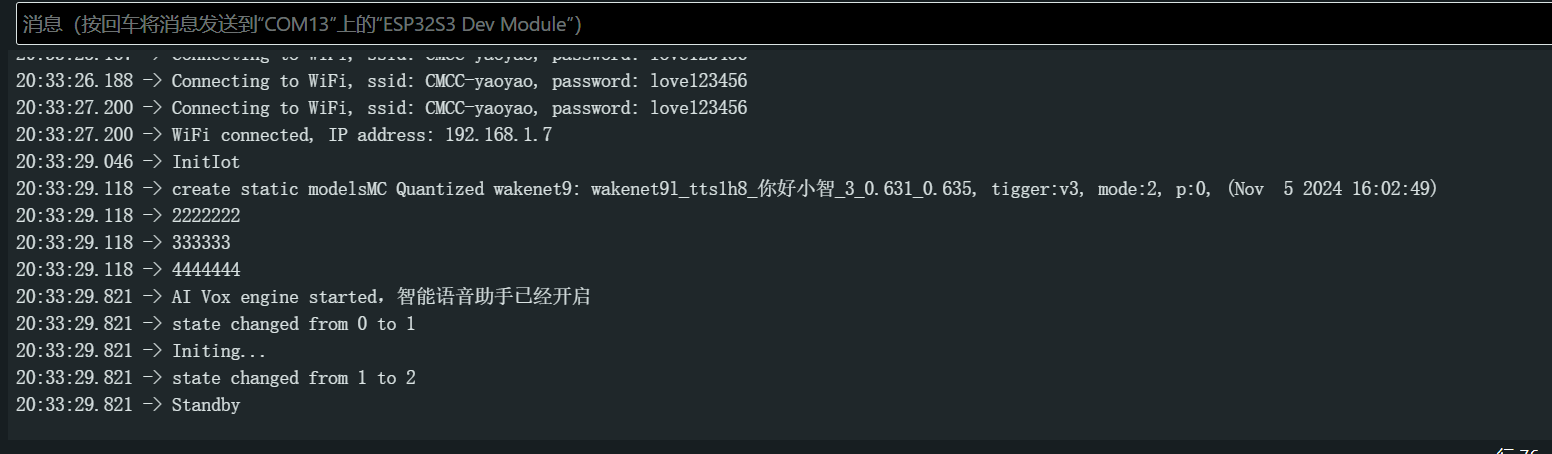
测试例子1 WS2812灯和普通灯
装库
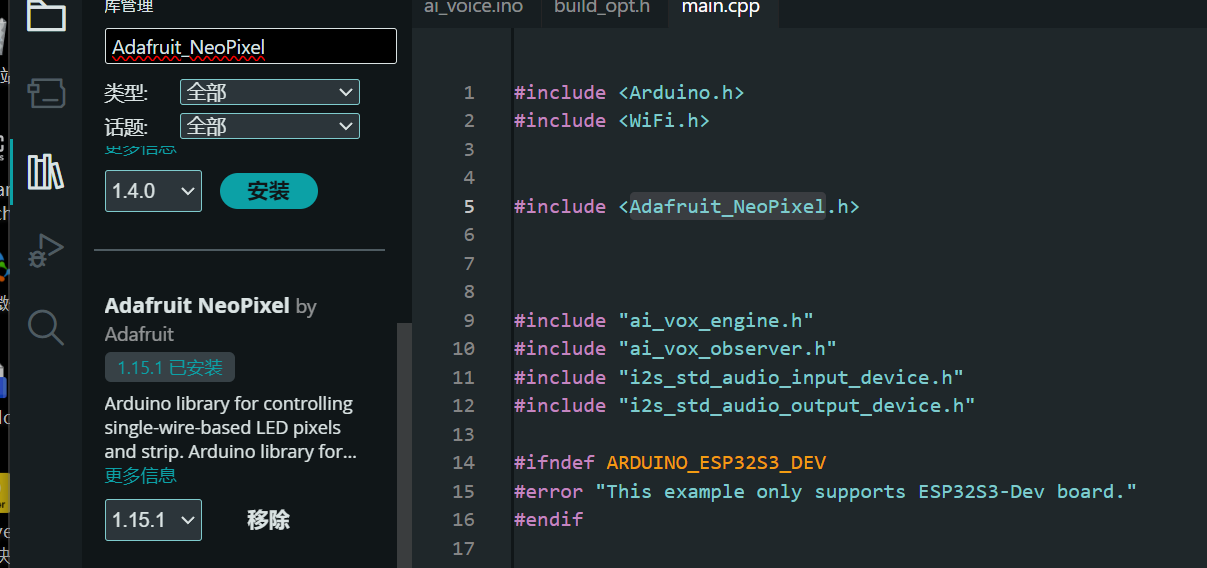
在普通led的例子上我追加了ws2812的例子,虽然官方有ws2812的例子,但是我习惯了这个库,比较简单,且没有oled的代码。


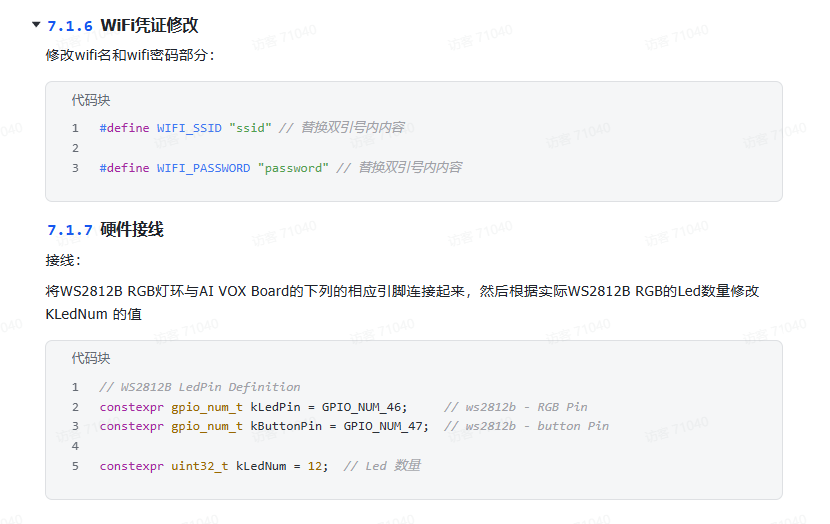
1 修改wifi密码

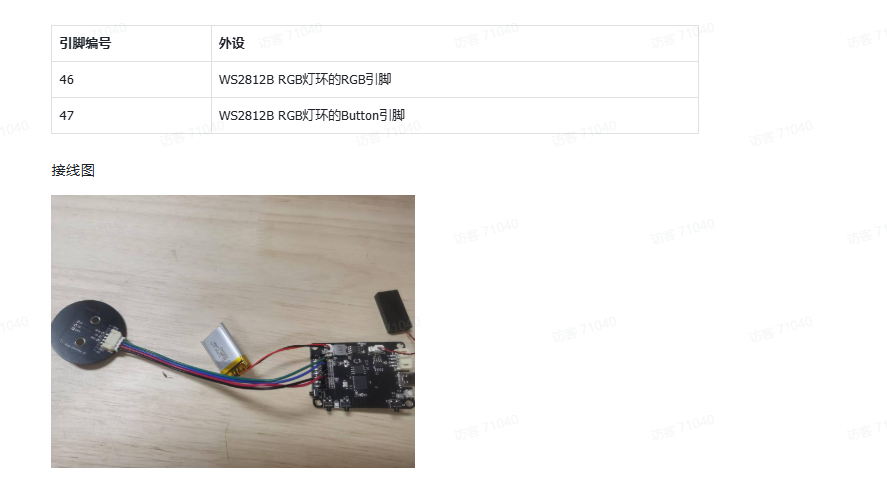
2修改灯的引脚
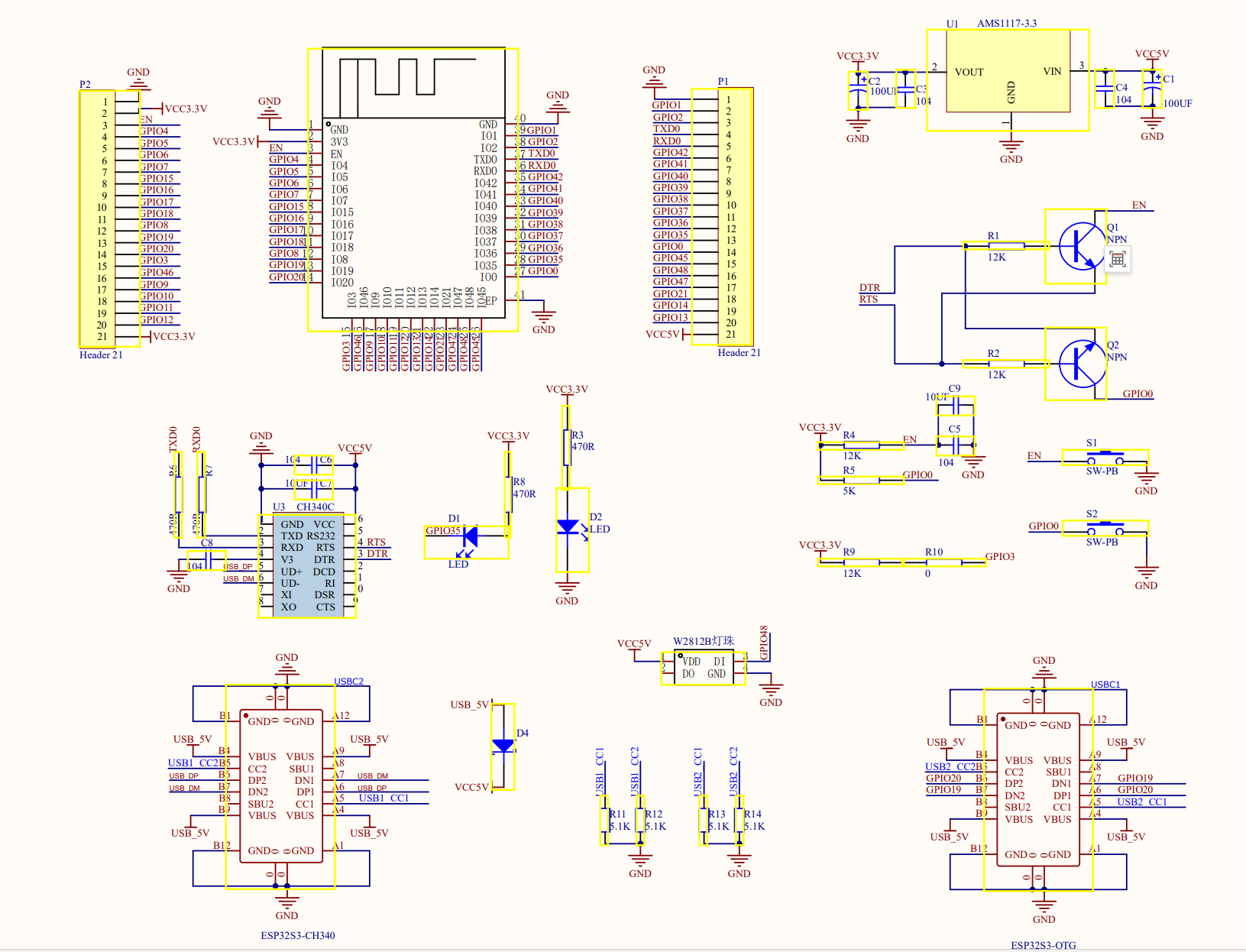
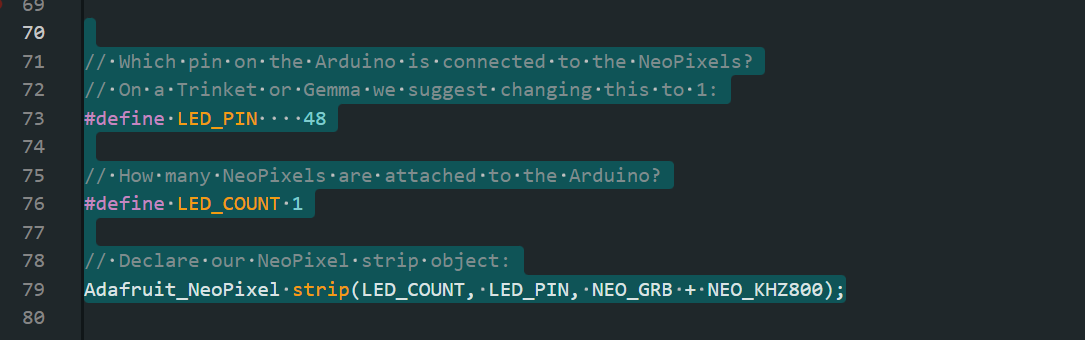
我用的板子 48引脚封装了一个ws2812单颗灯珠,直接用这个测试。

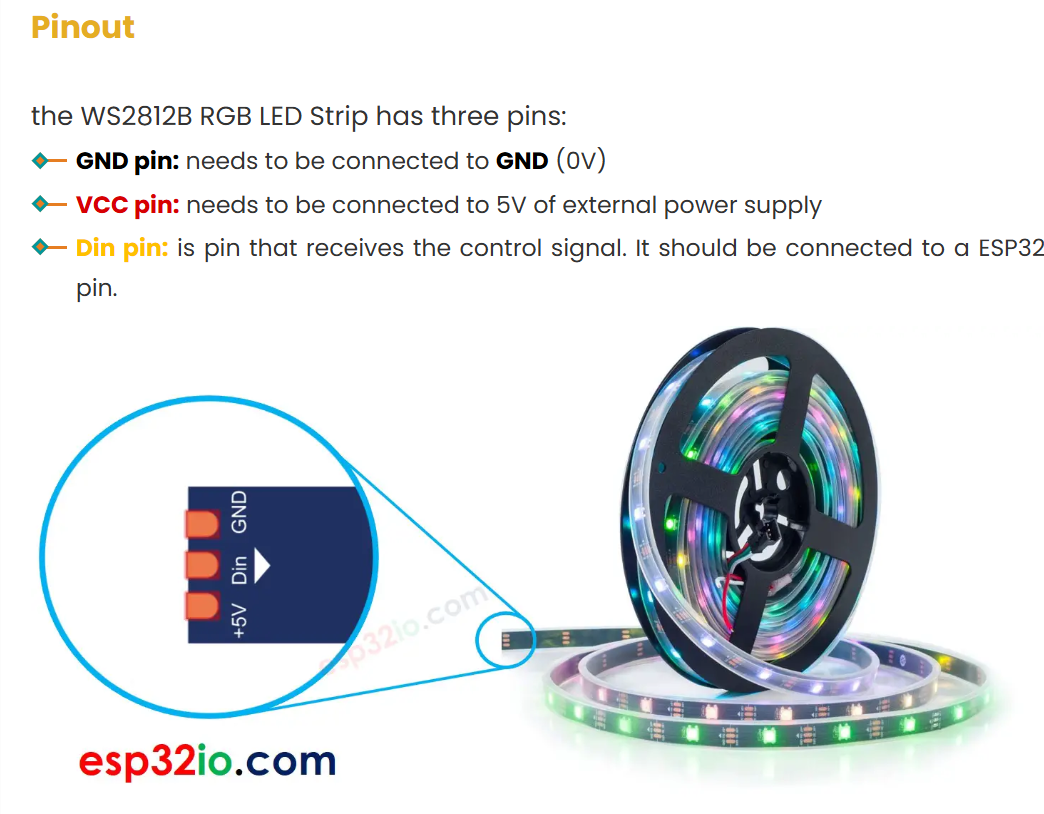
https://esp32io.com/tutorials/esp32-ws2812b-led-strip
constexpr gpio_num_t kMicPinBclk = GPIO_NUM_5; //麦克风 BCLK (BCK, SCLK, SCK) constexpr gpio_num_t kMicPinWs = GPIO_NUM_4; //麦克风 WS (LRCK, FS, LRCLK) constexpr gpio_num_t kMicPinDin = GPIO_NUM_6;//克风 DI (SDATA, SDOUT, SDIN) //kMicPin_L/R = GND 接地 短接 L/R 左/右声道 此引脚通过高低电平标识当前传输的是左声道还是右声道数据 constexpr gpio_num_t kSpeakerPinBclk = GPIO_NUM_15; //功放喇叭 BCLK (BCK, SCLK, SCK) constexpr gpio_num_t kSpeakerPinWs = GPIO_NUM_16; // 功放喇叭 WS (LRCK, FS, LRCLK) LRC/WS左/右时钟(Word Select),标识当前传输的是左声道(低电平)还是右声道(高电平)。 constexpr gpio_num_t kSpeakerPinDout = GPIO_NUM_7; // 功放喇叭 DOUT (SDATA, SDOUT, SDIN) DOUT/SD 数据输出(Serial Data),音频数据通过此引脚输出到扬声器或 DAC。 constexpr gpio_num_t kTriggerPin = GPIO_NUM_0; // 按键(按下为低电平) constexpr gpio_num_t kLedPin = GPIO_NUM_17; //默认的普通灯 随便给了引脚 pin48 接的是一个w2812b灯珠。 pin35引脚是板载LED,自己不要用,不然程序会挂掉。
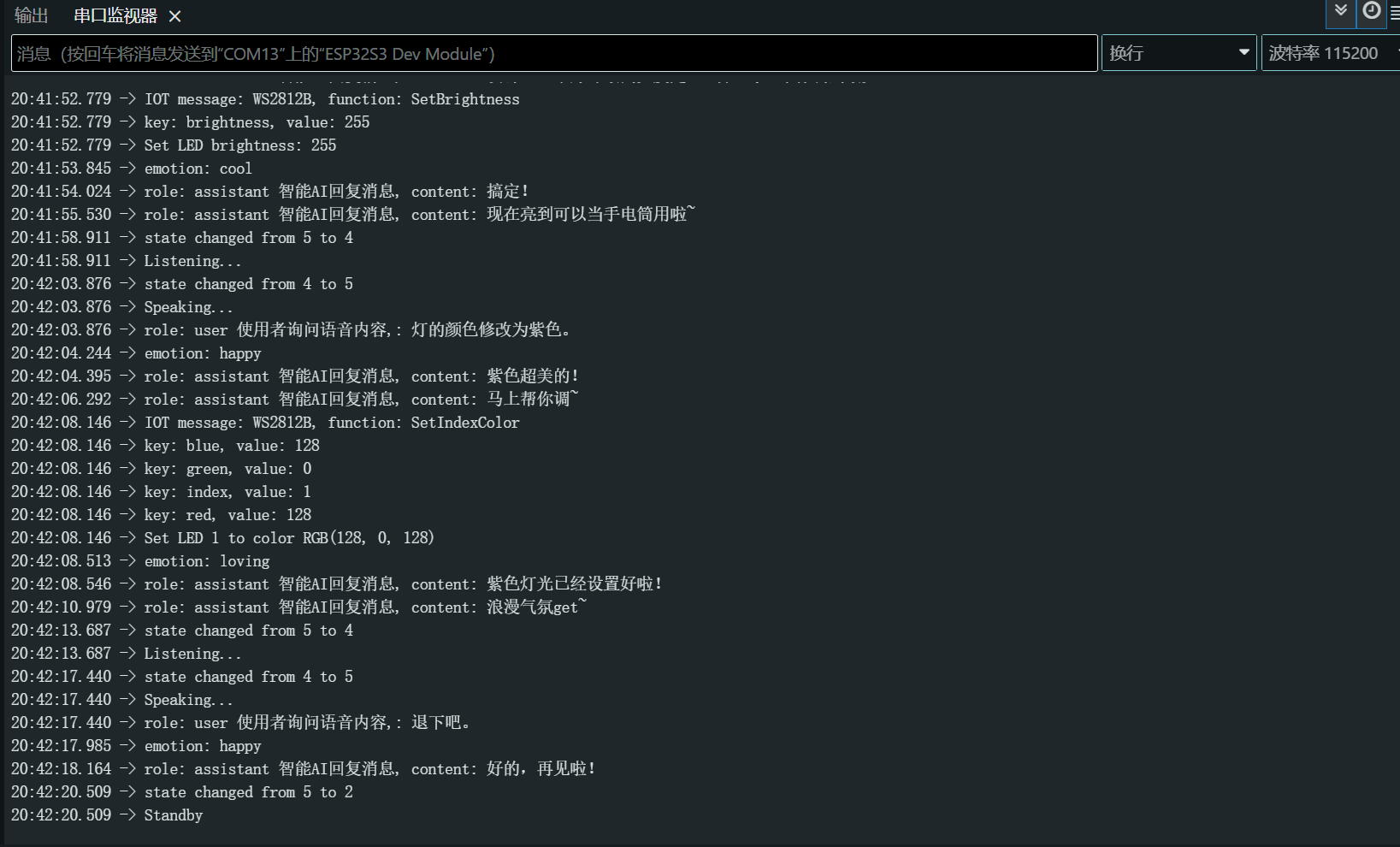
紫色都可以自动设置
#include <Arduino.h>
#include <WiFi.h>
#include <Adafruit_NeoPixel.h>
#include "ai_vox_engine.h"
#include "ai_vox_observer.h"
#include "i2s_std_audio_input_device.h"
#include "i2s_std_audio_output_device.h"
#ifndef ARDUINO_ESP32S3_DEV
#error "This example only supports ESP32S3-Dev board."
#endif
#ifndef WIFI_SSID
#define WIFI_SSID "CMCC-yaoyao"
#endif
#ifndef WIFI_PASSWORD
#define WIFI_PASSWORD "love123456"
#endif
namespace {
// constexpr gpio_num_t kMicPinBclk = GPIO_NUM_5;
// constexpr gpio_num_t kMicPinWs = GPIO_NUM_2;
// constexpr gpio_num_t kMicPinDin = GPIO_NUM_4;
// constexpr gpio_num_t kSpeakerPinBclk = GPIO_NUM_13;
// constexpr gpio_num_t kSpeakerPinWs = GPIO_NUM_14;
// constexpr gpio_num_t kSpeakerPinDout = GPIO_NUM_1;
// constexpr gpio_num_t kTriggerPin = GPIO_NUM_0;
// constexpr gpio_num_t kLedPin = GPIO_NUM_6;
constexpr gpio_num_t kMicPinBclk = GPIO_NUM_5; //麦克风 BCLK (BCK, SCLK, SCK)
constexpr gpio_num_t kMicPinWs = GPIO_NUM_4; //麦克风 WS (LRCK, FS, LRCLK)
constexpr gpio_num_t kMicPinDin = GPIO_NUM_6;//克风 DI (SDATA, SDOUT, SDIN)
//kMicPin_L/R = GND 接地 短接 L/R 左/右声道 此引脚通过高低电平标识当前传输的是左声道还是右声道数据
constexpr gpio_num_t kSpeakerPinBclk = GPIO_NUM_15; //功放喇叭 BCLK (BCK, SCLK, SCK)
constexpr gpio_num_t kSpeakerPinWs = GPIO_NUM_16; // 功放喇叭 WS (LRCK, FS, LRCLK) LRC/WS左/右时钟(Word Select),标识当前传输的是左声道(低电平)还是右声道(高电平)。
constexpr gpio_num_t kSpeakerPinDout = GPIO_NUM_7; // 功放喇叭 DOUT (SDATA, SDOUT, SDIN) DOUT/SD 数据输出(Serial Data),音频数据通过此引脚输出到扬声器或 DAC。
constexpr gpio_num_t kTriggerPin = GPIO_NUM_0; // 按键(按下为低电平)
constexpr gpio_num_t kLedPin = GPIO_NUM_17; // pin48 接的是一个w2812b灯珠。 pin35引脚是板载LED,自己不要用,不然程序会挂掉。
auto g_observer = std::make_shared<ai_vox::Observer>();
// 1 - 定义 IOT 实体:创建ai_vox::iot::Entity,声明属性(如LED灯开关状态)和方法(如打开灯TurnOn)。
std::shared_ptr<ai_vox::iot::Entity> g_led_iot_entity;
std::shared_ptr<ai_vox::iot::Entity> g_speaker_iot_entity;
std::shared_ptr<ai_vox::iot::Entity> g_ws2812b_iot_entity;//WS2812
int kLedNum = 1; // Led nums
auto g_audio_output_device = std::make_shared<ai_vox::I2sStdAudioOutputDevice>(kSpeakerPinBclk, kSpeakerPinWs, kSpeakerPinDout);
//==============WS2812===================
// Which pin on the Arduino is connected to the NeoPixels?
// On a Trinket or Gemma we suggest changing this to 1:
#define LED_PIN 48
// How many NeoPixels are attached to the Arduino?
#define LED_COUNT 1
// Declare our NeoPixel strip object:
Adafruit_NeoPixel strip(LED_COUNT, LED_PIN, NEO_GRB + NEO_KHZ800);
void IntwS2812(){
strip.begin(); // INITIALIZE NeoPixel strip object (REQUIRED)
strip.show(); // Turn OFF all pixels ASAP
strip.setBrightness(50); // Set BRIGHTNESS to about 1/5 (max = 255)
}
void colorWipe(uint32_t color, int wait) {
for(int i=0; i<strip.numPixels(); i++) { // For each pixel in strip...
strip.setPixelColor(i, color); // Set pixel's color (in RAM)
strip.show(); // Update strip to match
delay(wait); // Pause for a moment
}
}
// between frames.
void theaterChase(uint32_t color, int wait) {
for(int a=0; a<10; a++) { // Repeat 10 times...
for(int b=0; b<3; b++) { // 'b' counts from 0 to 2...
strip.clear(); // Set all pixels in RAM to 0 (off)
// 'c' counts up from 'b' to end of strip in steps of 3...
for(int c=b; c<strip.numPixels(); c += 3) {
strip.setPixelColor(c, color); // Set pixel 'c' to value 'color'
}
strip.show(); // Update strip with new contents
delay(wait); // Pause for a moment
}
}
}
void testws2812(){
colorWipe(strip.Color(255, 0, 0), 20); // Red
colorWipe(strip.Color( 0, 255, 0), 20); // Green
colorWipe(strip.Color( 0, 0, 255), 20); // Blue
// Do a theater marquee effect in various colors...
theaterChase(strip.Color(127, 127, 127), 20); // White, half brightness
theaterChase(strip.Color(127, 0, 0), 20); // Red, half brightness
theaterChase(strip.Color( 0, 0, 127), 20); // Blue, half brightness
//rainbow(10); // Flowing rainbow cycle along the whole strip
//theaterChaseRainbow(50); // Rainbow-enhanced theaterChase variant
}
#include <cJSON.h>
std::string ConvertRGBToJsonString(const int64_t red, const int64_t green, const int64_t blue) {
cJSON* root = cJSON_CreateObject();
if (!root) {
return "{}";
}
if (red >= 0 && red <= 255) {
cJSON_AddNumberToObject(root, "red", static_cast<int>(red));
} else {
cJSON_AddNumberToObject(root, "red", 0);
}
if (green >= 0 && green <= 255) {
cJSON_AddNumberToObject(root, "green", static_cast<int>(green));
} else {
cJSON_AddNumberToObject(root, "green", 0);
}
if (blue >= 0 && blue <= 255) {
cJSON_AddNumberToObject(root, "blue", static_cast<int>(blue));
} else {
cJSON_AddNumberToObject(root, "blue", 0);
}
const auto json_str = cJSON_PrintUnformatted(root);
std::string result;
if (json_str != nullptr) {
result = json_str;
cJSON_free(json_str);
} else {
result = "{}";
}
cJSON_Delete(root);
return result;
}
//=================================
void InitIot() {
printf("InitIot\n");
auto& ai_vox_engine = ai_vox::Engine::GetInstance();
printf("2222222\n");
// Speaker
// 1.Define the properties for the speaker entity
std::vector<ai_vox::iot::Property> speaker_properties({
{
"volume", // property name
"当前音量值", // property description
ai_vox::iot::ValueType::kNumber // property type: number, string or bool
},
// add more properties as needed
});
// 2.Define the functions for the speaker entity
std::vector<ai_vox::iot::Function> speaker_functions({
{"SetVolume", // function name
"设置音量", // function description
{
{
"volume", // parameter name
"0到100之间的整数", // parameter description
ai_vox::iot::ValueType::kNumber, // parameter type
true // parameter required
},
// add more parameters as needed
}},
// add more functions as needed
});
// 3.Create the speaker entity
g_speaker_iot_entity = std::make_shared<ai_vox::iot::Entity>("Speaker", // name
"扬声器", // description
std::move(speaker_properties), // properties
std::move(speaker_functions) // functions
);
// 4.Initialize the speaker entity with default values
g_speaker_iot_entity->UpdateState("volume", g_audio_output_device->volume());
printf("333333\n");
// 5.Register the speaker entity with the AI Vox engine
ai_vox_engine.RegisterIotEntity(g_speaker_iot_entity);
printf("4444444\n");
// LED
// 1.Define the properties for the LED entity
std::vector<ai_vox::iot::Property> led_properties({
{
"state", // property name
"LED灯开关状态", // property description
ai_vox::iot::ValueType::kBool // property type
},
// add more properties as needed
});
// 2.Define the functions for the LED entity
std::vector<ai_vox::iot::Function> led_functions({
{"TurnOn", // function name
"打开LED灯", // function description
{
// no parameters
}},
{"TurnOff", // function name
"关闭LED灯", // function description
{
// no parameters
}},
// add more functions as needed
});
// 3.Create the LED entity
g_led_iot_entity = std::make_shared<ai_vox::iot::Entity>("Led", // name
"LED灯", // description
std::move(led_properties), // properties
std::move(led_functions) // functions
);
// 4.Initialize the LED entity with default values
g_led_iot_entity->UpdateState("state", false);
// 5.Register the LED entity with the AI Vox engine
ai_vox_engine.RegisterIotEntity(g_led_iot_entity);
// ws2812
//1
std::vector<ai_vox::iot::Property> ws2812b_properties(
{
{
"brightness", // property name
"亮度(0-255)", // property description
ai_vox::iot::ValueType::kNumber // property type
},
{
"LedNums", // property name
"灯的数量", // property description
ai_vox::iot::ValueType::kNumber // property type
},
});
for (uint32_t i = 1; i <= kLedNum; ++i) {
const std::string property_name = "color" + std::to_string(i);
const std::string property_describe = std::to_string(i) + "号灯颜色";
ws2812b_properties.push_back({std::move(property_name), std::move(property_describe), ai_vox::iot::ValueType::kString});
}
// 2.Define the functions for the WS2812B RGB LED ring entity
std::vector<ai_vox::iot::Function> ws2812b_functions({
{"SetIndexColor", // function name
"设置指定LED颜色", // function description
{
{
"index", // parameter name
"LED索引(1-总数)", // parameter description
ai_vox::iot::ValueType::kNumber, // parameter type
true // parameter required
},
{"red", "红色值(0-255)", ai_vox::iot::ValueType::kNumber, true},
{"green", "绿色值(0-255)", ai_vox::iot::ValueType::kNumber, true},
{"blue", "蓝色值(0-255)", ai_vox::iot::ValueType::kNumber, true},
// add more parameters as needed
}},
{"SetRangeIndexsColor",
"设置连续LED范围颜色",
{
{"start", "起始LED索引(1-总数)", ai_vox::iot::ValueType::kNumber, true},
{"end", "结束LED索引(1-总数)", ai_vox::iot::ValueType::kNumber, true},
{"red", "红色值(0-255)", ai_vox::iot::ValueType::kNumber, true},
{"green", "绿色值(0-255)", ai_vox::iot::ValueType::kNumber, true},
{"blue", "蓝色值(0-255)", ai_vox::iot::ValueType::kNumber, true},
// add more parameters as needed
}},
{"SetBrightness",
"设置亮度",
{
{"brightness", "亮度值(0-255)", ai_vox::iot::ValueType::kNumber, true},
// add more parameters as needed
}},
{"Clear", "清除所有LED", {}},
// add more functions as needed
});
// 3.Create the WS2812B RGB LED ring entity
g_ws2812b_iot_entity = std::make_shared<ai_vox::iot::Entity>("WS2812B", // name
"RGB灯环", // description
std::move(ws2812b_properties), // properties
std::move(ws2812b_functions) // functions
);
// 4.Initialize the WS2812B RGB LED ring entity with default values
g_ws2812b_iot_entity->UpdateState("brightness", 128);
g_ws2812b_iot_entity->UpdateState("LedNums", kLedNum);
for (uint32_t i = 1; i <= kLedNum; ++i) {
const std::string property_name = "color" + std::to_string(i);
g_ws2812b_iot_entity->UpdateState(std::move(property_name), R"({"red":0,"green":0,"blue":0})");
}
// 5.Register the WS2812B RGB LED ring entity with the AI Vox engine
ai_vox_engine.RegisterIotEntity(g_ws2812b_iot_entity);
}
#ifdef PRINT_HEAP_INFO_INTERVAL
void PrintMemInfo() {
if (heap_caps_get_total_size(MALLOC_CAP_SPIRAM) > 0) {
const auto total_size = heap_caps_get_total_size(MALLOC_CAP_SPIRAM);
const auto free_size = heap_caps_get_free_size(MALLOC_CAP_SPIRAM);
const auto min_free_size = heap_caps_get_minimum_free_size(MALLOC_CAP_SPIRAM);
printf("SPIRAM total size: %zu B (%zu KB), free size: %zu B (%zu KB), minimum free size: %zu B (%zu KB)\n",
total_size,
total_size >> 10,
free_size,
free_size >> 10,
min_free_size,
min_free_size >> 10);
}
if (heap_caps_get_total_size(MALLOC_CAP_INTERNAL) > 0) {
const auto total_size = heap_caps_get_total_size(MALLOC_CAP_INTERNAL);
const auto free_size = heap_caps_get_free_size(MALLOC_CAP_INTERNAL);
const auto min_free_size = heap_caps_get_minimum_free_size(MALLOC_CAP_INTERNAL);
printf("IRAM total size: %zu B (%zu KB), free size: %zu B (%zu KB), minimum free size: %zu B (%zu KB)\n",
total_size,
total_size >> 10,
free_size,
free_size >> 10,
min_free_size,
min_free_size >> 10);
}
if (heap_caps_get_total_size(MALLOC_CAP_DEFAULT) > 0) {
const auto total_size = heap_caps_get_total_size(MALLOC_CAP_DEFAULT);
const auto free_size = heap_caps_get_free_size(MALLOC_CAP_DEFAULT);
const auto min_free_size = heap_caps_get_minimum_free_size(MALLOC_CAP_DEFAULT);
printf("DRAM total size: %zu B (%zu KB), free size: %zu B (%zu KB), minimum free size: %zu B (%zu KB)\n",
total_size,
total_size >> 10,
free_size,
free_size >> 10,
min_free_size,
min_free_size >> 10);
}
}
#endif
} // namespace
#include <esp_psram.h>
void setup() {
Serial.begin(115200);
printf("Init\n");
if (psramFound()) {
Serial.println("PSRAM 已启用,大小: " + String(ESP.getPsramSize() / 1024) + " KB");
} else {
Serial.println("PSRAM 未启用!");
}
if (heap_caps_get_total_size(MALLOC_CAP_SPIRAM) > 0) {
WiFi.useStaticBuffers(true);
} else {
WiFi.useStaticBuffers(false);
}
printf("Connecting to WiFi, ssid: %s, password: %s\n", WIFI_SSID, WIFI_PASSWORD);
WiFi.begin(WIFI_SSID, WIFI_PASSWORD);
while (WiFi.status() != WL_CONNECTED) {
delay(1000);
printf("Connecting to WiFi, ssid: %s, password: %s\n", WIFI_SSID, WIFI_PASSWORD);
}
printf("WiFi connected, IP address: %s\n", WiFi.localIP().toString().c_str());
pinMode(kLedPin, OUTPUT);
digitalWrite(kLedPin, LOW);
IntwS2812();
testws2812();
InitIot();
auto audio_input_device = std::make_shared<ai_vox::I2sStdAudioInputDevice>(kMicPinBclk, kMicPinWs, kMicPinDin);
auto& ai_vox_engine = ai_vox::Engine::GetInstance();
ai_vox_engine.SetObserver(g_observer);
ai_vox_engine.SetTrigger(kTriggerPin);
ai_vox_engine.SetOtaUrl("https://api.tenclass.net/xiaozhi/ota/");
ai_vox_engine.ConfigWebsocket("wss://api.tenclass.net/xiaozhi/v1/",
{
{"Authorization", "Bearer test-token"},
});
ai_vox_engine.Start(audio_input_device, g_audio_output_device);
printf("AI Vox engine started,智能语音助手已经开启\n");
}
void loop() {
#ifdef PRINT_HEAP_INFO_INTERVAL
static uint32_t s_print_heap_info_time = 0;
if (s_print_heap_info_time == 0 || millis() - s_print_heap_info_time >= PRINT_HEAP_INFO_INTERVAL) {
s_print_heap_info_time = millis();
PrintMemInfo();
}
#endif
const auto events = g_observer->PopEvents();
for (auto& event : events) {
if (auto activation_event = std::get_if<ai_vox::Observer::ActivationEvent>(&event)) {
// 初次打印激活码
printf("activation code: %s, message: %s\n", activation_event->code.c_str(), activation_event->message.c_str());
} else if (auto state_changed_event = std::get_if<ai_vox::Observer::StateChangedEvent>(&event)) {
printf("state changed from %" PRIu8 " to %" PRIu8 "\n",
static_cast<uint8_t>(state_changed_event->old_state),
static_cast<uint8_t>(state_changed_event->new_state));
switch (state_changed_event->new_state) {
case ai_vox::ChatState::kIdle: {
printf("Idle\n");
break;
}
case ai_vox::ChatState::kIniting: {
printf("Initing...\n");
break;
}
case ai_vox::ChatState::kStandby: {
printf("Standby\n");
break;
}
case ai_vox::ChatState::kConnecting: {
printf("Connecting...\n");
break;
}
case ai_vox::ChatState::kListening: {
printf("Listening...\n");
break;
}
case ai_vox::ChatState::kSpeaking: {
printf("Speaking...\n");
break;
}
default: {
break;
}
}
} else if (auto emotion_event = std::get_if<ai_vox::Observer::EmotionEvent>(&event)) {
printf("emotion: %s\n", emotion_event->emotion.c_str()); // 状态情绪
} else if (auto chat_message_event = std::get_if<ai_vox::Observer::ChatMessageEvent>(&event)) {
switch (chat_message_event->role) {
case ai_vox::ChatRole::kAssistant: {
printf("role: assistant 智能AI回复消息, content: %s\n", chat_message_event->content.c_str());// 语音助手回复消息
break;
}
case ai_vox::ChatRole::kUser: {
printf("role: user 使用者询问语音内容,: %s\n", chat_message_event->content.c_str());// 询问者消息
break;
}
}
} else if (auto iot_message_event = std::get_if<ai_vox::Observer::IotMessageEvent>(&event)) {
printf("IOT message: %s, function: %s\n", iot_message_event->name.c_str(), iot_message_event->function.c_str());
for (const auto& [key, value] : iot_message_event->parameters) {
if (std::get_if<bool>(&value)) {
printf("key: %s, value: %s\n", key.c_str(), std::get<bool>(value) ? "true" : "false");
} else if (std::get_if<std::string>(&value)) {
printf("key: %s, value: %s\n", key.c_str(), std::get<std::string>(value).c_str());
} else if (std::get_if<int64_t>(&value)) {
printf("key: %s, value: %lld\n", key.c_str(), std::get<int64_t>(value));
}
}
if (iot_message_event->name == "Led") {
if (iot_message_event->function == "TurnOn") {
printf("turn on led\n");
digitalWrite(kLedPin, HIGH);
g_led_iot_entity->UpdateState("state", true); // Note: Must UpdateState after change the device state
} else if (iot_message_event->function == "TurnOff") {
printf("turn off led\n");
digitalWrite(kLedPin, LOW);
g_led_iot_entity->UpdateState("state", false); // Note: Must UpdateState after change the device state
}
} else if (iot_message_event->name == "Speaker") {
if (iot_message_event->function == "SetVolume") {
if (const auto it = iot_message_event->parameters.find("volume"); it != iot_message_event->parameters.end()) {
auto volume = it->second;
if (std::get_if<int64_t>(&volume)) {
printf("Speaker volume: %lld\n", std::get<int64_t>(volume));
g_audio_output_device->SetVolume(std::get<int64_t>(volume));
g_speaker_iot_entity->UpdateState("volume", std::get<int64_t>(volume)); // Note: Must UpdateState after change the device state
}
}
}
}
else if (iot_message_event->name == "WS2812B") {
if (iot_message_event->function == "SetIndexColor") { // Specify the color of a certain light
int64_t index = 0;
int64_t red = 0;
int64_t green = 0;
int64_t blue = 0;
if (const auto it = iot_message_event->parameters.find("index"); it != iot_message_event->parameters.end()) {
if (std::get_if<int64_t>(&it->second)) {
index = std::get<int64_t>(it->second);
if (index < 1 || index > kLedNum) {
// printf("Error: lamp number is out of range (1-%d), got: %lld\n", kLedNum, index);
continue;
}
} else {
printf("Error: lamp number acquisition failed, please check.\n");
continue;
}
} else {
printf("Error: parameter 'index' not obtained, please check.\n");
continue;
}
if (const auto it = iot_message_event->parameters.find("red"); it != iot_message_event->parameters.end()) {
if (std::get_if<int64_t>(&it->second)) {
red = std::get<int64_t>(it->second);
if (red < 0 || red > 255) {
printf("Error: 'red' out of range (0-255), got: %lld\n", red);
continue;
}
} else {
printf("Error: Missing required parameter 'red'.\n");
continue;
}
} else {
printf("Error: parameter 'red' not obtained, please check.\n");
continue;
}
if (const auto it = iot_message_event->parameters.find("green"); it != iot_message_event->parameters.end()) {
if (std::get_if<int64_t>(&it->second)) {
green = std::get<int64_t>(it->second);
if (green < 0 || green > 255) {
printf("Error: 'green' out of range (0-255), got: %lld\n", green);
continue;
}
} else {
printf("Error: Missing required parameter 'green'.\n");
continue;
}
} else {
printf("Error: parameter 'green' not obtained, please check.\n");
continue;
}
if (const auto it = iot_message_event->parameters.find("blue"); it != iot_message_event->parameters.end()) {
if (std::get_if<int64_t>(&it->second)) {
blue = std::get<int64_t>(it->second);
if (blue < 0 || blue > 255) {
printf("Error: 'blue' out of range (0-255), got: %lld\n", blue);
continue;
}
} else {
printf("Error: Missing required parameter 'blue'.\n");
continue;
}
} else {
printf("Error: parameter 'blue' not obtained, please check.\n");
continue;
}
printf("Set LED %lld to color RGB(%lld, %lld, %lld)\n", index, red, green, blue);
const std::string property_name = "color" + std::to_string(index);
const std::string color_str = ConvertRGBToJsonString(red, green, blue);
g_ws2812b_iot_entity->UpdateState(std::move(property_name), std::move(color_str));
// g_leds[index - 1] = CRGB(red, green, blue);
// FastLED.show();
strip.setPixelColor(index-1, strip.Color(red, green, blue));
strip.show(); // Update strip with new contents
delay(10); // Pause for a moment
}
else if (iot_message_event->function == "SetBrightness") { // Set Brightness
int64_t brightness = 0;
if (const auto it = iot_message_event->parameters.find("brightness"); it != iot_message_event->parameters.end()) {
if (std::get_if<int64_t>(&it->second)) {
brightness = std::get<int64_t>(it->second);
if (brightness < 0 || brightness > 255) {
printf("Error: 'brightness' out of range (0-255), got %lld\n", brightness);
continue;
}
} else {
printf("Error: Missing required parameter 'brightness'.\n");
continue;
}
} else {
printf("Error: parameter 'brightness' not obtained, please check.\n");
continue;
}
printf("Set LED brightness: %lld\n", brightness);
//FastLED.setBrightness(brightness);
strip.setBrightness(brightness);
//FastLED.show();
strip.show();
delay(10);
g_ws2812b_iot_entity->UpdateState("brightness", brightness);
} else if (iot_message_event->function == "Clear") { // Turn off all lights
printf("Clear all LEDs\n");
// FastLED.clear();
// FastLED.show();
strip.clear();
strip.show();
delay(10);
for (uint32_t i = 1; i <= kLedNum; ++i) {
std::string property_name = "color" + std::to_string(i);
g_ws2812b_iot_entity->UpdateState(std::move(property_name), R"({"red":0,"green":0,"blue":0})");
}
}
}//
}
}
taskYIELD();
}

 浙公网安备 33010602011771号