

https://pythonjishu.com/tzzjavbepoesojm/
安装
1
pip install pyttsx3
pip install gtts
2
报错的话
OSError: libespeak.so.1: cannot open shared object file: No such file or directory
sudo apt-get update
sudo apt-get install espeak
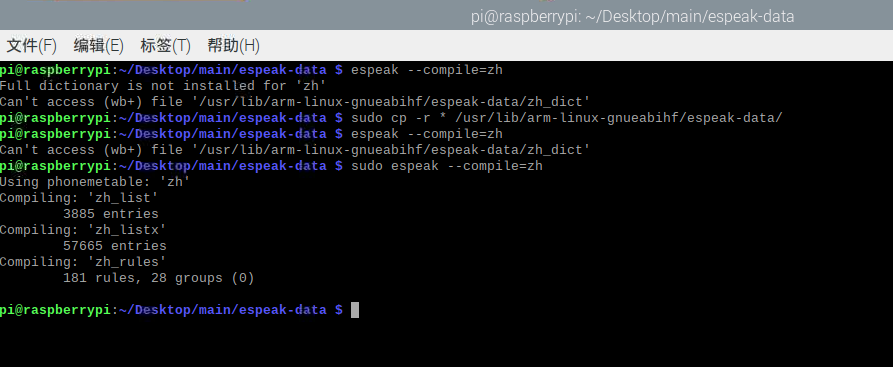
3 编译
$ git clone https://github.com/caixxiong/espeak-data
$ cd espeak-data/
$ unzip espeak-data.zip
$ sudo cp -r * /usr/lib/arm-linux-gnueabihf/espeak-data/
$ sudo espeak --compile=zh
设置中文
engine.setProperty('voice', 'zh')
单独
#!/usr/bin/env python
# -*- coding: utf-8 -*-


import pyttsx3

engine = pyttsx3.init()

'''
voices = engine.getProperty('voices')
for voice in voices:
    print("Voice:")
    print(" - ID: %s" % voice.id)
    print(" - Name: %s" % voice.name)
    print(" - Languages: %s" % voice.languages)
    print(" - Gender: %s" % voice.gender)
    print(" - Age: %s" % voice.age)
'''

engine.setProperty('voice', 'zh')
engine.setProperty('rate', 200)# speed
engine.setProperty('volume', 0.7)

text = "你好,欢迎使用中文语音合成!"
engine.say(text)
engine.runAndWait()

#engine.save_to_file(text, 'output.wav')
#engine.runAndWait()
综合实例
import pyttsx3
import pyaudio
import time
#from gtts import gTTS
from multiprocessing import Process,Manager

class Voice():


    #def __init__(self,ShareDatas,Lock):
    def __init__(self):


        # 初始化 TTS 引擎
        self.engine = pyttsx3.init()
        self.engine.setProperty("rate", 150) # 设置语速
        self.engine.setProperty("volume", 0.8) # 设置音量

        # 定义待朗读的中文文本
        self.text = "世界上没有垃圾,只有被人滥用的资源。"

        # 设置 TTS 引擎的语言为中文
        self.engine.setProperty("voice", "zh")

        # 进行语音合成
        #engine.say(text)
        #engine.runAndWait()


    def Say(self,text,voice_name='temp.mp3'):
        self.engine.say(text)
        self.engine.runAndWait()
        with open(voice_name, "wb") as file:
            self.engine.save_to_file(text, voice_name)
            self.engine.runAndWait()

    def Play(self,voice_name="temp.mp3"):
        #return
        # 播放合成的音频
        chunk = 1024
        p = pyaudio.PyAudio()
        stream = p.open(format=p.get_format_from_width(2),
                        channels=1,
                        rate=44100,
                        output=True)

        with open(voice_name, "rb") as file:
            data = file.read(chunk)
            while data:
                stream.write(data)
                data = file.read(chunk)

        stream.stop_stream()
        stream.close()
        p.terminate()


def Vioce_PLAY(ShareImages,lock):


    Voice_=Voice()

    while 1:

        if ShareImages[9]==1:
            print("vioce break")
            break


        if ShareImages[1]==1:
            ShareImages[1]=0
            msg=ShareImages[2]
            Voice_.Say(msg)
            time.sleep(4)
        else:
            time.sleep(0.001)

'''

if __name__ == '__main__':
    lock = Manager().Lock()#创建共享内存容器
    ShareImages=Manager().dict()#存str类型数据

    ShareImages[1]=0#用于控制保存图像和开始识别
    ShareImages[2]="购买物品是"#计算结果 播报
    ShareImages[9]=0

    p = Process(target=Vioce_PLAY, args=(ShareImages,lock))#开启进程
    p.deamon=True  #伴随主进程关闭而关闭,但是有时候还是关闭不了,单独搞个标志位来控制
    p.start()#开始

    i=0
    while 1:

        time.sleep(3)
        if ShareImages[1]==0:
            ShareImages[1]=1
            i=i+1
            ShareImages[2]="购买物品是"+str(i)
        else:
            pass

'''
单纯播放mp3
import time
import pygame
import os
from mutagen.mp3 import MP3


from multiprocessing import Process,Manager


def GET_mp3List():

    #获取地址并拼接
    path_mp3='mp3/'

    mp3_list_Path=[]
    for i in os.listdir(path_mp3):
        s=os.path.join(path_mp3,i)
        mp3_list_Path.append(s)
        print(i)
    return mp3_list_Path


def Mp3_paly_all():


    mp3_list_Path=GET_mp3List()


    if len(mp3_list_Path)==0:
        print("没有数据")
        return 0


    for Path_i in mp3_list_Path:
        # 获取每一首歌的时长
        audio = MP3(Path_i)
        print("歌曲时间",int(audio.info))
        pygame.mixer.init()
        path = Path_i
        pygame.mixer.music.load(path)

        pygame.mixer.music.play(10)#播放载入的音乐。该函数立即返回,音乐播放在后台进行
        time.sleep(int(10))
        pygame.mixer.music.pause() # 暂停
        time.sleep(int(3))
        pygame.mixer.music.unpause() # 接着播放
        #获取歌曲时间
        time.sleep(int(audio.info.length))


def Mp3_paly_while(ShareImages,lock):

    pygame.mixer.init()

    while 1:

        if ShareImages[9]==1:
            print("mp3 stop")

        if ShareImages[6]=="paly":

            ShareImages[6]="wait"
            path = ShareImages[7]
            pygame.mixer.music.load(path)
            print("开始播放歌曲",path)
            #audio = MP3(path)
            #print("歌曲时间",int(audio.info))

            pygame.mixer.music.play()

        elif ShareImages[6]=="stop":
            ShareImages[6]="wait"
            pygame.mixer.music.pause() # 暂停


        time.sleep(0.0001)


'''
if __name__ == '__main__':


    ShareImages=Manager().dict()
    lock=Manager().Lock()

    ShareImages[6]="wait"# ,mp3 动作
    ShareImages[7]="wait"# ,mp3 当前播放名字

    ShareImages[9]=0#用于关闭所有进程

    #1采集图像进程
    t1=Process(target=Mp3_paly_while,args=(managerdata,sharelock))
    t1.start()
    t1.deamon=True  #伴随主进程关闭而关闭

    while 1:
        pass
'''
单独播放mp3

 浙公网安备 33010602011771号