

https://github.com/Celebrandil/CudaSift/blob/Pascal/CMakeLists.txt
cmake_minimum_required(VERSION 2.6)

project(cudaSift)
set(cudaSift_VERSION_MAJOR 2)
set(cudaSift_VERSION_MINOR 0)
set(cudaSift_VERSION_PATCH 0)

set(CPACK_PACKAGE_VERSION_MAJOR "${cudaSift_VERSION_MAJOR}")
set(CPACK_PACKAGE_VERSION_MINOR "${cudaSift_VERSION_MINOR}")
set(CPACK_PACKAGE_VERSION_PATCH "${cudaSift_VERSION_PATCH}")
set(CPACK_GENERATOR "ZIP")
include(CPack)

find_package(OpenCV REQUIRED)
find_package(CUDA)
if (NOT CUDA_FOUND)
  message(STATUS "CUDA not found. Project will not be built.")
endif(NOT CUDA_FOUND)

if (WIN32)
  set(EXTRA_CXX_FLAGS "/DVERBOSE /D_CRT_SECURE_NO_WARNINGS ")
  list(APPEND CUDA_NVCC_FLAGS "-arch=sm_35;--compiler-options;-O2;-DVERBOSE")
endif()
if (UNIX)
  if (APPLE)
    set(EXTRA_CXX_FLAGS "-DVERBOSE -msse2")
    list(APPEND CUDA_NVCC_FLAGS "-arch=sm_35;--compiler-options;-O2;-DVERBOSE")
  else()
    set(CMAKE_CXX_FLAGS "${CMAKE_CXX_FLAGS} -O2 -msse2 ")
    list(APPEND CUDA_NVCC_FLAGS "-lineinfo;-ccbin;/usr/bin/gcc-6;--compiler-options;-O2;-D_FORCE_INLINES;-DVERBOSE_NOT")
  endif()
endif()

set(cuda_sources
  cudaImage.cu
  cudaImage.h
  cudaSiftH.cu
  cudaSiftH.h
  matching.cu
  cudaSiftD.h
  cudaSift.h
  cudautils.h
)

set(sources
  geomFuncs.cpp
  mainSift.cpp
)

include_directories(
  ${CMAKE_CURRENT_SOURCE_DIR}
)

#SET(CUDA_SEPARABLE_COMPILATION ON)

cuda_add_executable(cudasift ${cuda_sources} ${sources} OPTIONS -arch=sm_35)

#cuda_add_executable(l2net l2netD.cu OPTIONS -arch=sm_35)

set_target_properties(cudasift PROPERTIES
  COMPILE_FLAGS "${EXTRA_CXX_FLAGS}"
)

target_link_libraries(cudasift ${CUDA_cudadevrt_LIBRARY} ${OpenCV_LIBS})
#  /usr/local/cuda/lib64/libcudadevrt.a ${OpenCV_LIBS}
#)

install(FILES
  ${cuda_sources}
  ${sources}
  cudaSiftD.cu
  CMakeLists.txt
  Copyright.txt
  DESTINATION .
)
install(FILES data/left.pgm data/righ.pgm
  DESTINATION data
)
测试样例1 读取单路图像检测特征点
#include <iostream>
#include <cmath>
#include <dirent.h>   // 循环访问文件夹路径使用

#include <iomanip>
#include <opencv2/core/core.hpp>
#include <opencv2/highgui/highgui.hpp>
#include <opencv2/imgproc/imgproc.hpp>

#include "cudaImage.h"
#include "cudaSift.h"

using namespace std;

typedef struct {
  float xpos;
  float ypos;
  float scale;
  float sharpness;
  float edgeness;
  float orientation;
  float score;
  float ambiguity;
  int match;
  float match_xpos;
  float match_ypos;
  float match_error;
  float subsampling;
  float empty[3];
  float data[128];
} SiftPoint_gpu;

typedef struct {
  float xpos;
  float ypos;
  float scores;
  float descriptors[128];
} SiftPoint_cpu;


//单路测试
void  GetKeyPoint()
{
  int devNum = 0, imgSet = 0;


  //1读取图像
  cv::Mat limg;
  cv::imread("data/img1.png", 0).convertTo(limg, CV_32FC1);
  unsigned int w = limg.cols;
  unsigned int h = limg.rows;
  std::cout << "Image size = (" << w << "," << h << ")" << std::endl;

  //2 初始化cuda加速器
  std::cout << "Initializing data..." << std::endl;
  InitCuda(devNum);

  //3 加载图像到cuda
  CudaImage img1;
  img1.Allocate(w, h, iAlignUp(w, 128), false, NULL, (float*)limg.data);
  img1.Download();


  //  4-1 初始化提取器
  SiftData siftData1;
  float initBlur = 1.0f;
  float thresh = (imgSet ? 4.5f : 3.0f);
  InitSiftData(siftData1, 32768, true, true);


// 4-2 初始化分配空间
  float *memoryTmp = AllocSiftTempMemory(w, h, 5, false);

//  4-3 提取特征点
   ExtractSift(siftData1, img1, 5, initBlur, thresh, 0.0f, false, memoryTmp);


      int numPts = siftData1.numPts;//特征点总数目
      SiftPoint *sift1 = siftData1.h_data;//特征点的数据

     for (int j=0;j<numPts;j++)
      {

          float x=sift1[j].xpos;
          float y=sift1[j].ypos;
          float scores=sift1[j].score;

           //float descriptors[128];
           //sift1[j].data;

         cout<<  "(x,y)   "<<  x <<"   " <<y<< "scores    " <<scores <<endl;
     }
  // 4-4 释放特征点临时空间
    FreeSiftTempMemory(memoryTmp);

  // 5Free Sift data from device
  FreeSiftData(siftData1);


}


int main()
{

GetKeyPoint();


}
样例2 读取多个文件夹循环访问
#include <iostream>
#include <cmath>
#include <dirent.h> //循环访问文件夹路径使用

#include <iomanip>
#include <opencv2/core/core.hpp>
#include <opencv2/highgui/highgui.hpp>
#include <opencv2/imgproc/imgproc.hpp>

#include "cudaImage.h"
#include "cudaSift.h"

using namespace std;

typedef struct {
  float xpos;
  float ypos;
  float scale;
  float sharpness;
  float edgeness;
  float orientation;
  float score;
  float ambiguity;
  int match;
  float match_xpos;
  float match_ypos;
  float match_error;
  float subsampling;
  float empty[3];
  float data[128];
} SiftPoint_gpu;

typedef struct {
  float xpos;
  float ypos;
  float scores;
  float descriptors[128];
} SiftPoint_cpu;


// 获取目录下所有图像名称
std::vector<std::string> getAllImagesPath(std::string img_dir)
{
    std::vector<std::string> img_path_all;
    // 读取文件夹下所有地图文件路径存储在 map_path_all数组中
    DIR *pDir;
    struct dirent *ptr;
    if (!(pDir = opendir(img_dir.c_str())))
    {
        std::cout<<"Folder doesn't Exist!"<<std::endl;
    }
    while ((ptr = readdir(pDir)) != 0)
    {
        if (strcmp(ptr->d_name, ".") != 0 && strcmp(ptr->d_name, "..") != 0)
        {
            std::string path = img_dir + "/" + ptr->d_name;
            img_path_all.push_back(path);
            std::cout << "img_name:" << path << std::endl;
        }
    }
    closedir(pDir);
    return img_path_all;
}


//单路测试
void  GetKeyPoint(vector<string> imgs_path )
{
  int devNum = 0, imgSet = 0;
  //1-1 初始化cuda加速器
  std::cout << "Initializing data..." << std::endl;
  InitCuda(devNum);
  //1-2 初始化提取器
  SiftData siftData1;
  float initBlur = 1.0f;
  float thresh = (imgSet ? 4.5f : 3.0f);
  InitSiftData(siftData1, 32768, true, true);

  //1-3 初始化分配空间
  unsigned int w = 1920;
  unsigned int h = 1080;
  float *memoryTmp = AllocSiftTempMemory(w, h, 5, false);

  cv::Mat limg;//创建空白图像
  CudaImage img1;//创建空白cudA
  int IMG_NUM=imgs_path.size();//记录大小

  for( int i=0;i<IMG_NUM;i++){
  //2-1 读取图像

  cv::imread(imgs_path[i], 0).convertTo(limg, CV_32FC1);

   //w = limg.cols;
   //h = limg.rows;
  //std::cout << "Image size = (" << w << "," << h << ")" << std::endl;

  //2-2 加载图像到cuda

  img1.Allocate(w, h, iAlignUp(w, 128), false, NULL, (float*)limg.data);
  img1.Download();

// 2-3 提取特征点
   ExtractSift(siftData1, img1, 5, initBlur, thresh, 0.0f, false, memoryTmp);

//2-4 访问所有特征点的属性
    int numPts = siftData1.numPts;//特征点总数目
    SiftPoint *sift1 = siftData1.h_data;//特征点的数据


    //逐个特征点访问
    for (int j=0;j<numPts;j++)
    {
        float x=sift1[j].xpos;
        float y=sift1[j].ypos;
        float scores=sift1[j].score;
          //float descriptors[128];
          //sift1[j].data;
        cout<< "图像"<< imgs_path[i] << "   (x,y)   "<<  x <<"   " <<y<< "scores    " <<scores <<endl;
    }

//2-5 保存所有结果


  }//for 读取图像

  //3-1 释放特征点临时空间
  FreeSiftTempMemory(memoryTmp);

  //3-2Free Sift data from device
  FreeSiftData(siftData1);

}


int main()
{

  // 1.读取所有图像
  vector<string> imgs_path = getAllImagesPath("./data");
  //2 提取特征点
   GetKeyPoint(imgs_path);
}
样例
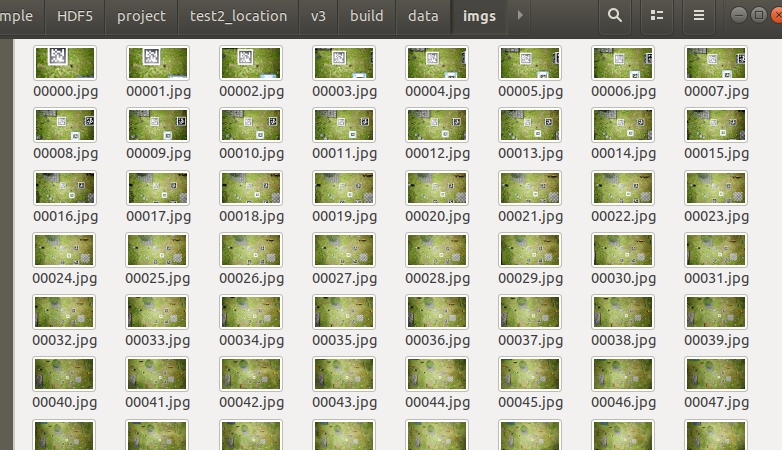
1读取文件夹,提取每个特征点保存h5
2读取txt中两个图像匹配关系,特征点保存在h5
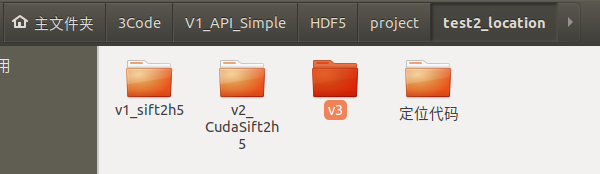
CMakeLists.txt
cmake_minimum_required(VERSION 3.10)

project(cudaSift)

#指定gcc和g++的版本为系统当前版本  工程默认6.0  现有系统7.5
set(CMAKE_C_COMPILER "/usr/bin/gcc")
set(CMAKE_CXX_COMPILER "/usr/bin/g++")

#设置cuda
set(cudaSift_VERSION_MAJOR 2)
set(cudaSift_VERSION_MINOR 0)
set(cudaSift_VERSION_PATCH 0)

#设置cpack
#CPack 是 CMake 2.4.2 之后的一个内置工具,用于创建软件的二进制包和源代码包。
set(CPACK_PACKAGE_VERSION_MAJOR "${cudaSift_VERSION_MAJOR}")
set(CPACK_PACKAGE_VERSION_MINOR "${cudaSift_VERSION_MINOR}")
set(CPACK_PACKAGE_VERSION_PATCH "${cudaSift_VERSION_PATCH}")
set(CPACK_GENERATOR "ZIP")
include(CPack)

#hdf5
find_package(HDF5 COMPONENTS C CXX HL REQUIRED)
link_directories( ${HDF5_LIBRARY_DIRS} )
include_directories( ${HDF5_INCLUDE_DIRS} )


find_package(OpenCV REQUIRED)
find_package(CUDA)
if (NOT CUDA_FOUND)
  message(STATUS "CUDA not found. Project will not be built.")
endif(NOT CUDA_FOUND)

if (WIN32)
  set(EXTRA_CXX_FLAGS "/DVERBOSE /D_CRT_SECURE_NO_WARNINGS ")
  list(APPEND CUDA_NVCC_FLAGS "-arch=sm_35;--compiler-options;-O2;-DVERBOSE")
endif()
if (UNIX)
  if (APPLE)
    set(EXTRA_CXX_FLAGS "-DVERBOSE -msse2")
    list(APPEND CUDA_NVCC_FLAGS "-arch=sm_35;--compiler-options;-O2;-DVERBOSE")
  else()
  #CMAKE_CXX_FLAGS 是CMake传给C++编译器的编译选项,通过设置这个值就好比 g++ -std=c++11 -g -Wall
    set(CMAKE_CXX_FLAGS "${CMAKE_CXX_FLAGS} -O2 -msse2 ") #  # release包优化
    list(APPEND CUDA_NVCC_FLAGS "-lineinfo;-ccbin;/usr/bin/gcc-6;--compiler-options;-O2;-D_FORCE_INLINES;-DVERBOSE_NOT")
  endif()
endif()


#把当前目录(CMakeLists.txt所在目录)下的include文件夹加入到包含路径
include_directories(
  ${CMAKE_CURRENT_SOURCE_DIR}
)

#cuda_sources 指代文件目录
set(cuda_sources
  cudaImage.cu
  cudaImage.h
  cudaSiftH.cu
  cudaSiftH.h
  matching.cu
  cudaSiftD.h
  cudaSift.h
  cudautils.h
)

#sources 指代 文件目录
set(sources
  geomFuncs.cpp
  v4_mainSift_h5_match.cpp
)


#SET(CUDA_SEPARABLE_COMPILATION ON)

cuda_add_executable(cudasift ${cuda_sources} ${sources} OPTIONS -arch=sm_35)

#cuda_add_executable(l2net l2netD.cu OPTIONS -arch=sm_35)

set_target_properties(cudasift PROPERTIES  COMPILE_FLAGS "${EXTRA_CXX_FLAGS}")

#告诉CMake我要链接哪个库文件
target_link_libraries(cudasift ${CUDA_cudadevrt_LIBRARY} ${OpenCV_LIBS}  ${HDF5_CXX_LIBRARIES} )
#  /usr/local/cuda/lib64/libcudadevrt.a ${OpenCV_LIBS}
#)


install(FILES
  ${cuda_sources}
  ${sources}
  cudaSiftD.cu
  CMakeLists.txt
  Copyright.txt
  DESTINATION .
)
install(FILES data/left.pgm data/righ.pgm
  DESTINATION data
)
v4_mainSift_h5_match.cpp
关键
float thresh = (imgSet ? 4.5f : 3.0f);
InitSiftData(siftData1, 4096, true, true); //
#include <iostream>
#include <cmath>
#include <dirent.h> //循环访问文件夹路径使用

#include <iomanip>
#include <opencv2/core/core.hpp>
#include <opencv2/highgui/highgui.hpp>
#include <opencv2/imgproc/imgproc.hpp>

#include "cudaImage.h"
#include "cudaSift.h"
#include "hdf5.h"
#include <fstream>
int ImproveHomography(SiftData &data, float *homography, int numLoops, float minScore, float maxAmbiguity, float thresh);
void PrintMatchData(SiftData &siftData1, SiftData &siftData2, CudaImage &img);
void MatchAll(SiftData &siftData1, SiftData &siftData2, float *homography);

double ScaleUp(CudaImage &res, CudaImage &src);


using namespace std;

typedef struct {
  float xpos;
  float ypos;
  float scale;
  float sharpness;
  float edgeness;
  float orientation;
  float score;
  float ambiguity;
  int match;
  float match_xpos;
  float match_ypos;
  float match_error;
  float subsampling;
  float empty[3];
  float data[128];
} SiftPoint_gpu;

typedef struct {
  float xpos;
  float ypos;
  float scores;
  float descriptors[128];
} SiftPoint_cpu;


// 获取目录下所有图像名称
std::vector<std::string> getAllImagesPath(std::string img_dir)
{
    std::vector<std::string> img_path_all;
    // 读取文件夹下所有地图文件路径存储在 map_path_all数组中
    DIR *pDir;
    struct dirent *ptr;
    if (!(pDir = opendir(img_dir.c_str())))
    {
        std::cout<<"Folder doesn't Exist!"<<std::endl;
    }
    while ((ptr = readdir(pDir)) != 0)
    {
        if (strcmp(ptr->d_name, ".") != 0 && strcmp(ptr->d_name, "..") != 0)
        {
            std::string path = img_dir + "/" + ptr->d_name;
            img_path_all.push_back(path);
            std::cout << "img_name:" << path << std::endl;
        }
    }
    closedir(pDir);
    return img_path_all;
}
//特征点提取保存的名字
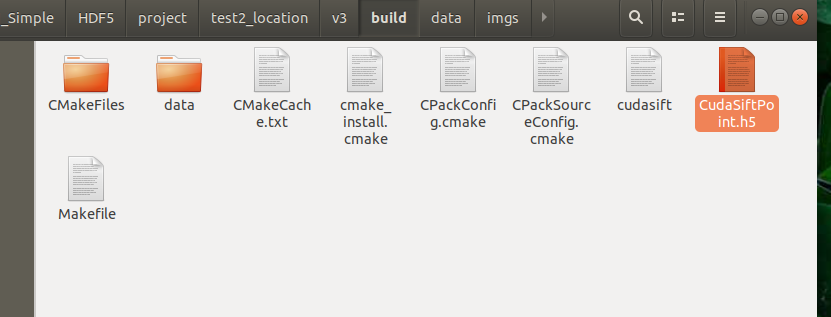
#define FILE "CudaSiftPoint.h5"
//特征点关系保存保存名字
#define FILE_Match "CudaSiftMatch.h5"

//单个文件夹循环读取图片提取特征点保存
void  GetKeyPoint(vector<string> imgs_path )
{
  int devNum = 0, imgSet = 1;
  //1-1 初始化cuda加速器
  std::cout << "Initializing data..." << std::endl;
  InitCuda(devNum);
  //1-2 初始化提取器
  SiftData siftData1;
  float initBlur = 1.0f;
  float thresh = (imgSet ? 4.5f : 3.0f);
  InitSiftData(siftData1, 32768, true, true); //

  //1-3 初始化分配空间
  unsigned int w = 1920;
  unsigned int h = 1080;
  float *memoryTmp = AllocSiftTempMemory(w, h, 5, false);

  cv::Mat limg;//创建空白图像
  CudaImage img1;//创建空白cudA
  int IMG_NUM=imgs_path.size();//记录大小


    // 3.存成h5文件
    hid_t file;
    herr_t status;
    // 创建h5 file
    file = H5Fcreate(FILE,H5F_ACC_TRUNC, H5P_DEFAULT, H5P_DEFAULT);
    hid_t group;
    hid_t space_kpt, space_dec, space_size, space_score;
    hid_t dset_kpt, dset_dec, dest_size, dest_score;


  for( int i=0;i<IMG_NUM;i++){
  //2-1 读取图像

  cv::imread(imgs_path[i], 0).convertTo(limg, CV_32FC1);

   //w = limg.cols;
   //h = limg.rows;
  //std::cout << "Image size = (" << w << "," << h << ")" << std::endl;

  //2-2 加载图像到cuda
  if(i==0){
  img1.Allocate(w, h, iAlignUp(w, 128), false, NULL, (float*)limg.data);
   }
  img1.Download();

// 2-3 提取特征点
   ExtractSift(siftData1, img1, 5, initBlur, thresh, 0.0f, false, memoryTmp);

//2-4 访问所有特征点的属性
    int numPts = siftData1.numPts;//特征点总数目
    SiftPoint *sift1 = siftData1.h_data;//特征点的数据


    // 构建group
    int p = imgs_path[i].find_last_of("/");
    std::string g_name = imgs_path[i].substr(p+1);
    // std::cout<<g_name<<std::endl;
    group = H5Gcreate(file, g_name.c_str(), H5P_DEFAULT, H5P_DEFAULT, H5P_DEFAULT);

    float kpt_pos[numPts*2];//特征点列表

    float score[numPts];//得分列表

    float descriptors[128][numPts];//numPts个描述子  每个128维度 h5是竖着存储的
    int img_size[2] = {w,h};


    //逐个特征点访问
    for (int j=0;j<numPts;j++)
    {
            kpt_pos[2 * j] = sift1[j].xpos;
            kpt_pos[2 * j + 1] = sift1[j].ypos;

            score[j]=sift1[j].score;

            for (int i =0;i<128;i++){
              descriptors[i][j]=sift1[j].data[i];
            }

       // cout<< "图像"<< imgs_path[i] << "   (x,y)   "<<  x <<"   " <<y<< "scores    " <<scores <<endl;
    }


        // 1.特征点
        // 设置数据空间
        hsize_t dims_kpt[2] = {numPts, 2}; // n行2列
        space_kpt = H5Screate_simple(2, dims_kpt, NULL);
        // 构建dataset
        dset_kpt = H5Dcreate(group, "keypoints", H5T_IEEE_F32LE, space_kpt, H5P_DEFAULT,
                     H5P_DEFAULT, H5P_DEFAULT);
        // 写入数据到dataset

        status = H5Dwrite(dset_kpt, H5T_NATIVE_FLOAT, H5S_ALL, H5S_ALL, H5P_DEFAULT,
                      kpt_pos);


        // 2.描述子
        // hsize_t dims_dec[2] = {descriptors_vec[i].rows, descriptors_vec[i].cols}; // 行列
        hsize_t dims_dec[2] = {128,numPts}; // 128行 1列
        space_dec = H5Screate_simple(2, dims_dec, NULL);
        dset_dec = H5Dcreate(group, "descriptors", H5T_IEEE_F32LE, space_dec, H5P_DEFAULT,
                     H5P_DEFAULT, H5P_DEFAULT);

        status = H5Dwrite(dset_dec, H5T_NATIVE_FLOAT, H5S_ALL, H5S_ALL, H5P_DEFAULT,
                      descriptors);

        // 3.特征点分数
        hsize_t dims_score[1] = {numPts}; // n行1列
        space_score = H5Screate_simple(1, dims_score, NULL);
        // 构建dataset
        dest_score = H5Dcreate(group, "scores", H5T_IEEE_F32LE, space_score, H5P_DEFAULT,
                     H5P_DEFAULT, H5P_DEFAULT);
        status = H5Dwrite(dest_score, H5T_NATIVE_FLOAT, H5S_ALL, H5S_ALL, H5P_DEFAULT,
                      score);


        // 4.图像大小
        hsize_t dims_size[1] = {2}; //
        space_size = H5Screate_simple(1, dims_size, NULL);
        // 构建dataset
        // 注意这里不能BE 需要是LE 涉及到字节存储顺序big-endian
        // https://stackoverflow.com/questions/59247385/why-does-torch-from-numpy-require-a-different-byte-ordering-while-matplotlib-doe
        // https://www.cnblogs.com/still-smile/p/11595775.html
        dest_size = H5Dcreate(group, "image_size", H5T_STD_I64LE, space_size, H5P_DEFAULT,
                     H5P_DEFAULT, H5P_DEFAULT);
        status = H5Dwrite(dest_size, H5T_NATIVE_INT, H5S_ALL, H5S_ALL, H5P_DEFAULT,
                      img_size);

  }//for 读取图像


  //3-1 释放特征点临时空间
  FreeSiftTempMemory(memoryTmp);
  //3-2Free Sift data from device
  FreeSiftData(siftData1);

  //4
    // 关闭句柄
  status = H5Dclose(dset_kpt);
  status = H5Sclose(space_kpt);
  status = H5Dclose(dset_dec);
  status = H5Sclose(space_dec);
  status = H5Dclose(dest_score);
  status = H5Sclose(space_score);
  status = H5Dclose(dest_size);
  status = H5Sclose(space_size);
  status = H5Gclose(group);
  status = H5Fclose(file);

}


//-------------------------------------------------------------------------
//读取colmap生成的匹配txt,生成cudasift对应的h5文件
int beginnum=200;
int endnum=600;  //2260
// 0-200  85-77
//200-400

bool issaveh5=1;//是否保存h5
//输入文件路径txt
void cudasift_matchImg( string txtpath)
{

//初始化
  int devNum = 0, imgSet = 1;

  unsigned int w = 1920;
  unsigned int h = 1080;
  InitCuda(devNum);
  CudaImage img1, img2;
  cv::Mat limg, rimg;


  float initBlur = 1.0f;
  float thresh = (imgSet ? 4.5f : 3.0f);//阈值  4.5f -3000多个  3.0f - 10000多个

   //特点点初始化
   SiftData siftData1, siftData2;
  InitSiftData(siftData1, 32768, true, true);
  InitSiftData(siftData2, 32768, true, true);
  float *memoryTmp = AllocSiftTempMemory(w, h, 5, false);

/*
//循环读取
//  1 读取txt 逐行读取 空格分割 获取结果两个图像名字
*/
ifstream in(txtpath);
  string line;
  vector< vector<string> > strALL_split;
  while (getline(in, line))
  {//将in文件中的每一行字符读入到string line中
    cout<< line <<endl;
    stringstream ss(line);//使用string初始化stringstream
    string tmp_str;
    vector<string> str_split;
      while(getline(ss,tmp_str,' ')){
      str_split.push_back(tmp_str);
      }
      strALL_split.push_back(str_split);
  }


  // 3.存成h5文
  herr_t status;
  //char FILE_Match[]="feats-superpoint-n4096-r1024_matches-NN-mutual_pairs-db-covis20.h5";
  // 创建h5 file
  hid_t file;
  hid_t group ;
  hid_t dest_matchid,dest_matchiderror;

   if(issaveh5){file = H5Fcreate(FILE_Match,H5F_ACC_TRUNC, H5P_DEFAULT, H5P_DEFAULT);}

   //int ci=beginnum-1;

   //-----------------------------------循环开始提取--------------------------------------
   //if(strALL_split.size()<=endnum){endnum=strALL_split.size();}

  for (int i=0;i<strALL_split.size();i++){

    cout <<"次数"<< i << "/"<<  strALL_split.size()<<"  图像1  "<<strALL_split[i][0] << "\t 图像2  "<<  strALL_split[i][1]<<endl;
    string img1name="data/imgs/"+strALL_split[i][0];
    string img2name="data/imgs/"+strALL_split[i][1];

    // 1 读取图像

    cv::imread(img1name, 0).convertTo(limg, CV_32FC1);
    cv::imread(img2name, 0).convertTo(rimg, CV_32FC1);
    //2载入cuda内存

    if(i==0){//只能执行一次 初始化分配 且图像格式是CV_32FC1
    img1.Allocate(w, h, iAlignUp(w, 128), false, NULL, (float*)limg.data);
    img2.Allocate(w, h, iAlignUp(w, 128), false, NULL, (float*)rimg.data);
    }
    img1.Download();
    img2.Download();
    //3特征点提取
    ExtractSift(siftData1, img1, 5, initBlur, thresh, 0.0f, false, memoryTmp);
    ExtractSift(siftData2, img2, 5, initBlur, thresh, 0.0f, false, memoryTmp);
    //4匹配
    MatchSiftData(siftData1, siftData2);
    float homography[9];
    int numMatches;
    FindHomography(siftData1, homography, &numMatches, 10000, 0.00f, 0.80f, 5.0);
    int numFit = ImproveHomography(siftData1, homography, 5, 0.00f, 0.80f, 3.0);


    //2-4 访问所有特征点的属性
    int numPts = siftData1.numPts;//特征点总数目
    SiftPoint *sift1 = siftData1.h_data;//特征点的数据
   // float kpt_pos[numPts*2];//特征点列表
    //float score[numPts];//得分列表
   // float descriptors[128][numPts];//numPts个描述子  每个128维度 h5是竖着存储的
    //int img_size[2] = {w,h};

    float matchid[numPts];
    float match_scores[numPts];


        float minScore= 0.00f;
        float maxAmbiguity=  0.80f;
        float thresh=3.0;
        float limit = thresh*thresh;
        int no_num=0;
      //逐个特征点访问
      for (int j=0;j<numPts;j++)
      {
             // if (sift1[j].score<minScore || sift1[j].ambiguity>maxAmbiguity)
               if(sift1[j].match_error>=limit) //剔除匹配不好的点
               {
                   no_num=no_num+1;
                   matchid[j]=-1;  //匹配为-1
               }
               else
               {
                  matchid[j]=sift1[j].match;  //正常的匹配点
               }
              match_scores[j]=sift1[j].match_error;
      }

           cout<<" 特征点总数 "<<numPts<< " 剔除的特征点 " <<  no_num<<endl;

      //保存h5
      if(issaveh5){
            //创建group
            std::string g_name = strALL_split[i][0]+"_"+strALL_split[i][1];
            group = H5Gcreate(file, g_name.c_str(), H5P_DEFAULT, H5P_DEFAULT, H5P_DEFAULT);

            if (numPts==0){continue;}
            //创建数据格式
            hsize_t dims_matchid[1] = {numPts}; // n行1列
            hid_t space_matchid = H5Screate_simple(1, dims_matchid, NULL);

            //保存matches0数据 int16   H5T_STD_I64LE   H5T_STD_I16LE--float
           dest_matchid = H5Dcreate(group, "matches0", H5T_STD_I16LE, space_matchid, H5P_DEFAULT,
                            H5P_DEFAULT, H5P_DEFAULT);
          status = H5Dwrite(dest_matchid, H5T_NATIVE_FLOAT, H5S_ALL, H5S_ALL, H5P_DEFAULT,matchid);

            //保存matching_scores0数据 float32
            hsize_t dims_matchiderror[1] = {numPts}; // n行1列
            hid_t space_matchiderror = H5Screate_simple(1, dims_matchiderror, NULL);

            dest_matchiderror = H5Dcreate(group, "matching_scores0", H5T_IEEE_F32LE, space_matchiderror, H5P_DEFAULT,
                            H5P_DEFAULT, H5P_DEFAULT);
            status = H5Dwrite(dest_matchiderror, H5T_NATIVE_FLOAT, H5S_ALL, H5S_ALL, H5P_DEFAULT,match_scores);
      }

  }//txt循环每一行图像路径

    if(issaveh5){


        status = H5Dclose(dest_matchid);
        status = H5Dclose(dest_matchiderror);
        status = H5Dclose(group);
         status = H5Dclose(file);
    }

        FreeSiftTempMemory(memoryTmp);
        FreeSiftData(siftData1);
        FreeSiftData(siftData2);

}


int main()
{

  // 1.读取文件夹下所有图像
  string imgspath="./data/imgs";
  vector<string> imgs_path = getAllImagesPath(imgspath);
  //2 提取特征点,没有筛选 ,并保存h5,  没有匹配
  GetKeyPoint(imgs_path);

  //3提取特征点,匹配关系保存h5,从txt获取每行要对比的图像名字
   //string txtpath="data/pairs-db-covis20.txt";
   //cudasift_matchImg(txtpath);
}
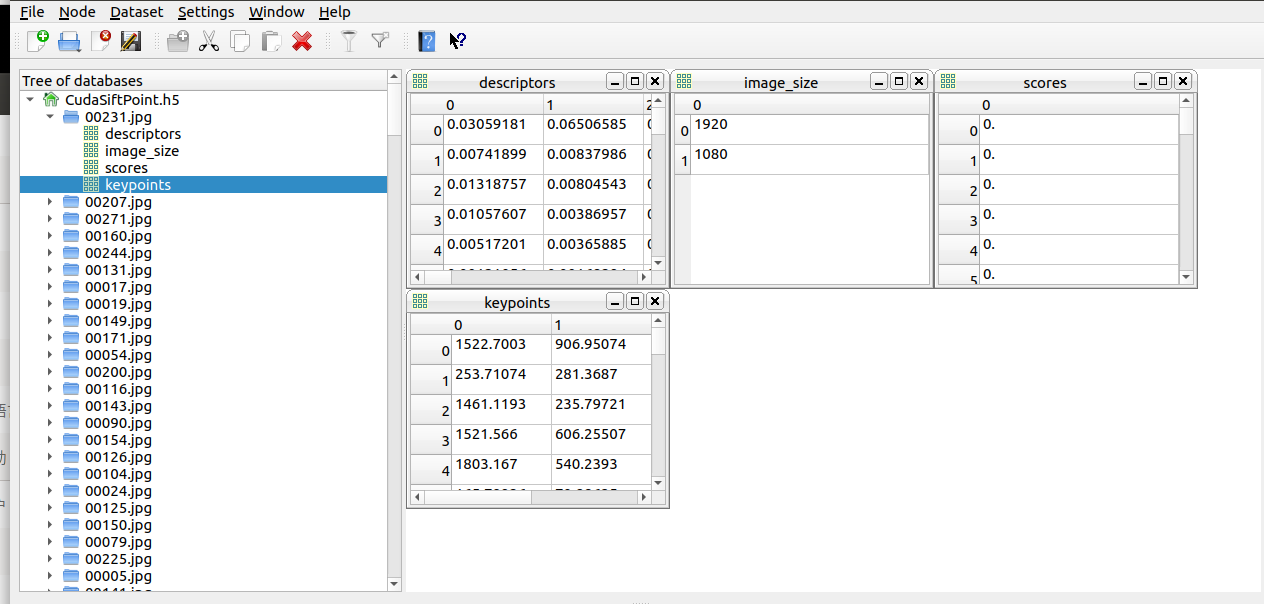
cmd中输入命令:vitables来打开ViTables,从而在可视化界面里来进行相应操作。

 浙公网安备 33010602011771号