
maven 搭建 ssm 框架 遇到的问题
maven tomacat8 插件的问题找了很久, 最后如下:
<build>
        <plugins>
            <plugin>
                <groupId>org.codehaus.mojo</groupId>
                <artifactId>tomcat-maven-plugin</artifactId>
                <version>1.1</version>
                <configuration>
                    <path>/ssm</path>
                    <port>8080</port>
                    <uriEncoding>utf-8</uriEncoding>
                    <server>tomcat8</server>
                </configuration>
            </plugin>
        </plugins>
    </build>
启动信息:
"C:\Program Files\Java\jdk1.8.0_162\bin\java.exe" -agentlib:jdwp=transport=dt_socket,address=127.0.0.1:13301,suspend=y,server=n -Dmaven.multiModuleProjectDirectory=E:\workSpace\test\SSM -Dmaven.home=E:\path\Maven\apache-maven-3.5.4 -Didea.modules.paths.file=C:\Users\jxl\.IntelliJIdea2018.2\system\Maven\idea-projects-state-9c77b9d1.properties -Dclassworlds.conf=C:\Users\jxl\AppData\Local\Temp\idea-307-mvn.conf -javaagent:C:\Users\jxl\.IntelliJIdea2018.2\system\captureAgent\debugger-agent.jar=file:/C:/Users/jxl/AppData/Local/Temp/capture1100.props -Dfile.encoding=UTF-8 -classpath "E:\path\Maven\apache-maven-3.5.4\boot\plexus-classworlds-2.5.2.jar;E:\path\idea\IntelliJ IDEA 2018.2.2\lib\idea_rt.jar" org.codehaus.classworlds.Launcher -Didea.version=2018.2.2 -s E:\path\Maven\apache-maven-3.5.4\conf\settings.xml clean tomcat:run
Connected to the target VM, address: '127.0.0.1:13301', transport: 'socket'
[INFO] Scanning for projects...
[WARNING]
[WARNING] Some problems were encountered while building the effective model for cn.jianxl:SSM:jar:1.0-SNAPSHOT
[WARNING] 'dependencies.dependency.(groupId:artifactId:type:classifier)' must be unique: org.springframework:spring-webmvc:jar -> duplicate declaration of version ${spring.version} @ line 94, column 21
[WARNING]
[WARNING] It is highly recommended to fix these problems because they threaten the stability of your build.
[WARNING]
[WARNING] For this reason, future Maven versions might no longer support building such malformed projects.
[WARNING]
[INFO]
[INFO] ---------------------------< cn.jianxl:SSM >----------------------------
[INFO] Building test project 1.0-SNAPSHOT
[INFO] --------------------------------[ jar ]---------------------------------
[INFO]
[INFO] --- maven-clean-plugin:2.5:clean (default-clean) @ SSM ---
[INFO] Deleting E:\workSpace\test\SSM\target
[INFO]
[INFO] >>> tomcat-maven-plugin:1.1:run (default-cli) > compile @ SSM >>>
[INFO]
[INFO] --- maven-resources-plugin:2.6:resources (default-resources) @ SSM ---
[WARNING] Using platform encoding (UTF-8 actually) to copy filtered resources, i.e. build is platform dependent!
[INFO] Copying 7 resources
[INFO]
[INFO] --- maven-compiler-plugin:3.1:compile (default-compile) @ SSM ---
[INFO] Changes detected - recompiling the module!
[WARNING] File encoding has not been set, using platform encoding UTF-8, i.e. build is platform dependent!
[INFO] Compiling 2 source files to E:\workSpace\test\SSM\target\classes
[INFO]
[INFO] <<< tomcat-maven-plugin:1.1:run (default-cli) < compile @ SSM <<<
[INFO]
[INFO]
[INFO] --- tomcat-maven-plugin:1.1:run (default-cli) @ SSM ---
[INFO] Skipping non-war project
[INFO] ------------------------------------------------------------------------
[INFO] BUILD SUCCESS
[INFO] ------------------------------------------------------------------------
[INFO] Total time: 1.587 s
[INFO] Finished at: 2018-10-12T08:36:04+08:00
[INFO] ------------------------------------------------------------------------
Skipping non-war project 注意到这行信息, 想到的还没达成war包, 就加上打war包的代码就可以启动了:
<packaging>war</packaging>
报了异常:Unknown system variable 'query_cache_size'
原因是mysql-connector-java的版本还是6.0.6,需要升级版本到8.0.11 ,这个报错就不存在了
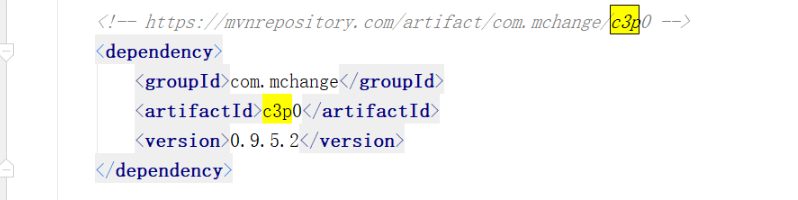
java.lang.AbstractMethodError: Method com/mchange/v2/c3p0/impl/NewProxyPreparedStatement.isClosed()
如果报了这个错, 是因为c3p0的jar包问题, 将jar包改成如下所示即可:
ssm的框架我用的是: mybatis: 3.4.6, mybatis-spring:1.3.0, spring: 5.0.9
以下是mybatis 和 spring的版本对照表
| MyBatis-Spring | MyBatis | Spring |
|---|---|---|
| 1.0.0 and 1.0.1 | 3.0.1 to 3.0.5 | 3.0.0 or higher |
| 1.0.2 | 3.0.6 | 3.0.0 or higher |
| 1.1.0 or higher | 3.1.0 or higher | 3.0.0 or higher |
| 1.3.0 or higher | 3.4.0 or higher | 3.0.0 or higher |
我当然是选最后一条, 什么都选最新的, 但是我发现, spring 如果选择 5.1.0的话, 会找不到controller, 访问controller会报noSuchMethedException, 具体原因也没去看, 我又分别试了5.0.9, 4.3.19和3.1.4, 发现 只有5.1和5.0不行。

 浙公网安备 33010602011771号