
SpringBoot容器功能的学习
一、组件添加
1、@configuration
标记类为配置类,配置类中为方法加上@Bean注解给容器注册组件,默认为单实例。配置类也会注册组件。
@configuration的属性:
proxyBeanMethods:代理bean的方法
Full(proxyBeanMethods = true)
【保证每个@Bean方法被调用多少次返回的组件都是单实例的,外部无论对配置类中的这个组件注册方法调用多少次获取的都是之前注册容器中的单实例对象,SpringBoot总会检查这个组件是否在容器中有】
Lite(proxyBeanMethods = false)
【每个@Bean方法被调用多少次返回的组件都是新创建的】
组件依赖必须使用Full模式默认。其他默认是否Lite模式
2、@Bean、@Component、@Controller、@Service、@Repository
在Stereotype(旧规矩)模式下,Spring为Controller-Service-Dao的分层模型分别提供了@Controller、@Service、@Repository注解,除此之外的组件使用@Component注解。
3、@ComponentScan、@Import
在配置类中使用。
@ComponentScan:将指定包的组件注入容器
@Import:将指定类注入容器
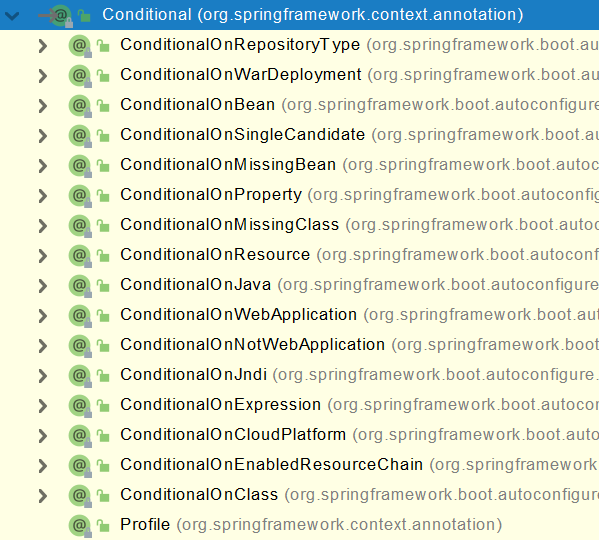
4、@Conditional
条件装配:满足Conditional指定的条件,则进行组件注入
5、@ImportResource
原生配置文件引入,在xml文件中配置组件,并通过@ImportResource注解注入IOC容器
6、配置绑定
@Target({ElementType.TYPE, ElementType.METHOD})
@Retention(RetentionPolicy.RUNTIME)
@Documented
public @interface ConfigurationProperties {
    @AliasFor("prefix")
    String value() default "";

    @AliasFor("value")
    String prefix() default "";

    boolean ignoreInvalidFields() default false;

    boolean ignoreUnknownFields() default true;
}
/**
* 只有在容器中的组件,才会拥有SpringBoot提供的强大功能
*/
@Component
@ConfigurationProperties(prefix = "mycar")
public class Car {private String brand;
private Integer price;public String getBrand() {
return brand;
}public void setBrand(String brand) {
this.brand = brand;
}public Integer getPrice() {
return price;
}public void setPrice(Integer price) {
this.price = price;
}@Override
public String toString() {
return "Car{" +
"brand='" + brand + '\'' +
", price=" + price +
'}';
}
}
-
@Component + @ConfigurationProperties
-
@EnableConfigurationProperties + @ConfigurationPropertie
@Import({User.class, DBHelper.class})
@Configuration(proxyBeanMethods = false) //告诉SpringBoot这是一个配置类 == 配置文件
public class MyConfig {
}

 浙公网安备 33010602011771号