
shell执行sh
假设我们有一个名为 “shell_script” 的脚本文件,文件内容如下
#!/bin/bash
然后我们准备执行这个文件
$ chmod u+x shell_script
$ ./shell_script
当我们执行 ./shell_script 这行命令的时候由于脚本添加了 shebang,相当于在命令行这样执行:
/bin/bash shell_script
#!/usr/bin/bash
cd /data/ &&
rm -rf openpilot &&
git clone https://mirror.ghproxy.com/https://github.com/dragonpilot-community/dragonpilot -b d2 --single-branch --depth=1 openpilot &&
touch /data/data/com.termux/files/continue.sh &&
echo "#! /usr/bin/bash" >> /data/data/com.termux/files/continue.sh &&
echo "cd /data/openpilot" >> /data/data/com.termux/files/continue.sh &&
echo "exec ./launch_openpilot.sh" >> /data/data/com.termux/files/continue.sh &&
chmod u+x /data/data/com.termux/files/continue.sh && reboot
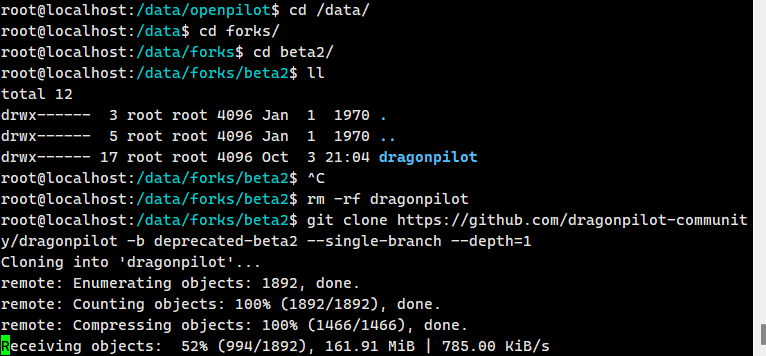
(切记)要进入forks/beta2下面,执行rm -rf openpilot(dragonpilot)
2025亲测,每次升级时候,按照这个步骤,只需rm -rf 后,重新下载就可以((切记)要进入forks/beta2下面),重启就是最新,不需要执行后面的语句:“touch /data/data/com.termux/files/continue.sh”
git clone https://github.com/dragonpilot-community/dragonpilot -b d2 --single-branch --depth=1 dragonpilot ( 注意后面要建一个名为dragonpilot的文件夹 ,因为你删除了)
git clone https://github.com/dragonpilot-community/dragonpilot -b deprecated-beta2 --single-branch --depth=1
git clone https://github.com/dragonpilot-community/dragonpilot -b r2 --single-branch --depth=1

 浙公网安备 33010602011771号