

基于百度图像识别SDK开发动植物识别系统
百度图像识别SDK参考资料:https://ai.baidu.com/ai-doc/IMAGERECOGNITION/Nk3bcxfzd
任务一:配置百度图像识别Java SDK(占10%)
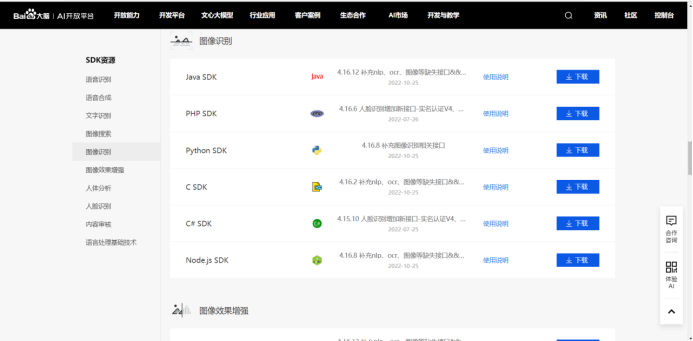
1.在官方网站下载Java SDK压缩工具包。
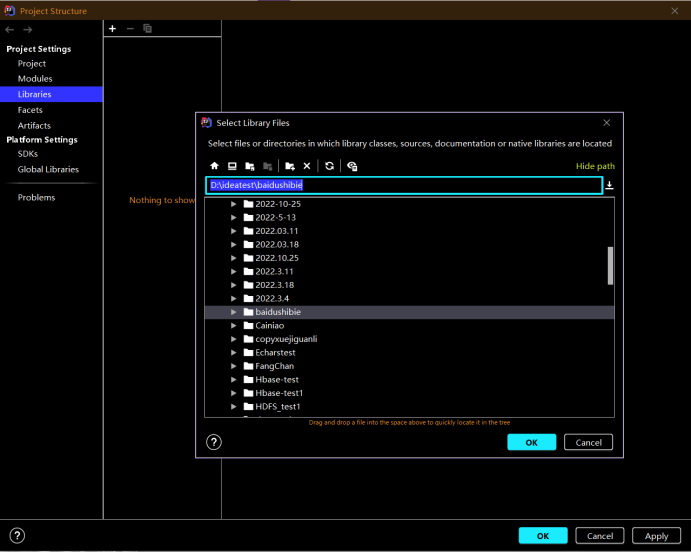
2.向新建的项目中导入解压后的jar包,不会导入的参考此文档:json的jar包导入到idea中 - zrswheart - 博客园 (cnblogs.com)
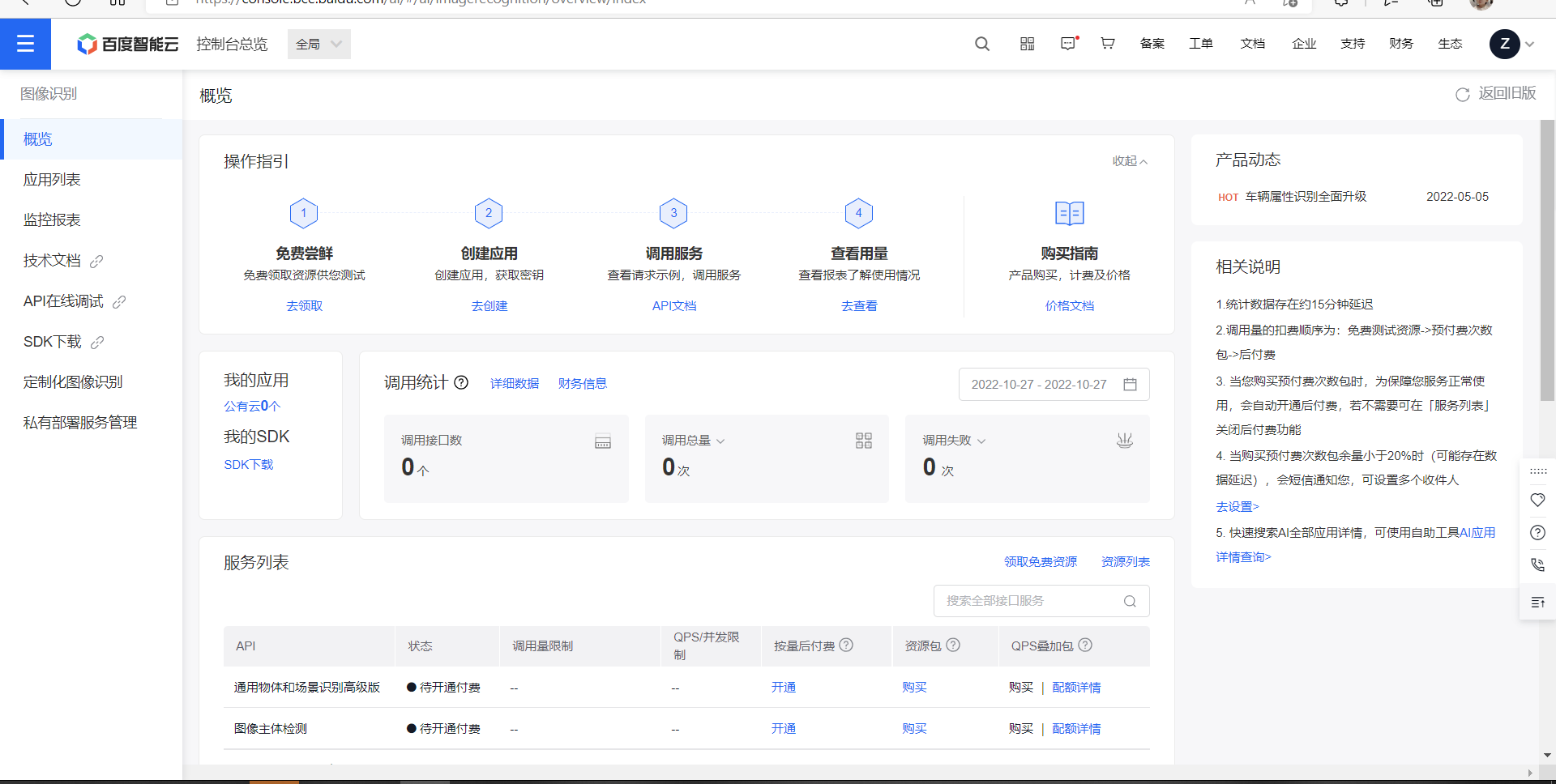
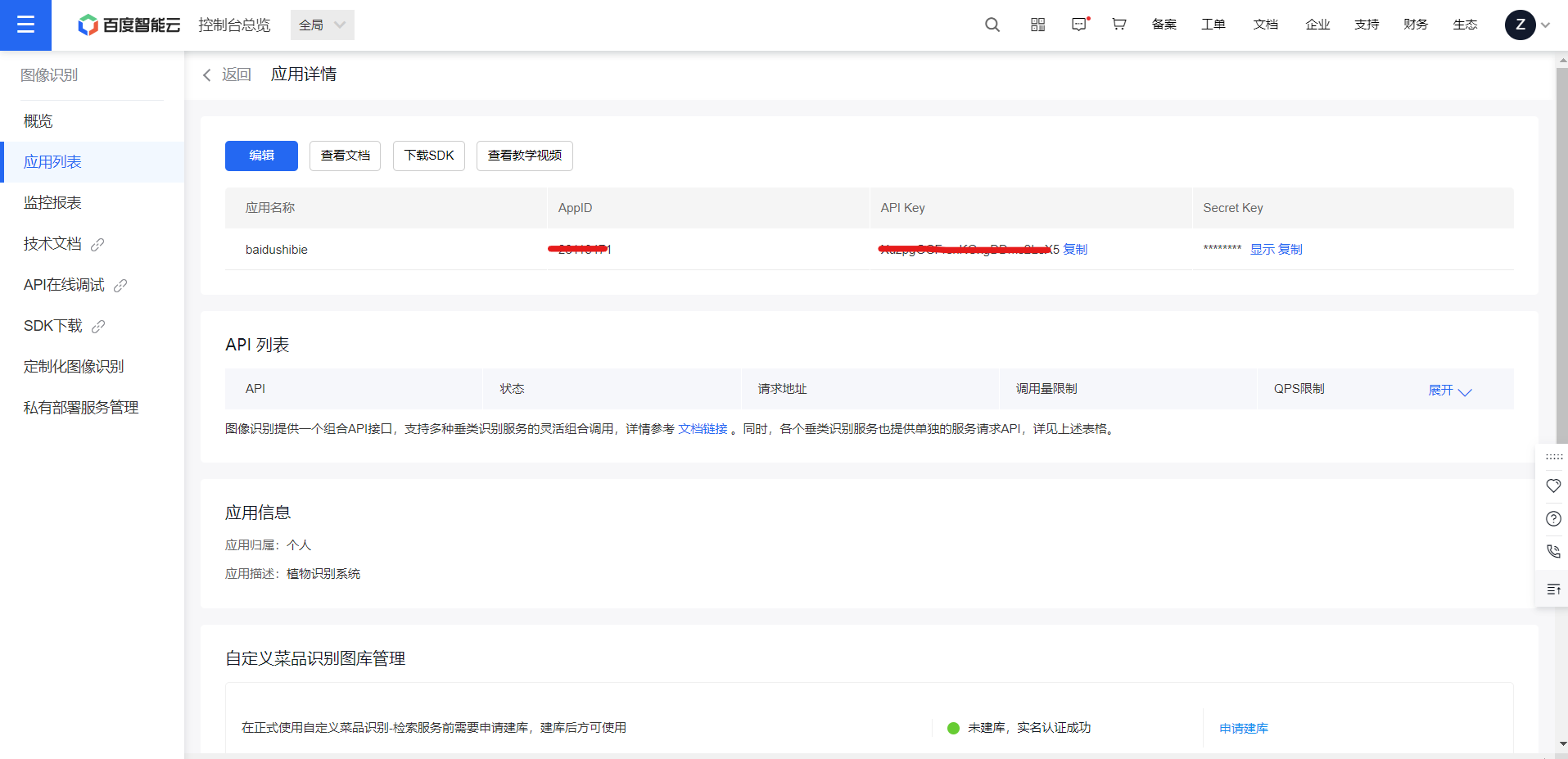
3.进入百度智能云-管理中心 (baidu.com)申请自己的App ID、Api Key、Secrect Key。
菜单->图像识别->创建应用
即可申请成功
测试代码(官网的)

public class Sample {
    //设置APPID/AK/SK
    public static final String APP_ID = "你的 App ID";
    public static final String API_KEY = "你的 Api Key";
    public static final String SECRET_KEY = "你的 Secret Key";

    public static void main(String[] args) {
        // 初始化一个AipImageClassify
        AipImageClassify client = new AipImageClassify(APP_ID, API_KEY, SECRET_KEY);

        // 可选:设置网络连接参数
        client.setConnectionTimeoutInMillis(2000);
        client.setSocketTimeoutInMillis(60000);

        // 可选:设置代理服务器地址, http和socket二选一,或者均不设置
        client.setHttpProxy("proxy_host", proxy_port);  // 设置http代理
        client.setSocketProxy("proxy_host", proxy_port);  // 设置socket代理

        // 调用接口
        String path = "test.jpg";
        JSONObject res = client.objectDetect(path, new HashMap<String, String>());
        System.out.println(res.toString(2));

    }
}
测试识别动物(植物)(官网的代码,自己拼接)
package com.company;


import java.util.HashMap;

import org.json.JSONArray;
import org.json.JSONObject;
import com.baidu.aip.imageclassify.AipImageClassify;
  public class Sample {
            //设置APPID/AK/SK
            public static final String APP_ID = "28  3471";
            public static final String API_KEY = "XuzpgGG eX5";
            public static final String SECRET_KEY = "UT   w9iw6CEfMElGttW7r";
            public static void main(String[] args) {
                // 初始化一个AipImageClassify
                AipImageClassify client = new AipImageClassify(APP_ID, API_KEY, SECRET_KEY);

                // 可选:设置网络连接参数
                client.setConnectionTimeoutInMillis(2000);
                client.setSocketTimeoutInMillis(60000);

                // 可选:设置代理服务器地址, http和socket二选一,或者均不设置
                // client.setHttpProxy("proxy_host", proxy_port);  // 设置http代理
                //client.setSocketProxy("proxy_host", proxy_port);  // 设置socket代理

                Sample.sample_animal(client);

            }


      public static void sample_animal(AipImageClassify client) {
          // 传入可选参数调用接口
          HashMap<String, String> options = new HashMap<String, String>();
          options.put("top_num", "3");
          options.put("baike_num", "5");


          // 参数为本地路径
          String image = "E:/test.jpg";
          JSONObject res = client.animalDetect(image, options);
          System.out.println(res.toString(2));


      }
  }
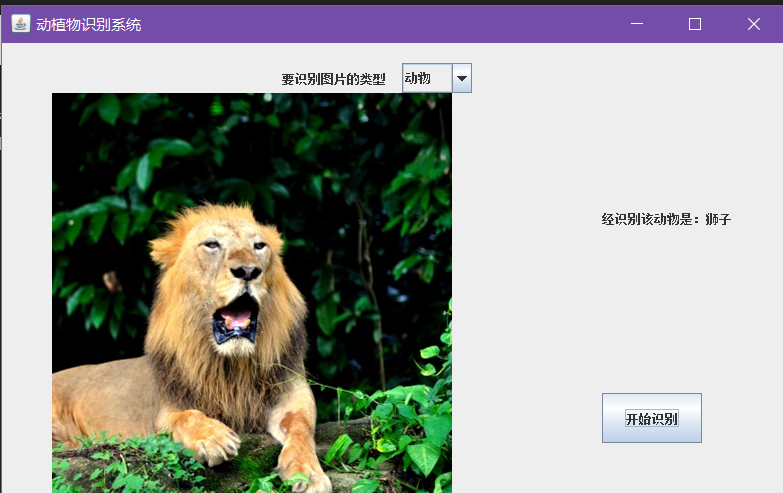
任务三:基于Java Swing+AWT完成动物识别应用界面,自行拍摄动物图片进行上传并查看结果(占30%)
任务四:基于Java Swing+AWT完成植物识别应用界面,自行拍摄植物图片进行上传并查看结果(占30%)
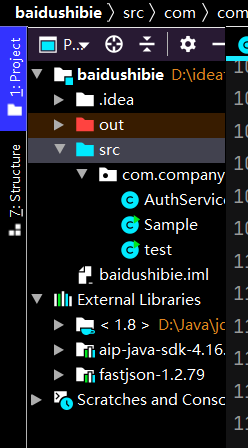
注意配置api-java-sdk .jar还有fastjson.jar
下面附上fastjson.jar的链接,过期了在评论区评论
fastjson-1.2.79.jar https://www.aliyundrive.com/s/vufv13T43VP 点击链接保存,或者复制本段内容,打开「阿里云盘」APP ,无需下载极速在线查看,视频原画倍速播放。
代码主要参考:基于百度图像识别SDK开发植物识别系统 - 宋浩伟 - 博客园 (cnblogs.com)感谢大佬
AuthService.java
package com.company;

import com.alibaba.fastjson.JSON;
import com.alibaba.fastjson.JSONArray;
import com.alibaba.fastjson.parser.DefaultJSONParser;
import com.baidu.aip.imageclassify.AipImageClassify;
import org.json.JSONObject;

import java.util.HashMap;

public class AuthService {

    public static String name;
    public static String description;
    public static final String APP_ID = "28  471";
    public static final String API_KEY = "XuzpgG g D LeX5";
    public static final String SECRET_KEY = "UTeB  Gt ctW7r";


    public static void animalSample(AipImageClassify client, String image) {
        // 传入可选参数调用接口
        HashMap<String, String> options = new HashMap<String, String>();
        options.put("top_num", "1");
        options.put("baike_num", "0");


        // 参数为本地路径
        JSONObject res = client.animalDetect(image, options);
        String result1 = res.get("result").toString();
        JSONArray arr = JSON.parseArray(result1);
        String jsonObject1 = arr.get(0).toString();
        com.alibaba.fastjson.JSONObject obj = JSON.parseObject(jsonObject1);
        String name = obj.getString("name");
        String description = obj.getString("description");
        AuthService.description = description;
        AuthService.name = name;
    }

    public static void plantSample(AipImageClassify client, String image) {
        // 传入可选参数调用接口
        HashMap<String, String> options = new HashMap<String, String>();
        options.put("baike_num", "0");


        // 参数为本地路径
        JSONObject res = client.plantDetect(image, options);
        String result1 = res.get("result").toString();
        com.alibaba.fastjson.JSONArray arr = JSON.parseArray(result1);
        String jsonObject1 = arr.get(0).toString();
        com.alibaba.fastjson.JSONObject obj = JSON.parseObject(jsonObject1);
        String name = obj.getString("name");
        String description = obj.getString("description");
        AuthService.name = name;
        AuthService.description = description;

    }
}
test.java
package com.company;

import com.baidu.aip.imageclassify.AipImageClassify;

import javax.swing.*;
import javax.swing.filechooser.FileFilter;
import java.awt.event.ActionEvent;
import java.awt.event.ActionListener;
import java.io.File;


public class test {
    public static String myFile;
    public static String[] type = new String[] {"动物","植物"};
    public static String temp;


    public static void main(String[] args) {
        setLookAndFeel();
        AuthService authService = new AuthService();

        //主窗体基本信息
        JFrame j = new JFrame("动植物识别系统");
        j.setSize(800, 500);
        j.setLocation(300, 100);
        j.setLayout(null);

        //下拉框选择查询类别
        JLabel tishi = new JLabel("要识别图片的类型");
        tishi.setBounds(280,20,200, 30);
        JComboBox<String> cb = new JComboBox<>(type);
        cb.setBounds(400, 20, 70, 30);

        //打开文件信息
        JFileChooser jfc = new JFileChooser();
        jfc.setFileFilter(new FileFilter() {

            @Override
            public String getDescription() {
                // TODO Auto-generated method stub
                return null;
            }

            @Override
            public boolean accept(File f) {
                // TODO Auto-generated method stub
                return true;
            }
        });

        //图片容器
        JLabel l = new JLabel();

        //显示文字组件
        JLabel jieguo = new JLabel("等待选择图片");

        jieguo.setBounds(600, 150, 200, 50);

        //获取图片按钮
        JButton jb1 = new JButton("上传图片");
        jb1.setBounds(200, 350, 100, 50);
        jb1.addActionListener(new ActionListener() {

            @Override
            public void actionPerformed(ActionEvent e) {
                // TODO Auto-generated method stub
                int returnVal =  jfc.showOpenDialog(j);
                File file = jfc.getSelectedFile();
                if (returnVal == JFileChooser.APPROVE_OPTION) {
                    myFile = file.getAbsolutePath();
                    myFile.replaceAll("\\\\", "/");
                    ImageIcon i = new ImageIcon(myFile);
                    l.setIcon(i);
                    l.setBounds(50,50,i.getIconWidth(),i.getIconHeight());
                    jb1.setBounds(i.getIconWidth()/2, i.getIconHeight()+100, 100, 50);
                }
                jieguo.setText("等待识别");
            }
        });

        //上传百度接口验证按钮
        JButton jb2 = new JButton("开始识别");
        jb2.setBounds(600, 350, 100, 50);
        jb2.addActionListener(new ActionListener() {

            @Override
            public void actionPerformed(ActionEvent e) {
                // TODO Auto-generated method stub
                AipImageClassify client = new AipImageClassify(AuthService.APP_ID, AuthService.API_KEY, AuthService.SECRET_KEY);
                temp = cb.getSelectedItem().toString();
                if(temp.equals("动物")) {
                    AuthService.animalSample(client, myFile);
                } else {
                    AuthService.plantSample(client, myFile);
                }
                jieguo.setText("经识别该"+temp+"是:"+AuthService.name);

            }
        });

        j.add(tishi);
        j.add(cb);
        j.add(jieguo);

        j.add(l);
        j.add(jb1);
        j.add(jb2);
        j.setDefaultCloseOperation(JFrame.EXIT_ON_CLOSE);
        j.setVisible(true);
    }

    private static void setLookAndFeel() {
        try {
            //javax.swing.UIManager.setLookAndFeel("com.birosoft.liquid.LiquidLookAndFeel");
            //javax.swing.UIManager.setLookAndFeel("com.jtattoo.plaf.smart.SmartLookAndFeel");
//       javax.swing.UIManager.setLookAndFeel("com.jtattoo.plaf.mcwin.McWinLookAndFeel");
//        javax.swing.UIManager.setLookAndFeel("com.jtattoo.plaf.luna.LunaLookAndFeel");
//          javax.swing.UIManager.setLookAndFeel("com.jtattoo.plaf.aluminium.AluminiumLookAndFeel");
//          javax.swing.UIManager.setLookAndFeel("com.jtattoo.plaf.bernstein.BernsteinLookAndFeel");
//          javax.swing.UIManager.setLookAndFeel("com.jtattoo.plaf.hifi.HiFiLookAndFeel");
//          javax.swing.UIManager.setLookAndFeel("com.jtattoo.plaf.mint.MintLookAndFeel");
//          javax.swing.UIManager.setLookAndFeel("com.jtattoo.plaf.aero.AeroLookAndFeel");
//          javax.swing.UIManager.setLookAndFeel("com.jtattoo.plaf.fast.FastLookAndFeel");
            javax.swing.UIManager.setLookAndFeel("com.jtattoo.plaf.acryl.AcrylLookAndFeel");
//          javax.swing.UIManager.setLookAndFeel("com.jtattoo.plaf.noire.NoireLookAndFeel");
        } catch (Exception e) {
            e.printStackTrace();
            // handle exception
        }
    }
}


 浙公网安备 33010602011771号