

hdfs测试(文件上传,内容读取,文件删除)
工具:idea2021
配置:hadoop2.6.0
项目:Maven项目
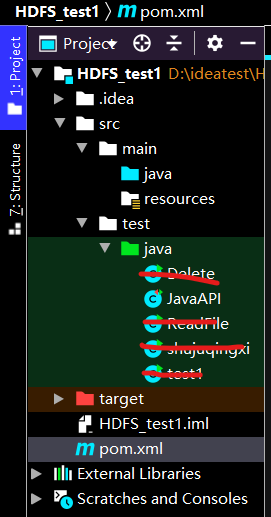
首先编辑pom.xml(Maven项目的核心文件)文件,添加如下内容,导入依赖(所需jar包)(注意hadoop版本号)

<?xml version="1.0" encoding="UTF-8"?>
<project xmlns="http://maven.apache.org/POM/4.0.0"
         xmlns:xsi="http://www.w3.org/2001/XMLSchema-instance"
         xsi:schemaLocation="http://maven.apache.org/POM/4.0.0 http://maven.apache.org/xsd/maven-4.0.0.xsd">
    <modelVersion>4.0.0</modelVersion>

    <groupId>org.example</groupId>
    <artifactId>HDFS_test1</artifactId>
    <version>1.0-SNAPSHOT</version>
    <build>
        <plugins>
            <plugin>
                <groupId>org.apache.maven.plugins</groupId>
                <artifactId>maven-compiler-plugin</artifactId>
                <configuration>
                    <source>7</source>
                    <target>7</target>
                </configuration>
            </plugin>
        </plugins>
    </build>
    <dependencies>
        <!-- Hadoop所需依赖包 -->
        <dependency>
            <groupId>org.apache.hadoop</groupId>
            <artifactId>hadoop-common</artifactId>
            <version>2.6.0</version>
        </dependency>
        <dependency>
            <groupId>org.apache.hadoop</groupId>
            <artifactId>hadoop-hdfs</artifactId>
            <version>2.6.0</version>
        </dependency>
        <dependency>
            <groupId>org.apache.hadoop</groupId>
            <artifactId>hadoop-client</artifactId>
            <version>2.6.0</version>
        </dependency>

        <!-- junit测试依赖 -->
        <dependency>
            <groupId>junit</groupId>
            <artifactId>junit</artifactId>
            <version>4.12</version>
        </dependency>
        <dependency>
            <groupId>junit</groupId>
            <artifactId>junit</artifactId>
            <version>RELEASE</version>
            <scope>test</scope>
        </dependency>
        <dependency>
            <groupId>junit</groupId>
            <artifactId>junit</artifactId>
            <version>RELEASE</version>
            <scope>test</scope>
        </dependency>
    </dependencies>

</project>

这边可能会爆红,等它自动更新配置就好,或者手动刷新下载
JavaAPI.java
import org.apache.hadoop.conf.Configuration;
import org.apache.hadoop.fs.FSDataInputStream;
import org.apache.hadoop.fs.FSDataOutputStream;
import org.apache.hadoop.fs.FileSystem;
import org.apache.hadoop.fs.Path;
import org.junit.After;
import org.junit.Before;
import org.junit.Test;
import sun.plugin.com.BeanCustomizer;

import java.io.BufferedReader;
import java.io.IOException;
import java.io.InputStreamReader;
import java.net.URI;
import java.net.URISyntaxException;
import java.util.Scanner;

public class JavaAPI {
    // 可操作HDFS文件系统的对象
    FileSystem hdfs = null;

    private static FileSystem fs;

    // 测试方法执行前执行,用于初始化操作,避免频繁初始化
    @Before
    public void init() throws IOException {
        // 构造一个配置参数对象,设置一个参数:要访问的HDFS的URI
        Configuration conf = new Configuration();
        // 指定使用HDFS访问
        conf.set("fs.defaultFS","hdfs://hadoop102:9002");
        // 进行客户端身份的设置(root为虚拟机的用户名,hadoop集群节点的其中一个都可以)
        System.setProperty("HADOOP_USER_NAME","root");
        // 通过FileSystem的静态get()方法获取HDFS文件系统客户端对象
        try {
            hdfs = FileSystem.get(conf);
        } catch (IOException e) {
            e.printStackTrace();
        }
    }

    // 测试方法执行后执行,用于处理结尾的操作,关闭对象
    @After
    public void close() throws IOException {
        // 关闭文件操作对象
        hdfs.close();
    }

    @Test

    public void testUploadFileToHDFS() throws IOException {
        // 待上传的文件路径(windows)
        Path src = new Path("E:/result.csv");
        // 上传之后存放的路径(HDFS)
        Path dst = new Path("/result.csv");
        // 上传
        hdfs.copyFromLocalFile(src,dst);
        System.out.println("上传成功");
    }

    @Test
    public void testMkdirFile() throws IOException {
        // 待创建目录路径
        Path src = new Path("/ZR");
        // 创建目录
        hdfs.mkdirs(src);
        System.out.println("创建成功");
    }

    @Test

    public  void write() throws IOException {

        Configuration conf = new Configuration();

        conf.set("fs.defaultFS", "hdfs://192.168.80.134:9004");

        FileSystem fs = FileSystem.get(conf);

        byte[] buff = "信2005-1 ******* rongbao HDFS课堂测试".getBytes(); // 要写入的内容

        String filename = "hdfs://192.168.80.134:9004/ZR/hdfstest2.txt"; //要写入的文件名

        FSDataOutputStream os = fs.create(new Path(filename));

        os.write(buff,0,buff.length);

        System.out.println("写入文件:"+new Path(filename).getName());

        os.close();

        fs.close();


    }


@Test
public void readFileFromHdfs() {
    try {

        Path f = new Path("/ZR/hdfstest2.txt");
        FileSystem fs = FileSystem.get(new URI("hdfs://hadoop104:9004"), new Configuration());

        FSDataInputStream dis = fs.open(f);

        InputStreamReader isr = new InputStreamReader(dis, "utf-8");
        BufferedReader br = new BufferedReader(isr);
        String str = "";
        while ((str = br.readLine()) !=null) {
            System.out.println(str);
        }
        br.close();
        isr.close();
        dis.close();
    } catch (Exception e) {
        e.printStackTrace();
    }
}


@Test
public void deleteFile() {


    FileSystem fs = null;
    try {
        fs = FileSystem.get(new URI("hdfs://hadoop104:9004"), new Configuration());
    } catch (IOException e) {
        e.printStackTrace();
    } catch (URISyntaxException e) {
        e.printStackTrace();
    }


    try{
                fs.delete(new Path("/ZR/hdfstest1.txt"),true);
                fs.close();
            } catch (IOException e) {
                e.printStackTrace();
            }
        }

    }

 浙公网安备 33010602011771号