<!DOCTYPE html>
<html>
<head>
<meta charset="utf-8">
<title>订单页面</title>
<style type="text/css">
#shou{
height: 200px;
width: 490px;
margin-left: 100px;
text-align: left;
margin-top: 40px;
}
#pei{
margin-left: 100px;
text-align: left;
margin-top: 40px;
}
#zhi{
margin-left: 100px;
text-align: left;
margin-top: 40px;
}
#que{
margin-left: 1200px;
}
body{
background:url("img/z0.png") center/cover;
background-repeat: no-repeat;
background-size: 100% 100%;
background-attachment: fixed;
}
span{
font-size: 1px;
font-family: "楷体";
}
#a1{
width: 800px;
}
#a2{
width: 300px;
}
#c3{
line-height: 30px;
}
.success {
background-color: rgba(199, 199, 199, 0.94);
}
#container1 {
box-shadow: 5px 5px 5px 5px #b6b6b6;
border-radius: 20px;
}
#container2 {
box-shadow: 5px 5px 5px 5px #b6b6b6;
border-radius: 20px;
}
/*整个tab层居中,宽度为600px*/
#tabDiv {
width: 600px;
margin: 1em auto;
padding-bottom: 10px;
border-right: #ffffff 1px solid;
border-top: #ffffff 1px solid;
border-left: #ffffff 1px solid;
border-bottom: #ffffff 1px solid;
background-color:#fffef9 ;
}
/*tab头的样式*/
#tabsHead {
height: 226px;
background-color:#9bc1d2 ;
}
/*已选tab头(超链接)的样式*/
.curtab {
padding-top: 0px;
padding-right: 10px;
padding-bottom: 0px;
padding-left: 10px;
border-right: #294224 1px solid;
font-weight: bold;
float: left;
cursor: pointer;
}
/*未选tab头(超链接)的样式*/
.tabs {
border-right: #ffffff 1px solid;
padding-top: 0px;
padding-right: 10px;
padding-bottom: 0px;
padding-left: 10px;
font-weight: normal;
float: left;
cursor: pointer;
}
a {
color: #00000;
text-decoration:none;
font-size:15px;/*设置字体大小*/
font-weight:3px;/*调整字体粗细*/
}
a:hover {
color: #f5eae2;
font-size: 15px;
}
button { /* 按钮美化 */
width: 200px; /* 宽度 */
height: 40px; /* 高度 */
border-width: 0px; /* 边框宽度 */
border-radius: 5px; /* 边框半径 */
background: #ffc91c; /* 背景颜色 */
cursor: pointer; /* 鼠标移入按钮范围时出现手势 */
outline: none; /* 不显示轮廓线 */
font-family: "幼圆"; /* 设置字体 */
color: white; /* 字体颜色 */
font-size: 17px; /* 字体大小 */
}
button:hover { /* 鼠标移入按钮范围时改变颜色 */
background: #ffc91c;
}
</style>
</head>
<div id="tabContent2" class="main" style="width:100%;height:900px;position:relative;background-color: #f5eae2;">
<form class="layui-form"action="table1.jsp" method="post" target="hideIframe1" >
</form>
<p> </p>
<p> </p>
<div class="container3"style="height:750px;border-radius:30px;border:10px solid #ffffff;background-color:#ffffff;width:80% ;margin:auto;">
<body id="d1">
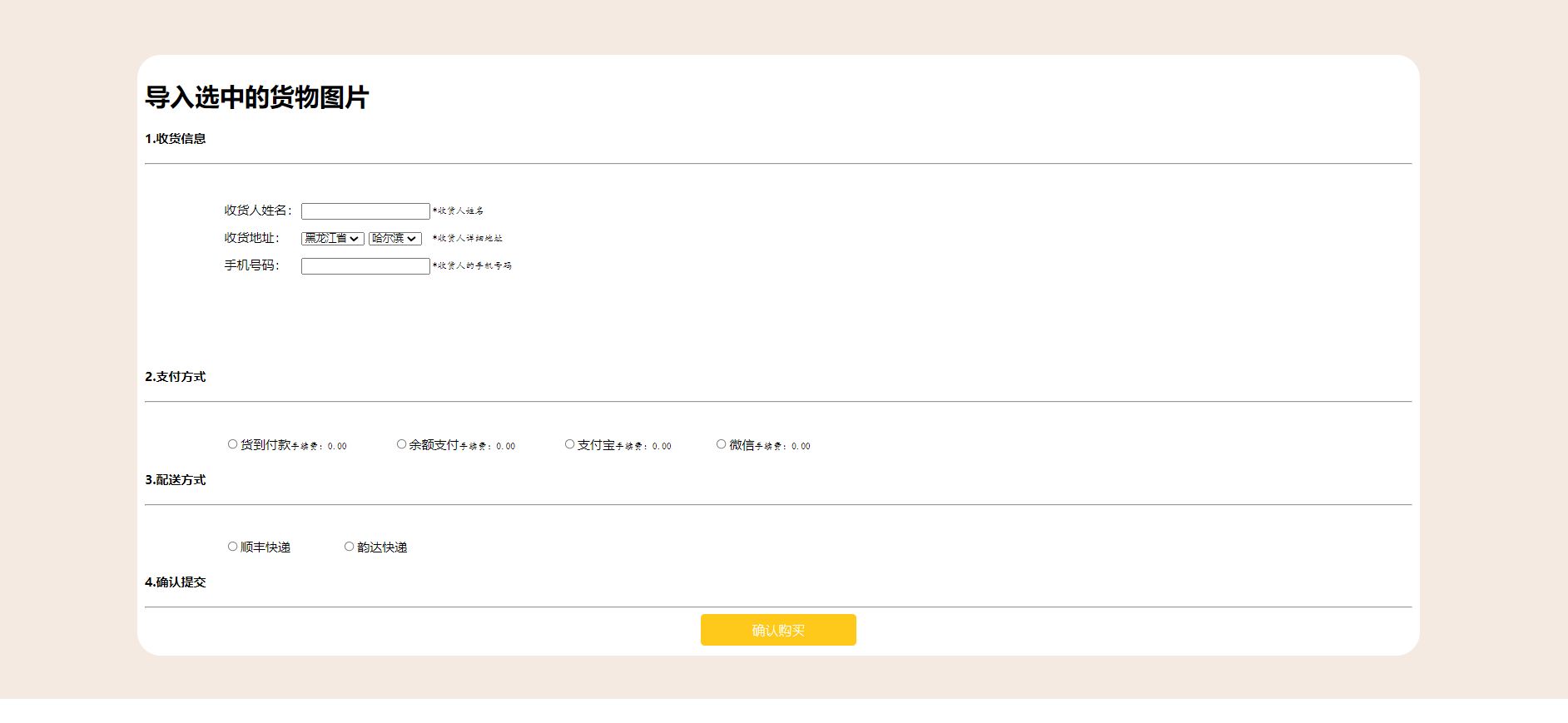
<h1>导入选中的货物图片</h1>
<h4>1.收货信息</h4>
<hr >
<div id="shou">
<table id="c3">
<tr>
<td>收货人姓名:</td>
<td><input type="text" /></td>
<td><span>*收货人姓名</span></td>
</tr>
<tr>
<td>收货地址:</td>
<td><select id="province" onchange="myChange()"></select>
<select id="cities"></select></td>
<td><span>*收货人详细地址</span></td>
</tr>
<tr>
<td>手机号码:</td>
<td><input type="text" /></td>
<td><span>*收货人的手机号码</span></td>
</tr>
</table>
</div>
<h4>2.支付方式</h4>
<hr >
<div id="zhi">
<table id="a1">
<tr>
<td><input type="radio" name="s1" />货到付款<span>手续费:0.00</span></td>
<td><input type="radio" name="s1" />余额支付<span>手续费:0.00</span></td>
<td><input type="radio" name="s1" />支付宝<span>手续费:0.00</span></td>
<td><input type="radio" name="s1" />微信<span>手续费:0.00</span></td>
</tr>
</table>
</div>
<h4>3.配送方式</h4>
<hr >
<div id="pei">
<table id="a2">
<tr>
<td><input type="radio" name="s2" />顺丰快递</td>
<td><input type="radio" name="s2" />韵达快递</td>
</tr>
</table>
</div>
<h4>4.确认提交</h4>
<hr >
<div >
<center>
<button type="button">确认购买</button>
</center>
</div>
</div>
</div>
</body>
<script type="text/javascript">
//数组怎么写?
//类型不限制
//长度不限制
//数组可以是字符串
var provinces=[]
//城市
provinces["黑龙江省"]=["哈尔滨","鸡西","大庆"]
provinces["湖南省"]=["长沙","怀化","永州"]
provinces["广西省"]=["南宁","柳州"]
//省份怎么来
// for of 相当于foreach 遍历元素
// for in 遍历下标
for(let i in provinces){
//往省份的下拉框中添加选项
//<option value="i">i</option>
province.appendChild(new Option(i,i))
}
//城市里面放谁?
function setCity(name) {
for(let i of provinces[name]){
cities.appendChild(new Option(i,i))
}
}
setCity(province.value)
function myChange() {
//清空原来的选项
cities.innerHTML=""
//输入框 和 下拉框
setCity(province.value)
}
var b=1;
//箭头函数
setInterval(()=>{
//操作元素(html)的css
d1.style.backgroundImage='url("img/z'+(b%5)+'.png")'
b++;
},1000)
</script>
</html>


 浙公网安备 33010602011771号