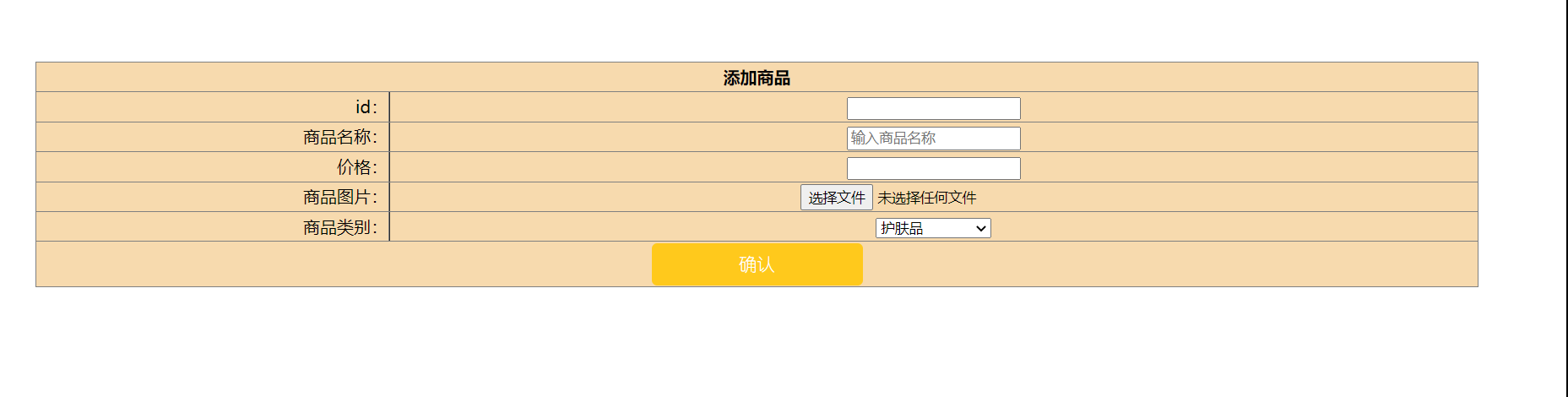
<!DOCTYPE html>
<html lang="en">
<head>
    <meta charset="UTF-8">
    <title>商品添加</title>
      <style>
             table {

width: 90%;

background: #f7daae;

margin: 10px auto;

border-collapse: collapse;

/*border-collapse:collapse合并内外边距

(去除表格单元格默认的2个像素内外边距*/

}

th,td {

height: 25px;

line-height: 25px;

text-align: center;6

border: 1px solid #ccc;

}
button { /* 按钮美化 */
      width: 200px; /* 宽度 */
      height: 40px; /* 高度 */
      border-width: 0px; /* 边框宽度 */
      border-radius: 5px; /* 边框半径 */
      background: #ffc91c; /* 背景颜色 */
      cursor: pointer; /* 鼠标移入按钮范围时出现手势 */
      outline: none; /* 不显示轮廓线 */
      font-family: "幼圆"; /* 设置字体 */
      color: white; /* 字体颜色 */
      font-size: 17px; /* 字体大小 */
    }
    button:hover { /* 鼠标移入按钮范围时改变颜色 */
      background: #ffc91c;
    }
            </style>
</head>
<body>

        <table align="center"  border="1" cellspacing="0" style="margin-top:100px;width=95%">
        <tr>
            <th colspan="5" style="background:#f7daae;">添加商品</th>
        </tr>
        <tr>
            <td style="text-align:right" onchange="">
                id:
            </td>
            <td>
                <input type="text" name="id" id="id" >
            </td>
        </tr>
        <tr>
            <td style="text-align:right" onchange="">
                商品名称:
            </td>
            <td>
                <input type="text" name="name" id="name" placeholder="输入商品名称">
            </td>
        </tr>
         <tr>
            <td style="text-align:right" onchange="">
                价格:
            </td>
            <td>
                <input type="text" name="price" id="price" >
            </td>
        </tr>
        <tr>
            <td style="text-align:right">
                商品图片:
            </td>
            <td>
            <input class="style_file_content" accept="." type="file" id="upload_file_id"/>
            </td>
        </tr>

        <tr>
            <td style="text-align:right">
                商品类别:
            </td>
            <td>
<!--                这里写商品的类别-->
                <select name="leibie" id="leibie" style="width:110px">
                    <option vulu1="1">护肤品</option>
                    <option vulu1="2">口红</option>
                    <option vulu1="3">粉底液</option>
                    <option vulu1="4">化妆刷</option>
                    <option vulu1="5">散粉</option>

                </select>
            </td>
        </tr>

        <tr>
            <td colspan="2" style="text-align:center">   <button type="button">确认</button></td>
        </tr>

    </table>

</form>


</body>
</html>



 浙公网安备 33010602011771号