第八周
1、创建私有CA并进行证书申请。
1.1 创建CA相关目录和文件[root@centos8 ~]#mkdir -pv /etc/pki/CA/{certs,crl,newcerts,private}mkdir: created directory '/etc/pki/CA'
mkdir: created directory '/etc/pki/CA/certs'
mkdir: created directory '/etc/pki/CA/crl'
mkdir: created directory '/etc/pki/CA/newcerts'
mkdir: created directory '/etc/pki/CA/private'
[root@centos8 ~]#tree /etc/pki/CA/
/etc/pki/CA/
├── certs
├── crl
├── newcerts
└── private
4 directories, 0 files
[root@centos8 ~]#touch /etc/pki/CA/index.txt
[root@centos8 ~]#echo 01 > /etc/pki/CA/serial
1.2 创建CA的私钥
[root@centos8 ~]#cd /etc/pki/CA/
[root@centos8 CA]#(umask 066; openssl genrsa -out private/cakey.pem 2048)
Generating RSA private key, 2048 bit long modulus (2 primes)
..........................................................................+++++
.............................+++++
e is 65537 (0x010001)
[root@centos8 CA]#tree
.
├── certs
├── crl
├── newcerts
└── private
└── cakey.pem
4 directories, 1 file
1.3给CA颁发自签名证书
[root@centos8 ~]#openssl req -new -x509 -key /etc/pki/CA/private/cakey.pem -days 3650 -out /etc/pki/CA/cacert.pem
You are about to be asked to enter information that will be incorporatedinto your certificate request.
What you are about to enter is what is called a Distinguished Name or a DN.
There are quite a few fields but you can leave some blank
For some fields there will be a default value,
If you enter '.', the field will be left blank.
-----
Country Name (2 letter code) [XX]:CN
State or Province Name (full name) []:beijing
Locality Name (eg, city) [Default City]:beijing
Organization Name (eg, company) [Default Company Ltd]:magedu
Organizational Unit Name (eg, section) []:devops
Common Name (eg, your name or your server's hostname) []:ca.magedu.org
Email Address []:admin@magedu.org
1.4 用户生成私钥和证书申请
[root@centos8 ~]#mkdir /data/app1
[root@centos8 ~]#(umask 066; openssl genrsa -out /data/app1/app1.key 2048)
Generating RSA private key, 2048 bit long modulus (2 primes)
....................+++++
....................................+++++
e is 65537 (0x010001)
[root@centos8 ~]#openssl req -new -key /data/app1/app1.key -out
/data/app1/app1.csr
You are about to be asked to enter information that will be incorporated
into your certificate request.
What you are about to enter is what is called a Distinguished Name or a DN.
There are quite a few fields but you can leave some blank
For some fields there will be a default value,
If you enter '.', the field will be left blank.
-----
Country Name (2 letter code) [XX]:CN
State or Province Name (full name) []:beijing
Locality Name (eg, city) [Default City]:bj
Organization Name (eg, company) [Default Company Ltd]:magedu
Organizational Unit Name (eg, section) []:it
Common Name (eg, your name or your server's hostname) []:app1.magedu.org
Email Address []:root@magedu.org
Please enter the following 'extra' attributes
to be sent with your certificate request
A challenge password []:
An optional company name []:
1.5 CA颁发证书
[root@centos8 ~]#openssl ca -in /data/app1/app1.csr -out
/etc/pki/CA/certs/app1.crt -days 1000
2、总结ssh常用参数、用法
telnet协议是使用明文的方式进行传输,这就非常地不安全,而ssh协议是密文传输的,实现了加密通信。在CentOS系统上默认安装了openssh(ssh协议的开源实现)。
ssh执行指纹核对(fingerprint verification)来确保用户连接到正确的远程主机。在第一次连接到服务器上时,ssh默认会存储指纹信息,在之后的连接过程中核对该指纹。
ssh命令是ssh客户端,允许实现对远程系统经验证地加密安全访问。
ssh用法: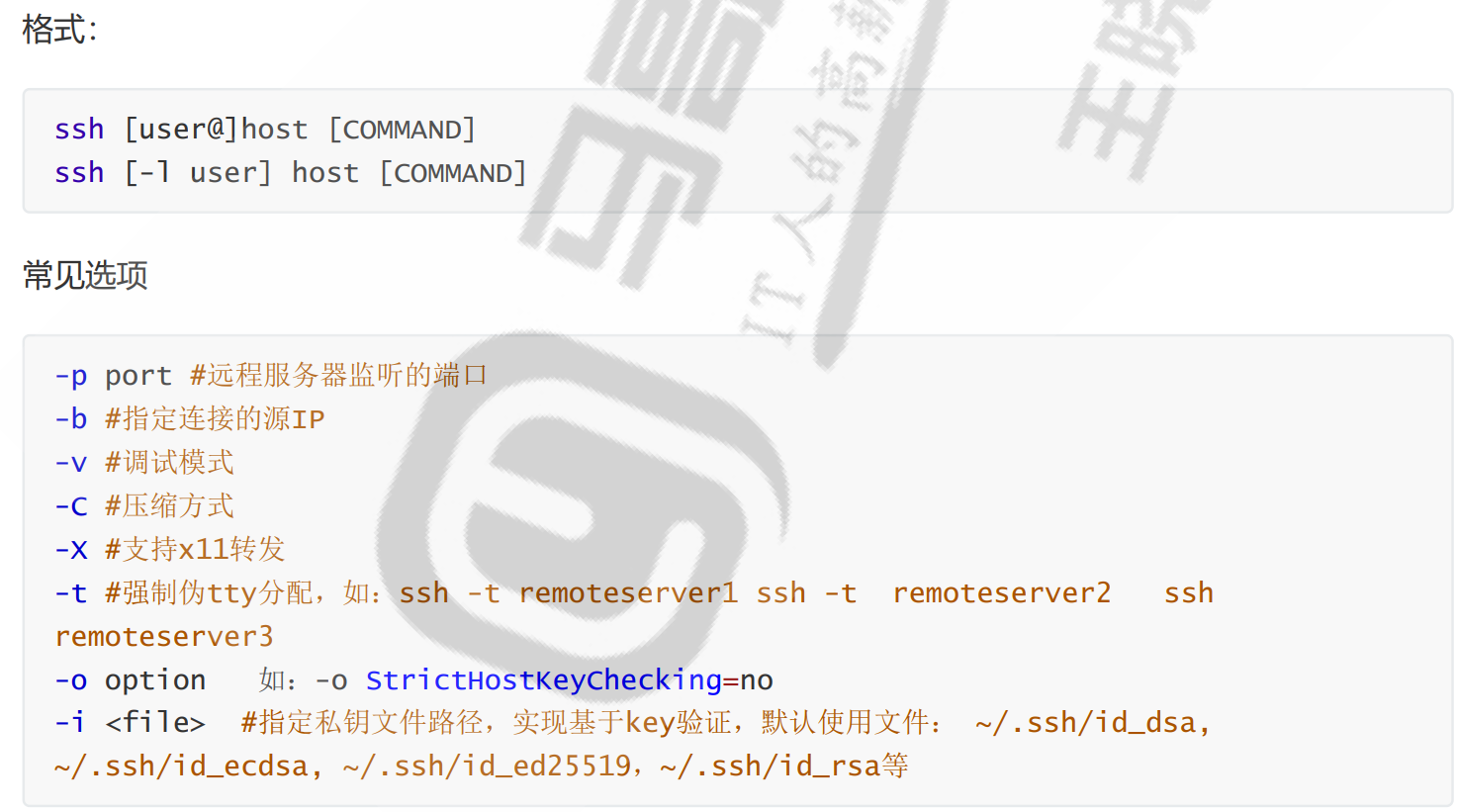
3、总结sshd服务常用参数。
sshd:openssh服务器守护进程。
服务器端:sshd
服务器端的配置文件: /etc/ssh/sshd_config
常用参数:
Port #生产建议修改
ListenAddress ip
LoginGraceTime 2m
PermitRootLogin yes #默认ubuntu不允许root远程ssh登录
StrictModes yes #检查.ssh/文件的所有者,权限等
MaxAuthTries 6 #pecifies the maximum number of authentication
attempts permitted per connection. Once the number of failures reaches half this
value, additional failures are logged. The default is 6.
MaxSessions 10 #同一个连接最大会话
PubkeyAuthentication yes #基于key验证
PermitEmptyPasswords no #空密码连接
PasswordAuthentication yes #基于用户名和密码连接
GatewayPorts no
ClientAliveInterval 10 #单位:秒
ClientAliveCountMax 3 #默认3
UseDNS yes #提高速度可改为no
GSSAPIAuthentication yes #提高速度可改为no
MaxStartups #未认证连接最大值,默认值10
Banner /path/file
#以下可以限制可登录用户的办法:
AllowUsers user1 user2 user3
DenyUsers user1 user2 user3
AllowGroups g1 g2
DenyGroups g1 g2
ssh服务的最佳实践:
(1)建议使用非默认端口
(2)禁止使用protocol version 1
(3)限制可登录用户
(4)设定空闲会话超时时长
(5)利用防火墙设置ssh访问策略
(6)仅监听特定的IP地址
(7)基于口令认证时,使用强密码策略,比如:tr -dc A-Za-z0-9_ < /dev/urandom | head -c 12|
xargs
(8)使用基于密钥的认证
(9)禁止使用空密码
(10)禁止root用户直接登录
(11)限制ssh的访问频度和并发在线数
(12)经常分析日志
4、搭建dhcp服务,实现ip地址申请分发
yum -y install dhcp(centos7)/dhcp-server(centos8)
修改/etc/dhcp/dhcpd.conf配置文件
option domain-name "example.org";
option domain-name-servers 180.76.76.76, 223.6.6.6;
default-lease-time 86400;
max-lease-time 106400;
subnet 10.0.0.0 netmask 255.255.255.0 {
range 10.0.0.9 10.0.0.100;
option routers 10.0.0.2;
next-server 10.0.0.8;
filename "pxelinux.0";
}
systemctl enable --now dhcpd #启动dhcp
ss -ntul 查看udp67端口
在 /var/lib/dhcpd/dhcpd.leases中查看分配的地址

 浙公网安备 33010602011771号