
今天完成数据库的实验五,
实验五 数据库编程
一、实验目的
熟悉并掌握嵌入式 SQL 编程、 使用数据库访问接口技术实现对数据库的访问。
二、实验要求
熟悉使用嵌入式SQL编程访问数据库,熟悉VB中开发数据库应用程序的过程。
三、实验步骤
2、 设计一个小型的数据库应用程序
l 可利用现有的数据库,也可重新设计数据库。
l 要求实现数据的增加、删除、 修改、查询的功能。
l 在报告中描述清楚使用的数据库、数据表及实现的功能(要求截图,并附
代码)。
注:如使用其它编程工具,请在实验报告中说明。
① 、使用pycharm,基于python语言以及mysql数据库实现的对于错题信息的增删改查。
② 我重新设计了数据库mistakedb用于存储错题信息表,设计了数据库表mistakes来存储错题。

:create database if not exists mistakedb;
use mistakedb;
CREATE TABLE mistakes (
                          id INT AUTO_INCREMENT PRIMARY KEY,
                          question VARCHAR(255) NOT NULL,
                          error_info VARCHAR(255),
                          answer_analysis VARCHAR(255),
                          thoughts VARCHAR(255),
                          source VARCHAR(255),
                          reason VARCHAR(255),
                          difficulty VARCHAR(255),
                          question_type VARCHAR(255),
                          knowledge_point VARCHAR(255)
);
① 、实现的功能为对错题信息的增删改查
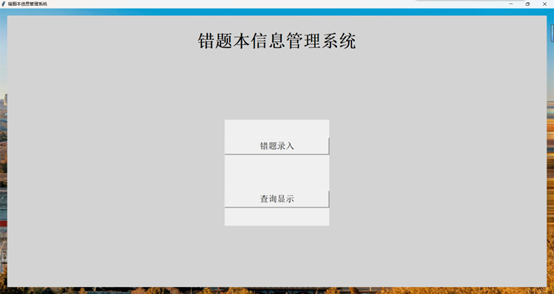
Ⅰ、主页面
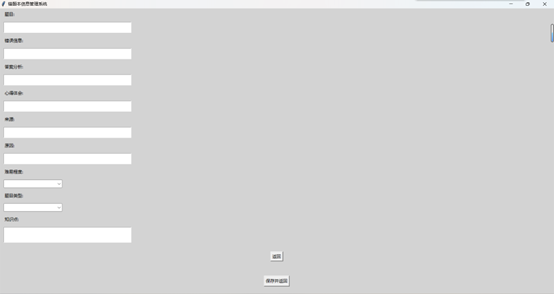
Ⅱ、错题录入
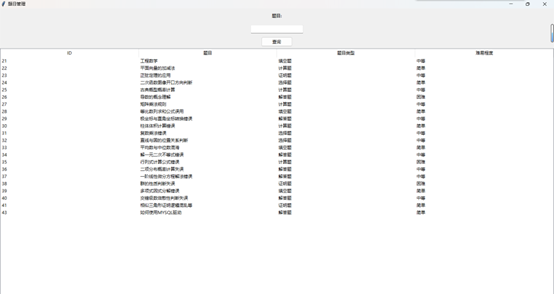
Ⅲ、错题查询(可根据题目搜索)
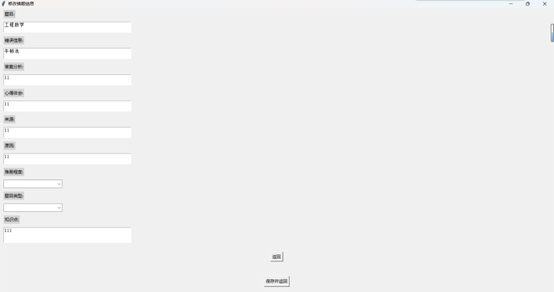
Ⅳ、错题修改
Ⅴ、错题删除(选中行后右键选择删除)
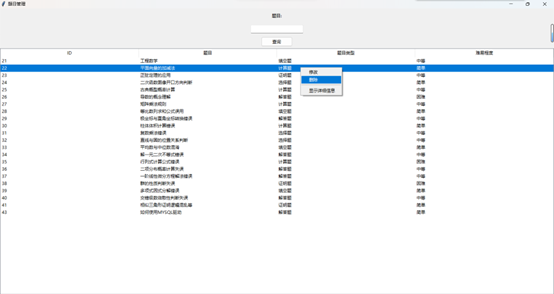
Ⅵ、显示详细信息
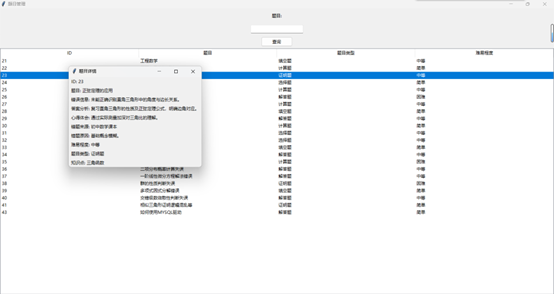
Ⅶ、代码
main.py
import tkinter as tk
from tkinter import ttk, messagebox
from PIL import Image, ImageTk
import mysql.connector
import select


# 数据库连接函数
def create_connection():
    return mysql.connector.connect(
        host='localhost',
        user='root',  # 使用你的数据库用户名
        password='123456789',  # 使用你的数据库密码
        database='MistakeDB'
    )


# 插入数据到数据库的函数
def insert_mistake(conn, question, error_info, answer_analysis, thoughts, source, reason, difficulty, question_type,
                   knowledge_point):
    cursor = conn.cursor()
    sql = (
        "INSERT INTO mistakes (question, error_info, answer_analysis, thoughts, source, reason, difficulty, question_type, knowledge_point) "
        "VALUES (%s, %s, %s, %s, %s, %s, %s, %s, %s)")
    val = (question, error_info, answer_analysis, thoughts, source, reason, difficulty, question_type, knowledge_point)
    cursor.execute(sql, val)
    conn.commit()
    cursor.close()


# 主界面类
class MainInterface(tk.Tk):
    def __init__(self):
        super().__init__()
        self.title("错题本信息管理系统")
        self.state('zoomed')
        self.setup_background()
        self.create_widgets()

        # 初始化输入页面Frame,但不显示
        self.input_page_frame = None

    def setup_background(self):
        """设置背景图片"""
        self.background_image = Image.open("background.jpg")  # 确保图片存在并正确命名
        self.background_image = self.background_image.resize((self.winfo_screenwidth(), self.winfo_screenheight()),
                                                             resample=Image.Resampling.LANCZOS)
        self.background_tk = ImageTk.PhotoImage(self.background_image)
        background_label = tk.Label(self, image=self.background_tk)
        background_label.image = self.background_tk
        background_label.place(relwidth=1, relheight=1)

    def create_widgets(self):
        """创建主界面控件"""
        main_frame = tk.Frame(self, bg="lightgray")
        main_frame.pack(fill=tk.BOTH, expand=True, padx=20, pady=20)

        title_font = ("Helvetica", 36, "bold")
        title_label = tk.Label(main_frame, text="错题本信息管理系统", font=title_font, bg="lightgray", pady=20)
        title_label.pack(pady=20)

        buttons_frame = tk.Frame(main_frame)
        buttons_frame.pack(expand=True, pady=(0, 20))

        add_button = tk.Button(buttons_frame, text="错题录入", command=self.show_input_page, font=("Helvetica", 18),
                               width=20)
        add_button.pack(fill=tk.X, pady=50)

        query_button = tk.Button(buttons_frame, text="查询显示", command=self.open_query_page, font=("Helvetica", 18),
                                 width=20)
        query_button.pack(fill=tk.X, pady=50)

    def show_input_page(self):
        """显示错题录入页面"""
        if self.input_page_frame is None:
            self.input_page_frame = InputPage(self)
        self.input_page_frame.pack(fill=tk.BOTH, expand=True)
        self.hide_main_widgets()

    def hide_input_page(self):
        """隐藏错题录入页面"""
        if self.input_page_frame:
            self.input_page_frame.pack_forget()
            self.show_main_widgets()

    def hide_main_widgets(self):
        """隐藏主界面控件"""
        for widget in self.winfo_children():
            if widget != self.input_page_frame:
                widget.pack_forget()

    def show_main_widgets(self):
        """显示主界面控件"""
        main_frame = self.winfo_children()[1]  # Assuming main frame is the second child after background label
        main_frame.pack(fill=tk.BOTH, expand=True)

    def open_query_page(self):
        """打开查询显示页面的占位函数"""
        print("打开查询显示页面")
        # 这里可以添加打开查询显示页面的代码
        select.main()


# 错题录入页面类
# 错题录入页面类
class InputPage(tk.Frame):
    def __init__(self, master=None):
        super().__init__(master)
        self.master = master
        self.configure(bg="lightgray")
        self.create_input_widgets()

    def create_input_widgets(self):
        """创建录入页面控件"""
        padx_val = 10
        pady_val = 5

        # 题目输入框
        tk.Label(self, text="题目:", bg="lightgray").pack(anchor=tk.W, padx=padx_val, pady=pady_val)
        self.entry_question = tk.Text(self, width=50, height=2, wrap=tk.WORD)
        self.entry_question.pack(anchor=tk.W, padx=padx_val, pady=pady_val)

        # 错误信息输入框
        tk.Label(self, text="错误信息:", bg="lightgray").pack(anchor=tk.W, padx=padx_val, pady=pady_val)
        self.entry_error_info = tk.Text(self, width=50, height=2, wrap=tk.WORD)
        self.entry_error_info.pack(anchor=tk.W, padx=padx_val, pady=pady_val)

        # 答案分析输入框
        tk.Label(self, text="答案分析:", bg="lightgray").pack(anchor=tk.W, padx=padx_val, pady=pady_val)
        self.entry_answer_analysis = tk.Text(self, width=50, height=2, wrap=tk.WORD)
        self.entry_answer_analysis.pack(anchor=tk.W, padx=padx_val, pady=pady_val)

        # 心得体会输入框
        tk.Label(self, text="心得体会:", bg="lightgray").pack(anchor=tk.W, padx=padx_val, pady=pady_val)
        self.entry_thoughts = tk.Text(self, width=50, height=2, wrap=tk.WORD)
        self.entry_thoughts.pack(anchor=tk.W, padx=padx_val, pady=pady_val)

        # 来源输入框
        tk.Label(self, text="来源:", bg="lightgray").pack(anchor=tk.W, padx=padx_val, pady=pady_val)
        self.entry_source = tk.Text(self, width=50, height=2, wrap=tk.WORD)
        self.entry_source.pack(anchor=tk.W, padx=padx_val, pady=pady_val)

        # 原因输入框
        tk.Label(self, text="原因:", bg="lightgray").pack(anchor=tk.W, padx=padx_val, pady=pady_val)
        self.entry_reason = tk.Text(self, width=50, height=2, wrap=tk.WORD)
        self.entry_reason.pack(anchor=tk.W, padx=padx_val, pady=pady_val)

        # 难易程度下拉菜单
        tk.Label(self, text="难易程度:", bg="lightgray").pack(anchor=tk.W, padx=padx_val, pady=pady_val)
        difficulty_options = ["简单", "中等", "困难"]
        self.difficulty_var = tk.StringVar()
        self.difficulty_menu = ttk.Combobox(self, textvariable=self.difficulty_var, values=difficulty_options)
        self.difficulty_menu.pack(anchor=tk.W, padx=padx_val, pady=pady_val)

        # 题目类型下拉菜单
        tk.Label(self, text="题目类型:", bg="lightgray").pack(anchor=tk.W, padx=padx_val, pady=pady_val)
        type_options = ["选择题", "填空题", "解答题"]
        self.type_var = tk.StringVar()
        self.type_menu = ttk.Combobox(self, textvariable=self.type_var, values=type_options)
        self.type_menu.pack(anchor=tk.W, padx=padx_val, pady=pady_val)

        # 知识点输入框
        tk.Label(self, text="知识点:", bg="lightgray").pack(anchor=tk.W, padx=padx_val, pady=pady_val)
        self.entry_knowledge_point = tk.Text(self, width=50, height=3, wrap=tk.WORD)
        self.entry_knowledge_point.pack(anchor=tk.W, padx=padx_val, pady=pady_val)

        # 保存按钮
        tk.Button(self, text="保存并返回", command=self.save_and_close).pack(side=tk.BOTTOM, pady=20)
        # 保存按钮
        tk.Button(self, text="返回", command=self.return_to_main).pack(side=tk.BOTTOM, pady=20)

    def return_to_main(self):
        """返回到主界面"""
        self.master.hide_input_page()  # 隐藏错题录入页面
        self.master.show_main_widgets()  # 显示主界面控件

    def save_and_close(self):
        """保存错题信息并返回主界面"""
        # 获取所有输入控件的数据
        question = self.entry_question.get("1.0", 'end-1c')
        error_info = self.entry_error_info.get("1.0", 'end-1c')
        answer_analysis = self.entry_answer_analysis.get("1.0", 'end-1c')
        thoughts = self.entry_thoughts.get("1.0", 'end-1c')
        source = self.entry_source.get("1.0", 'end-1c')
        reason = self.entry_reason.get("1.0", 'end-1c')
        difficulty = self.difficulty_var.get()
        question_type = self.type_var.get()
        knowledge_point = self.entry_knowledge_point.get("1.0", 'end-1c')

        try:
            conn = create_connection()
            if conn.is_connected():
                insert_mistake(conn, question, error_info, answer_analysis, thoughts, source, reason, difficulty,
                               question_type, knowledge_point)
                messagebox.showinfo("成功", "错题信息已保存!")
            else:
                messagebox.showerror("错误", "无法连接到数据库!")
        except mysql.connector.Error as err:
            messagebox.showerror("数据库错误", f"发生错误: {err}")
        finally:
            if conn and conn.is_connected():
                conn.close()
        self.entry_question.delete("1.0", 'end')
        self.entry_error_info.delete("1.0", 'end')
        self.entry_answer_analysis.delete("1.0", 'end')
        self.entry_thoughts.delete("1.0", 'end')
        self.entry_source.delete("1.0", 'end')
        self.entry_reason.delete("1.0", 'end')
        self.entry_knowledge_point.delete("1.0", 'end')

        self.master.hide_input_page()

# 运行应用
if __name__ == "__main__":
    app = MainInterface()
    app.mainloop()
select.py
import tkinter as tk
from tkinter import ttk, messagebox

import db_connection
from update import UpdatePage
import time


# 查询数据库并返回结果
def fetch_mistakes(search_text=""):
    conn1 = db_connection.create_connection()
    cursor = conn1.cursor()
    if search_text:
        query = "SELECT id, question, question_type, difficulty FROM mistakes WHERE question LIKE %s"
        cursor.execute(query, ('%' + search_text + '%',))
    else:
        query = "SELECT id, question, question_type, difficulty FROM mistakes"
        cursor.execute(query)
    results = cursor.fetchall()
    cursor.close()
    return results


# 搜索按钮点击事件处理
def on_search_click():
    search_text = search_entry.get()
    mistakes = fetch_mistakes(search_text)
    display_results(mistakes)


# 删除数据库记录的函数
def delete_mistake(id):
    conn1 = db_connection.create_connection()
    cursor = conn1.cursor()
    cursor.execute("DELETE FROM mistakes WHERE id = %s", (id,))
    conn1.commit()
    cursor.close()


# 查看详细信息的函数(弹出新窗口展示详情)
def view_details_popup(conn, id):
    popup_window = tk.Toplevel()
    popup_window.title("题目详情")
    conn1 = db_connection.create_connection()
    cursor = conn1.cursor()
    # 查询该ID对应的完整记录
    cursor.execute("SELECT * FROM mistakes WHERE id = %s", (id,))
    detail = cursor.fetchone()
    cursor.close()

    if detail:
        # 构建详细信息展示
        for i, column_name in enumerate(("ID", "题目", "错误信息", "答案分析", "心得体会", "错题来源", "错题原因",
                                         "难易程度", "题目类型", "知识点")):
            ttk.Label(popup_window, text=f"{column_name}: {detail[i]}").grid(row=i, column=0, sticky=tk.W, padx=5,
                                                                             pady=2)
    else:
        ttk.Label(popup_window, text="未找到相关记录").grid(row=0, column=0)


# 修改信息的函数(此处仅为框架,具体UI及逻辑需根据需求实现)
def modify_mistake_ui(root, id):
    # conn=db_connection.create_connection()
    print(f"Opening modify UI for mistake with ID: {id}")
    # 创建一个新的Tk实例,用于更新界面
    update_root = tk.Toplevel(root)  # 假设root是主窗口
    update_root.title("修改错题信息")
    update_root.state("zoomed")
    # 创建并展示UpdatePage实例
    update_page = UpdatePage(update_root, mistake_id=id)
    update_page.pack(fill=tk.BOTH, expand=True)


def popup_action(event):
    item = tree.identify_row(event.y)
    if item:
        # 如果需要根据条件禁用或启用菜单项,应该在显示菜单前进行配置
        # 例如,如果需要禁用删除命令,可以这样做:
        # popup_menu.entryconfig(1, state=tk.DISABLED)
        popup_menu.tk_popup(event.x_root, event.y_root)
    else:
        # 如果没有选中行,可以决定是否仍然弹出菜单或以其他方式处理
        # 这里假设你想禁用所有命令并仍然弹出一个不可操作的菜单作为提示
        for index in range(len(popup_menu.children)):
            popup_menu.entryconfigure(index, state=tk.DISABLED)
        popup_menu.tk_popup(event.x_root, event.y_root)
        # 记得在下次有效点击时恢复菜单项状态
        for index in range(len(popup_menu.children)):
            popup_menu.entryconfigure(index, state=tk.NORMAL)


# 主函数,创建Tkinter界面
def main():
    global tree, search_entry, popup_menu

    root = tk.Tk()
    root.title("题目管理")
    root.state('zoomed')

    # 搜索框和按钮
    search_label = ttk.Label(root, text="题目:")
    search_label.pack(pady=10)
    search_entry = ttk.Entry(root)
    search_entry.pack(pady=5)
    search_button = ttk.Button(root, text="查询", command=lambda: on_search_click())
    search_button.pack(pady=5)
    # 表格展示数据
    columns = ("ID", "题目", "题目类型", "难易程度")
    tree = ttk.Treeview(root, columns=columns, show="headings")
    for col in columns:
        tree.heading(col, text=col)
    tree.pack(fill="both", expand=True)

    # 为每一行添加按钮的右键菜单
    popup_menu = tk.Menu(tree, tearoff=0)
    popup_menu.add_command(label="修改",
                           command=lambda: modify_mistake_ui(root, tree.item(tree.selection())['values'][0]))
    popup_menu.add_command(label="删除", command=lambda: delete_and_refresh(tree.item(tree.selection())['values'][0]))
    popup_menu.add_separator()
    popup_menu.add_command(label="显示详细信息",
                           command=lambda: view_details_popup(db_connection.create_connection(),
                                                              tree.item(tree.selection())['values'][0]))
    tree.bind("<Button-3>", popup_action)  # 绑定右键点击事件
    conn1 = db_connection.create_connection()
    # 初始化数据展示
    mistakes = fetch_mistakes()
    display_results(mistakes)

    root.mainloop()


# 删除并刷新数据列表
def delete_and_refresh(id):
    delete_mistake(id)
    mistakes = fetch_mistakes()
    display_results(mistakes)


# 显示结果
def display_results(results):
    for widget in tree.get_children():
        tree.delete(widget)
    for result in results:
        tree.insert("", "end", values=result)


if __name__ == "__main__":
    main()
update.py
import tkinter as tk
from tkinter import ttk, messagebox
from PIL import Image, ImageTk
import mysql.connector

import db_connection


def update_mistake(conn, mistake_id, question, error_info, answer_analysis, thoughts, source, reason, difficulty,
                   question_type, knowledge_point):
    try:
        cursor = conn.cursor()
        # 构建SQL更新语句
        sql_query = """
        UPDATE mistakes
        SET
            question = %s,
            error_info = %s,
            answer_analysis = %s,
            thoughts = %s,
            source = %s,
            reason = %s,
            difficulty = %s,
            question_type = %s,
            knowledge_point = %s
        WHERE
            id = %s
        """

        # 执行更新操作
        cursor.execute(sql_query, (question, error_info, answer_analysis, thoughts, source, reason, difficulty,
                                   question_type, knowledge_point, mistake_id))
        # 提交事务
        conn.commit()

        cursor.close()

        print("错题信息更新成功!")
    except mysql.connector.Error as err:
        print(f"更新错题信息时发生错误: {err}")
        # 在实际应用中,可能还需要进行回滚操作 `conn.rollback()` 和进一步的错误处理
    finally:
        pass


class UpdatePage(tk.Frame):
    def __init__(self, master=None, mistake_id=None):
        super().__init__(master)
        self.mistake_id = mistake_id
        self.create_widgets()
        global conn
        conn = db_connection.create_connection()

    def create_widgets(self):
        self.create_input_widgets()

    def create_input_widgets(self):
        padx_val = 10
        pady_val = 5

        # 题目输入框
        tk.Label(self, text="题目:", bg="lightgray").pack(anchor=tk.W, padx=padx_val, pady=pady_val)
        self.entry_question = tk.Text(self, width=50, height=2, wrap=tk.WORD)
        self.entry_question.pack(anchor=tk.W, padx=padx_val, pady=pady_val)

        # 错误信息输入框
        tk.Label(self, text="错误信息:", bg="lightgray").pack(anchor=tk.W, padx=padx_val, pady=pady_val)
        self.entry_error_info = tk.Text(self, width=50, height=2, wrap=tk.WORD)
        self.entry_error_info.pack(anchor=tk.W, padx=padx_val, pady=pady_val)

        # 答案分析输入框
        tk.Label(self, text="答案分析:", bg="lightgray").pack(anchor=tk.W, padx=padx_val, pady=pady_val)
        self.entry_answer_analysis = tk.Text(self, width=50, height=2, wrap=tk.WORD)
        self.entry_answer_analysis.pack(anchor=tk.W, padx=padx_val, pady=pady_val)

        # 心得体会输入框
        tk.Label(self, text="心得体会:", bg="lightgray").pack(anchor=tk.W, padx=padx_val, pady=pady_val)
        self.entry_thoughts = tk.Text(self, width=50, height=2, wrap=tk.WORD)
        self.entry_thoughts.pack(anchor=tk.W, padx=padx_val, pady=pady_val)

        # 来源输入框
        tk.Label(self, text="来源:", bg="lightgray").pack(anchor=tk.W, padx=padx_val, pady=pady_val)
        self.entry_source = tk.Text(self, width=50, height=2, wrap=tk.WORD)
        self.entry_source.pack(anchor=tk.W, padx=padx_val, pady=pady_val)

        # 原因输入框
        tk.Label(self, text="原因:", bg="lightgray").pack(anchor=tk.W, padx=padx_val, pady=pady_val)
        self.entry_reason = tk.Text(self, width=50, height=2, wrap=tk.WORD)
        self.entry_reason.pack(anchor=tk.W, padx=padx_val, pady=pady_val)

        # 难易程度下拉菜单
        tk.Label(self, text="难易程度:", bg="lightgray").pack(anchor=tk.W, padx=padx_val, pady=pady_val)
        difficulty_options = ["简单", "中等", "困难"]
        self.difficulty_var = tk.StringVar()
        self.difficulty_menu = ttk.Combobox(self, textvariable=self.difficulty_var, values=difficulty_options)
        self.difficulty_menu.pack(anchor=tk.W, padx=padx_val, pady=pady_val)

        # 题目类型下拉菜单
        tk.Label(self, text="题目类型:", bg="lightgray").pack(anchor=tk.W, padx=padx_val, pady=pady_val)
        type_options = ["选择题", "填空题", "解答题"]
        self.type_var = tk.StringVar()
        self.type_menu = ttk.Combobox(self, textvariable=self.type_var, values=type_options)
        self.type_menu.pack(anchor=tk.W, padx=padx_val, pady=pady_val)

        # 知识点输入框
        tk.Label(self, text="知识点:", bg="lightgray").pack(anchor=tk.W, padx=padx_val, pady=pady_val)
        self.entry_knowledge_point = tk.Text(self, width=50, height=3, wrap=tk.WORD)
        self.entry_knowledge_point.pack(anchor=tk.W, padx=padx_val, pady=pady_val)

        # 保存按钮
        tk.Button(self, text="保存并返回", command=self.save_and_close).pack(side=tk.BOTTOM, pady=20)
        # 保存按钮
        tk.Button(self, text="返回", command=self.return_to_main).pack(side=tk.BOTTOM, pady=20)

        # 添加一个查询数据库并填充表单的方法
        self.fetch_data()

    def fetch_data(self):
        conn = db_connection.create_connection()
        try:
            cursor = conn.cursor()
            query = "SELECT question, error_info, answer_analysis, thoughts, source, reason, difficulty, question_type, knowledge_point FROM mistakes WHERE id = %s"
            cursor.execute(query, (self.mistake_id,))
            data = cursor.fetchone()
            cursor.close()

            if not data:
                messagebox.showerror("错误", "未找到该记录")
                return
            # 填充表单
            self.entry_question.insert(tk.END, data[0])
            self.entry_error_info.insert(tk.END, data[1])
            self.entry_answer_analysis.insert(tk.END, data[2])
            self.entry_thoughts.insert(tk.END, data[3])
            self.entry_source.insert(tk.END, data[4])
            self.entry_reason.insert(tk.END, data[5])
            # 设置下拉菜单值
            self.difficulty_var.set(data[6])
            self.type_var.set(data[7])

            self.entry_knowledge_point.insert(tk.END, data[8])
        except mysql.connector.Error as err:
            messagebox.showerror("数据库错误", f"查询失败: {err}")

    def save_and_close(self):
        """保存错题信息并返回主界面"""
        # 获取所有输入控件的数据
        global conn
        question = self.entry_question.get("1.0", 'end-1c')
        error_info = self.entry_error_info.get("1.0", 'end-1c')
        answer_analysis = self.entry_answer_analysis.get("1.0", 'end-1c')
        thoughts = self.entry_thoughts.get("1.0", 'end-1c')
        source = self.entry_source.get("1.0", 'end-1c')
        reason = self.entry_reason.get("1.0", 'end-1c')
        difficulty = self.difficulty_var.get()
        question_type = self.type_var.get()
        knowledge_point = self.entry_knowledge_point.get("1.0", 'end-1c')

        try:
            conn = db_connection.create_connection()
            if conn.is_connected():
                update_mistake(conn, self.mistake_id, question, error_info, answer_analysis, thoughts, source, reason,
                               difficulty,
                               question_type, knowledge_point)
                messagebox.showinfo("成功", "错题信息已更新!")
            else:
                messagebox.showerror("错误", "无法连接到数据库!")
        except mysql.connector.Error as err:
            messagebox.showerror("数据库错误", f"发生错误: {err}")
        finally:
            if conn and conn.is_connected():
                conn.close()
        self.return_to_main()

    def return_to_main(self):
        self.master.destroy()
db_connection.py
# db_connection.py
import mysql.connector


def create_connection():
    return mysql.connector.connect(
        host='localhost',
        user='root',  # 使用你的数据库用户名
        password='123456789',  # 使用你的数据库密码
        database='MistakeDB'
    )

 浙公网安备 33010602011771号