
【题目描述】设计一个电子算盘。要求绘制电子算盘界面,设计并实现打珠算过程(界面参考如下图示)。
界面右侧要求以图形绘制的方式绘制自画像,注意不能是图像文件显示的形式。
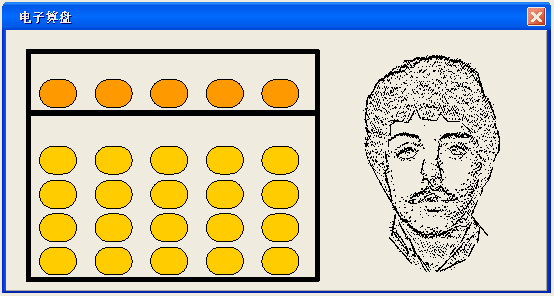
from tkinter import *
tk = Tk()
tk.title("电子算盘") # 窗口名称
tank = Canvas(tk, width=1000, height=600, bg='ivory') # 创建画板
tank.pack() # 显示画板
tank.create_rectangle(30, 30, 520, 190, width=3) # 左上侧方框
tank.create_rectangle(30, 190, 520, 570, width=3) # 左下侧方框
tank.create_oval(900, 400, 620, 120, fill='yellow')
tank.create_oval(800, 200, 850, 250, fill='black', tags='left')
tank.create_oval(670, 200, 720, 250, fill='black', tags='right')
tank.create_line(695, 320, 825, 320, width=5, tags='mouth')
backround_image = PhotoImage(file="img.png") # 上珠图片
backround_image2 = PhotoImage(file="img_1.png") # 下珠图片
button = Button()
button1 = [button for i in range(5)] # 5个上珠
button2 = [[button for i in range(5)] for i in range(4)] # 四行,每行五个下珠
num = [[0 for i in range(5)] for i in range(4)] # 五个下珠分别对应的数值
num2 = [0 for i in range(5)] # 五个上珠分别对应的数值
def getNum(num, num2): # 计算算盘总和
sum_ = 0
for i in num:
for j in i:
sum_ += j
for i in num2:
sum_ += i
return sum_
def button_click_back(events): # 鼠标右击点击事件触发
widget = events.widget
for i in range(5):
if widget == button1[i]:
button1[i].place(x=40 + 100 * i, y=50 + 70 * 1)
num2[i] = 0
label = Label(tk, text="当前数字:" + str(getNum(num, num2)), width=30, height=4)
label.place(x=780, y=30)
for i in range(4):
for j in range(5):
if widget == button2[i][j]:
if i == 3:
button2[3][j].place(x=40 + 100 * j, y=210 + 70 * (i + 1))
num[3][j] = 0
label = Label(tk, text="当前数字:" + str(getNum(num, num2)), width=30, height=4)
label.place(x=780, y=30)
if i == 2:
button2[2][j].place(x=40 + 100 * j, y=210 + 70 * (i + 1))
button2[3][j].place(x=40 + 100 * j, y=210 + 70 * (i + 2))
num[2][j] = 0
num[3][j] = 0
label = Label(tk, text="当前数字:" + str(getNum(num, num2)), width=30, height=4)
label.place(x=780, y=30)
if i == 1:
button2[1][j].place(x=40 + 100 * j, y=210 + 70 * (i + 1))
button2[2][j].place(x=40 + 100 * j, y=210 + 70 * (i + 2))
button2[3][j].place(x=40 + 100 * j, y=210 + 70 * (i + 3))
num[1][j] = 0
num[2][j] = 0
num[3][j] = 0
label = Label(tk, text="当前数字:" + str(getNum(num, num2)), width=30, height=4)
label.place(x=780, y=30)
if i == 0:
button2[0][j].place(x=40 + 100 * j, y=210 + 70 * (i + 1))
button2[1][j].place(x=40 + 100 * j, y=210 + 70 * (i + 2))
button2[2][j].place(x=40 + 100 * j, y=210 + 70 * (i + 3))
button2[3][j].place(x=40 + 100 * j, y=210 + 70 * (i + 4))
num[0][j] = 0
num[1][j] = 0
num[2][j] = 0
num[3][j] = 0
label = Label(tk, text="当前数字:" + str(getNum(num, num2)), width=30, height=4)
label.place(x=780, y=30)
def button_click(events): # 鼠标左击点击事件触发
widget = events.widget
for i in range(5):
if widget == button1[i]:
button1[i].place(x=40 + 100 * i, y=50 + 70 * 0)
num2[i] = 10 ** (4 - i) * 5
label = Label(tk, text="当前数字:" + str(getNum(num, num2)), width=30, height=4)
label.place(x=780, y=30)
for i in range(4):
for j in range(5):
if widget == button2[i][j]:
if i == 3:
button2[0][j].place(x=40 + 100 * j, y=210 + 70 * (i - 3))
button2[1][j].place(x=40 + 100 * j, y=210 + 70 * (i - 2))
button2[2][j].place(x=40 + 100 * j, y=210 + 70 * (i - 1))
button2[3][j].place(x=40 + 100 * j, y=210 + 70 * (i))
num[0][j] = 10 ** (4 - j) * 1
num[1][j] = 10 ** (4 - j) * 1
num[2][j] = 10 ** (4 - j) * 1
num[3][j] = 10 ** (4 - j) * 1
label = Label(tk, text="当前数字:" + str(getNum(num, num2)), width=30, height=4)
label.place(x=780, y=30)
if i == 2:
button2[0][j].place(x=40 + 100 * j, y=210)
button2[1][j].place(x=40 + 100 * j, y=210 + 70 * 1)
button2[2][j].place(x=40 + 100 * j, y=210 + 70 * 2)
num[0][j] = 10 ** (4 - j) * 1
num[1][j] = 10 ** (4 - j) * 1
num[2][j] = 10 ** (4 - j) * 1
label = Label(tk, text="当前数字:" + str(getNum(num, num2)), width=30, height=4)
label.place(x=780, y=30)
if i == 1:
button2[0][j].place(x=40 + 100 * j, y=210)
button2[1][j].place(x=40 + 100 * j, y=210 + 70 * 1)
num[0][j] = 10 ** (4 - j) * 1
num[1][j] = 10 ** (4 - j) * 1
label = Label(tk, text="当前数字:" + str(getNum(num, num2)), width=30, height=4)
label.place(x=780, y=30)
else:
button2[i][j].place(x=40 + 100 * j, y=210 + 70 * i)
num[0][j] = 10 ** (4 - j) * 1
label = Label(tk, text="当前数字:" + str(getNum(num, num2)), width=30, height=4)
label.place(x=780, y=30)
for i in range(5): # 生成5个上珠
button1[i] = Button(tk, image=backround_image)
button1[i].bind("<Button-1>", button_click)
button1[i].bind("<Button-3>", button_click_back)
button1[i]["bg"] = "ivory"
button1[i]["border"] = "0"
button1[i].place(x=40 + 100 * i, y=50 + 70)
for i in range(4): # 四行,每行生成5个下珠
for j in range(5):
button2[i][j] = Button(tk, image=backround_image2)
button2[i][j].bind("<Button-1>", button_click)
button2[i][j].bind("<Button-3>", button_click_back)
button2[i][j]["bg"] = "ivory"
button2[i][j]["border"] = "0"
button2[i][j].place(x=40 + 100 * j, y=210 + 70 * (i + 1))
tk.mainloop()

 浙公网安备 33010602011771号