
今天我们来实现管理员登陆与学生登录及功能等的前后端代码
首先是我的配置图

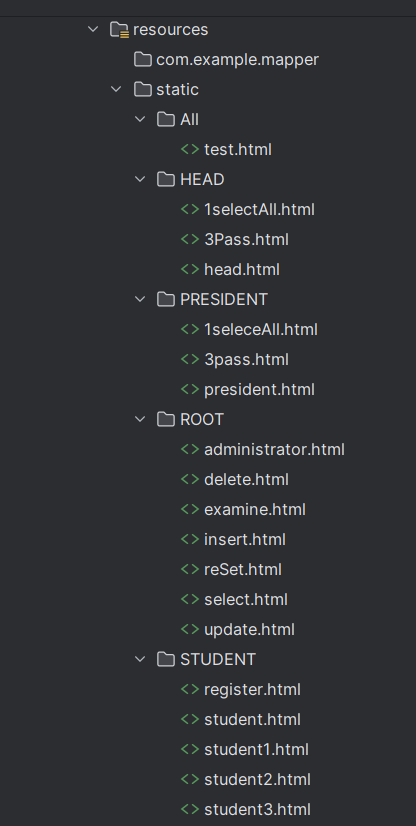
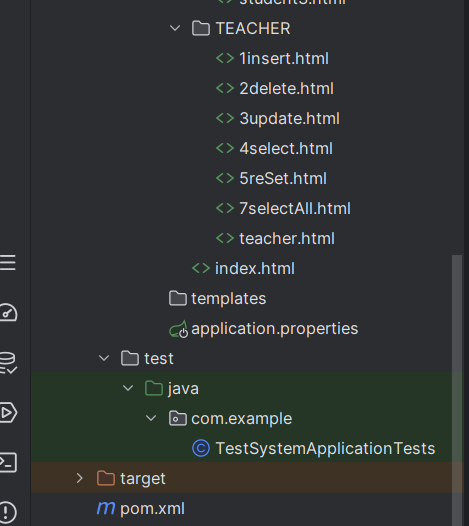
1、管理员
①后端
UserController

package com.example.controller;

import com.example.pojo.Result;
import com.example.pojo.User;
import com.example.pojo.student;
import com.example.service.UserService;
import org.springframework.beans.factory.annotation.Autowired;
import org.springframework.http.ResponseEntity;
import org.springframework.web.bind.annotation.*;

import java.util.List;

@RestController
@RequestMapping("/user")
public class UserController {
    @Autowired
    private UserService userService;

    //登陆验证
    @GetMapping("/getByUser")
    public ResponseEntity<Integer> getByUser(String username, String password, String position) {
        int re = userService.getByUser(username, password, position);
        return ResponseEntity.ok(re);
    }

    //学生注册
    @PostMapping("/add")
    public Result add(@RequestBody student s) {
        userService.add(s);
        return Result.success(s);
    }

    //登陆用户信息添加
    @PostMapping("addUser")
    public Result addUser(@RequestBody User user) {
        userService.addUser(user);
        return Result.success(user);
    }

    //查询登录数据
    @GetMapping("getUser/{username}")
    public Result getUser1(@PathVariable String username) {
        User user = userService.getUser(username);
        if (user != null) {
            return Result.success(user);
        } else {
            return Result.error("查询失败");
        }
    }

    //查询个人信息
    @GetMapping("/person/{username}")
    public Result getPerson(@PathVariable String username) {
        student s = userService.getPerson(username);
        if (s != null) {
            return Result.success(s);
        } else {
            return Result.error("查询失败");
        }
    }

    //修改用户密码
    @PutMapping("/update/{username}/{password}")
    public Result update(@PathVariable String username, @PathVariable String password) {
        userService.update(username, password);
        User user = userService.getUser(username);
        if (user != null) {
            return Result.success(user);
        } else {
            return Result.error("修改失败");
        }
    }


    //    获取全部申请注册的信息
    @GetMapping("/getAll")
    public Result getAll() {
        List<student> students = userService.getAll();
        if (students != null) {
            return Result.success(students);
        } else {
            return Result.error("当前不存在未审查的信息");
        }
    }

    //修改审批状态
    @PutMapping("/updateById/{stuId}/{state}")
    public Result updateById(@PathVariable String stuId, @PathVariable int state) {
        userService.updateById(stuId, state);
        List<student> s = userService.getAll();
        if (s != null) {
            return Result.success(s);
        } else {
            return Result.error("审批失败");
        }
    }

    //查询考试信息
    @GetMapping("/selectTest/{courseName}/{courseClass}/{courseMajor}")
    public Result selectTest(@PathVariable("courseName") String courseName, @PathVariable("courseClass") String courseClass, @PathVariable("courseMajor") String courseMajor) {
        return Result.success(userService.selectTest(courseName, courseClass, courseMajor));
    }
}
UserService
package com.example.service;

import com.example.mapper.UserMapper;
import com.example.pojo.Test;
import com.example.pojo.User;
import com.example.pojo.student;
import org.springframework.beans.factory.annotation.Autowired;
import org.springframework.stereotype.Service;

import java.util.List;

@Service
public class UserService {
    @Autowired
    private UserMapper userMapper;

    //登陆验证
    public int getByUser(String username, String password, String position) {
        return userMapper.getByUser(username, password, position);
    }

    //注册学生数据
    public void add(student s) {
        String stuID = s.getStuId();
        String stuName = s.getStuName();
        String grade = s.getGrade();
        String sex = s.getSex();
        String college = s.getCollege();
        String professionals = s.getProfessionals();
        String phone = s.getPhone();
        String position = s.getPosition();
        int state = s.getState();
        userMapper.add(stuID, stuName, grade, sex, college, professionals, phone, position, state);
    }
    public void addUser(User user) {
        String username=user.getUsername();
        String password=user.getPassword();
//        String[] position= user.getPosition().toArray(new String[0]);
        String position=String.join(",",user.getPosition());
        userMapper.addUser(username,password, position);
    }
    //查询个人详细信息
    public student getPerson(String username) {
        return userMapper.getPerson(username);
    }

    public User getUser(String username) {
        return userMapper.getUser(username);
    }

    public void update(String username, String password) {
        userMapper.update(username, password);
    }

    public List<student> getAll() { return userMapper.getAll();
    }

    public void updateById(String stuId,int state) { userMapper.updateById(stuId,state);

    }

    public List<Test> selectTest(String courseName, String courseClass, String courseMajor) {
        return userMapper.selectTest(courseName, courseClass, courseMajor);
    }
}
UserMapper
package com.example.mapper;

import com.example.pojo.Test;
import com.example.pojo.User;
import com.example.pojo.student;
import org.apache.ibatis.annotations.*;

import java.util.List;

@Mapper
public interface UserMapper {
    //根据用户名和密码查询用户

    //根据用户名和密码查询用户,并返回用户所在部门
    @Select("select count(*) from user where username = #{username} and password = #{password} and position like concat('%', #{position}, '%')")
    int getByUser(@Param("username") String username, @Param("password") String password, @Param("position") String position);

    @Insert("insert into student(StuID, StuName, grade, sex, College, Professionals, Phone, Position, State) VALUES (#{id},#{StuName},#{grade},#{sex},#{College},#{Professionals},#{Phone},#{Position},#{State})")
    void add(String id, String StuName, String grade, String sex, String College, String Professionals, String Phone, String Position, int State);

    @Select("select * from student where StuID=#{username}")
    student getPerson(String username);

    @Select("select  * from user where username=#{username}")
    User getUser(String username);

    @Update("update user set password=#{password} where username=#{username}")
    void update(@Param("username") String username, @Param("password") String password);

    @Select("SELECT * from student where State=0")
    List<student> getAll();

    @Update("update student set State=#{state} where StuID=#{stuId}")
    void updateById(String stuId, int state);

    @Insert("insert into user(username,password,position) VALUES (#{username},#{password},#{position})")
    void addUser(String username, String password, String position);

    @Select("select * from test1 where AuditStatus=2 and CourseName=#{courseName} and CourseClass=#{courseClass} and CourseMajor=#{courseMajor} ")
    List<Test> selectTest(String courseName, String courseClass, String courseMajor);
}
②前端
主页面index.html
<!DOCTYPE html>
<html lang="en">
<head>
    <meta charset="UTF-8">
    <title>用户登录</title>
    <style>
        button {
            display: block;
            margin-top: 10px;
            padding: 10px;
            background-color: #007bff;
            color: #fff;
            border: none;
            border-radius: 3px;
            cursor: pointer;
        }

        .centered-form {
            text-align: center;
            display: flex;
            flex-direction: column;
            align-items: center;
            justify-content: center;
            height: 100vh;
        }

        .bordered-form {
            border: 2px solid #000; /* 边框样式 */
            padding: 20px; /* 可选的内边距 */
            background-color: #f0f0f0; /* 可选的背景颜色 */
        }
    </style>
</head>
<body>
<div class="centered-form">
    <div class="bordered-form">
        <h1>用户登录</h1>
        <form id="login">
            <label for="username">用户名:</label><input type="text" id="username">
            <br>
            <label for="password">密码:</label><input type="password" id="password">
            <br>
            <label>职位:</label>
            <div id="loginUser">
                <label><input type="radio" name="loginUser" value="专业教师">专业教师</label>
                <label><input type="radio" name="loginUser" value="专业负责人">专业负责人</label>
                <label><input type="radio" name="loginUser" value="教学副院长">教学副院长</label>
                <label><input type="radio" name="loginUser" value="学生">学生</label>
                <label><input type="radio" name="loginUser" value="系统管理员">系统管理员</label>
            </div>
            <div class="centered-buttons">
                <button type="submit" style="display: block; margin: 0 auto;">登录</button>
                <br>
                <button id="register" type="button" style="display: block; margin: 0 auto;">学生注册</button>
            </div>
        </form>
    </div>
</div>
</body>
<script>
    const register = document.getElementById("register");
    register.addEventListener("click", function () {
        window.location.href = "http://localhost:8080/STUDENT/register.html";
    });
    document.getElementById("login").addEventListener("submit", function (event) {
        event.preventDefault();
        const username = document.getElementById("username").value;
        const password = document.getElementById("password").value;
        const loginUser = document.querySelectorAll('input[name="loginUser"]');
        let l;

        loginUser.forEach(radio => {
            if (radio.checked) {
                l = radio.value;
            }
        });
        const url = `user/getByUser?username=${username}&password=${password}&position=${l}`;
        fetch(url, {
            method: 'GET',
            headers: {
                'Content-Type': 'application/json'
            }
        })
            .then(res => res.json())
            .then(data => {
                if (data === 1) {
                    alert("登录成功");
                    if (l === '系统管理员') {
                        window.location.href = "ROOT/administrator.html?username=" + encodeURIComponent(username);
                    } else if (l === '学生') {
                        window.location.href = "STUDENT/student.html?username=" + encodeURIComponent(username);
                    } else if (l === '专业教师') {
                        window.location.href = "TEACHER/teacher.html?username=" + encodeURIComponent(username);
                    } else if (l === '专业负责人') {
                        window.location.href = "HEAD/head.html?username=" + encodeURIComponent(username);
                    } else if (l === '教学副院长') {
                        window.location.href = "PRESIDENT/president.html?username=" + encodeURIComponent(username);
                    }
                } else {
                    alert("登录失败");
                    console.log(data);
                }
            })
            .catch(error => {
                alert("请求失败,请重试");
                console.error(error);
            });
    });
</script>
</html>
administrator.html
<!DOCTYPE html>
<html lang="en">
<head>
    <meta charset="UTF-8">
    <title>管理员页面</title>
    <style>
        .form {
            width: 600px;
            margin: 0 auto;
            /*border: 1px solid red;*/
        }

        .form table {
            margin: 0 auto;
        }

        .form table tr td {
            width: 100px;
            height: 30px;
            border: 1px solid #000;
            text-align: center;
        }

        button {
            display: block;
            margin-top: 10px;
            padding: 10px;
            background-color: #007bff;
            color: #fff;
            border: none;
            border-radius: 3px;
            cursor: pointer;
        }
    </style>
</head>
<body>
<h1 style="text-align: center">管理员系统</h1>
<script>
    // 获取URL中的用户名参数
    var urlParams = new URLSearchParams(window.location.search);
    var username = urlParams.get('username');
    console.log(username);
</script>
<div class="form">
    <table border="1px" cellspacing="0" width="600px">
        <tr>
            <th>编号</th>
            <th>功能</th>
        </tr>
        <tr>
            <td>1</td>
            <td>
                <button id="examine">审批学生注册信息</button>
            </td>
        </tr>
        <tr>
            <td>2</td>
            <td>
                <button id="insert">增加信息</button>
            </td>
        </tr>
        <tr>
            <td>3</td>
            <td>
                <button id="delete">删除信息</button>
            </td>
        </tr>
        <tr>
            <td>4</td>
            <td>
                <button id="update">修改信息</button>
            </td>
        </tr>
        <tr>
            <td>5</td>
            <td>
                <button id="select">查询信息</button>
            </td>
        </tr>
        <tr>
            <td>6</td>
            <td>
                <button id="reset">重置学生密码</button>
            </td>
        </tr>
    </table>
</div>
</body>
<script>
    document.getElementById("examine").addEventListener("click", function () {
        window.location.href = "examine.html";
    });
    document.getElementById('insert').addEventListener('click', function () {
        window.location.href = "insert.html";
    });
    document.getElementById("delete").addEventListener("click", function () {
        window.location.href = "delete.html";
    });
    document.getElementById('update').addEventListener('click', function () {
        window.location.href = "update.html";
    });
    document.getElementById("select").addEventListener("click", function () {
        window.location.href = "select.html";
    });
    document.getElementById("reset").addEventListener("click", function () {
        window.location.href = "reSet.html";
    });
</script>
</html>
insert.html
<!DOCTYPE html>
<html lang="en">
<head>
    <meta charset="UTF-8">
    <title>信息添加</title>
    <style>
        .reSet {
            background-color: #4CAF50;
            color: white;
            border: none;
            padding: 10px 20px;
            text-align: center;
            text-decoration: none;
            display: inline-block;
            font-size: 16px;
            margin: 4px 2px;
            cursor: pointer;
        }

        .form {
            width: 600px;
            margin: 0 auto;
            /*border: 1px solid red;*/
        }

        .form table {
            margin: 0 auto;
        }

        .form table tr td {
            width: 100px;
            height: 30px;
            border: 1px solid #000;
            text-align: center;
        }

        button {
            display: block;
            margin-top: 10px;
            padding: 10px;
            background-color: #007bff;
            color: #fff;
            border: none;
            border-radius: 3px;
            cursor: pointer;
        }

        .centered-form {
            text-align: center;
            display: flex;
            flex-direction: column;
            align-items: center;
            justify-content: center;
            height: 100vh;
        }

        .bordered-form {
            border: 2px solid #000; /* 边框样式 */
            padding: 20px; /* 可选的内边距 */
            background-color: #f0f0f0; /* 可选的背景颜色 */
        }
    </style>
</head>
<body>
<h1 style="text-align: center">添加信息</h1>
<div class="centered-form">
    <div class="bordered-form">
        <div class="form">
            <form id="addForm">
                <label for="username">请输入用户名</label>
                <input type="text" id="username" minlength="8" maxlength="8" required>
                <br>
                <label for="name">请输入姓名</label>
                <input type="text" id="name">
                <br>
                <label for="college">请输入所属学院</label>
                <input type="text" id="college">
                <br>
                <label for="pro">请输入所属专业</label>
                <input type="text" id="pro">
                <br>
                <label for="position">请输入职位,001表示普通教师、010表示专业负责人、011表示即是教师又是专业负责人,111表示三种角色兼具</label>
                <input type="text" id="position">
                <button type="submit" style="display: block; margin: 0 auto;">添加</button>
            </form>
        </div>
    </div>
</div>
</body>
<script>
    document.getElementById('addForm').addEventListener('submit', function (e) {
        e.preventDefault();
        const username = document.getElementById('username');
        const name = document.getElementById('name');
        const college = document.getElementById('college');
        const pro = document.getElementById('pro');
        const role = document.getElementById('position');
        console.log(username.value + "   " + name.value + "   " + college.value + "  " + pro.value + "  " + role.value);
        addUser(username.value, role.value);
        addTea(username.value, name.value, college.value, pro.value, role.value);
    });
</script>
<script>
    function addUser(username, role) {
        const requestUrl = 'http://localhost:8080/root/add';
        const roleToPoList = {
            '111': ["专业教师", "专业负责人", "教学副院长"],
            '011': ["专业教师", "专业负责人"],
            '001': ["专业教师"],
            '100': ["教学副院长"],
            '010': ["专业负责人"],
            '110': ["专业负责人", "教学副院长"],
            '101': ["专业教师", "教学副院长"],
        };

        const poList = roleToPoList[role] || [];
        console.log(poList);
        fetch(requestUrl,
            {
                method: 'POST',
                headers: {
                    'Content-Type': 'application/json'
                },
                body: JSON.stringify({
                    username: username,
                    password: "123456",
                    position: poList,
                })
            })
            .then(res => res.json())
            .then(data => {
                if (data.msg === 'success') {
                    alert("已将登录信息添加到数据库");
                    console.log(data);
                } else {
                    alert("添加失败  " + data.msg);
                }
            })
            .catch(error => {
                alert("请求失败,请重试");
                console.error(error);
            });
    }
</script>
<script>
    function addTea(username, name, college, pro, role) {
        const requestUrl = 'http://localhost:8080/root/addTea';
        fetch(requestUrl,
            {
                method: 'POST',
                headers: {
                    'Content-Type': 'application/json'
                },
                body: JSON.stringify({
                    teacherID: username,
                    name: name,
                    college: college,
                    professionals: pro,
                    role: role,
                })
            })
            .then(res => res.json())
            .then(data => {
                if (data.msg === 'success') {
                    alert("添加角色成功");
                    console.log(data);
                } else {
                    alert("添加失败  " + data.msg);
                }
            })
            .catch(error => {
                alert("请求失败,请重试");
                console.error(error);
            });
    }
</script>
</html>
delete.html
<!DOCTYPE html>
<html lang="en">
<head>
    <meta charset="UTF-8">
    <title>删除教师信息</title>
    <style>
        .form {
            width: 600px;
            margin: 0 auto;
            /*border: 1px solid red;*/
        }

        .form table {
            margin: 0 auto;
        }

        .form table tr td {
            width: 100px;
            height: 30px;
            border: 1px solid #000;
            text-align: center;
        }

        button {
            display: block;
            margin-top: 10px;
            padding: 10px;
            background-color: #007bff;
            color: #fff;
            border: none;
            border-radius: 3px;
            cursor: pointer;
        }

        .centered-form {
            text-align: center;
            display: flex;
            flex-direction: column;
            align-items: center;
            justify-content: center;
            height: 100vh;
        }

        .bordered-form {
            border: 2px solid #000; /* 边框样式 */
            padding: 20px; /* 可选的内边距 */
            background-color: #f0f0f0; /* 可选的背景颜色 */
        }
    </style>
</head>
<body>
<h1 style="text-align: center">删除教师信息</h1>
<!--边框居中-->
<div class="centered-form">
    <!--    增加边框-->
    <div class="bordered-form">
        <!--        调整边框大小-->
        <div class="form">
            <form id="deleteForm">
                <label for="username">请输入您要删除的用户名</label>
                <input type="text" id="username" minlength="8" maxlength="8" required>
                <br>
                <button type="submit" style="display: block; margin: 0 auto;">查询</button>
                <div id="container">

                </div>
            </form>
        </div>
    </div>
</div>
</body>
<script>
    function getTea(username) {
        const requestUrl = `http://localhost:8080/root/getTea/${username}`;
        fetch(requestUrl,
            {
                method: 'GET',
                headers: {
                    'Content-Type': 'application/json'
                },
            })
            .then(response => response.json())
            .then(data => {
                if (data.msg === 'success' && data.data != null) {
                    console.log(data);
                    generateTable(data.data);
                } else {
                    alert("查询失败,未查找到该教师");
                }
            })
            .catch(error => {
                alert("请求失败,请重试");
                console.error(error);
            });
    }
</script>
<script>
    document.getElementById('deleteForm').addEventListener('submit', function (event) {
        event.preventDefault();
        const username = document.getElementById('username').value;
        console.log(username);
        getTea(username);
    });
</script>
<script>
    function generateTable(data) {
        const tableContainer = document.getElementById("container");
        // 清空 tableContainer 中的所有子节点
        while (tableContainer.hasChildNodes()) {
            tableContainer.removeChild(tableContainer.firstChild);
        }
        const table = document.createElement("table");
        const tableBody = document.createElement("tbody");
        let row = document.createElement("tr");
        row.innerHTML = '<td>工号/用户名</td><td>姓名</td><td>所属学院</td><td>所属专业</td><td>职位</td><td>是否删除</td>';
        tableBody.appendChild(row);
        const roleToPoList = {
            '111': ["专业教师", "专业负责人", "教学副院长"],
            '011': ["专业教师", "专业负责人"],
            '001': ["专业教师"],
            '100': ["教学副院长"],
            '010': ["专业负责人"],
            '110': ["专业负责人", "教学副院长"],
            '101': ["专业教师", "教学副院长"],
        };
        const poList = roleToPoList[data.role] || [];
        row = document.createElement("tr");
        row.innerHTML = `<td>${data.teacherID}</td><td>${data.name}</td><td>${data.college}</td><td>${data.professionals}</td><td>${poList}</td><td><button class="deleteButton">删除信息</button></td>`;
        tableBody.appendChild(row);
        table.appendChild(tableBody);
        tableContainer.appendChild(table);
    }
</script>
<script>
    const tableContainer = document.getElementById("container");
    tableContainer.addEventListener("click", function (event) {
        // 获取到点击事件的目标元素
        let target = event.target;
        // 向上遍历DOM树,找到具有相应类名的祖先元素
        while (target !== tableContainer && ![...target.classList].some(className => ["deleteButton"].includes(className))) {
            target = target.parentNode;
        }
        if (target.classList.contains("deleteButton")) {
            // 点击了"审批通过"按钮
            const row = target.closest("tr");
            const username = row.querySelector("td:first-child").textContent;
            deleteTea(username);
            deleteUser(username);
            // display(); // 重新显示数据
        }
    });
</script>
<script>
    function deleteTea(username) {
        const requestUrl = `http://localhost:8080/root/deleteTea/${username}`;
        fetch(requestUrl,
            {
                method: 'DELETE',
                headers: {
                    'Content-Type': 'application/json'
                },
            })
            .then(response => response.json())
            .then(data => {
                if (data.msg === 'success' && data.data != null) {
                    alert("删除教师信息成功");
                } else {
                    alert("删除失败,或是未查找到该教师");
                }
            })
            .catch(error => {
                alert("请求失败,请重试");
                console.error(error);
            });
    }
</script>
<script>
    function deleteUser(username) {
        const requestUrl = `http://localhost:8080/root/deleteUser/${username}`;
        fetch(requestUrl,
            {
                method: 'DELETE',
                headers: {
                    'Content-Type': 'application/json'
                },
            })
            .then(response => response.json())
            .then(data => {
                if (data.msg === 'success' && data.data != null) {
                    console.log(data);
                    alert("删除登录信息成功");
                } else {
                    alert("删除失败,或是未查找到该信息");
                }
            })
            .catch(error => {
                alert("请求失败,请重试");
                console.error(error);
            });
    }
</script>
</html>
update.html
<!DOCTYPE html>
<html lang="en">
<head>
    <meta charset="UTF-8">
    <title>修改教师信息</title>
    <style>
        .form {
            width: 600px;
            margin: 0 auto;
            /*border: 1px solid red;*/
        }

        .form table {
            margin: 0 auto;
        }

        .form table tr td {
            width: 100px;
            height: 30px;
            border: 1px solid #000;
            text-align: center;
        }

        button {
            display: block;
            margin-top: 10px;
            padding: 10px;
            background-color: #007bff;
            color: #fff;
            border: none;
            border-radius: 3px;
            cursor: pointer;
        }

        .centered-form {
            text-align: center;
            display: flex;
            flex-direction: column;
            align-items: center;
            justify-content: center;
            height: 100vh;
        }

        .bordered-form {
            border: 2px solid #000; /* 边框样式 */
            padding: 20px; /* 可选的内边距 */
            background-color: #f0f0f0; /* 可选的背景颜色 */
        }
    </style>
</head>
<body>
<h1 style="text-align: center">修改教师信息</h1>
<!--边框居中-->
<div class="centered-form">
    <!--    增加边框-->
    <div class="bordered-form">
        <!--        调整边框大小-->
        <div class="form">
            <form id="deleteForm">
                <label for="username">请输入您要修改的用户名</label>
                <input type="text" id="username" minlength="8" maxlength="8" required>
                <br>
                <button type="submit" style="display: block; margin: 0 auto;">查询</button>
                <div id="container">

                </div>
            </form>
            <form id="updateForm">
                <label for="userid">请输入用户名</label>
                <input type="text" id="userid" minlength="8" maxlength="8" required>
                <br>
                <label for="name">请输入姓名</label>
                <input type="text" id="name">
                <br>
                <label for="college">请输入所属学院</label>
                <input type="text" id="college">
                <br>
                <label for="pro">请输入所属专业</label>
                <input type="text" id="pro">
                <br>
                <label for="position">请输入职位,001表示普通教师、010表示专业负责人、011表示即是教师又是专业负责人,111表示三种角色兼具</label>
                <input type="text" id="position">
                <button type="submit" style="display: block; margin: 0 auto;">添加</button>
            </form>
        </div>
    </div>
</div>
</body>
<script>
    document.getElementById('updateForm').addEventListener('submit', function (e) {
        e.preventDefault();
        const username = document.getElementById('userid');
        const name = document.getElementById('name');
        const college = document.getElementById('college');
        const pro = document.getElementById('pro');
        const role = document.getElementById('position');
        console.log(username.value + "   " + name.value + "   " + college.value + "  " + pro.value + "  " + role.value);
        updateTea(username.value, name.value, college.value, pro.value, role.value);
    });
</script>
<script>
    function updateTea(username, name, college, pro, role) {
        const requestUrl = `http://localhost:8080/root/updateTea/${username}/${name}/${college}/${pro}/${role}`;
        fetch(requestUrl,
            {
                method: 'PUT',
                headers: {
                    'Content-Type': 'application/json'
                },
            })
            .then(res => res.json())
            .then(data => {
                if (data.msg === 'success') {
                    alert("修改信息成功");
                    console.log(data);
                } else {
                    alert("修改失败  " + data.msg);
                }
            })
            .catch(error => {
                alert("请求失败,请重试");
                console.error(error);
            });
    }
</script>
<script>
    function getTea(username) {
        const requestUrl = `http://localhost:8080/root/getTea/${username}`;
        fetch(requestUrl,
            {
                method: 'GET',
                headers: {
                    'Content-Type': 'application/json'
                },
            })
            .then(response => response.json())
            .then(data => {
                if (data.msg === 'success' && data.data != null) {
                    console.log(data);
                    generateTable(data.data);
                } else {
                    alert("查询失败,未查找到该教师");
                }
            })
            .catch(error => {
                alert("请求失败,请重试");
                console.error(error);
            });
    }
</script>
<script>
    document.getElementById('deleteForm').addEventListener('submit', function (event) {
        event.preventDefault();
        const username = document.getElementById('username').value;
        console.log(username);
        getTea(username);
    });
</script>
<script>
    function generateTable(data) {
        const tableContainer = document.getElementById("container");
        // 清空 tableContainer 中的所有子节点
        while (tableContainer.hasChildNodes()) {
            tableContainer.removeChild(tableContainer.firstChild);
        }
        const table = document.createElement("table");
        const tableBody = document.createElement("tbody");
        let row = document.createElement("tr");
        row.innerHTML = '<td>工号/用户名</td><td>姓名</td><td>所属学院</td><td>所属专业</td><td>职位</td>';
        tableBody.appendChild(row);
        const roleToPoList = {
            '111': ["专业教师", "专业负责人", "教学副院长"],
            '011': ["专业教师", "专业负责人"],
            '001': ["专业教师"],
            '100': ["教学副院长"],
            '010': ["专业负责人"],
            '110': ["专业负责人", "教学副院长"],
            '101': ["专业教师", "教学副院长"],
        };
        const poList = roleToPoList[data.role] || [];
        row = document.createElement("tr");
        row.innerHTML = `<td>${data.teacherID}</td><td>${data.name}</td><td>${data.college}</td><td>${data.professionals}</td><td>${poList}</td>`;
        tableBody.appendChild(row);
        table.appendChild(tableBody);
        tableContainer.appendChild(table);
    }
</script>
</html>
select.html
<!DOCTYPE html>
<html lang="en">
<head>
    <meta charset="UTF-8">
    <title>查询用户信息</title>
    <style>
        .form {
            width: 600px;
            margin: 0 auto;
            /*border: 1px solid red;*/
        }

        .form table {
            margin: 0 auto;
        }

        .form table tr td {
            width: 100px;
            height: 30px;
            border: 1px solid #000;
            text-align: center;
        }

        button {
            display: block;
            margin-top: 10px;
            padding: 10px;
            background-color: #007bff;
            color: #fff;
            border: none;
            border-radius: 3px;
            cursor: pointer;
        }

        .centered-form {
            text-align: center;
            display: flex;
            flex-direction: column;
            align-items: center;
            justify-content: center;
            height: 100vh;
        }

        .bordered-form {
            border: 2px solid #000; /* 边框样式 */
            padding: 20px; /* 可选的内边距 */
            background-color: #f0f0f0; /* 可选的背景颜色 */
        }
    </style>
</head>
<body>
<h1 style="text-align: center">查询教师信息</h1>
<!--边框居中-->
<div class="centered-form">
    <!--    增加边框-->
    <div class="bordered-form">
        <!--        调整边框大小-->
        <div class="form">
            <form id="deleteForm">
                <label for="username">请输入您要查询的用户名</label>
                <input type="text" id="username" minlength="8" maxlength="8" required>
                <br>
                <button type="submit" style="display: block; margin: 0 auto;">查询</button>
                <div id="container">

                </div>
            </form>
        </div>
    </div>
</div>
</body>
<script>
    function getTea(username)
    {
        const requestUrl=`http://localhost:8080/root/getTea/${username}`;
        fetch(requestUrl,
            {
                method: 'GET',
                headers: {
                    'Content-Type': 'application/json'
                },
            })
            .then(response => response.json())
            .then(data => {
                if (data.msg === 'success'&&data.data!=null) {
                    console.log(data);
                    generateTable(data.data);
                } else {
                    alert("查询失败,未查找到该教师");
                }
            })
            .catch(error => {
                alert("请求失败,请重试");
                console.error(error);
            });
    }
</script>
<script>
    document.getElementById('deleteForm').addEventListener('submit',function (event)
    {
        event.preventDefault();
        const username=document.getElementById('username').value;
        console.log(username);
        getTea(username);
    });
</script>
<script>
    function generateTable(data) {
        const tableContainer = document.getElementById("container");
        // 清空 tableContainer 中的所有子节点
        while (tableContainer.hasChildNodes()) {
            tableContainer.removeChild(tableContainer.firstChild);
        }
        const table = document.createElement("table");
        const tableBody = document.createElement("tbody");
        let row = document.createElement("tr");
        row.innerHTML = '<td>工号/用户名</td><td>姓名</td><td>所属学院</td><td>所属专业</td><td>职位</td>';
        tableBody.appendChild(row);
        const roleToPoList = {
            '111': ["专业教师", "专业负责人", "教学副院长"],
            '011': ["专业教师", "专业负责人"],
            '001': ["专业教师"],
            '100': ["教学副院长"],
            '010': ["专业负责人"],
            '110': ["专业负责人", "教学副院长"],
            '101': ["专业教师", "教学副院长"],
        };
        const poList = roleToPoList[data.role] || [];
        row = document.createElement("tr");
        row.innerHTML = `<td>${data.teacherID}</td><td>${data.name}</td><td>${data.college}</td><td>${data.professionals}</td><td>${poList}</td>`;
        tableBody.appendChild(row);
        table.appendChild(tableBody);
        tableContainer.appendChild(table);
    }
</script>
</html>
exmine.html
<!DOCTYPE html>
<html lang="en">
<head>
    <meta charset="utf-8">
    <meta name="viewport" content="width=device-width, initial-scale=1">
    <title>审查学生信息</title>
    <style>
        .approveButton {
            background-color: #4CAF50;
            color: white;
            border: none;
            padding: 10px 20px;
            text-align: center;
            text-decoration: none;
            display: inline-block;
            font-size: 16px;
            margin: 4px 2px;
            cursor: pointer;
        }

        .rejectButton {
            background-color: #f44336;
            color: white;
            border: none;
            padding: 10px 20px;
            text-align: center;
            text-decoration: none;
            display: inline-block;
            font-size: 16px;
            margin: 4px 2px;
            cursor: pointer;
        }

        .form {
            width: 600px;
            margin: 0 auto;
            /*border: 1px solid red;*/
        }

        .form table {
            margin: 0 auto;
        }

        .form table tr td {
            width: 100px;
            height: 30px;
            border: 1px solid #000;
            text-align: center;
        }

        button {
            display: block;
            margin-top: 10px;
            padding: 10px;
            background-color: #007bff;
            color: #fff;
            border: none;
            border-radius: 3px;
            cursor: pointer;
        }

        .centered-form {
            text-align: center;
            display: flex;
            flex-direction: column;
            align-items: center;
            justify-content: center;
            height: 100vh;
        }

        .bordered-form {
            border: 2px solid #000; /* 边框样式 */
            padding: 20px; /* 可选的内边距 */
            background-color: #f0f0f0; /* 可选的背景颜色 */
        }
    </style>
</head>
<body>
<h1 style="text-align: center">审查信息</h1>
<div class="centered-form">
    <div class="bordered-form">
        <div class="form">
            <div id="container">

            </div>
        </div>
    </div>
</div>
<script>
    const tableContainer = document.getElementById("container");
    tableContainer.addEventListener("click", function (event) {
        // 获取到点击事件的目标元素
        let target = event.target;
        // 向上遍历DOM树,找到具有相应类名的祖先元素
        while (target !== tableContainer && ![...target.classList].some(className => ["approveButton", "rejectButton"].includes(className))) {
            target = target.parentNode;
        }
        if (target.classList.contains("approveButton")) {
            // 点击了"审批通过"按钮
            const row = target.closest("tr");
            const stuId = row.querySelector("td:first-child").textContent;
            updateStateInDatabase(stuId, 1);
            // display(); // 重新显示数据
        } else if (target.classList.contains("rejectButton")) {
            // 点击了"审批不通过"按钮
            const row = target.closest("tr");
            const stuId = row.querySelector("td:first-child").textContent;
            updateStateInDatabase(stuId, -1);
        }
    });
</script>
</body>
<script>
    const requestUrl = `http://localhost:8080/user/getAll`;
    function display() {
        fetch(requestUrl, {
            method: 'GET',
            headers: {
                'Content-Type': 'application/json'
            },
        })
            .then(response => response.json())
            .then(data => {
                if (data.msg === 'success') {
                    generateTable(data.data);
                } else {
                    alert("当前不存在未审查的结果");
                }
            })
            .catch(error => {
                alert("请求失败,请重试");
                console.error(error);
            });
    }
    display();
</script>
<script>
    function generateTable(data) {
        const tableContainer = document.getElementById("container");
        // 清空 tableContainer 中的所有子节点
        while (tableContainer.hasChildNodes()) {
            tableContainer.removeChild(tableContainer.firstChild);
        }
        const table = document.createElement("table");
        const tableBody = document.createElement("tbody");
        let row = document.createElement("tr");
        row.innerHTML = '<td>学号/用户名</td><td>姓名</td><td>年级</td><td>性别</td><td>学院</td><td>专业</td><td>手机号</td><td>职位</td><td>审核状态</td><td>是否通过</td>';
        tableBody.appendChild(row);
        // 查询方式是按姓名查询或多条查询
        for (let i = 0; i < data.length; i++) {
            row = document.createElement("tr");
            row.innerHTML = `<td>${data[i].stuId}</td><td>${data[i].stuName}</td><td>${data[i].grade}</td><td>${data[i].sex}</td><td>${data[i].college}</td><td>${data[i].professionals}</td><td>${data[i].phone}</td><td>${data[i].position}</td><td>${data[i].state}</td><td><button class="approveButton">审批通过</button></td><td><button class="rejectButton">审批不通过</button></td>`;
            tableBody.appendChild(row);
            table.appendChild(tableBody);
            tableContainer.appendChild(table);
        }
    }
</script>
<script>
    function add(stuId) {
        const requestUrl = `http://localhost:8080/user/addUser`;
        fetch(requestUrl,
            {
                method: 'POST',
                headers: {
                    'Content-Type': 'application/json'
                },
                body: JSON.stringify(
                    {
                        username: stuId,
                        password: "123456",
                        position: ["学生"],
                    })
            })
            .then(response => response.json())
            .then(data => {
                if (data.msg === 'success') {
                    alert("已添加学生用户到数据库");
                } else {
                    alert("未通过审核,取消添加入数据库");
                }
            })
            .catch(error => {
                alert("请求失败,请重试");
                console.error(error);
            });
    }
</script>
<script>
    function updateStateInDatabase(stuId, state) {
        const requestUrl = `http://localhost:8080/user/updateById/${stuId}/${state}`;
        fetch(requestUrl, {
            method: 'PUT',
            headers: {
                'Content-Type': 'application/json'
            },
        })
            .then(response => response.json())
            .then(data => {
                if (data.msg === 'success') {
                    generateTable(data.data);
                    if(state===1)
                    {
                        add(stuId);
                    }
                    alert("审核成功")
                } else {
                    alert("审核失败");
                }
            })
            .catch(error => {
                alert("请求失败,请重试");
                console.error(error);
            });
    }
</script>
</html>
reSet.html
<!DOCTYPE html>
<html lang="en">
<head>
    <meta charset="UTF-8">
    <title>重置学生密码</title>
    <style>
        .reSet {
            background-color: #4CAF50;
            color: white;
            border: none;
            padding: 10px 20px;
            text-align: center;
            text-decoration: none;
            display: inline-block;
            font-size: 16px;
            margin: 4px 2px;
            cursor: pointer;
        }

        .form {
            width: 600px;
            margin: 0 auto;
            /*border: 1px solid red;*/
        }

        .form table {
            margin: 0 auto;
        }

        .form table tr td {
            width: 100px;
            height: 30px;
            border: 1px solid #000;
            text-align: center;
        }

        button {
            display: block;
            margin-top: 10px;
            padding: 10px;
            background-color: #007bff;
            color: #fff;
            border: none;
            border-radius: 3px;
            cursor: pointer;
        }

        .centered-form {
            text-align: center;
            display: flex;
            flex-direction: column;
            align-items: center;
            justify-content: center;
            height: 100vh;
        }

        .bordered-form {
            border: 2px solid #000; /* 边框样式 */
            padding: 20px; /* 可选的内边距 */
            background-color: #f0f0f0; /* 可选的背景颜色 */
        }
    </style>
</head>
<body>
<h1 style="text-align: center">重置学生密码</h1>
<div class="centered-form">
    <div class="bordered-form">
        <div class="form">
                <label for="name">请输入学生姓名</label>
                <input type="text" id="name">
                <button id="select" style="display: block; margin: 0 auto;">查询</button>
            <div id="container">

            </div>
        </div>
    </div>
</div>
</body>
<script>
    function generateTable(data) {
        const tableContainer = document.getElementById("container");
        // 清空 tableContainer 中的所有子节点
        while (tableContainer.hasChildNodes()) {
            tableContainer.removeChild(tableContainer.firstChild);
        }
        const table = document.createElement("table");
        const tableBody = document.createElement("tbody");
        let row = document.createElement("tr");
        row.innerHTML = '<td>学号/用户名</td><td>姓名</td><td>年级</td><td>性别</td><td>学院</td><td>专业</td><td>手机号</td><td>职位</td><td>审核状态</td><td>密码重置</td>';
        tableBody.appendChild(row);
        let s="审核中";
        if(data.state===1)
        {
            s="审核通过";
        }else if(data.state===-1)
        {
            s="审核未通过";
        }
        if(data.state===0||data.state===-1)
        {
            row = document.createElement("tr");
            row.innerHTML = `<td>${data.stuId}</td><td>${data.stuName}</td><td>${data.grade}</td><td>${data.sex}</td><td>${data.college}</td><td>${data.professionals}</td><td>${data.phone}</td><td>${data.position}</td><td>${s}</td>`;
            tableBody.appendChild(row);

            table.appendChild(tableBody);
            tableContainer.appendChild(table);
            alert("当前学生并未通过审核或者还未进行审核,无法进行重置密码操作")
        }
        else {
            row = document.createElement("tr");
            row.innerHTML = `<td>${data.stuId}</td><td>${data.stuName}</td><td>${data.grade}</td><td>${data.sex}</td><td>${data.college}</td><td>${data.professionals}</td><td>${data.phone}</td><td>${data.position}</td><td>${s}</td><td><button class="reSet">密码重置</button></td>`;
            tableBody.appendChild(row);

            table.appendChild(tableBody);
            tableContainer.appendChild(table);
        }
    }
</script>
<script>
    document.getElementById('select').addEventListener('click', function () {
        const name = document.getElementById('name').value;

        const requestUrl = `http://localhost:8080/root/getByName/${name}`;
        fetch(requestUrl,
            {
                method: 'GET',
                headers: {
                    'Content-Type': 'application/json'
                },
            })
            .then(response => response.json())
            .then(data => {
                if (data.msg === 'success') {
                    console.log(data);
                    generateTable(data.data);
                } else {
                    alert("学生信息不存在");
                }
            })
            .catch(error => {
                alert("请求失败,请重试");
                console.error(error);
            });
    });
</script>
<script>
    const tableContainer = document.getElementById("container");
    tableContainer.addEventListener("click", function (event) {
        // 获取到点击事件的目标元素
        let target = event.target;
        // 向上遍历DOM树,找到具有相应类名的祖先元素
        while (target !== tableContainer && ![...target.classList].some(className => ["reSet"].includes(className))) {
            target = target.parentNode;
        }
        if (target.classList.contains("reSet")) {
            // 点击了"审批通过"按钮
            const row = target.closest("tr");
            const id = row.querySelector("td:first-child").textContent;
            const requestUrl = `http://localhost:8080/root/updatePassword/${id}`
            fetch(requestUrl,
                {
                    method: 'PUT',
                    headers: {
                        'Content-Type': 'application/json'
                    },
                })
                .then(response => response.json())
                .then(data => {
                    if (data.msg === 'success') {
                        console.log(data);
                        alert("重置成功")
                    } else {
                        alert("重置失败");
                    }
                })
                .catch(error => {
                    alert("请求失败,请重试");
                    console.error(error);
                });
        }
    });
</script>
</html>

 浙公网安备 33010602011771号