
今天我们再来实现上述个人信息添加的前端代码。
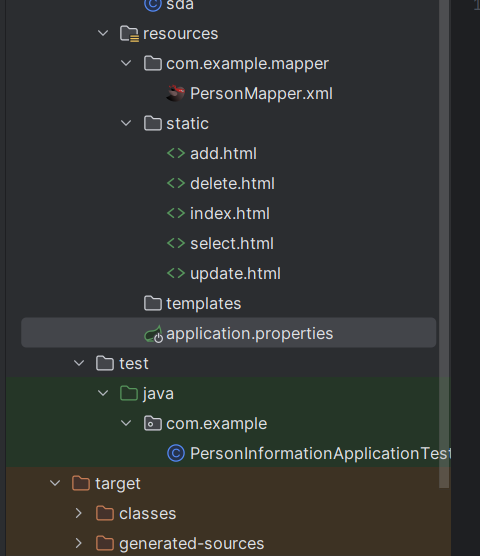
1、add.html

<!DOCTYPE html>
<html lang="en">
<head>
    <meta charset="UTF-8">
    <title>添加个人信息</title>
    <style>
        body {
            font-family: Arial, sans-serif;
        }

        #root {
            margin: 20px;
        }

        h2 {
            font-size: 18px;
            margin-bottom: 10px;
        }

        label {
            display: block;
            margin-bottom: 5px;
        }

        input, select {
            width: 300px;
            padding: 5px;
            font-size: 16px;
        }

        button {
            display: block;
            margin-top: 10px;
            padding: 10px;
            background-color: #007bff;
            color: #fff;
            border: none;
            border-radius: 3px;
            cursor: pointer;
        }
    </style>
</head>
<body>
<h1 style="text-align: center">添加用户信息</h1>
<div id="root" style="border: 1px solid black">
    <h2>增加人员</h2>
    <form id="addForm">
        <label for="updateId">学号:</label>
        <input type="text" id="updateId" name="id" required oninput="limitInput(this)" maxlength="8">
        <label for="updateName">姓名:</label>
        <input type="text" id="updateName" name="name" required>
        <label for="updateAge">年龄:</label>
        <input type="number" id="updateAge" name="age" min="1" max="150">
        <label>性别:</label>
        <div id="gender">
            <label><input type="radio" name="gender" value="男"> 男</label>
            <label><input type="radio" name="gender" value="女"> 女</label>
        </div>
        <label>兴趣爱好:</label>
        <div id="hobbies">
            <label><input type="checkbox" name="hobbies" value="阅读"> 阅读</label>
            <label><input type="checkbox" name="hobbies" value="音乐"> 音乐</label>
            <label><input type="checkbox" name="hobbies" value="运动"> 运动</label>
            <label><input type="checkbox" name="hobbies" value="旅行"> 旅行</label>
            <label><input type="checkbox" name="hobbies" value="烹饪"> 烹饪</label>
        </div>
        <label for="updateMajor">专业:</label>
        <select id="updateMajor" name="major" required>
            <option value="">请选择</option>
            <option value="计算机科学与技术">计算机科学与技术</option>
            <option value="软件工程">软件工程</option>
            <option value="网络工程">网络工程</option>
            <option value="信息工程">信息工程</option>
            <option value="数字媒体技术">数字媒体与技术</option>
            <option value="人工智能">人工智能</option>
        </select>
        <button type="submit">添加人员</button>

    </form>
    <div>
        <a href="index.html">
            <button>返回主界面</button>
        </a>
    </div>
</div>
</body>
<script>
    document.getElementById("addForm").addEventListener("submit", function (event) {
        event.preventDefault();
        const studentid = document.getElementById("updateId");
        const name = document.getElementById("updateName");
        const age = document.getElementById("updateAge");
        const genderRadios = document.querySelectorAll('input[name="gender"]');
        let gender;

        genderRadios.forEach(radio => {
            if (radio.checked) {
                gender = radio.value;
                alert(gender);
            }
        });

        const hobbies = document.querySelectorAll('input[name="hobbies"]:checked');
        const hobbyList = [];
        for (const hobby of hobbies) {
            hobbyList.push(hobby.value);
        }
        const major = document.getElementById("updateMajor");
        fetch('person/add',
            {
                method: 'POST',
                headers: {
                    'Content-Type': 'application/json'
                },
                body: JSON.stringify({
                    studentid: studentid.value,
                    name: name.value,
                    age: age.value,
                    gender: gender,
                    hobby: hobbies.value,
                    major: major.value
                })
            })
            .then(res => res.json())
            .then(data => {
                if (data.msg === 'success') {
                    alert("添加成功");
                    console.log(data);
                } else {
                    alert("添加失败  " + data.msg);
                }
            })
            .catch(error => {
                alert("请求失败,请重试");
                console.error(error);
            });
    });
</script>
<script>
    function limitInput(input) {
        const value = input.value;
        if (value.length > 8) {
            input.value = value.slice(0, 8);
        }
        if (value.length < 4 || value.slice(0, 4) !== '2022') {
            input.setCustomValidity('学号必须是八位且前四位为2022');
        } else {
            input.setCustomValidity('');
        }
    }
</script>
</html>
2、delete.html
<!DOCTYPE html>
<html lang="en">
<head>
    <meta charset="UTF-8">
    <title>删除个人信息</title>
    <style>
        body {
            display: flex;
            justify-content: center;
            align-items: center;
            height: 100vh;
            margin: 0;
        }

        .container {
            text-align: center;
            border: 1px solid #ccc;
            padding: 500px;
        }

        button {
            margin-top: 10px;
            padding: 10px;
            background-color: #007bff;
            color: #fff;
            border: none;
            border-radius: 3px;
            cursor: pointer;
        }
    </style>
</head>
<body>
<div class="container">
    <h1 style="text-align: center">删除信息</h1>
    <form id="deleteform">
        <label>学号</label>
        <input type="text" id="studentid" required oninput="limitInput(this)" maxlength=8">
        <br>
        <button type="submit" name="提交">提交</button>
    </form>
    <div>
        <a href="index.html">
            <button>返回主界面</button>
        </a>
    </div>
</div>
</body>
<script>
    document.getElementById("deleteform").addEventListener('submit', function (event) {
        event.preventDefault();
        const studentid = document.getElementById("studentid");
        fetch('person/delete/' + studentid.value, {
            method: 'DELETE',
            headers: {
                'Content-type': 'application.json'
            },
            body: JSON.stringify(
                {
                    studentid: studentid.value
                }
            )
        })
            .then(response => response.json())
            .then(data => {
                if (data.msg == 'success') {
                    alert("删除成功");
                } else {
                    alert("删除失败 " + data.msg);
                }
            })
            .catch(error => {
                alert("请求失败,请重试");
                console.error(error);
            })
    });
</script>
<script>
    function limitInput(input) {
        const value = input.value;
        if (value.length > 8) {
            input.value = value.slice(0, 8);
        }
        if (value.length < 4 || value.slice(0, 4) !== '2022') {
            input.setCustomValidity('学号必须是八位且前四位为2022');
        } else {
            input.setCustomValidity('');
        }
    }
</script>
</html>
3、index.html
<!DOCTYPE html>
<html lang="en">
<head>
    <meta charset="UTF-8">
    <meta name="viewport" content="width=device-width, initial-scale=1.0">
    <title>人员管理系统</title>
    <style>
        .form {
            width: 600px;
            margin: 0 auto;
            /*border: 1px solid red;*/
        }

        .form table {
            margin: 0 auto;
        }

        .form table tr td {
            width: 100px;
            height: 30px;
            border: 1px solid #000;
            text-align: center;
        }

        button {
            display: block;
            margin-top: 10px;
            padding: 10px;
            background-color: #007bff;
            color: #fff;
            border: none;
            border-radius: 3px;
            cursor: pointer;
        }
    </style>
</head>
<body>
<h1 style="text-align: center">个人信息管理</h1>
<!-- 其余代码不变 -->
<div class="form">
    <table border="1px" cellspacing="0" width="600px">
        <tr>
            <th>编号</th>
            <th>功能</th>
        </tr>
        <tr>
            <td>1</td>
            <td>
                <a href="add.html" target="_blank">
                    <button>添加信息</button>
                </a>
            </td>
        </tr>
        <tr>
            <td>2</td>
            <td><a href="delete.html" target="_blank">
                <button>删除信息</button>
            </a>
            </td>
        </tr>
        <tr>
            <td>3</td>
            <td>
                <a href="update.html" target="_blank">
                    <button>修改信息</button>
                </a>
            </td>
        </tr>
        <tr>
            <td>4</td>
            <td>
                <a href="select.html" target="_blank">
                    <button>查询信息</button>
                </a>
            </td>
        </tr>
    </table>
</div>
</body>
</html>
4、select.html
<!DOCTYPE html>
<html lang="en">
<head>
    <meta charset="UTF-8">
    <title>查询信息</title>
    <style>
        body {
            display: flex;
            justify-content: center;
            align-items: center;
            height: 100vh;
            margin: 0;
        }

        .container {
            text-align: center;
            border: 1px solid #ccc;
            padding: 500px;
        }

        button {
            margin-top: 10px;
            padding: 10px;
            background-color: #007bff;
            color: #fff;
            border: none;
            border-radius: 3px;
            cursor: pointer;
        }

        h1 {
            margin-top: 0; /* 防止标题上方的空白 */
        }
    </style>
</head>
<body>'
<div class="container">
    <h1 style="text-align: center">查询信息</h1>
    <form id="selectform">
        <select id="selectway">
            <option value="id">按照学号查询,学号为八位,开头须为2022</option>
            <option value="name">按照姓名查询</option>
            <option value="all">查询所有信息</option>
        </select>
        <br>
        <input type="text" id="information">
        <button type="submit" name="提交" required>提交</button>
    </form>
    <div id="tablecontainer">

    </div>
    <div>
        <a href="index.html">
            <button>返回主界面</button>
        </a>
    </div>
</div>
</body>
<script>
    document.getElementById("selectform").addEventListener('submit', function (event) {
        event.preventDefault();
        const selectway = document.getElementById("selectway").value;
        const information = document.getElementById("information").value;

        fetchAndDisplayData(selectway, information);
    });
</script>
<script>
    function fetchAndDisplayData(selectway, information) {
        if (selectway === "id") {
            fetch(`person/getById/${information}`, {
                method: 'GET',
                headers: {
                    'Content-Type': 'application.json'
                },
            })
                .then(response => response.json())
                .then(data => {
                    if (data.msg === 'success') {
                        generateTable(data.data, 1);
                    } else {
                        alert("此结果不存在");
                    }
                })
                .catch(error => {
                    alert("请求失败,请重试");
                    console.error(error);
                });
        } else if (selectway === "name") {
            fetch(`person/getByName/${information}`, {
                method: 'GET',
                headers: {
                    'Content-Type': 'application.json'
                },
            })
                .then(response => response.json())
                .then(data => {
                    if (data.msg === 'success') {
                        alert(data.data.name);
                        generateTable(data.data, 2);
                    } else {
                        alert("此结果不存在");
                    }
                })
                .catch(error => {
                    alert("请求失败,请重试");
                    console.error(error);
                });
        } else if (selectway === "all") {
            fetch('person/getAll', {
                method: 'GET',
                headers: {
                    'Content-Type': 'application.json'
                },
            })
                .then(response => response.json())
                .then(data => {
                    if (data.msg === 'success') {
                        generateTable(data.data, 3);
                    } else {
                        alert("此结果不存在");
                    }
                })
                .catch(error => {
                    alert("请求失败,请重试");
                    console.error(error);
                });
        }
    }

</script>
<script>
    function generateTable(data, way) {
        const tableContainer = document.getElementById("tablecontainer");

        // 清空 tableContainer 中的所有子节点
        while (tableContainer.hasChildNodes()) {
            tableContainer.removeChild(tableContainer.firstChild);
        }

        // if (way===1||(way===2)) {
        if (data.studentid) {
            // 查询方式是按学号查询
            console.log(11);
            const table = document.createElement("table");
            const tableBody = document.createElement("tbody");

            let row = document.createElement("tr");
            row.innerHTML = '<td>学号</td><td>姓名</td><td>年龄</td><td>性别</td><td>爱好</td><td>专业</td>';
            tableBody.appendChild(row);

            row = document.createElement("tr");
            row.innerHTML = `<td>${data.studentid}</td><td>${data.name}</td><td>${data.age}</td><td>${data.gender}</td><td>${data.hobby}</td><td>${data.major}</td>`;
            tableBody.appendChild(row);

            table.appendChild(tableBody);
            tableContainer.appendChild(table);
        } else {
            // if (data.length>1) {
            const table = document.createElement("table");
            const tableBody = document.createElement("tbody");
            let row = document.createElement("tr");
            row.innerHTML = '<td>学号</td><td>姓名</td><td>年龄</td><td>性别</td><td>爱好</td><td>专业</td>';
            tableBody.appendChild(row);
            // 查询方式是按姓名查询或多条查询
            for (let i = 0; i < data.length; i++) {
                row = document.createElement("tr");
                row.innerHTML = `<td>${data[i].studentid}</td><td>${data[i].name}</td><td>${data[i].age}</td><td>${data[i].gender}</td><td>${data[i].hobby}</td><td>${data[i].major}</td>`;
                tableBody.appendChild(row);

                table.appendChild(tableBody);
                tableContainer.appendChild(table);
            }
        }
    }
</script>
</html>
5、update.html
<!DOCTYPE html>
<html lang="en">
<head>
    <meta charset="UTF-8">
    <title>更新信息</title>
    <style>
        body {
            display: flex;
            justify-content: center;
            align-items: center;
            height: 100vh;
            margin: 0;
        }

        .container {
            text-align: center;
            border: 1px solid #ccc;
            padding: 500px;
        }

        button {
            margin-top: 10px;
            padding: 10px;
            background-color: #007bff;
            color: #fff;
            border: none;
            border-radius: 3px;
            cursor: pointer;
        }

        h1 {
            margin-top: 0; /* 防止标题上方的空白 */
        }
    </style>
</head>
<body>
<div class="container">
    <h1 style="align-content: center">更新个人信息</h1>
    <form id="addForm">
        <label for="updateId">请输入您要修改信息的学号:</label>
        <br>
        <input type="text" id="updateId" name="id" required oninput="limitInput(this)" maxlength="8">
        <br>
        <label for="updateName">姓名:</label>
        <br>
        <input type="text" id="updateName" name="name" required>
        <br>
        <label for="updateAge">年龄:</label>
        <br>
        <input type="number" id="updateAge" name="age" min="1" max="150">
        <br>
        <label>性别:</label>
        <div id="gender">
            <label><input type="radio" name="gender" value="男"> 男</label>
            <label><input type="radio" name="gender" value="女"> 女</label>
        </div>
        <label>兴趣爱好:</label>
        <div id="hobbies">
            <label><input type="checkbox" name="hobbies" value="阅读"> 阅读</label>
            <label><input type="checkbox" name="hobbies" value="音乐"> 音乐</label>
            <label><input type="checkbox" name="hobbies" value="运动"> 运动</label>
            <label><input type="checkbox" name="hobbies" value="旅行"> 旅行</label>
            <label><input type="checkbox" name="hobbies" value="烹饪"> 烹饪</label>
        </div>
        <label for="updateMajor">专业:</label>
        <select id="updateMajor" name="major" required>
            <option value="">请选择</option>
            <option value="计算机科学与技术">计算机科学与技术</option>
            <option value="软件工程">软件工程</option>
            <option value="网络工程">网络工程</option>
            <option value="信息工程">信息工程</option>
            <option value="数字媒体技术">数字媒体与技术</option>
            <option value="人工智能">人工智能</option>
        </select>
        <br>
        <button type="submit">更改人员</button>
    </form>
    <div>
        <a href="index.html">
            <button>返回主界面</button>
        </a>
    </div>
</div>
</body>
<script>
    document.getElementById("addForm").addEventListener("submit", function (event) {
        event.preventDefault();
        const studentid = document.getElementById("updateId");
        const name = document.getElementById("updateName");
        const age = document.getElementById("updateAge");
        const genderRadios = document.querySelectorAll('input[name="gender"]');
        let gender;

        genderRadios.forEach(radio => {
            if (radio.checked) {
                gender = radio.value;
                alert(gender);
            }
        });

        const hobbies = document.querySelectorAll('input[name="hobbies"]:checked');
        const hobbyList = [];
        for (const hobby of hobbies) {
            hobbyList.push(hobby.value);
        }
        const major = document.getElementById("updateMajor");
        console.log(studentid + " " + name + " " + age + " " + gender + " " + hobbyList + " " + major + "  " + hobbyList.value);
        fetch('person/update',
            {
                method: 'PUT',
                headers: {
                    'Content-Type': 'application/json'
                },
                body: JSON.stringify({
                    studentid: studentid.value,
                    name: name.value,
                    age: age.value,
                    gender: gender,/**/
                    hobby: hobbyList,
                    major: major.value
                })
            })
            .then(res => res.json())
            .then(data => {
                if (data.msg === 'success') {
                    alert("更改成功");
                    console.log(data);
                } else {
                    alert("添加失败  " + data.msg);
                }
            })
            .catch(error => {
                alert("请求失败,请重试");
                console.error(error);
            });
    });
</script>
<script>
    function limitInput(input) {
        const value = input.value;
        if (value.length > 8) {
            input.value = value.slice(0, 8);
        }
        if (value.length < 4 || value.slice(0, 4) !== '2022') {
            input.setCustomValidity('学号必须是八位且前四位为2022');
        } else {
            input.setCustomValidity('');
        }
    }
</script>
</html>

 浙公网安备 33010602011771号