
- 备份与更新apt-get 源
-
cd /etc/apt/
cp sources.list sources.list_bakecho "deb http://mirrors.163.com/debian/ buster main non-free contrib" >/etc/apt/sources.list
echo "deb http://mirrors.163.com/debian/ buster-updates main non-free contrib" >>/etc/apt/sources.list
echo "deb http://mirrors.163.com/debian/ buster-backports main non-free contrib" >>/etc/apt/sources.list
echo "deb http://mirrors.163.com/debian-security/ buster/updates main non-free contrib" >>/etc/apt/sources.list
echo "deb-src http://mirrors.163.com/debian/ buster main non-free contrib" >>/etc/apt/sources.list
echo "deb-src http://mirrors.163.com/debian/ buster-updates main non-free contrib" >>/etc/apt/sources.list
echo "deb-src http://mirrors.163.com/debian/ buster-backports main non-free contrib" >>/etc/apt/sources.list
echo "deb-src http://mirrors.163.com/debian-security/ buster/updates main non-free contrib" >>/etc/apt/sources.list
apt-get update
-
- 更新与安装中文字符集locale
- apt-get install locales
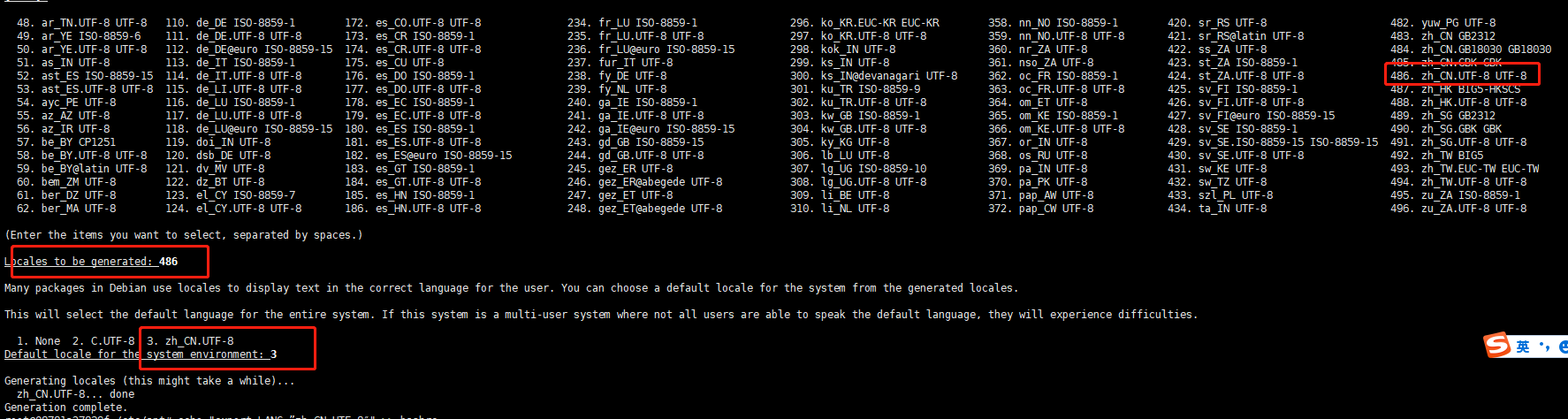
dpkg-reconfigure locales
#选择:486 【中文字符集】
#选择:3 【中文字符集】 ![]()
- apt-get install locales
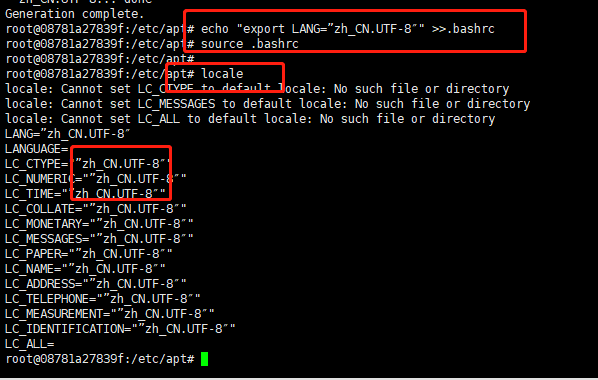
- 修改环境变量并生效
- echo "export LANG=”zh_CN.UTF-8″" >>.bashrc
source .bashrc ![]()
- echo "export LANG=”zh_CN.UTF-8″" >>.bashrc
- 参考连接
-
Debian 国内常用镜像源
-
Debian下安装locale并设置zh_CN.UTF-8
- https://www.jiloc.com/42865.html
-

 浙公网安备 33010602011771号