
1.查看ubuntu 版本号
cat /etc/lsb-release
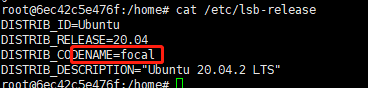
2.寻找相应的源(建议匹配,否则安装软件时,会提示各种错误)
vim /etc/apt/sources.list
样例源:
#deb http://archive.ubuntu.com/ubuntu bionic main universe
#deb http://archive.ubuntu.com/ubuntu bionic-security main universe
#deb http://archive.ubuntu.com/ubuntu bionic-updates main universe
deb http://archive.ubuntu.com/ubuntu/ focal main restricted universe multiverse
deb-src http://archive.ubuntu.com/ubuntu/ focal main restricted universe multiverse
deb http://archive.ubuntu.com/ubuntu/ focal-updates main restricted universe multiverse
deb-src http://archive.ubuntu.com/ubuntu/ focal-updates main restricted universe multiverse
deb http://archive.ubuntu.com/ubuntu/ focal-security main restricted universe multiverse
deb-src http://archive.ubuntu.com/ubuntu/ focal-security main restricted universe multiverse
deb http://archive.ubuntu.com/ubuntu/ focal-backports main restricted universe multiverse
deb-src http://archive.ubuntu.com/ubuntu/ focal-backports main restricted universe multiverse
deb http://archive.canonical.com/ubuntu focal partner
deb-src http://archive.canonical.com/ubuntu focal partner
3.更新
sudo apt-get update
4.安装软件
sudo apt-get install -y git


 浙公网安备 33010602011771号