
【免费工具】一键将Excel通讯录批量导入手机!支持VCF格式,超简单!
【免费工具】一键将Excel通讯录批量导入手机!支持VCF格式,超简单!
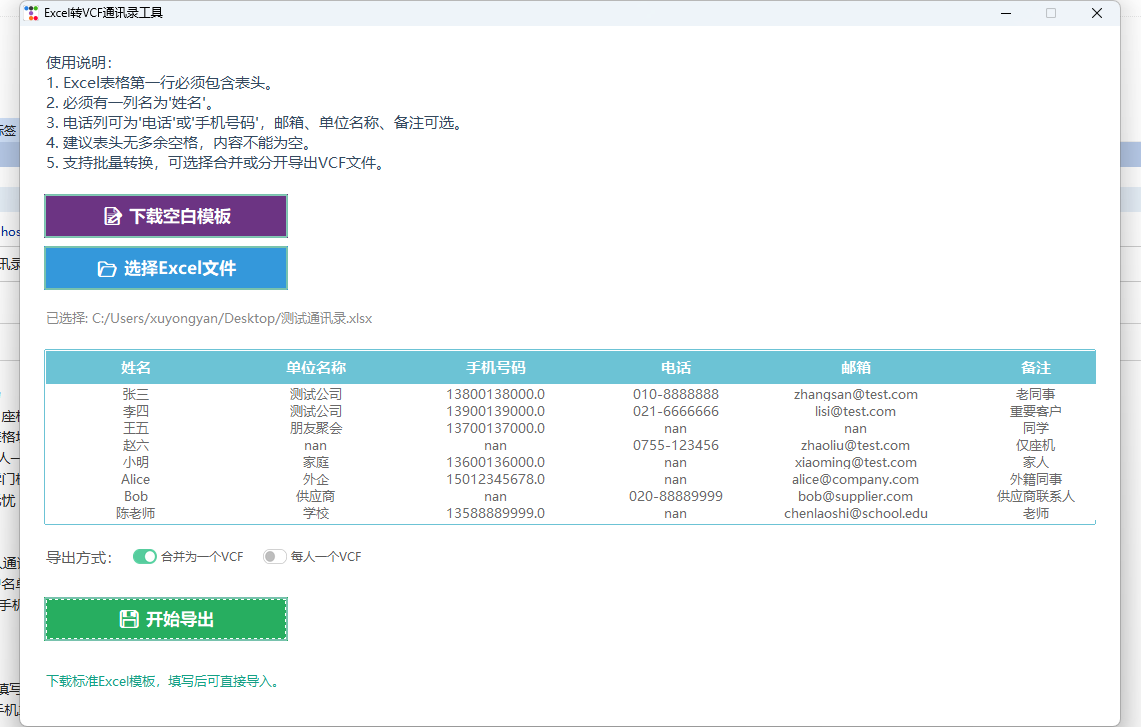
笔者开发了一款【Excel转VCF通讯录工具】,支持一键将Excel表格批量转换为VCF格式,轻松导入到手机、邮箱、企业微信等通讯录!
链接:https://pan.quark.cn/s/e9563a4149bd
主要亮点:
- 支持批量导入,省时省力
- 支持姓名、单位、手机、座机、邮箱、备注等字段
- 支持自定义模板下载,表格填写更规范
- 支持合并为一个VCF或每人一个VCF,适配各种导入场景
- 现代化美观界面,操作零门槛
- 纯本地运行,数据安全无忧
适用场景:
- 企业/学校/社群批量导入通讯录
- 家庭成员、同学录、客户名单管理
- 需要将Excel联系人导入手机/邮箱/微信/钉钉等
使用方法:
- 下载并运行本工具
- 按提示下载空白模板,填写联系人信息
- 一键导出VCF,导入到手机或通讯录应用即可
![]()
更多详细关注公众号:

import ttkbootstrap as ttk
from ttkbootstrap.constants import *
import pandas as pd
import os
from tkinter import filedialog, messagebox, StringVar
import vobject
import subprocess
import sys

class ExcelToVCFApp:
    def __init__(self):
        self.window = ttk.Window(themename="minty")
        self.window.title("Excel转VCF通讯录工具")
        self.window.geometry("1100x700")
        self.window.resizable(False, False)

        # 创建主框架(用grid布局)
        self.main_frame = ttk.Frame(self.window, padding="24")
        self.main_frame.pack(fill=BOTH, expand=YES)
        self.main_frame.rowconfigure(0, weight=1)
        self.main_frame.rowconfigure(1, weight=0)
        self.main_frame.columnconfigure(0, weight=1)
        self.main_frame.columnconfigure(1, weight=0)

        # 标题标签
        title_label = ttk.Label(
            self.main_frame,
            text="Excel转VCF通讯录工具",
            font=("微软雅黑", 22, "bold"),
            foreground="#2c3e50"
        )
        title_label.grid(row=0, column=0, sticky="w", pady=(10, 5))

        # 使用说明
        instruction = (
            "使用说明:\n"
            "1. Excel表格第一行必须包含表头。\n"
            "2. 必须有一列名为'姓名'。\n"
            "3. 电话列可为'电话'或'手机号码',邮箱、单位名称、备注可选。\n"
            "4. 建议表头无多余空格,内容不能为空。\n"
            "5. 支持批量转换,可选择合并或分开导出VCF文件。"
        )
        self.instruction_label = ttk.Label(
            self.main_frame,
            text=instruction,
            wraplength=1000,
            font=("微软雅黑", 11),
            foreground="#34495e",
            justify="left"
        )
        self.instruction_label.grid(row=1, column=0, sticky="w", pady=(0, 12))

        # 设置自定义按钮字体和颜色样式
        style = ttk.Style()
        style.configure("MyBlue.TButton", font=("微软雅黑", 13, "bold"), foreground="#fff", background="#3498db")
        style.map("MyBlue.TButton",
                  background=[('active', '#2980b9'), ('!active', '#3498db')])
        style.configure("MyGreen.TButton", font=("微软雅黑", 13, "bold"), foreground="#fff", background="#27ae60")
        style.map("MyGreen.TButton",
                  background=[('active', '#219150'), ('!active', '#27ae60')])
        style.configure("MyPurple.TButton", font=("微软雅黑", 13, "bold"), foreground="#fff", background="#8e44ad")
        style.map("MyPurple.TButton", background=[('active', '#6c3483'), ('!active', '#8e44ad')])

        # 下载空白模板按钮(紫色)
        self.template_btn = ttk.Button(
            self.main_frame,
            text="📝 下载空白模板",
            command=self.download_template,
            style="MyPurple.TButton",
            width=22,
            padding=(10, 8)
        )
        self.template_btn.grid(row=2, column=0, sticky="w", pady=(8, 0))
        # 鼠标悬停提示
        def show_tooltip(event):
            self.status_label.config(text="下载标准Excel模板,填写后可直接导入。")
        def hide_tooltip(event):
            self.status_label.config(text="")
        self.template_btn.bind("<Enter>", show_tooltip)
        self.template_btn.bind("<Leave>", hide_tooltip)
        # 选择Excel文件按钮(自定义蓝色)
        self.select_btn = ttk.Button(
            self.main_frame,
            text="📂 选择Excel文件",
            command=self.select_excel_file,
            style="MyBlue.TButton",
            width=22,
            padding=(10, 8)
        )
        self.select_btn.grid(row=3, column=0, sticky="w", pady=(8, 16))

        # 显示选择的文件路径
        self.file_label = ttk.Label(
            self.main_frame,
            text="未选择文件",
            wraplength=1000,
            font=("微软雅黑", 10),
            foreground="#888"
        )
        self.file_label.grid(row=4, column=0, sticky="w", pady=(0, 10))

        # 预览表格
        self.tree = None
        self.tree_frame = ttk.Frame(self.main_frame)
        self.tree_frame.grid(row=5, column=0, sticky="nsew", pady=(10, 0))
        self.main_frame.rowconfigure(5, weight=1)

        # 底部操作区
        self.bottom_frame = ttk.Frame(self.main_frame)
        self.bottom_frame.grid(row=6, column=0, sticky="ew", pady=(10, 0))
        self.main_frame.rowconfigure(6, weight=0)

        # 导出方式选择
        self.export_mode = StringVar(value="single")
        mode_frame = ttk.Frame(self.bottom_frame)
        mode_frame.pack(pady=10, anchor="w")
        ttk.Label(mode_frame, text="导出方式:", font=("微软雅黑", 11)).pack(side='left')
        ttk.Radiobutton(mode_frame, text="合并为一个VCF", variable=self.export_mode, value="single", bootstyle="success-round-toggle").pack(side='left', padx=10)
        ttk.Radiobutton(mode_frame, text="每人一个VCF", variable=self.export_mode, value="multi", bootstyle="warning-round-toggle").pack(side='left', padx=10)

        # 导出按钮(自定义绿色)
        self.export_btn = ttk.Button(
            self.bottom_frame,
            text="💾 开始导出",
            style="MyGreen.TButton",
            command=self.convert_to_vcf,
            state=DISABLED,
            width=22,
            padding=(10, 8)
        )
        self.export_btn.pack(pady=18, anchor="w")

        # 状态标签
        self.status_label = ttk.Label(
            self.bottom_frame,
            text="",
            wraplength=1000,
            font=("微软雅黑", 10),
            foreground="#16a085"
        )
        self.status_label.pack(pady=10, anchor="w")

        self.excel_file_path = None
        self.df = None

    def select_excel_file(self):
        file_path = filedialog.askopenfilename(
            filetypes=[("Excel files", "*.xlsx *.xls")]
        )
        if file_path:
            self.excel_file_path = file_path
            self.file_label.config(text=f"已选择: {file_path}")
            try:
                df = pd.read_excel(self.excel_file_path)
                # 自动去除所有Unnamed列
                df = df.loc[:, ~df.columns.str.contains('^Unnamed')]
                df = df.applymap(lambda x: x.strip() if isinstance(x, str) else x)
                if '姓名' not in df.columns:
                    messagebox.showerror("错误", "Excel表格必须包含'姓名'列,请检查表头!")
                    self.export_btn.config(state=DISABLED)
                    self.df = None
                    self.clear_tree()
                    return
                self.df = df
                self.refresh_tree(df)
                self.export_btn.config(state=NORMAL)
            except Exception as e:
                messagebox.showerror("错误", f"读取Excel文件失败:\n{str(e)}")
                self.status_label.config(text="读取Excel失败!")
                self.export_btn.config(state=DISABLED)
                self.df = None
                self.clear_tree()

    def clear_tree(self):
        if self.tree:
            self.tree.destroy()
            self.tree = None

    def refresh_tree(self, df):
        self.clear_tree()
        columns = list(df.columns)
        self.tree = ttk.Treeview(self.tree_frame, columns=columns, show='headings', height=20, bootstyle="info")
        style = ttk.Style()
        style.configure("Treeview.Heading", font=("微软雅黑", 11, "bold"), foreground="#2c3e50")
        style.configure("Treeview", font=("微软雅黑", 10), rowheight=28)
        for col in columns:
            self.tree.heading(col, text=col)
            self.tree.column(col, width=180, anchor='center')
        for _, row in df.iterrows():
            self.tree.insert('', 'end', values=[row.get(col, '') for col in columns])
        self.tree.pack(fill='both', expand=YES)

    def convert_to_vcf(self):
        if self.df is None:
            messagebox.showerror("错误", "请先选择并预览Excel文件")
            return
        try:
            df = self.df
            save_dir = filedialog.askdirectory(title="选择保存VCF文件的目录")
            if not save_dir:
                return
            total_contacts = len(df)
            converted = 0
            skipped = 0
            vcf_all = ""
            for index, row in df.iterrows():
                name = str(row['姓名']).strip() if not pd.isna(row['姓名']) else ''
                if not name or name.lower() == 'nan':
                    skipped += 1
                    continue
                vcard = vobject.vCard()
                vcard.add('fn')
                vcard.fn.value = name
                vcard.add('n')
                vcard.n.value = vobject.vcard.Name(family=name)
                # 单位名称
                if '单位名称' in df.columns and not pd.isna(row['单位名称']):
                    org = str(row['单位名称'])
                    if org and org.lower() != 'nan':
                        vcard.add('org')
                        vcard.org.value = [org]
                # 备注
                if '备注' in df.columns and not pd.isna(row['备注']):
                    note = str(row['备注'])
                    if note and note.lower() != 'nan':
                        vcard.add('note')
                        vcard.note.value = note
                # 添加电话(座机)
                if '电话' in df.columns and not pd.isna(row['电话']):
                    phone = str(row['电话']).strip()
                    if phone and phone.lower() != 'nan':
                        tel_home = vcard.add('tel')
                        tel_home.value = phone
                        tel_home.type_param = 'HOME'
                # 添加手机号码
                if '手机号码' in df.columns and not pd.isna(row['手机号码']):
                    mobile = str(row['手机号码']).strip()
                    if mobile and mobile.lower() != 'nan':
                        tel_cell = vcard.add('tel')
                        tel_cell.value = mobile
                        tel_cell.type_param = 'CELL'
                # 邮箱
                if '邮箱' in df.columns and not pd.isna(row['邮箱']):
                    email = str(row['邮箱']).strip()
                    if email and email.lower() != 'nan':
                        vcard.add('email')
                        vcard.email.value = email
                        vcard.email.type_param = 'INTERNET'
                if self.export_mode.get() == "single":
                    vcf_all += vcard.serialize()
                else:
                    filename = f"{name}_{index + 1}.vcf"
                    filepath = os.path.join(save_dir, filename)
                    with open(filepath, 'w', encoding='utf-8') as f:
                        f.write(vcard.serialize())
                converted += 1
                self.status_label.config(
                    text=f"正在转换: {converted}/{total_contacts}"
                )
                self.window.update()
            # 合并导出
            if self.export_mode.get() == "single" and converted > 0:
                filepath = os.path.join(save_dir, "contacts.vcf")
                with open(filepath, 'w', encoding='utf-8') as f:
                    f.write(vcf_all)
            msg = f"转换完成!\n共转换 {converted} 个联系人"
            if skipped > 0:
                msg += f"\n跳过无效数据 {skipped} 条(无姓名)"
            if self.export_mode.get() == "single" and converted > 0:
                msg += f"\n保存位置: {filepath}"
            else:
                msg += f"\n保存位置: {save_dir}"
            # 弹窗带"打开文件夹"按钮
            if messagebox.askyesno("成功", msg + "\n\n是否打开导出文件夹?"):
                self.open_folder(save_dir)
            self.status_label.config(text="转换完成!")
        except Exception as e:
            messagebox.showerror("错误", f"转换过程中出现错误:\n{str(e)}")
            self.status_label.config(text="转换失败!")

    def open_folder(self, path):
        if sys.platform.startswith('win'):
            os.startfile(path)
        elif sys.platform.startswith('darwin'):
            subprocess.Popen(['open', path])
        else:
            subprocess.Popen(['xdg-open', path])

    def download_template(self):
        # 定义模板内容
        columns = ['姓名', '单位名称', '手机号码', '电话', '邮箱', '备注']
        df = pd.DataFrame(columns=columns)
        save_path = filedialog.asksaveasfilename(
            defaultextension='.xlsx',
            filetypes=[('Excel文件', '*.xlsx')],
            title='保存空白模板',
            initialfile='通讯录模板.xlsx'
        )
        if save_path:
            try:
                df.to_excel(save_path, index=False)
                messagebox.showinfo("成功", f"空白模板已保存到:\n{save_path}")
            except Exception as e:
                messagebox.showerror("错误", f"保存模板失败:\n{str(e)}")

    def run(self):
        self.window.mainloop()

if __name__ == "__main__":
    app = ExcelToVCFApp()
    app.run()
```
 浙公网安备 33010602011771号